
1. Introduzzjoni
The BUSICOM PC-SeaV15c is a 15-inch Windows IoT touch panel PC designed for commercial and industrial applications. This manual provides essential information for the safe and efficient setup, operation, and maintenance of your device. Please read this manual thoroughly before using the product and retain it for future reference.
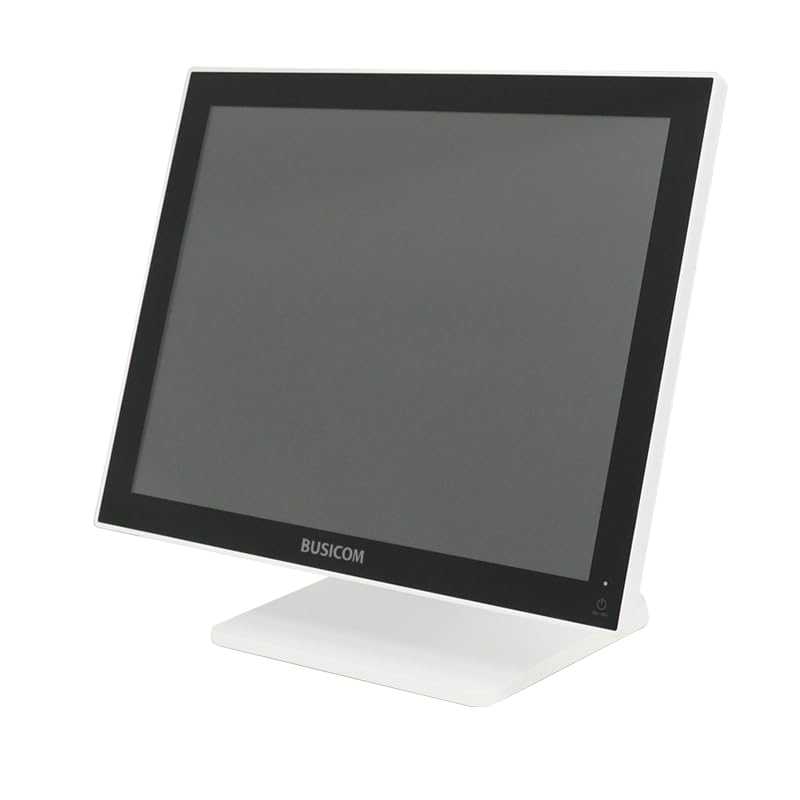
Figura 1: Quddiem view of the BUSICOM PC-SeaV15c Touch Panel PC.
2. Prodott Aktarview
2.1 Karatteristiċi ewlenin
- Disinn Avvanzat: Features an ultra-thin bezel and a highly durable 7H reinforced display for enhanced aesthetics and protection.
- Prestazzjoni Superjuri: Equipped with Microsoft Windows 10 IoT Enterprise, ensuring long-term support and reliable operation.
- Intuitive Touch Panel: Utilizes a capacitive touch method, offering a familiar and responsive touch experience similar to smartphones and tablets.
- Manutenzjoni faċli: Designed for simple RAM and SSD replacement, facilitating upgrades and servicing.
- Interfejsijiet Versatili: Provides a wide range of connectivity options to integrate with various peripherals.
- Ħażna Effiċjenti: SSD storage ensures fast processing speeds, quiet operation, and excellent shock resistance.
2.2 Komponenti
The package typically includes the BUSICOM PC-SeaV15c unit and a power adapter. Additional accessories may vary.

Figura 2: Pro ta' quddiem u tal-ġenbfile of the PC-SeaV15c unit.

Figura 3: Wara view showing access panels for RAM and SSD components.
3. Istruzzjonijiet ta' Setup
3.1 Disimballaġġ
- Carefully remove the PC-SeaV15c from its packaging.
- Check for any visible damage. If damaged, contact your vendor immediately.
- Kun żgur li l-komponenti kollha elenkati huma preżenti.
3.2 Konnessjoni tal-Periferali
Refer to the interface diagram below for port locations and types.

Figure 4: Detailed diagram of the PC-SeaV15c's rear and bottom interfaces.
- Konnessjoni tal-Enerġija: Connect the provided power adapter to the DC In port and then to a power outlet.
- Apparat USB: Use the USB 2.0 (4 ports) and USB 3.0 (2 ports) for connecting keyboards, mice, printers, and other USB peripherals.
- Konnessjoni tan-Netwerk: Qabbad kejbil Ethernet mal-port LAN għal aċċess għan-netwerk bil-fili.
- Output Awdjo: Connect external speakers or headphones to the Audio Out port.
- Serial Ports (RJ45): Utilize COM1, COM2, COM3, and COM6 for connecting specialized POS peripherals such as barcode scanners or receipt printers.
- Cash Drawer (RJ11): Connect a compatible cash drawer to the RJ11 port.
- Display Estern: If an external monitor is required, connect it to the Mini DisplayPort.
- USB Tip-Ċ: For compatible devices.
3.3 Tixgħel/Jitfi
- Qawwa Mixgħul: Press the power button located on the upper right side of the display bezel or the power mark on the rear panel.
- Itfi: To safely shut down the system, use the standard Windows shutdown procedure. Avoid direct power disconnection during operation to prevent data loss.
4. Istruzzjonijiet Operattivi
4.1 Windows 10 IoT Enterprise
The PC-SeaV15c operates on Windows 10 IoT Enterprise 2021. Familiarize yourself with the Windows operating system for basic navigation, application management, and system settings.
4.2 Touch Panel Usage
The capacitive touch screen supports multi-touch gestures.
- Tektek: Ekwivalenti għal klikk tal-maws.
- Tektek doppju: Ekwivalenti għal klikk doppja.
- Agħfas u żomm: Ekwivalenti għal klikk bil-lemin.
- Swipe: For scrolling or navigating.
- Agħfas biex Tiżżumja: Uża żewġ swaba' biex tagħmel zoom in jew zoom out.
5. Manutenzjoni
5.1 Tindif tal-Apparat
- Dejjem itfi u aqla’ l-apparat qabel ma tnaddaf.
- Uża drapp ratba u mingħajr ħelu ftit dampMaħsul bl-ilma jew b'tindif tal-iskrin li ma jobrox.
- Do not spray liquids directly onto the screen or device.
- Evita li tuża kimiċi ħarxa, solventi, jew materjali li joborxu.
5.2 RAM and SSD Replacement
The PC-SeaV15c is designed for easy replacement of RAM and SSD components. Refer to Figure 3 for the access panel location. For detailed instructions on component replacement, consult a qualified technician or the BUSICOM support websit.
6 Issolvi l-problemi
Din it-taqsima tipprovdi soluzzjonijiet għal kwistjonijiet komuni li tista’ tiltaqa’ magħhom.
- L-apparat ma jixgħelx:
- Kun żgur li l-adapter tal-enerġija huwa konness sew kemm mal-apparat kif ukoll ma' sokit tal-enerġija li jaħdem.
- Ivverifika li s-sokit tal-enerġija jaħdem billi tqabbad apparat ieħor.
- Touch screen is unresponsive:
- Ibda mill-ġdid l-apparat.
- Kun żgur li l-iskrin ikun nadif u ħieles minn ostakli.
- Ebda wiri:
- Iċċekkja jekk l-apparat huwiex mixgħul.
- If an external display is connected, ensure the correct input source is selected on the external display.
- Periferali mhux skopert:
- Ensure the peripheral is correctly connected to the appropriate port (USB, LAN, COM).
- Ipprova qabbad il-periferali ma' port differenti.
- Check the peripheral's own power supply, if applicable.
For further assistance, please contact BUSICOM customer support.
7. Speċifikazzjonijiet
| Karatteristika | Dettall |
|---|---|
| Brand | BUSICOM |
| Isem tal-Mudell | PC-SeaV15c |
| Kulur | Abjad |
| Daqs tal-Iskrin | 15 pulzieri |
| Riżoluzzjoni | 1024x768 |
| Sistema Operattiva | Windows 10 IoT Enterprise 2021 |
| Brand CPU | Intel |
| Socket tal-Proċessur | Intel® N97 |
| Veloċità tas-CPU | 3.6 GHz |
| Tip ta' Memorja | DDR4 |
| RAM installat | 4 GB |
| Tip ta 'Hard Disk | SSD |
| Kapaċità SSD | 128 GB (skont it-titlu tal-prodott) |
| Tip ta' Karta Grafika | Integrata |
| VRAM Type | DDR4 SDRAM |
| VRAM Capacity | 4 GB |
| Portijiet USB 2.0 | 4 |
| Portijiet USB 3.0 | 2 |
| Drive ottiku | Xejn |
| Piż tal-Prodott | 6 Kilogrammi |
| Għoli (madwar) | 307.5 mm (as per dimension diagram) |

Figura 5: Wara view of the PC-SeaV15c with approximate height dimension.
8. Garanzija u Appoġġ
For warranty information and technical support, please refer to the warranty card included with your product or visit the official BUSICOM websit. Żomm l-irċevuta tax-xiri tiegħek bħala prova tax-xiri għal talbiet ta' garanzija.
BUSICOM Official Websit: BUSICOM Store on Amazon.co.jp