
1. Introduzzjoni
This manual provides essential information for setting up, operating, maintaining, and troubleshooting your Lenovo ThinkPad T14S Gen 2 laptop. Please read this manual thoroughly to ensure proper use and to maximize the performance and longevity of your device.

Figure 1: Lenovo ThinkPad T14S Gen 2 laptop with Windows 11 interface.
2. Setup
2.1 Żpakkjar u Spezzjoni Inizjali
Carefully remove your laptop and all accessories from the packaging. Inspect for any signs of damage. If any components are missing or damaged, contact your vendor immediately.
2.2 Konnessjoni mal-Enerġija
- Qabbad l-adapter tal-AC mal-konnettur tal-enerġija fuq il-laptop tiegħek.
- Ipplaggja l-korda tad-dawl fi żbokk tal-elettriku.
- Il-batterija tibda tiċċarġja awtomatikament. Huwa rakkomandat li tiċċarġja l-batterija kompletament qabel l-ewwel użu.
2.3 L-Ewwel Bidu
Press the power button to turn on your laptop. Follow the on-screen instructions to complete the Windows 11 Pro setup, including language selection, network connection, and user account creation.
3. It-Tħaddim tal-Laptop Tiegħek
3.1 Wiri u Kamera
Your laptop features a 14-inch Full HD (1920x1080) anti-glare screen. An integrated 1080p + IR/RGB Hybrid camera with a Privacy Shutter and Dual Array Microphone is located at the top of the display.

Figure 2: Display and camera features, highlighting the 14-inch screen and webcam bi shutter tal-privatezza.
3.2 Tastiera u TrackPoint
The laptop is equipped with a backlit keyboard for comfortable typing in various lighting conditions. It also includes a TrackPoint for precise cursor control.

Figura 3: Close-up view of the backlit keyboard and TrackPoint.
3.3 Portijiet u Konnettività
Your ThinkPad T14S Gen 2 offers a variety of ports for connecting peripherals and external devices:
- In-naħa tax-xellug: 2 x Thunderbolt 4, 1 x HDMI 2.0, 1 x USB 3.2 Type A, 1 x Combo audio/microphone jack.
- In-naħa tal-lemin: 1 x USB 3.2 Type A, 1 x Kensington Nano Security Slot.
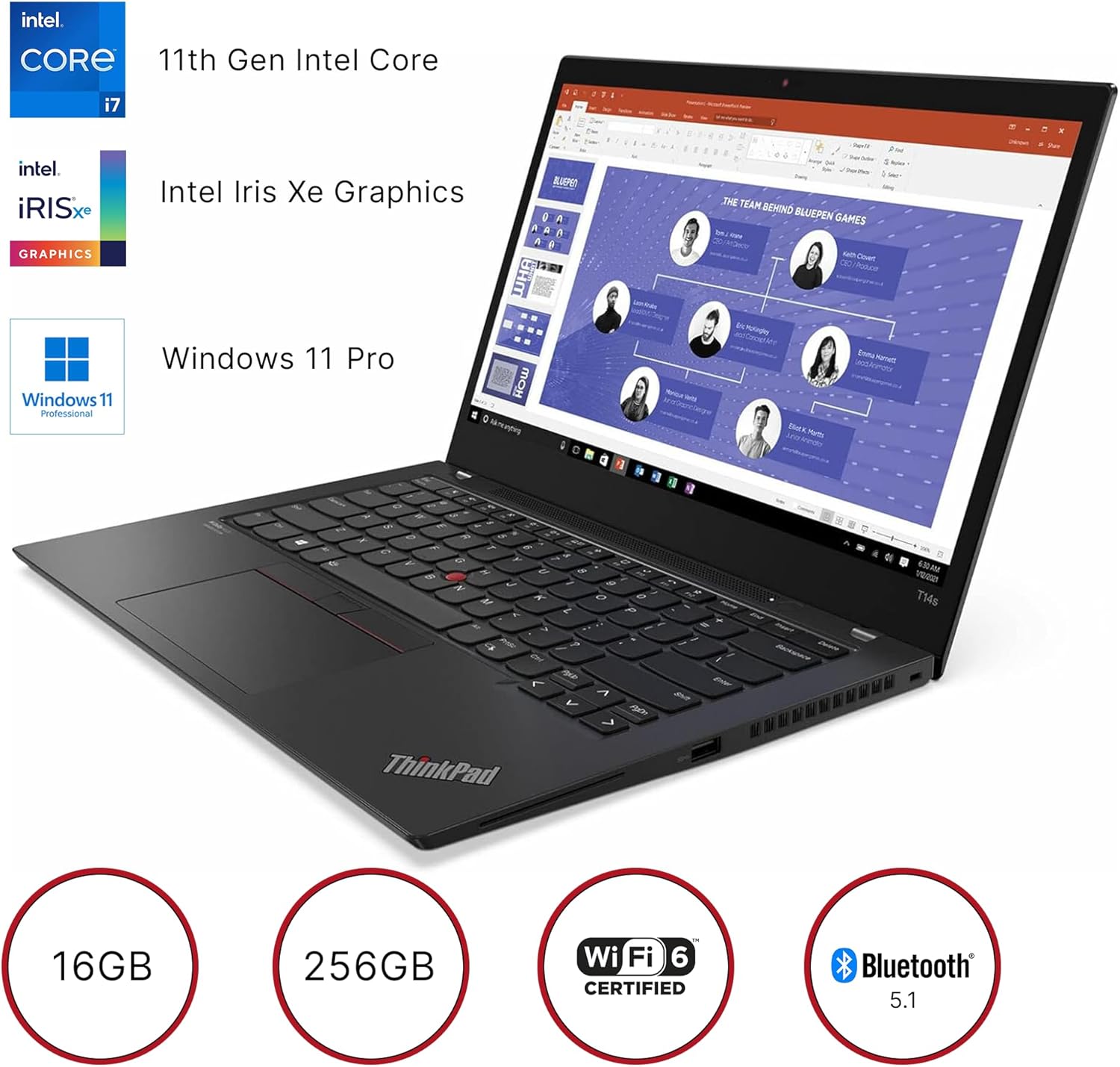
Figura 4: Portijiet fuq in-naħa tax-xellug tal-laptop.

Figura 5: Portijiet fuq in-naħa tal-lemin tal-laptop.
Wireless connectivity includes 802.11ax Wi-Fi 6 and Bluetooth 5.1.
4. Manutenzjoni
4.1 Kura Ġenerali
- Keep your laptop clean by gently wiping surfaces with a soft, lint-free cloth.
- Evita li tesponi l-laptop għal temperaturi estremi, dawl tax-xemx dirett, jew umdità għolja.
- Tpoġġix oġġetti tqal fuq il-laptop.
- Żgura ventilazzjoni xierqa billi ma timblokkax il-ventijiet tal-arja.
4.2 Kura tal-Batterija
To prolong battery life, avoid frequently discharging the battery completely. Store the laptop in a cool, dry place if not used for extended periods.
5 Issolvi l-problemi
5.1 Kwistjonijiet Komuni u Soluzzjonijiet
- Il-laptop mhux qed jixgħel: Ensure the AC adapter is securely connected and the battery has sufficient charge. Try holding the power button for 10-15 seconds.
- Prestazzjoni bil-mod: Close unnecessary applications, check for malware, or consider performing a system cleanup.
- Problemi ta' konnettività tal-Wi-Fi: Restart your router and laptop. Check if Wi-Fi is enabled in Windows settings.
- Problemi bl-iskrin: If the screen is blank, try connecting an external monitor to check if the display output is working.
Għal kwistjonijiet aktar kumplessi, irreferi għall-appoġġ uffiċjali ta' Lenovo websit jew ikkuntattja l-appoġġ tekniku.
6. Speċifikazzjonijiet

Figure 6: Key specifications of the Lenovo ThinkPad T14S Gen 2.
| Karatteristika | Speċifikazzjoni |
|---|---|
| Brand | Lenovo |
| Isem tal-Mudell | ThinkPad T14s Gen 2 (Intel) |
| Numru tal-Mudell tal-Oġġett | 20WN |
| Sistema Operattiva | Windows 11 Pro |
| Proċessur | 3 GHz Intel Core i7-1185G7 |
| RAM | 16 GB LPDDR4X-4266 MHz |
| Hard Drive | 256 GB SSD M.2 2280 PCIe |
| Koproċessur tal-Grafika | Grafika Intel Iris Xe (Integrata) |
| Daqs tal-Iskrin | 14 Pulzier |
| Riżoluzzjoni tal-Iskrin | 1920 x 1080 pixels (Full HD) |
| Riżoluzzjoni Massima tal-Iskrin | 4096x2304 Pixel |
| Tip bla fili | 802.11ax (Wi-Fi 6) |
| Bluetooth | 5.1 |
| Portijiet USB 3.0 | 2 x USB 3.2 Tip A |
| Portijiet Thunderbolt | 2 x Thunderbolt 4 |
| Port HDMI | 1 x HDMI 2.0 |
| Awdjo Jack | Combo audio/microphone jack |
| Karatteristiċi Speċjali | Backlit Keyboard, Fingerprint Reader, HD Audio, Spill Resistant, TrackPoint |
| Piż tal-oġġett | 2.99 liri |
| Dimensjonijiet tal-Prodott | 12.89 x 8.82 x 0.64 pulzieri |
| Kulur | Villi black |

Figura 7: Dimensjonijiet fiżiċi u piż tal-laptop.
7. Garanzija u Appoġġ
7.1 Informazzjoni dwar Garanzija
This product is offered as a renewed item and is typically covered under the Amazon Renewed Guarantee. This guarantee ensures that if you are not satisfied with your purchase, renewed products are eligible for replacement or refund within a specified period. Please refer to the specific terms and conditions of the Amazon Renewed Guarantee at the time of purchase for full details.
7.2 Appoġġ Tekniku
Għal assistenza teknika, downloads ta' sewwieqa, jew aktar informazzjoni dwar il-prodott, jekk jogħġbok żur is-sit uffiċjali tal-appoġġ ta' Lenovo website or contact their customer service. You may also reach out to the seller, Epower Solutions, for support related to your renewed product.