
ASUS BR1102FGA
ASUS BR1102FGA 11.6-inch 2-in-1 Educational Laptop User Manual
Mudell: BR1102FGA
Introduzzjoni
This manual provides essential information for setting up, operating, maintaining, and troubleshooting your ASUS BR1102FGA 11.6-inch HD Touchscreen 2-in-1 Educational Laptop. Designed for versatility, this device functions as both a traditional laptop and a tablet, featuring an Intel Celeron N100 processor, 4GB RAM, and a 128GB SSD, running on Windows 11 Pro. Its spill-resistant design and anti-glare coating enhance durability and usability in various environments.
X'hemm fil-Kaxxa
Carefully unpack all items from the box. Ensure all components are present before proceeding with setup.
- ASUS BR1102FGA 11.6-inch 2-in-1 Educational Laptop
- Adapter tal-Enerġija u Cable
- 9H HDMI Cable (Accessory)
- Dokumentazzjoni (Gwida ta' Bidu Mgħaġġel, Karta tal-Garanzija)
Setup
1. Iċċarġjar Inizjali u Tixgħel
Before first use, connect the power adapter to the laptop's charging port and a power outlet. Allow the battery to charge for at least 30 minutes. Press the power button located on the right side of the device to turn it on.

Immaġni: Naħa tal-lemin view of the ASUS BR1102FGA laptop, highlighting the power button and various ports.
2. Konfigurazzjoni tal-Windows 11 Pro
Follow the on-screen instructions to complete the initial Windows 11 Pro setup. This includes selecting your region, language, connecting to a Wi-Fi network, and creating a user account.
3. Konnessjoni mal-Wi-Fi
During the Windows setup, you will be prompted to connect to a wireless network. Select your network from the list and enter the password. If you skip this step, you can connect later via the Windows Settings menu (Start > Settings > Network & internet > Wi-Fi).
4. Port Identification
Familiarize yourself with the available ports for connecting peripherals.
- In-naħa tax-xellug: 1 x USB 2.0 Type-C, 1 x USB 3.2 Gen 2 Type-C, 1 x USB 3.2 Gen 2 Type-A, NETWORK (RJ-45), HDMI.
- In-naħa tal-lemin: Power Button, Audio Jack, USB-A, USB-C, Volume Buttons.

Immaġni: In-naħa tax-xellug view of the ASUS BR1102FGA laptop, displaying the Ethernet, HDMI, USB-C, and USB-A ports.
Operazzjoni
1. Funzjonalità 2 f'1
Your ASUS BR1102FGA is a versatile 2-in-1 device, allowing you to switch between laptop and tablet modes. The hinge allows for a full 360-degree rotation of the screen.
- Modalità tal-Laptop: Traditional clamshell configuration for typing and productivity.
- Modalità Pillola: Itwi l-iskrin lura kompletament biex tużah bħala tablet. It-tastiera u t-touchpad se jiddiżattivaw awtomatikament.
- Tent/Stand Mode: Position the laptop in a tent or stand configuration for media consumption or presentations.

Image: The ASUS BR1102FGA laptop in its traditional laptop configuration.

Image: The ASUS BR1102FGA laptop converted into tablet mode.

Image: The ASUS BR1102FGA laptop configured in a tent or stand mode.
2. Operazzjoni tat-touchscreen
The 11.6-inch HD display supports multi-touch gestures. Use your fingers to navigate, tap, swipe, pinch-to-zoom, and interact with applications. The anti-glare coating helps reduce reflections for better visibility.
3. Tastiera u Touchpad
The integrated keyboard and touchpad provide standard input functionality. The keyboard is designed to be spill-resistant, offering protection against minor liquid spills.
4. Uża l-Kameras
The laptop features two cameras for various uses, including video conferencing and capturing images.

Image: The ASUS BR1102FGA laptop highlighting the locations of both the front-facing and keyboard-facing cameras.
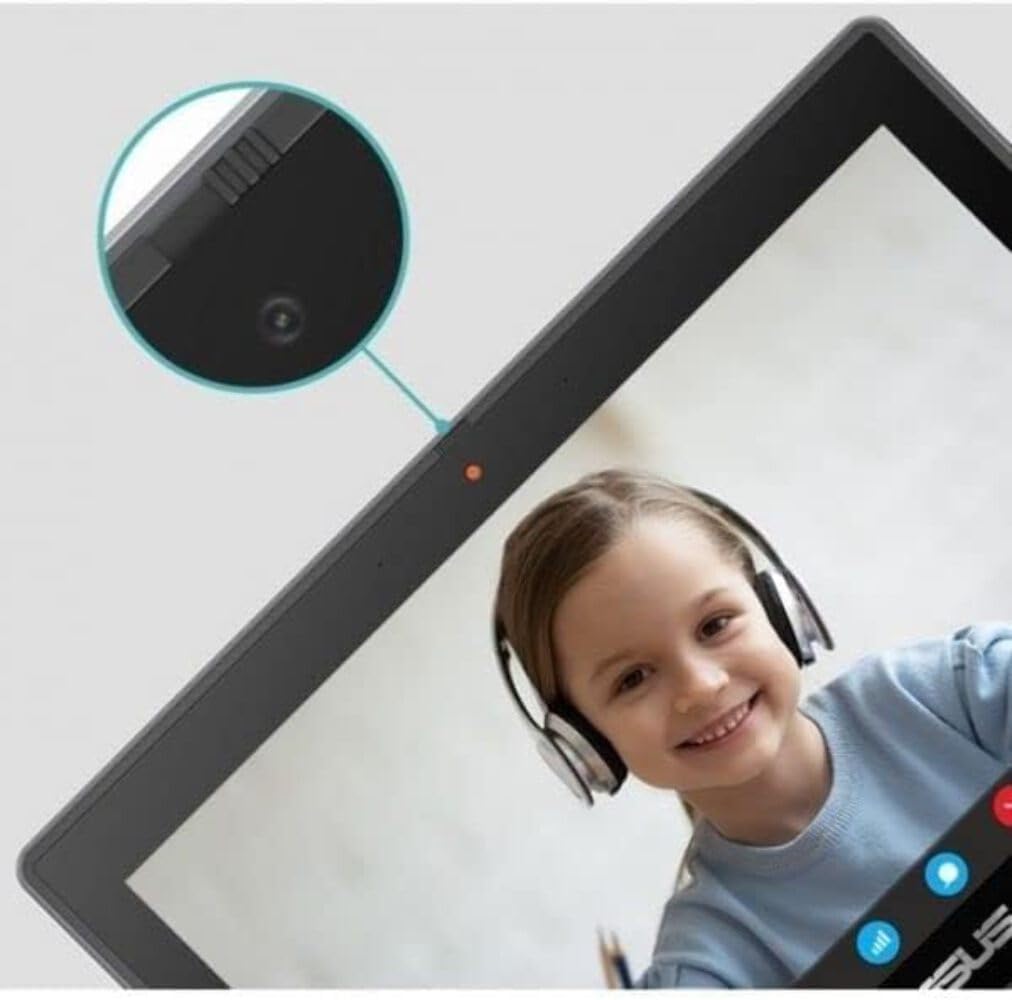
Immaġni: Close-up view of the front-facing webcam on the ASUS BR1102FGA laptop.
Manutenzjoni
1. Istruzzjonijiet għat-Tindif
- Skrin: Uża drapp ratba u mingħajr ħelu ftit dampLaħlaħ bl-ilma jew b'tindif tal-iskrin. Evita kimiċi ħarxa.
- Tastiera u Chassis: Uża drapp artab u niexef. Għal ħmieġ iebes, neħħi ftit drapp.amp cloth can be used. Ensure no liquid enters openings.
2. Kura tal-batterija
To prolong battery life, avoid extreme temperatures. Do not fully discharge the battery frequently. For long-term storage, charge the battery to about 50-60% and store in a cool, dry place.
3. Aġġornamenti tas-Software
Regularly check for and install Windows updates to ensure optimal performance, security, and compatibility. Go to Start > Settings > Windows Update.
4. Ġestjoni tal-Ħażna
Perjodikament mill-ġdidview u ħassar bla bżonn files to maintain sufficient free space on the 128GB SSD. Utilize cloud storage or external drives for large files.
Issolvi l-problemi
1. Laptop Not Powering On
- Kun żgur li l-adapter tal-enerġija huwa konness sew kemm mal-laptop kif ukoll ma' sokit tal-enerġija li jaħdem.
- Iċċekkja jekk is-sokit tal-enerġija hux qed jaħdem billi tqabbad apparat ieħor.
- Allow the laptop to charge for a period before attempting to power on again.
2. Prestazzjoni bil-mod
- Agħlaq l-applikazzjonijiet bla bżonn li jkunu qed jaħdmu fl-isfond.
- Iċċekkja u installa kwalunkwe aġġornament pendenti tal-Windows.
- Kun żgur li hemm biżżejjed spazju ħieles fuq l-SSD.
- Ibda mill-ġdid il-laptop.
3. Kwistjonijiet ta' Konnettività tal-Wi-Fi
- Verify that Wi-Fi is enabled in Windows Settings.
- Erġa' ibda r-router u l-modem tiegħek.
- Insieh in-netwerk Wi-Fi u erġa' qabbad.
- Ensure your laptop is within range of the Wi-Fi signal.
4. L-iskrin tattili mhux qed jirrispondi
- Ibda mill-ġdid il-laptop.
- Kun żgur li l-iskrin ikun nadif u ħieles mill-fdalijiet.
- Check for updated display drivers via Windows Update or the ASUS support websit.
Speċifikazzjonijiet
| Karatteristika | Speċifikazzjoni |
|---|---|
| Isem tal-Mudell | ASUS BR1102FGA |
| Wiri | 11.6-inch HD (1366 x 768) Touchscreen, Anti-Glare |
| Proċessur | Intel Celeron N100 (sa 3.4GHz, 4-Qlub) |
| Grafika | Grafika Intel UHD |
| RAM | 4GB DDR4 |
| Ħażna | 128GB SSD |
| Sistema Operattiva | Windows 11 Pro |
| Konnettività bla fili | Wi-Fi 6 (802.11ax), Bluetooth 5.1 |
| Portijiet | 1x USB 2.0 Type-C, 1x USB 3.2 Gen 2 Type-C, 2x USB 3.2 Gen 2 Type-A, 1x HDMI, 1x RJ-45 (Ethernet), 1x Audio Jack |
| Batterija | Li-ion bi 3 ċelluli |
| Dimensjonijiet (LxWxH) | 11.7 x 8.2 x 0.83 pulzieri |
| Piż | 3.24 liri |
| Kulur | Mineral Gray |
Garanzija u Appoġġ
1. Garanzija tal-Prodott
Your ASUS BR1102FGA laptop is covered by a manufacturer's warranty. Please refer to the warranty card included in your product packaging for specific terms, conditions, and duration of coverage. Keep your proof of purchase for warranty claims.
2. Appoġġ Tekniku
Għal assistenza teknika, downloads ta' sewwieqa, jew aktar appoġġ, jekk jogħġbok żur is-sit uffiċjali tal-appoġġ tal-ASUS website. You can typically find support resources by searching for your model number (BR1102FGA) on their websit.
Appoġġ ASUS Websit: https://www.asus.com/support/
Ħanut tal-ASUS: Żur il-Ħanut tal-ASUS fuq Amazon
Ask a question about this manual
Ask about setup, troubleshooting, compatibility, parts, safety, or missing instructions. Manuals+ will review the question and use this page’s manual context to help answer it.