
Shimbol M7
Shimbol M7 7-inch 2000 Nits Camera Monitor User Manual
Mudell: M7
1. Introduzzjoni
Thank you for choosing the Shimbol M7 7-inch 2000 Nits Camera Monitor. This professional on-camera field monitor is designed to enhance your filmmaking and photography experience with its high-brightness touchscreen, 1920x1080 IPS display, and comprehensive monitoring tools. This manual provides essential information for the proper setup, operation, and maintenance of your device.

Image 1.1: The Shimbol M7 7-inch 2000 Nits Camera Monitor.
2. Informazzjoni dwar is-Sigurtà
Please read all safety instructions carefully before using the Shimbol M7 monitor to prevent damage to the product or injury to yourself. Keep this manual for future reference.
- Tesponix il-monitor għax-xita, umdità, jew temperaturi estremi.
- Evita li twaqqa’ l-monitor jew li tissottomettih għal impatti qawwija.
- Do not disassemble the monitor. Repairs should only be performed by authorized personnel.
- Use only approved power sources and accessories.
- Naddaf l-iskrin b'ċarruta ratba u niexfa. Evita li tuża kimiċi ħarxa.
- Ensure proper ventilation when operating the monitor.
3. Kontenut tal-Pakkett
Iċċekkja li l-oġġetti kollha elenkati hawn taħt huma inklużi fil-pakkett tiegħek. Jekk xi oġġetti huma neqsin jew bil-ħsara, jekk jogħġbok ikkuntattja lill-bejjiegħ tiegħek.

Image 3.1: Shimbol M7 monitor and included accessories.
- Shimbol M7 Camera Monitor
- SDI Cable
- Cable HDMI
- Hot Shoe Mount
- Tempered Screen Protector
- Dusting Cloth
- Manwal għall-Utent
- Kaxxa tal-Kulur
- Każ tal-ġarr
- SD Card (32GB)
4. Prodott Aktarview
The Shimbol M7 is a high-performance 7-inch camera monitor designed for professional use. It features a robust aluminum body and a bright, clear display with advanced monitoring capabilities.
4.1 Karatteristiċi ewlenin
- 2000 Nits High Brightness: Ensures clear visibility for outdoor shooting, even in strong sunlight.
- 1920x1080 IPS Display: Provides sharp images and rich colors with a DCI-P3 display.
- Interface touchscreen: For easy and intuitive navigation of menus and functions.
- 4K HDMI & 3G-SDI Support: Versatile connectivity for various camera setups.
- Custom 3D LUTs: Allows for quick application of desired shooting effects.
- Professional Monitoring Tools: Includes False Color, Waveform, Focus Peaking, Histogram, Vectorscope, RGB adjustments, and more.
- Dual Battery Slots: Extends operating time for prolonged shooting sessions (batteries not included).
- Korp tal-Aluminju tal-Avjazzjoni: Durable, lightweight, and meticulously crafted using CNC process.

Immaġni 4.1: Fuqview of Shimbol M7 features including 2000 Nits, 4K HDMI, 3G-SDI, 3D LUT, and IPS display.
4.2 Portijiet u Kontrolli
Familiarize yourself with the various ports and controls on your Shimbol M7 monitor.

Stampa 4.2: Wara view of the Shimbol M7 showing HDMI and SDI dual interfaces and battery plate.
- Input/Output HDMI: Connects to cameras or other video sources and outputs to other displays.
- SDI Input/Output: Professional video input/output for high-quality signals.
- Input ta' Enerġija DC: Għal provvista ta' enerġija esterna.
- Dual Battery Plate: Accommodates two NP-F style batteries for extended power.
- Buttuna tal-Qawwa: Ixgħel/itfi l-monitor.
- Buttuni tal-Funzjoni: Buttuni li jistgħu jiġu personalizzati għal aċċess rapidu għal karatteristiċi użati ta' spiss.
5. Setup
Follow these steps for initial setup of your Shimbol M7 monitor.
- Immuntar tal-Monitor: Attach the monitor to your camera rig or hot shoe using the provided hot shoe mount. Ensure it is securely fastened.
- It-Tħaddim tal-Monitor:
- Qawwa tal-batterija: Insert one or two compatible NP-F style batteries into the dual battery slots on the rear of the monitor.
- Qawwa DC: Connect an external DC power adapter (not included) to the DC power input port.
- Connecting to a Camera:
- Konnessjoni HDMI: Use the provided HDMI cable to connect your camera's HDMI output to the monitor's HDMI input.
- SDI Connection: Use the provided SDI cable to connect your camera's SDI output to the monitor's SDI input.
- Qawwa Mixgħul: Agħfas u żomm il-buttuna tal-qawwa sakemm l-iskrin jixgħel.
6. Istruzzjonijiet Operattivi
The Shimbol M7 features an intuitive touchscreen interface and a range of professional monitoring tools.
6.1 Operazzjoni Bażika
- Navigazzjoni bil-touchscreen: Tap icons to select functions, swipe to navigate menus, and pinch-to-zoom (if supported by specific functions).
- Aċċess għall-Menu: Tap the menu icon on the screen to access the main settings and tools.
- Għażla tal-Input: Select the appropriate input source (HDMI or SDI) from the menu or quick access icons.

Image 6.1: The Shimbol M7's new UI design for easy and smooth operation.
6.2 Għodod ta' Monitoraġġ Professjonali
The M7 monitor includes a suite of tools to assist with accurate exposure and focus.
- Focus Peaking: Highlights in-focus areas with a selectable color.
- Kulur Falz: Displays exposure levels using a spectrum of colors, helping to identify over/underexposed areas.
- Forma tal-mewġ: Provides a graphical representation of video signal luminance levels.
- Vettorskopju: Shows the color information of the video signal.
- Istogramma: Illustrates the distribution of tones in your image.
- 3D LUTs: Apply custom Look Up Tables for real-time color grading and monitoring.
- Anamorphic Ratio: De-squeezes anamorphic footage għal xieraq viewing.
- Maskra: Applies various aspect ratio masks.

Immaġni 6.2: Eż.amples of professional monitoring tools including False Color, Mask, RGB Custom Settings, and High Precision Oscillogram.

Image 6.3: The Shimbol M7 supporting custom 3D LUTs for quick visual effects.
6.3 Kalibrazzjoni tal-Kulur
The M7 monitor features professional color calibration to ensure accurate color reproduction.
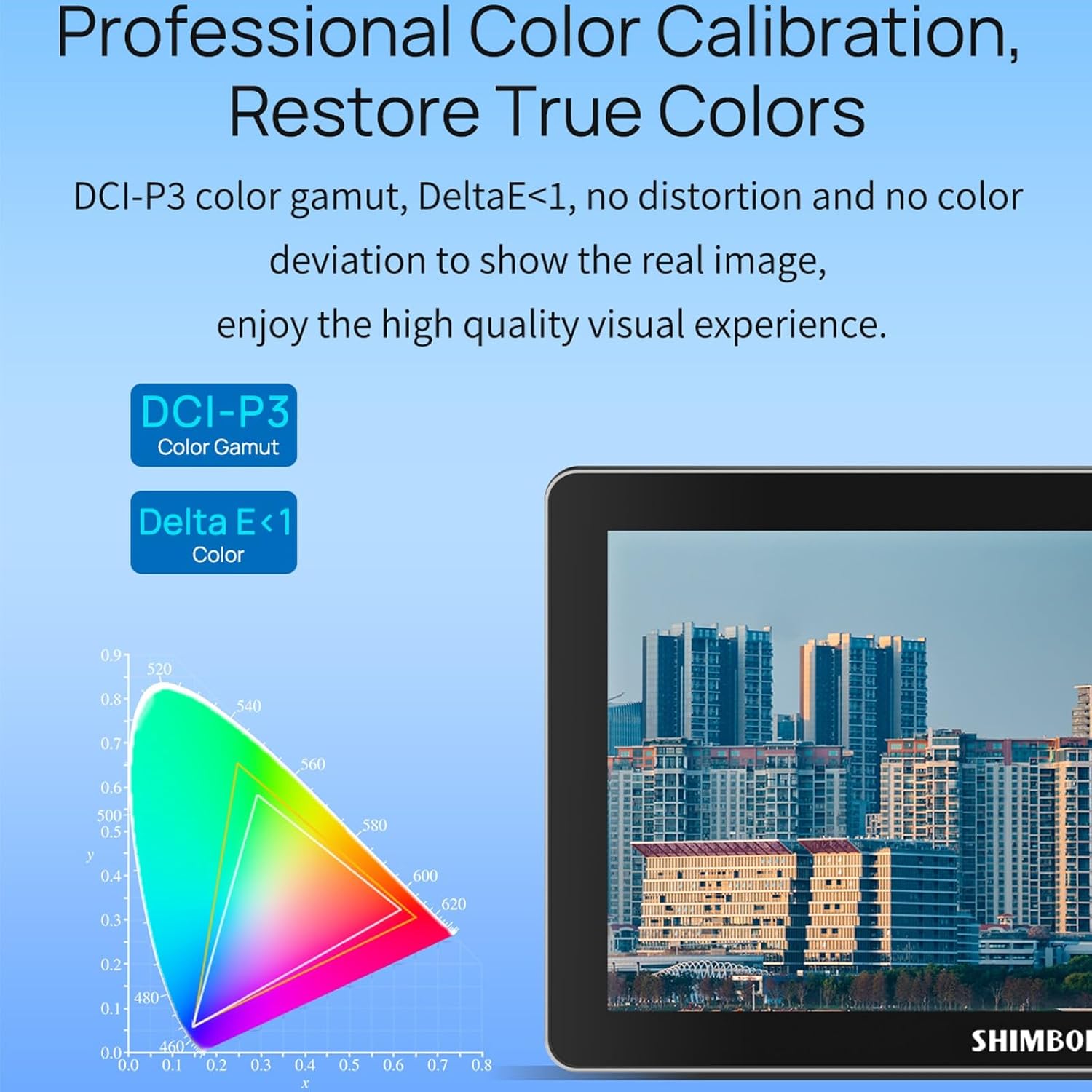
Image 6.4: Professional color calibration on the Shimbol M7, showing DCI-P3 color gamut and Delta E < 1.
7. Manutenzjoni
Proper care and maintenance will ensure the longevity and optimal performance of your Shimbol M7 monitor.
- Tindif tal-Iskrin: Use the provided dusting cloth or a soft, lint-free microfiber cloth to gently wipe the screen. For stubborn smudges, slightly dampLaħlaħ id-drapp bl-ilma jew b'soluzzjoni tat-tindif li ma tagħmilx ħsara lill-iskrin. Tisprejjax likwidu direttament fuq l-iskrin.
- Tindif tal-ġisem: Wipe the monitor's aluminum body with a soft, dry cloth.
- Ħażna: When not in use, store the monitor in its carry case in a cool, dry place away from direct sunlight and extreme temperatures.
- Kura tal-batterija: If using batteries, remove them if the monitor will not be used for an extended period.
8 Issolvi l-problemi
If you encounter issues with your Shimbol M7 monitor, refer to the following common problems and solutions.
| Problema | Kawża Possibbli | Soluzzjoni |
|---|---|---|
| Il-monitor ma jixgħelx. | No power, low battery, faulty power cable. | Ensure batteries are charged and correctly inserted, or connect to a working DC power source. Check power cable connections. |
| No video signal. | Incorrect input selected, faulty cable, camera output issue. | Verify the correct input (HDMI/SDI) is selected on the monitor. Check cable connections. Ensure camera video output is active. Try a different cable. |
| L-iskrin huwa mċajpar/qawwi wisq. | Brightness settings. | Adjust the brightness setting in the monitor's menu. |
| Touchscreen ma jirrispondix. | Temporary software glitch, screen protector issue. | Restart the monitor. Ensure the screen protector is applied correctly and not interfering with touch. |
If the problem persists after attempting these solutions, please contact Shimbol customer support.
9. Speċifikazzjonijiet
Detailed technical specifications for the Shimbol M7 Camera Monitor.
| Karatteristika | Speċifikazzjoni |
|---|---|
| Brand | Shimbol |
| Numru tal-Mudell | M7 |
| Daqs tal-Iskrin | 7 Pulzier |
| Riżoluzzjoni Nattiva | 1920x1080 (FHD 1080p) |
| Riżoluzzjoni tal-Wiri Massimu | 1920 x 1080 |
| Luminożità | 2000 nits |
| Proporzjon ta' Kuntrast | 1800:1 |
| ViewIng Angolu | 170 Grad |
| Proporzjon ta' l-aspett | 16:9 |
| Tip ta 'Wiri | LED IPS |
| Deskrizzjoni tal-wiċċ tal-iskrin | Matte |
| Teknoloġija tal-Konnettività | HDMI, SDI, Wi-Fi |
| Numru Totali ta' Portijiet HDMI | 1 |
| Number of Component Outputs | 2 |
| Piż tal-oġġett | 0.8 Kilogrammi |
| Kulur | Iswed |
| Apparati Kompatibbli | Camera, Camcorder, Certain Multimedia Devices |
| Karatteristiċi Addizzjonali | Portabbli |
10. Garanzija u Appoġġ
The Shimbol M7 Camera Monitor comes with a standard manufacturer's warranty. Please refer to the warranty card included in your package for specific terms and conditions. For technical support, troubleshooting assistance, or warranty claims, please contact Shimbol customer service through their official webis-sit jew il-punt tax-xiri tiegħek.
Żomm l-irċevuta tax-xiri tiegħek bħala prova tax-xiri għal skopijiet ta' garanzija.
Ask a question about this manual
Ask about setup, troubleshooting, compatibility, parts, safety, or missing instructions. Manuals+ will review the question and use this page’s manual context to help answer it.