
Introduzzjoni
This manual provides essential information for the proper installation, operation, and maintenance of your TouchWo 15-inch Capacitive Multi-Touchscreen Industrial Embedded PC Monitor, model DM150NFWA. Please read this manual thoroughly before using the product to ensure safe and efficient operation.
Prodott Overview
Karatteristiċi Ewlenin
- 10-Point Capacitive Touchscreen: Supports multi-finger gestures, glove operation, and offers adjustable brightness. No additional drivers are required for basic touch functionality.
- Sistema Integrata: Equipped with Windows 10, Wi-Fi, and Bluetooth for comprehensive functionality.
- Konnettività Rikka: Features a gigabit Ethernet port, Phoenix2Pin connector, multiple USB ports, HDMI-Out, and audio ports for diverse industrial applications.
- Fanless and Silent Design: Engineered for quiet operation and energy efficiency, utilizing an aluminum alloy back shell for effective heat dissipation without the need for active cooling.
- Robust Industrial Design: IP65 rated screen for protection against dust and water splashes. Suitable for embedded installation and VESA mounting, ideal for high-traffic industrial environments such as cabinets, CNC tools, and control consoles.
X'hemm fil-Kaxxa
- 1 x Touchscreen Tablet
- 1 x Power Adapter (with 1.5m Power Line)
- 1 x Manwal tal-Prodott (dan id-dokument)
- 4 x Embedded Snaps
Informazzjoni dwar is-Sigurtà
Osserva l-prekawzjonijiet ta' sigurtà li ġejjin biex tevita ħsara lill-apparat jew korriment lilek innifsek.
- Provvista tal-Enerġija: Use only the provided power adapter. Ensure the power source matches the specified voltage (12V DC).
- Ambjent: Operate the monitor within the specified temperature range (0°C-50°C). Avoid exposure to extreme temperatures, direct sunlight, or high humidity.
- Installazzjoni: Ensure the monitor is securely mounted using either embedded snaps or VESA mounting points. Improper installation can lead to device damage or personal injury.
- Tindif: Skonnettja l-provvista tal-enerġija qabel it-tindif. Uża drapp artab u damp drapp. Evita prodotti tat-tindif jew solventi li joborxu.
- Immaniġġjar: Do not drop or subject the device to strong impacts. Avoid placing heavy objects on the monitor.
Setup
1. Spakkjar
Neħħi l-komponenti kollha mill-imballaġġ bir-reqqa. Ivverifika li l-oġġetti kollha elenkati fit-taqsima "X'hemm fil-Kaxxa" huma preżenti.
2. Għażliet ta 'Immuntar
The monitor supports both embedded installation and VESA standard mounting (75mm x 75mm or 100mm x 100mm patterns are typically supported, refer to physical product for exact VESA pattern).
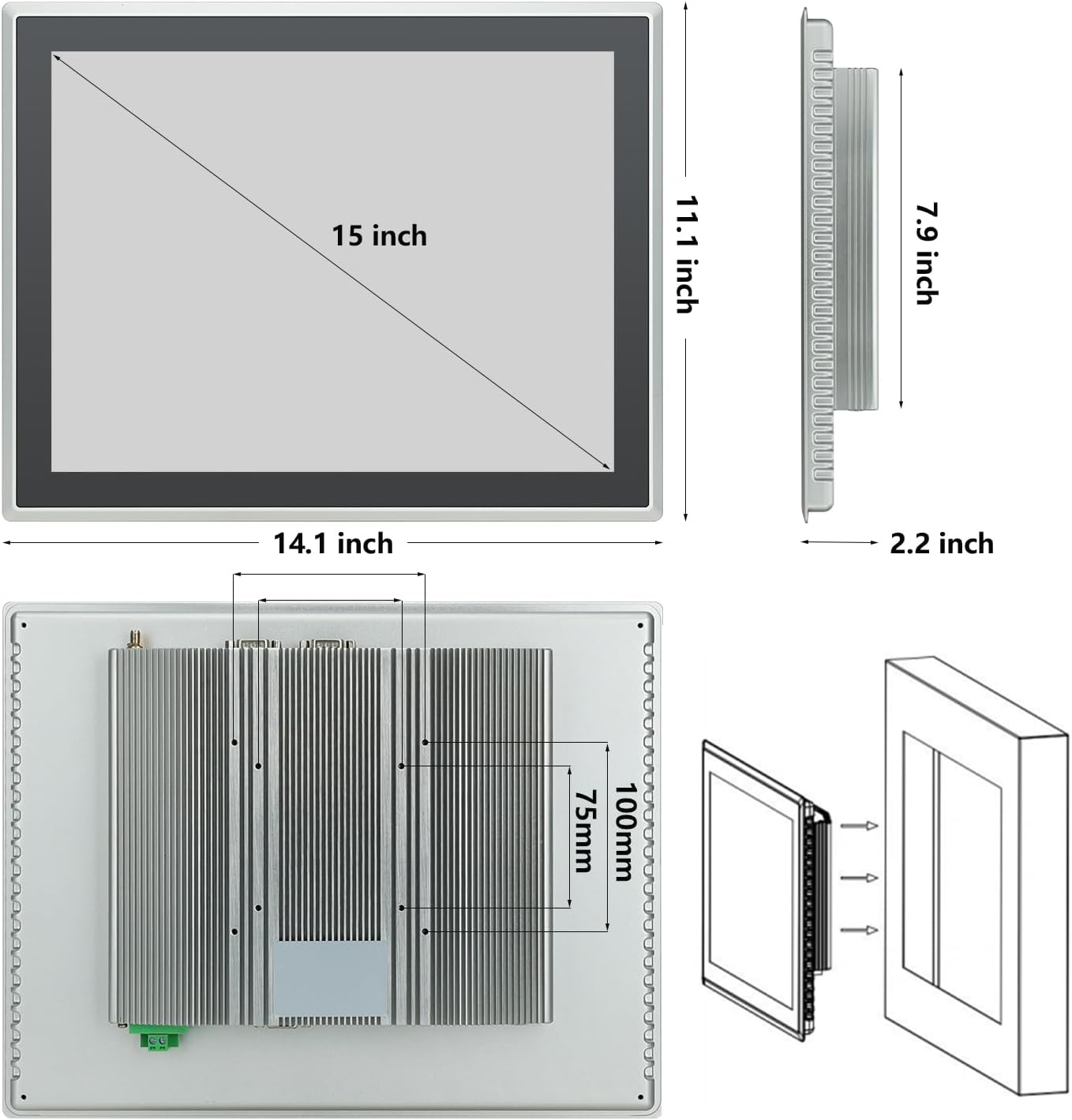
Figure 1: Monitor dimensions and embedded installation diagram. The monitor measures 14.1 inches wide, 11.1 inches high, and 2.2 inches deep. The screen display area is 15 inches diagonally. The back panel shows VESA mounting points and the embedded snap mechanism.
- Installazzjoni inkorporata: Use the provided embedded snaps to secure the monitor into a compatible cutout in a panel or enclosure.
- Immuntar VESA: Attach a VESA-compatible mount to the mounting holes on the rear of the monitor.
3. Konnessjoni Periferali
Connect necessary devices to the available ports. Refer to the port diagram below.

Figura 2: Wara view of the monitor displaying various input/output ports. These include Terminal Ground, DC12V power input, VGA, LAN, USB ports, Audio ports, HDMI, Phoenix2pin, and WiFi antenna connectors.
- Qawwa: Connect the provided power adapter to the DC12V input port and then to a power outlet.
- Output tal-vidjo: Use the HDMI-Out port to connect to an external display if needed.
- Apparat USB: Connect keyboards, mice, or other USB peripherals to the USB ports.
- Netwerk: Qabbad kejbil Ethernet mal-port LAN għal aċċess għan-netwerk bil-fili.
- Awdjo: Use the audio ports for external speakers or headphones.
- Phoenix2Pin: Connect industrial control signals as required by your application.
4. L-Ewwel Tixgħil
After all connections are made, press the power button (location typically on the side or back, refer to product for exact placement) to turn on the monitor. The system will boot into Windows 10.
Istruzzjonijiet Operattivi
Operazzjoni tat-touchscreen
The monitor features a 10-point capacitive multi-touchscreen, allowing for intuitive interaction with the Windows 10 operating system.

Figure 3: A gloved hand interacting with the monitor's touchscreen, highlighting its 10-point touch capability and IP65 standard for industrial use.
- Tektek Uniku: Functions like a left-click on a mouse to select items or open applications.
- Tektek doppju: Functions like a double-click on a mouse.
- Iddreggja: Touch and hold an item, then move your finger across the screen to reposition it.
- Agħfas biex Tiżżumja: Use two fingers to pinch in or spread out to zoom in or out of content.
- Glove Operation: The touchscreen is designed to respond even when wearing gloves, enhancing usability in industrial environments.
Aġġustament tal-luminożità
Brightness can be adjusted through the Windows 10 display settings or via dedicated buttons on the monitor (if available, refer to product for exact controls).
Awdjo
The monitor includes built-in speakers. Volume can be controlled via Windows 10 audio settings or external audio devices connected to the audio output ports.
Manutenzjoni
Tindif tal-Iskrin
- Ensure the monitor is powered off and unplugged before cleaning.
- Uża ċarruta ratba u mingħajr ħelu dampMaħsul bl-ilma jew b'tindif tal-iskrin li ma jobrox.
- Tisprejjax soluzzjonijiet tat-tindif direttament fuq l-iskrin.
- Evita li tuża kimiċi ħarxa, alkoħol, jew prodotti tat-tindif ibbażati fuq l-ammonja, għax dawn jistgħu jagħmlu ħsara lill-wiċċ tal-iskrin.
Dissipazzjoni tas-Sħana
The monitor features a fanless design with an aluminum alloy back shell for efficient passive heat dissipation. Ensure adequate airflow around the back of the unit, especially if embedded, to maintain optimal operating temperatures.

Figure 4: The rear of the monitor, illustrating the fanless design with prominent heat dissipation fins. Blue arrows indicate the direction of heat dissipation, emphasizing the efficient thermal management.
Konsiderazzjonijiet Ambjentali
The IP65 rating protects the screen from dust ingress and low-pressure water jets. However, avoid submerging the device or exposing it to high-pressure water. Operate within the recommended temperature range of 0°C to 50°C.
Issolvi l-problemi
Jekk tiltaqa' ma' problemi bil-monitor tiegħek, irreferi għall-problemi u s-soluzzjonijiet komuni li ġejjin:
| Problema | Kawża Possibbli | Soluzzjoni |
|---|---|---|
| Ebda Qawwa | Power cable disconnected; Power adapter faulty; Power outlet issue. | Check power cable connections. Ensure power adapter is working. Test power outlet with another device. |
| Ebda Display | Monitor is off; Brightness set too low; External display cable (if used) loose. | Press power button. Adjust brightness. Check HDMI/VGA cable connections. |
| Touchscreen ma jirrispondix | System frozen; Software issue; Screen dirty. | Restart the monitor. Ensure Windows 10 is updated. Clean the screen surface. |
| Kwistjonijiet ta' Konnettività tan-Netwerk | Ethernet cable disconnected; Wi-Fi disabled; Router issue. | Check Ethernet cable. Verify Wi-Fi is enabled in Windows settings. Restart router. |
Jekk il-problema tippersisti wara li tipprova dawn is-soluzzjonijiet, jekk jogħġbok ikkuntattja l-appoġġ għall-klijenti.
Speċifikazzjonijiet
| Karatteristika | Dettall |
|---|---|
| Numru tal-Mudell | DM150NFWA |
| Daqs tal-Iskrin | 15 Pulzier |
| Riżoluzzjoni | 1024 x 768 Pixels |
| Proporzjon ta' l-aspett | 4:3 |
| Touch Teknoloġija | 10-Point Capacitive Multi-Touch |
| Luminożità tal-Immaġni | 350 lm |
| Sistema Operattiva | Windows 10 (pre-installed) |
| Proċessur | Intel Core i3 |
| RAM | 4GB |
| Ħażna | 128GB SSD |
| Konnettività | Wi-Fi, Bluetooth, Gigabit Ethernet, USB (4 ports), HDMI-Out, Audio, Phoenix2Pin |
| Ingress Protection (Screen) | IP65 |
| Voltage | 12 Volts (DC) |
| Dimensjonijiet tal-Prodott (L x W x H) | 14.1 x 11.1 x 2.2 pulzieri |
| Piż tal-oġġett | 11.46 liri |
| Manifattur | Guangzhou Touchwo Electronics Co., Ltd. |
Garanzija u Appoġġ
Assigurazzjoni tal-Kwalità
This TouchWo monitor is FCC, CE, and RoHS certified, ensuring compliance with relevant safety and environmental standards. The manufacturing facility holds ISO9001 quality management certification.
Appoġġ għall-Klijent
For any technical assistance, troubleshooting, or inquiries regarding your product, TouchWo offers 24/7 online customer support. Please refer to the product packaging or the official TouchWo websit għad-dettalji tal-kuntatt.