
Introduzzjoni
This manual provides essential instructions for the safe and efficient operation of your Kaiser MSA-2016 Professional Portable Bluetooth Speaker System. Please read this manual thoroughly before using the product and retain it for future reference.
Informazzjoni Importanti dwar is-Sigurtà
- Sors tal-Enerġija: Uża biss l-adapter tal-enerġija speċifikat għall-iċċarġjar.
- Espożizzjoni għall-Ilma: Dan l-apparat mhuwiex reżistenti għall-ilma. Evita l-espożizzjoni għall-ilma jew umdità eċċessiva.
- Ventilazzjoni: Aċċerta ruħek li jkun hemm ventilazzjoni xierqa. Timblokkax xi fetħiet tal-ventilazzjoni.
- Tindif: Disconnect from power before cleaning. Use a dry, soft cloth.
- Servizzi: Tippruvax issewwi dan il-prodott int stess. Irreferi għal kull manutenzjoni f'idejn persunal kwalifikat.
- Batterija: The unit contains a rechargeable battery. Do not expose to extreme temperatures or dispose of in fire.
Kontenut tal-Pakkett
L-oġġetti li ġejjin huma inklużi fil-pakkett tiegħek:
- 1 x Kaiser MSA-2016 Speaker System
- 1 x Mikrofonu bil-fili
- 1 x Manwal għall-Utent
- 1 x Kejbil tal-Enerġija
Prodott Overview
Komponenti tal-Ispeaker
The Kaiser MSA-2016 speaker system features a robust design with integrated controls and multiple connectivity options.

Figura 1: Quddiem view of the Kaiser MSA-2016 speaker, showing dual 25 cm speakers and dynamic LED illumination.
Tqassim tal-Panew tal-Kontroll
The top-mounted control panel provides intuitive access to all speaker functions.

Figura 2: Dettaljat view of the control panel, including power switch, input ports (Micro SD, USB, AUX, MIC, Guitar), volume, EQ, and playback controls.
Rear Panel and Portability
The rear of the speaker includes a bass reflex port and features for enhanced portability.
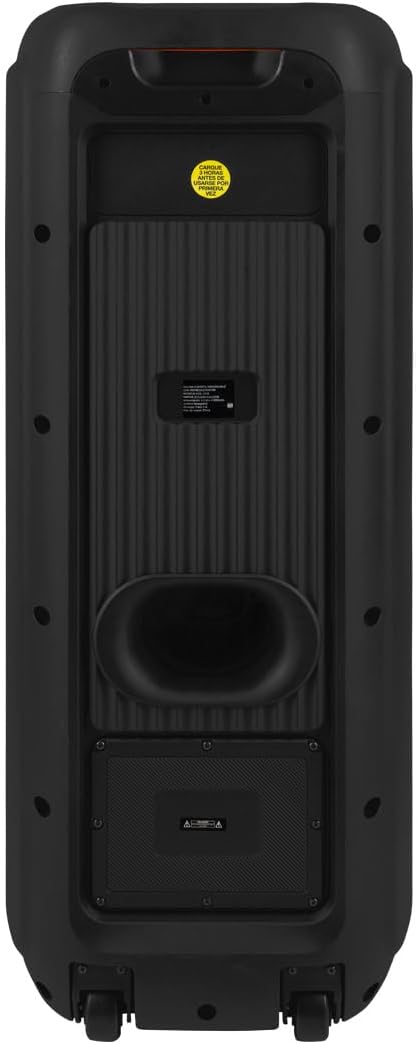
Figura 3: Wara view of the speaker, showing the bass port and overall enclosure design.
Għażliet ta' Konnettività
The speaker supports various audio input methods for versatile use.

Figure 4: Diagram detailing the input ports: AUX 3.5 mm, two 6.3 mm microphone inputs, one 6.3 mm guitar input, USB, and Micro SD card slot.
Aċċessorji Inklużi
The package includes a wired microphone for immediate use.

Figure 5: The wired microphone accessory provided with the Kaiser MSA-2016 speaker.
Setup Istruzzjonijiet
Iċċarġjar lill-Ispeaker
- Connect the power cable to the speaker's power input.
- Ipplaggja t-tarf l-ieħor tal-kejbil tal-enerġija f'sokit elettriku standard.
- The charging indicator (if available) will illuminate.
- The speaker can operate while charging, but for optimal battery life, it is recommended to fully charge before first use.
Qawwa Inizjali Mixgħula
- Sib il- QAWWA switch on the control panel.
- Flip the switch to the "ON" position. The display will light up, indicating the speaker is active.
Istruzzjonijiet Operattivi
Għażla tal-Modalità
Agħfas il- MODALITÀ button on the control panel to cycle through available input modes: Bluetooth, USB, Micro SD, AUX, and FM Radio.
Konnessjoni Bluetooth
- Turn on the speaker and select Bluetooth mode using the MODE button. The display will show "BLUE" or a similar indicator.
- Fuq l-apparat mobbli tiegħek (smartphone, tablet, eċċ.), attiva l-Bluetooth u fittex apparati disponibbli.
- Select "Kaiser MSA-2016" from the list of devices.
- Ladarba jkun imqabbad, l-ispiker se joħroġ ħoss ta' konferma, u d-displej se jindika konnessjoni b'suċċess.
- Issa tista' ddoqq l-awdjo mit-tagħmir tiegħek mingħajr fili permezz tal-ispiker.
Daqq USB/Micro SD
- Insert a USB flash drive or Micro SD card into the corresponding port on the control panel.
- L-ispiker awtomatikament jaqleb għall-modalità USB jew Micro SD u jibda jdoqq l-awdjo files. Jekk le, agħfas il-buttuna MODALITÀ buttuna biex tagħżel l-input korrett.
- Use the playback control buttons (Play/Pause, Previous, Next) to manage your music.
Input AUX
- Qabbad apparat awdjo estern (eż., MP3 player, laptop) mal- AUX input port using a 3.5mm audio cable.
- Agħfas il- MODALITÀ buttuna biex tagħżel AUX mod.
- Audio from your connected device will now play through the speaker.
Radju FM
- Agħfas il- MODALITÀ buttuna biex tagħżel Radju FM mod.
- Agħfas u żomm il- Play/Pawsa button to initiate an automatic scan for FM stations. The speaker will save detected stations.
- Uża l- Preċedenti u Li jmiss buttuni biex tinnaviga bejn l-istazzjonijiet salvati.
Inputs tal-Mikrofonu u l-Kitarra
- Connect a wired microphone to either MIC 1 or MIC 2 input.
- Qabbad kitarra mal- KWITRA input.
- Aġġusta l- MIC VOL knob for microphone volume and KITAR VOL knob for guitar volume.
- Uża l- ECHO u DEWMIEN MIC knobs to add effects to the microphone audio.
Aġġustament Awdjo
Uża l- VOLUM knob to control the overall master volume. The TREBLE u BASS knobs allow you to adjust the high and low frequencies of the audio output.
Il- EQ button allows you to cycle through preset equalizer modes for different audio profiles.
Manutenzjoni
Tindif
Wipe the speaker's exterior with a soft, dry cloth. Do not use abrasive cleaners, waxes, or solvents as they may damage the finish. Ensure the speaker is powered off and unplugged before cleaning.
Ħażna
When not in use for extended periods, store the speaker in a cool, dry place, away from direct sunlight and extreme temperatures. It is recommended to charge the battery periodically to maintain its health.
Issolvi l-problemi
| Problema | Kawża Possibbli | Soluzzjoni |
|---|---|---|
| Ebda qawwa | Battery drained, power cable disconnected. | Charge the speaker. Ensure power cable is securely connected. |
| L-ebda ħoss | Volume too low, incorrect input mode, device not connected properly. | Increase volume. Select correct input mode. Reconnect audio source. |
| Nuqqas ta' pairing Bluetooth | Speaker not in pairing mode, device too far, interference. | Kun żgur li l-ispiker jinsab fil-modalità Bluetooth. Mexxi l-apparat eqreb. Itfi apparati Bluetooth oħra. |
| Mikrofonu mhux qed jaħdem | Microphone not plugged in, MIC VOL too low, microphone switch off. | Ensure microphone is fully plugged into MIC 1 or MIC 2. Increase MIC VOL. Check microphone's ON/OFF switch. |
Speċifikazzjonijiet
| Karatteristika | Dettall |
|---|---|
| Isem tal-Mudell | MSA-2016 |
| Brand | Kaiser |
| Tip ta' Kelliem | Torri |
| Daqs tal-Kelliem | 25 ċm (10-il pulzier) x 2 |
| Qawwa tal-Ħruġ | 60 Watt RMS |
| Rispons ta' Frekwenza | 60 KHz |
| Teknoloġija tal-Konnettività | Bluetooth |
| Komunikazzjoni bla fili | Bluetooth |
| Metodu ta' Kontroll | Tactile (Knobs/Buttons) |
| Sors tal-Enerġija | Hybrid (Electric Cable and Battery) |
| Ħajja tal-Batterija (Medja) | 6 Sigħat |
| Batterija Rikarikabbli | Iva |
| Dimensjonijiet (D x W x H) | 33 ċm x 32 ċm x 84 ċm |
| Waterproof | Nru |
| Komponenti Inklużi | 1 Speaker, 1 User Manual, 1 Wired Microphone |
Garanzija u Appoġġ
This product comes with a limited warranty. For detailed warranty information and support, please refer to the warranty card included in your package or visit the official Kaiser website. For customer service inquiries, please contact Kaiser support directly.
You can visit the Kaiser store on Amazon for more products and information: Kaiser Store