
1. Introduzzjoni
Thank you for choosing the Hama DR2002BT Digital Radio. This device offers a comprehensive audio experience with FM, DAB/DAB+ digital radio reception, and Bluetooth connectivity. Its user-friendly design, featuring large buttons and a clear 4.3-inch TFT color display, makes it suitable for all users. This manual will guide you through the setup, operation, and maintenance of your new digital radio.
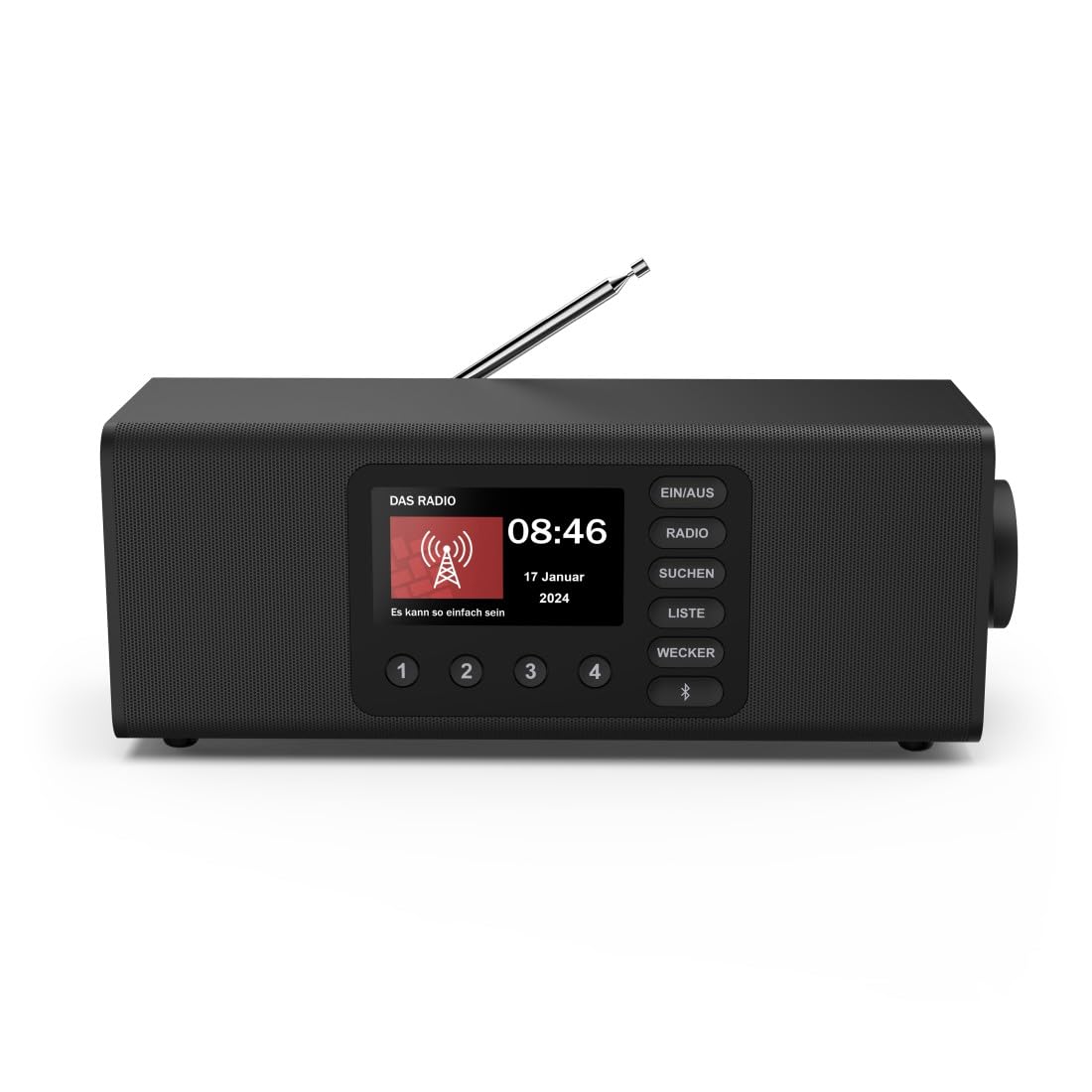
Immaġni: Quddiem view of the Hama DR2002BT Digital Radio, showcasinid-displej u l-buttuni tal-kontroll tiegħu.
2. Informazzjoni dwar is-Sigurtà
Please read these safety instructions carefully before using the device. Keep this manual for future reference.
- Tesponix l-apparat għall-umdità, xita, jew temperaturi estremi.
- Evita li tpoġġi l-apparat ħdejn sorsi tas-sħana jew fid-dawl tax-xemx dirett.
- Tiftaħx l-apparat casing. Repairs should only be performed by qualified personnel.
- Uża biss l-adapter tal-enerġija pprovdut.
- Żgura ventilazzjoni xierqa madwar l-apparat.
3. Kontenut tal-Pakkett
Iċċekkja li l-oġġetti kollha huma preżenti meta tiftaħ il-pakkett:
- Hama DR2002BT Digital Radio
- Adapter tal-Enerġija
- Manwal għall-Utent
4. Prodott Aktarview
4.1 Kontrolli u Wiri tal-Panew ta' Quddiem

Image: Front panel of the radio highlighting the display and control buttons, with icons for Bluetooth, DAB+, and Alarm functions.
The front panel features a 4.3-inch TFT color display, large control buttons, and a rotary knob for easy navigation and selection. Key buttons include:
- EIN/AUS (ON/OFF): Jixgħel jew jitfi l-apparat.
- RADJU: Switches between FM and DAB/DAB+ modes.
- SUCHEN (SEARCH): Initiates station scanning.
- LISTE (LIST): Accesses the list of available stations.
- WECKER (ALARM): Configures alarm settings.
- Buttuna Bluetooth: Jattiva l-modalità ta' tqabbil Bluetooth.
- Buttuni Predefiniti (1-4): Aċċess rapidu għall-istazzjonijiet favoriti maħżuna.
- Rotary Knob (LAUTSTÄRKE/NAVIGIEREN): Controls volume and navigates menus.
4.2 Konnessjonijiet tal-Panew ta' wara
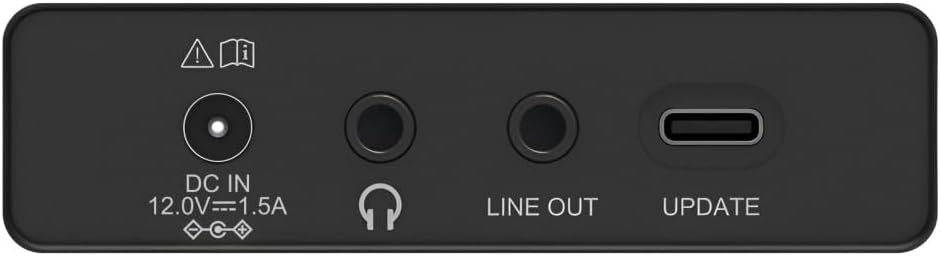
Image: Close-up of the rear panel showing the DC IN, Headphone, Line Out, and UPDATE (USB-C) ports.
Il-pannell ta' wara jipprovdi għażliet essenzjali ta' konnettività:
- DC IN 12.0V --- 1.5A: Power input for the external adapter.
- Jack tal-headphone (3.5mm): Għal smigħ privat.
- LINE OUT: Audio output for connecting to external ampliifikaturi jew kelliema.
- UPDATE (USB-C): Għal aġġornamenti tal-firmware.
- Antenna teleskopika: For FM and DAB/DAB+ reception.

Immaġni: Wara view of the Hama DR2002BT Digital Radio with its telescopic antenna extended for optimal signal reception.
5. Setup
5.1 Konnessjoni tal-Enerġija
- Qabbad l-adapter tal-enerġija pprovdut mal- DC IN port fuq wara tar-radju.
- Ipplaggja l-adapter ta 'l-enerġija fi żbokk ta' l-elettriku adattat.
- Ir-radju jixgħel awtomatikament jew jidħol fil-modalità standby.
5.2 Pożizzjonament tal-Antenna
For optimal FM and DAB/DAB+ reception, fully extend the telescopic antenna. Position the radio near a window if reception is poor.
5.3 Setup Inizjali (L-Ewwel Użu)
Upon first power-on, the radio may guide you through an initial setup process, including language selection and an automatic DAB station scan. Follow the on-screen prompts.
6. Istruzzjonijiet Operattivi
6.1 Power On/Off
Agħfas il- EIN/AUS buttuna biex tixgħel jew titfi r-radju.
Modalità tar-Radju 6.2 DAB/DAB+
- Agħfas il- RADJU buttuna biex tagħżel il-mod DAB.
- If this is the first time in DAB mode or if you want to rescan, press SUCHEN to perform a full scan for available stations.
- Use the rotary knob to navigate through the station list. Press the knob to select a station.
- Biex view the station list, press the LISTE buttuna.
6.3 Modalità tar-Radju FM
- Agħfas il- RADJU buttuna biex tagħżel il-mod FM.
- Agħfas SUCHEN to automatically scan for the next available FM station.
- Alternatively, use the rotary knob to manually tune to a frequency.
6.4 Ħażna u Tiftix mill-Ġdid ta' Presets
The radio allows you to store up to 4 favorite stations using the dedicated preset buttons (1-4).
- Tune to the desired station (DAB or FM).
- Press and hold one of the preset buttons (1-4) until the display confirms the station has been saved.
- To recall a preset station, simply press the corresponding preset button (1-4).
6.5 Operazzjoni Bluetooth

Immaġni: Quddiem view of the radio with Bluetooth and stereo speaker icons, indicating its wireless audio streaming capability.
The Hama DR2002BT can stream audio from your smartphone, tablet, or laptop via Bluetooth 5.0.
- Press the Bluetooth button on the front panel to enter Bluetooth pairing mode. The display will show a pairing indicator.
- On your external device (smartphone, tablet), enable Bluetooth and search for available devices.
- Select "Hama DR2002BT" from the list of devices to pair.
- Once paired, you can play audio from your device, and it will be output through the radio's speakers.
6.6 Funzjoni tal-Arloġġ tal-Allarm

Image: A person waking up with the Hama DR2002BT Digital Radio placed on a bedside table, illustrating its alarm clock functionality.
The radio features two independent alarm settings.
- Agħfas il- WECKER buttuna biex taċċessa s-settings tal-allarm.
- Use the rotary knob to select Alarm 1 or Alarm 2.
- Configure the alarm time, source (buzzer or radio station), and repetition (once, daily, weekdays, weekends, or specific days).
- Press the rotary knob to confirm each setting.
- To quickly activate/deactivate an alarm, press the WECKER button and use the rotary knob to toggle the alarm status.

Image: A person interacting with the Hama DR2002BT Digital Radio, demonstrating its ease of use for setting functions like alarms or tuning stations.
7. Manutenzjoni
To ensure the longevity and optimal performance of your Hama DR2002BT Digital Radio, follow these maintenance guidelines:
- Tindif: Use a soft, dry, lint-free cloth to clean the exterior of the radio. Do not use abrasive cleaners, waxes, or solvents.
- Trab: Regularly dust the device to prevent accumulation in vents and ports.
- Ħażna: Jekk se taħżen ir-radju għal perjodu estiż, skonnettjah mill-provvista tal-enerġija u aħżnu f'post frisk u niexef.
- Antenna: Immaniġġja l-antenna teleskopika b'attenzjoni biex tevita li titgħawweġ jew tinkiser.
8 Issolvi l-problemi
Jekk tiltaqa' ma' problemi bir-radju tiegħek, irreferi għall-problemi u s-soluzzjonijiet komuni li ġejjin:
| Problema | Kawża Possibbli | Soluzzjoni |
|---|---|---|
| Ebda qawwa | Power adapter not connected; Power outlet faulty | Check power adapter connection; Try a different power outlet. |
| Riċeviment ħażin tar-radju (DAB/FM) | Antenna mhux estiża; Żona b'sinjal dgħajjef; Interferenza | Fully extend the telescopic antenna; Reposition the radio (e.g., near a window); Perform a new station scan. |
| Tqabbil Bluetooth ifalli | Bluetooth not enabled on external device; Radio not in pairing mode; Device too far | Ensure Bluetooth is on and visible on your device; Press the Bluetooth button on the radio; Move devices closer (within 10m). |
| L-ebda ħoss | Volum baxx wisq; Mute attivat; Sors mhux korrett magħżul | Increase volume using the rotary knob; Check if mute is active; Ensure the correct mode (DAB, FM, Bluetooth) is selected. |
| L-allarm ma ħossx | Alarm not activated; Incorrect alarm time/day set | Verify alarm is enabled in settings; Check alarm time and repetition settings. |
9. Speċifikazzjonijiet

Image: Diagram showing the dimensions of the Hama DR2002BT Digital Radio: 35 cm (width), 12.5 cm (depth), and 13 cm (height).
| Karatteristika | Dettall |
|---|---|
| Numru tal-Mudell | DR2002BT (00054298) |
| Akkoljenza | DAB, DAB+, FM |
| Verżjoni Bluetooth | 5.0 |
| Qawwa tal-Ħruġ (RMS) | 10 W (Stereo) |
| Wiri | Wiri bil-Kulur TFT ta' 4.3" |
| Konnessjonijiet | 3.5mm Jack (Headphone), USB-C (Update), Line Out, DC IN |
| Provvista tal-Enerġija | Adapter tal-Enerġija Esterna |
| Dimensjonijiet (W x D x H) | 35 x 12.5 x 13 ċm |
| Piż | 1788 Gramm |
| Materjal | Plastik |
| Kulur | Iswed |
| Karatteristiċi Addizzjonali | Alarm Function (2 alarms), Direct Selection Keys |
10. Garanzija u Appoġġ
Hama GmbH & Co KG provides a warranty for this product. Please refer to the warranty card included in your package or visit the official Hama websit għal termini u kundizzjonijiet dettaljati tal-garanzija.
For technical support, troubleshooting assistance, or spare parts, please contact Hama customer service or visit their websit. Id-disponibbiltà tal-ispare parts fl-UE hija garantita għal 7 snin.
- Manifattur: Hama GmbH & Co KG
- Pajjiż ta' Oriġini: il-Ġermanja
- Disponibbiltà ta' Spare Parts tal-UE: 7 Snin