
1. Introduzzjoni
This manual provides essential information for the installation, operation, and maintenance of your ASUS TUF Gaming Radeon RX 9060 XT 16GB GDDR6 OC Edition graphics card. Please read this manual thoroughly before installation to ensure proper setup and optimal performance.
2. Prodott Aktarview u Karatteristiċi Ewlenin
The ASUS TUF Gaming Radeon RX 9060 XT is a high-performance graphics card designed for demanding gaming and computing tasks. It features AMD RDNA™ 4 Architecture, advanced cooling solutions, and robust power delivery.
Karatteristiċi ewlenin:
- Komponenti ta' Grad Militari: Certified TUF chokes and MOSFETs provide stable power delivery, enhancing system stability. TUF 5K black metallic capacitors offer wider temperature tolerance and extended lifespan.
- Kisi protettiv tal-PCB: A conformal coating protects against short circuits caused by moisture, dust, or debris.
- Boxxli tal-Fann tal-Ballun Doppju: Fans utilize dual ball bearings for increased lifespan and reliable, quiet cooling performance.
- 2.5-Slot Design with Axial-tech Fans: Features a large fin array optimized for airflow from three Axial-tech fans, which spin on dual-ball bearings for improved air pressure.
- ASUS GPU Guard: Secures the GPU, reducing the risk of damage.
- Eżoskeletru tal-metall: Adds structural rigidity and includes vents for enhanced heat dissipation.
- Teknoloġija Auto-Extreme: Precision automated manufacturing ensures higher reliability and consistent quality.
- Softwer tal-GPU Tweak III: Provides intuitive tools for performance tweaking, advanced thermal controls, and system monitoring.
- BIOS Doppju: Allows selection between Performance mode (maximizes cooling) and Quiet mode (quieter operation with less aggressive fan curve).
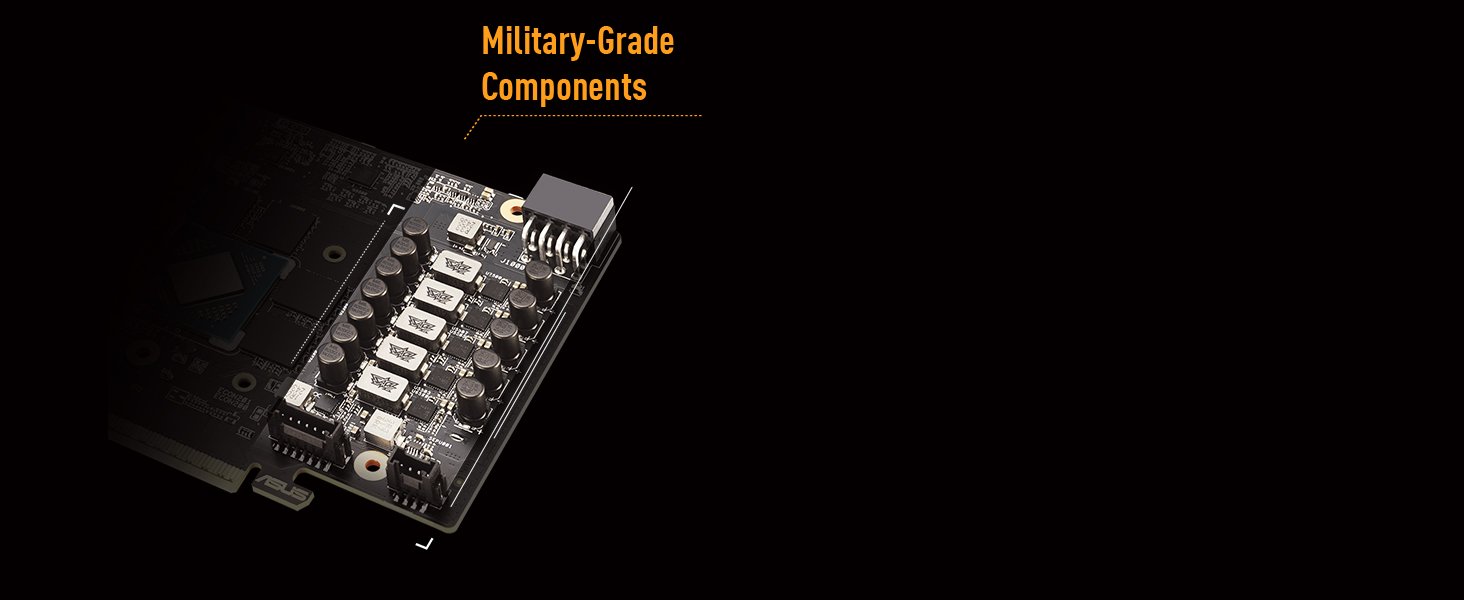
Image: Military-Grade Components. This image displays the internal components of the graphics card, highlighting the robust chokes and capacitors designed for durability and stable power delivery.

Image: Protective PCB Coating and Dual Ball Fan Bearings. This diagram illustrates the protective layer on the circuit board and the design of the fan bearings for enhanced longevity.

Image: Cooling Mastery. This image details the MaxContact heat spreader, Axial-tech fan design, and the vented exoskeleton, all contributing to efficient heat dissipation.

Image: Dual BIOS Switch. This image highlights the physical switch on the graphics card that allows users to select between Performance and Quiet BIOS modes.
3. X'hemm fil-Kaxxa
The retail package for your ASUS TUF Gaming Radeon RX 9060 XT graphics card should contain the following items:
- TUF-RX9060XT-O16G-GAMING Graphics Card
- Grazzi card
- Speed setup manual
- TUF Certificate of Reliability
- TUF Velcro Hook & Loop cable ties
- TUF Fridge Magnet

Image: Product and Packaging. This image shows the ASUS TUF Gaming Radeon RX 9060 XT graphics card alongside its retail packaging.
4. Setup Guide (Installation)
Follow these steps to properly install your graphics card into your computer system.
4.1 Rekwiżiti tas-Sistema
- Motherboard konformi mal-PCI Express b'slott grafika wieħed x16.
- Sufficient power supply unit (PSU) with appropriate PCIe power connectors. Refer to your PSU's documentation for details.
- Minimum 16GB system RAM recommended.
- Compatible operating system (e.g., Windows 11 Pro).
4.2 Installazzjoni Fiżika
- Itfi: Kun żgur li l-kompjuter tiegħek huwa mitfi kompletament u skonnettjat mill-plakka tal-ħajt.
- Kawża Miftuħa: Neħħi l-pannell tal-ġenb tal-kaxxa tal-kompjuter tiegħek.
- Sib is-Slott tal-PCIe: Identifika slott PCI Express x16 disponibbli fuq il-motherboard tiegħek.
- Neħħi l-Għotjien tas-Slott: Remove the necessary expansion slot covers from the back of your computer case that correspond to the graphics card's size (this card typically requires 2.5 slots).
- Daħħal il-Karta: Carefully align the graphics card with the PCIe slot and press it down firmly until it is securely seated. Ensure the retention clip on the PCIe slot locks into place.
- Karta Sikura: Fasten the graphics card to the case using screws.
- Qabbad l-Enerġija: Connect the required PCIe power cables from your power supply to the graphics card. This model typically requires 8-pin PCIe power connectors.
- Agħlaq il-Każ: Ibdel il-pannell tal-ġenb tal-kaxxa tal-kompjuter.
4.3 Installazzjoni tas-sewwieq
- Qawwa Mixgħul: Reconnect your computer to power and turn it on.
- Wirja Inizjali: Il-kompjuter tiegħek jista' jibda b'wiri bażiku.
- Niżżel is-Sewwieqa: Żur l-appoġġ uffiċjali tal-ASUS websit (www.asus.com/support/) or the AMD official websit (www.amd.com/support/) to download the latest drivers for your Radeon RX 9060 XT graphics card.
- Installa Sewwieqa: Mexxi l-installatur tas-sewwieq li niżżilt u segwi l-istruzzjonijiet fuq l-iskrin. Jista' jkun meħtieġ li terġa' tibda s-sistema.
5. Istruzzjonijiet Operattivi
5.1 Konnessjoni ma' Display
Connect your monitor(s) to the graphics card's output ports (DisplayPort 2.1a or HDMI 2.1b) using appropriate cables. This card supports multiple displays.

Image: Video Output Interfaces. This image displays the DisplayPort and HDMI ports available on the graphics card for connecting to monitors.
5.2 Swiċċ tal-BIOS Doppju
The graphics card features a Dual BIOS switch, typically located on the side of the card. This switch allows you to toggle between two distinct BIOS profiles:
- Modalità tal-Prestazzjoni (Modalità P): Maximizes cooling performance, potentially resulting in higher fan speeds and noise levels.
- Modalità Kwieta (Modalità Q): Utilizes a less aggressive fan curve for quieter operation, without altering core power settings.
Switching modes requires a system restart to take effect.
6. Softwer u Utilitajiet
6.1 ASUS GPU Tweak III
ASUS GPU Tweak III is a utility that allows you to monitor and fine-tune your graphics card's performance. It provides features for:
- Overclocking the GPU core clock and memory clock.
- Adjusting fan speeds and creating custom fan curves.
- Monitoring GPU temperature, usage, and other vital statistics.
- Switching between predefined modes (OC, Gaming, Silent) or creating custom user profiles.
Niżżel GPU Tweak III mill-appoġġ uffiċjali tal-ASUS websit.

Image: GPU Tweak III Software. This image shows the GPU Tweak III interface, illustrating its capabilities for performance tuning and monitoring.
6.2 AMD Adrenaline Software
AMD Adrenaline Software provides a comprehensive suite of tools for managing your Radeon graphics card. It includes features such as:
- Game optimization and performance tuning.
- Driver updates and system monitoring.
- Advanced display settings and video enhancements.
- Recording and streaming capabilities.
Ensure you have the latest version installed for optimal performance and access to all features.
7. Manutenzjoni
Proper maintenance helps ensure the longevity and performance of your graphics card.
- Tneħħija tat-Trab: Regularly clean dust from the graphics card's heatsink and fans using compressed air. Ensure the system is powered off and unplugged before cleaning.
- Aġġornamenti tas-sewwieq: Keep your graphics drivers updated by regularly checking the ASUS or AMD support websites for the latest versions.
- Fluss tal-Arja tas-Sistema: Ensure your computer case has adequate airflow to prevent overheating.
8 Issolvi l-problemi
Jekk tiltaqa' ma' problemi bil-karta grafika tiegħek, irreferi għall-passi komuni li ġejjin għas-soluzzjoni tal-problemi:
- L-ebda Output tal-Wiri:
- Kun żgur li l-kejbil tal-monitor huwa konness sew kemm mal-karta grafika kif ukoll mal-monitor.
- Ivverifika li l-karta grafika tkun imdaħħla sew fl-islott tal-PCIe.
- Check that all necessary PCIe power cables are connected to the graphics card.
- Ittestja b'kejbil tad-displej jew monitor differenti jekk possibbli.
- Kwistjonijiet ta' Prestazzjoni (FPS Baxx, Tfixkil):
- Kun żgur li għandek l-aħħar sewwieqa tal-grafika installati.
- Check GPU temperatures using monitoring software (e.g., GPU Tweak III) to rule out thermal throttling.
- Ivverifika li l-unità tal-provvista tal-enerġija (PSU) tiegħek tissodisfa l-istandards tal-qawwa rakkomandati.tage for the graphics card and other system components.
- Agħlaq applikazzjonijiet fl-isfond mhux meħtieġa.
- Driver Installation Problems:
- Uninstall any previous graphics drivers using a utility like Display Driver Uninstaller (DDU) in Safe Mode, then attempt a clean installation of the latest drivers.
- Kun żgur li s-sistema operattiva tiegħek hija aġġornata.
- System Instability (Crashes, Freezes):
- Check for system overheating.
- Ensure your system BIOS/UEFI is updated to the latest version.
- If overclocking, revert to default settings to see if stability improves.
9. Speċifikazzjonijiet
| Karatteristika | Speċifikazzjoni |
|---|---|
| Brand | ASUS |
| Serje | TUF-RX9060XT-O16G-GAMING |
| Koproċessur tal-Grafika | AMD RX9060XT |
| Chipset Brand | AMD |
| Daqs tar-RAM tal-Karta tal-Grafika | 16 GB GDDR6 |
| Veloċità tal-Memorja | 2800 MHz |
| Interface tal-Output tal-Vidjo | DisplayPort 2.1a x2, HDMI 2.1b |
| Riżoluzzjoni Massima tal-Iskrin | 7680x4320 Pixel |
| Piż tal-oġġett | 2.07 liri |
| Dimensjonijiet tal-Prodott (LxWxH) | 11.97 x 4.96 x 0.04 pulzieri |
| Kulur | ISWED |
10. Garanzija u Appoġġ
Għal informazzjoni dwar il-garanzija u appoġġ tekniku, jekk jogħġbok żur is-sit uffiċjali tal-appoġġ tal-ASUS websit. Hemmhekk tista' ssib sewwieqa, FAQs, u informazzjoni ta' kuntatt għas-servizz tal-konsumatur.
Appoġġ ASUS Websit: www.asus.com/support/
Jekk jogħġbok żomm il-prova tax-xiri tiegħek għal pretensjonijiet ta' garanzija.