
1. Prodott Aktarview
The Sony Alpha ZV-E10 II is an APS-C interchangeable lens mirrorless camera designed for content creators. It features a 26-megapixel APS-C back-illuminated Exmor R™ CMOS image sensor, offering high resolution and intricate detail. The camera supports a wide selection of E-mount lenses, including the versatile E PZ 16-50mm F3.5-5.6 OSS II zoom lens included in this kit. Advanced audio capabilities, Creative Looks, and a Cinematic Vlog setting enhance creative expression. Its intuitive touch operation and flip-out vari-angle LCD with rotating UI facilitate both horizontal and vertical video shooting.
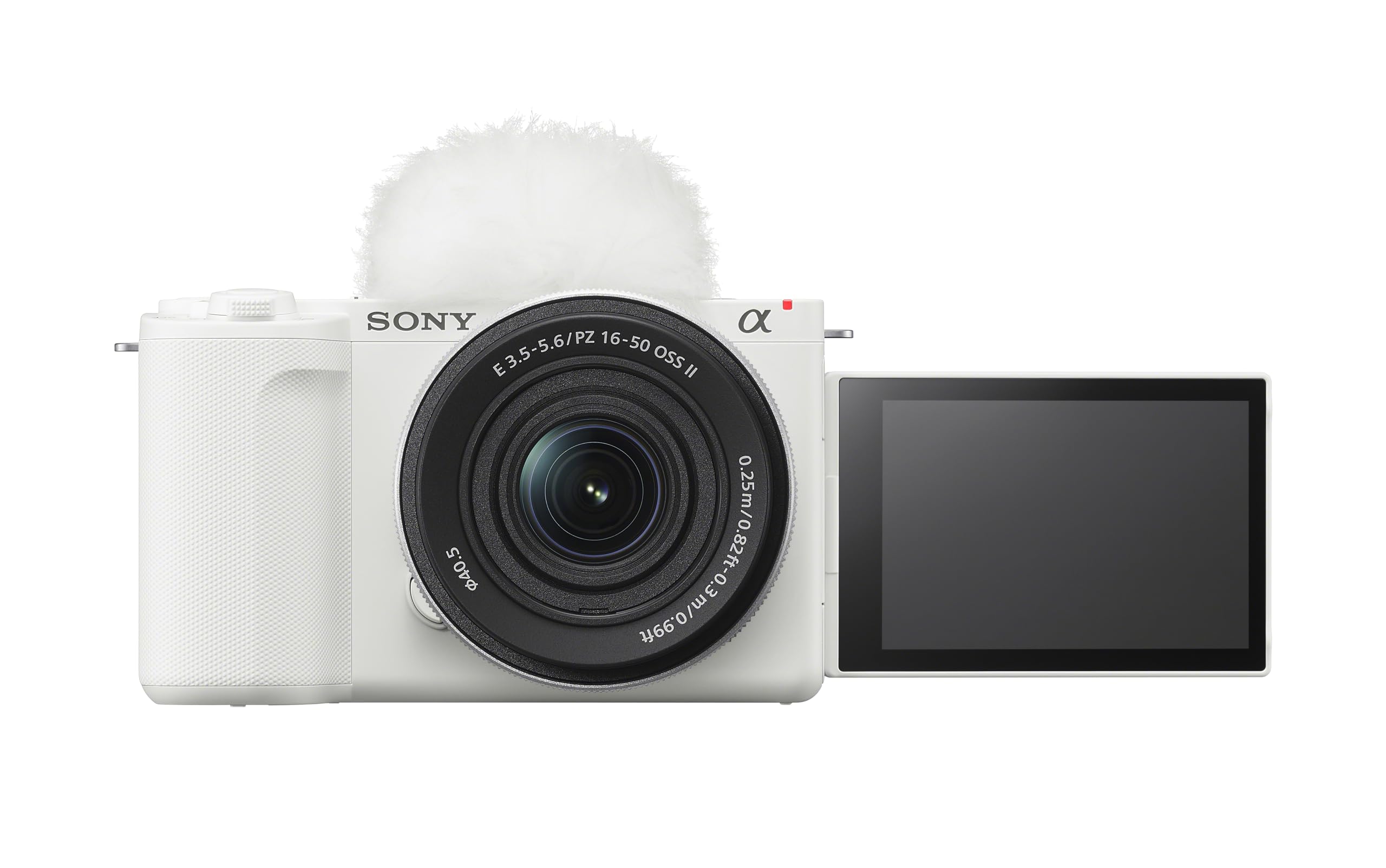
2. Setup Inizjali
2.1 Disimballaġġ
Neħħi l-komponenti kollha mill-imballaġġ bir-reqqa. Kun żgur li l-oġġetti li ġejjin huma preżenti:
- Korp tal-Kamera
- E PZ 16-50mm F3.5-5.6 OSS II Lens
- Kappa tal-Ġisem
- Batterija Rikarikabbli
- Wind Screen
2.2 Installazzjoni u Iċċarġjar tal-Batterija
Insert the supplied rechargeable battery into the battery compartment located at the bottom of the camera. Ensure it clicks into place. Connect the camera to a power source using the provided USB cable for charging. The charging indicator will illuminate during charging and turn off when complete.

2.3 Inserzjoni tal-Kard tal-Memorja
Open the memory card slot cover, typically located near the battery compartment. Insert a compatible SD card (UHS-II recommended for optimal performance) with the contacts facing the correct direction until it locks into place. Close the cover securely.
2.4 Twaħħil tal-Lenti
Align the white index mark on the lens with the white index mark on the camera body. Mount the lens by rotating it clockwise until it locks into position. To remove, press the lens release button and rotate counter-clockwise.

3. Istruzzjonijiet Operattivi
3.1 Power On/Off
To power on the camera, slide the ON/OFF switch located on the top plate. To power off, slide the switch back to the OFF position.

3.2 Modi Bażiċi tal-Fotografija
The ZV-E10 II offers various shooting modes accessible via the mode dial or on-screen menu. Common modes include:
- Awto Intelliġenti: Il-kamera awtomatikament tiskopri x-xena u tapplika l-aħjar settings.
- Programm Awtomatiku (P): Camera sets aperture and shutter speed, while you control other settings.
- Prijorità tal-Apertura (A): Inti tissettja l-apertura, u l-kamera tissettja l-veloċità tax-xater.
- Prijorità tax-Xatter (S): Inti tissettja l-veloċità tax-shutter, u l-kamera tissettja l-apertura.
- Manwal (M): Inti tikkontrolla kemm l-apertura kif ukoll il-veloċità tax-xater.
3.3 Reġistrazzjoni tal-Vidjo
Press the dedicated MOVIE button to start and stop video recording. The camera supports 4K video at up to 60 fps and Full HD at up to 120 fps for slow-motion effects. The articulating touch LCD can be flipped out and rotated for easy self-recording or unique angles.

3.4 Sistema ta' Awtofokus
The ZV-E10 II features Real-time Eye AF and Real-time Tracking for precise subject focus. It recognizes human, animal, and bird eyes, maintaining sharp focus even when subjects move. Utilize the touchscreen to select focus points or track subjects.

3.5 Karatteristiċi Kreattivi
Explore the Creative Look function with 10 presets for expressive moods. The My Image Style function allows adjustments to background bokeh, brightness, and color tone directly on the touch screen in Intelligent Auto or Scene Selection modes. The camera also includes a dedicated button for Background Defocus mode.

4. Kura u Manutenzjoni
4.1 Tindif tal-Kamera u l-Lenti
Use a soft, lint-free cloth to clean the camera body. For the lens, use a lens brush to remove dust, followed by a lens cleaning solution and a microfiber cloth. Avoid touching the lens surface directly with your fingers. Never use harsh chemicals or abrasive materials.
4.2 Kura tal-Batterija
Store batteries in a cool, dry place. Avoid fully discharging the battery frequently, as this can reduce its lifespan. If storing the camera for an extended period, remove the battery.
4.3 Ħażna
When not in use, store the camera in a dry, dust-free environment, preferably in a camera bag or case. Attach the body cap and lens cap to protect the sensor and lens elements.
5 Issolvi l-problemi
This section addresses common issues you might encounter with your Sony Alpha ZV-E10 II camera.
| Problema | Kawża Possibbli | Soluzzjoni |
|---|---|---|
| Il-kamera ma tixgħelx | Il-batterija hija eżawrita jew imdaħħla ħażin. | Iċċarġja l-batterija kompletament. Kun żgur li l-batterija hija mdaħħla sew. |
| L-immaġini huma mċajpra | Fokus mhux korrett, tħawwid tal-kamera, jew lenti maħmuġa. | Check focus settings. Use a faster shutter speed or image stabilization. Clean the lens. |
| Camera overheats and shuts down | Prolonged 4K video recording or use in high ambient temperatures. | Allow the camera to cool down. Reduce recording duration or resolution. Use in a cooler environment. |
| Żball tal-karta tal-memorja | Il-karta hija mimlija, korrotta, jew inkompatibbli. | Ħassar bla bżonn files or use a new card. Format the card (this will erase all data). Ensure the card is compatible. |
6. Speċifikazzjonijiet Tekniċi
| Karatteristika | Speċifikazzjoni |
|---|---|
| Isem tal-Mudell | Alpha ZV-E10 II |
| Tip tas-Sensor | APS-C Exmor R™ CMOS |
| Riżoluzzjoni Għadha Effettiva | 26 MP |
| Riżoluzzjoni tal-vidjo | Up to 2160p (4K 60fps) |
| Mount Lens | Sony E-mount |
| Kit Lens | E PZ 16-50mm F3.5-5.6 OSS II |
| Stabbilizzazzjoni tal-Immaġni | Digital, Optical (with OSS lens) |
| Teknoloġija tal-Awtofokus | AI-assisted Subject Recognition, Real-time Eye AF (Human/Animal/Bird), Real-time AF Tracking |
| Tip ta 'Wiri | 3-inch Articulating Touch LCD |
| Konnettività | Micro HDMI, USB, Wi-Fi, Bluetooth |
| Sparar Kontinwu | Sa 11 FPS |
| Piż tal-oġġett | 14.07 Ounces (Body Only) |
7. Garanzija u Appoġġ għall-Klijent
7.1 Informazzjoni dwar Garanzija
This Sony Alpha ZV-E10 II camera comes with a Garanzija ta' 1 snin mill-manifatturJekk jogħġbok żomm il-prova tax-xiri tiegħek għal talbiet taħt garanzija. Il-garanzija tkopri difetti fil-materjali u l-abbilità taħt użu normali. Ma tkoprix ħsara kkawżata minn użu ħażin, inċidenti, modifiki mhux awtorizzati, jew diżastri naturali.
7.2 Appoġġ għall-Klijent
For technical assistance, troubleshooting beyond this manual, or warranty service, please contact Sony customer support. You can find contact information on the official Sony website or through the documentation included with your product. Have your model number (ZV-E10 II) and serial number ready when contacting support.
Additional resources, including software updates and detailed guides, may be available on the official Sony support websit.