
1. Introduzzjoni
Welcome to the instruction manual for your new SUNLUX 12-Digit Electronic Calculator. This manual provides essential information on how to set up, operate, maintain, and troubleshoot your device. Please read it thoroughly to ensure optimal performance and longevity of your calculator.
2. Kontenut tal-Pakkett
Jekk jogħġbok iċċekkja l-pakkett għall-oġġetti li ġejjin:
- SUNLUX 12-Digit Electronic Calculator
- Manwal ta 'Istruzzjoni (dan id-dokument)
3. Prodott Aktarview
The SUNLUX 12-Digit Electronic Calculator is designed for ease of use and reliability, featuring a clear display and responsive keys. It operates on a dual power system, utilizing both solar energy and a backup battery.
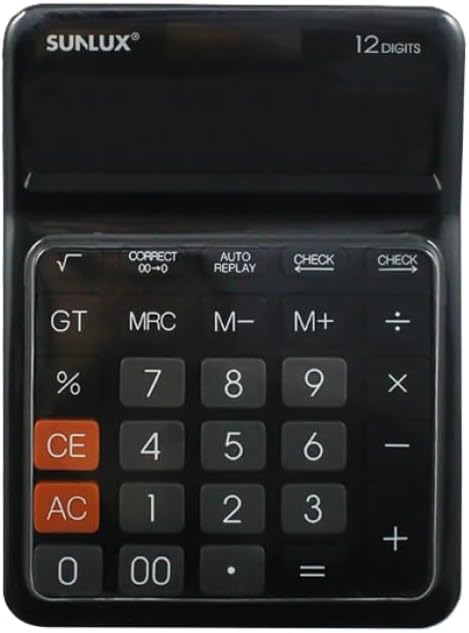
This image shows the front of the SUNLUX 12-digit electronic calculator, highlighting its display, numeric keypad, and function buttons. The calculator features a black casing with clearly labeled keys for various operations.
Funzjonijiet Ewlenin
- 0-9, 00: Tasti ta' input numeriċi.
- +: Addition.
- -: Subtraction.
- *: Multiplication.
- /: Division.
- =: Equals key, displays the result of a calculation.
- %: Perċenswalitagkalkolu.
- √: Square root function.
- GT (Total Grand): Recalls the grand total of all calculations.
- MRC (Memory Recall/Clear): Recalls memory content (first press), clears memory (second press).
- M+ (Memory Plus): Iżżid il-valur muri mal-memorja.
- M- (Minus Memorja): Inaqqas il-valur muri mill-memorja.
- CE (Dħul Ċar): Clears the last entered number or calculation.
- AC (Kull Ċari): Clears all entries and memory, resetting the calculator.
- KONTROLL: Jippermetti reviewing previous calculation steps.
- AUTO REPLAY: Automatically replays the calculation steps.
- CORRECT (00->0): Jikkoreġi l-aħħar ċifra li daħħalt.
4. Setup
Provvista tal-Enerġija
Your SUNLUX calculator features a dual power system: solar power and battery power. Under sufficient light, the calculator will operate using solar power. In low light conditions, it will automatically switch to battery power.
Installazzjoni tal-batterija
While the calculator primarily uses solar power, a battery ensures operation in all lighting conditions. If the display is dim or unresponsive in low light, the battery may need replacement.
- Sib l-għatu tal-kompartiment tal-batterija fuq wara tal-kalkulatur.
- Neħħi b'attenzjoni l-għatu.
- Insert a new battery (type typically AG10 or LR1130, check compartment for specific type if indicated) with the correct polarity (+/-).
- Ibdel l-għatu tal-kompartiment tal-batterija b'mod sikur.
5. Istruzzjonijiet Operattivi
Kalkoli Bażiċi
- Żieda: Daħħal l-ewwel numru, agħfas +, daħħal it-tieni numru, agħfas =.
- Tnaqqis: Daħħal l-ewwel numru, agħfas -, daħħal it-tieni numru, agħfas =.
- Multiplikazzjoni: Daħħal l-ewwel numru, agħfas *, daħħal it-tieni numru, agħfas =.
- Diviżjoni: Daħħal l-ewwel numru, agħfas /, daħħal it-tieni numru, agħfas =.
Funzjonijiet tal-Memorja
- M+: Iżżid in-numru muri bħalissa mal-memorja.
- M-: Naqqas in-numru muri bħalissa mill-memorja.
- MRC: Press once to recall the value stored in memory. Press twice to clear the memory.
- GT: Displays the grand total of all results obtained since the last AC press.
Funzjonijiet Speċjali
- Perċenswalitage (%): Per example, to calculate 10% of 200: Enter 200, press *, daħħal 10, agħfas %.
- Għerq Kwadrat (√): Daħħal numru, imbagħad agħfas √.
- KONTROLL: After a series of calculations, press CHECK to review the entered operations step-by-step.
- AUTO REPLAY: Press AUTO REPLAY to automatically cycle through the calculation steps.
- CORRECT (00->0): If you enter a wrong digit, press CORRECT to delete the last digit without clearing the entire entry.
6. Manutenzjoni
Tindif
To clean your calculator, use a soft, dry cloth. Do not use liquid cleaners, abrasive pads, or chemical solvents, as these can damage the display or casing.
Ħażna
Store the calculator in a cool, dry place away from direct sunlight and extreme temperatures. Avoid placing heavy objects on top of the calculator to prevent damage to the display or keys.
7 Issolvi l-problemi
- Id-displej huwa vojt jew mudlam:
Ensure the calculator is in a well-lit area for solar power. If the issue persists, the battery may need replacement. Refer to the "Battery Installation" section. - Riżultati tal-kalkolu mhux korretti:
Agħfas AC to clear all previous entries and memory. Re-enter your calculation carefully. Check if any memory functions (M+, M-, MRC) are active. - Iċ-ċwievet ma jirrispondux:
Ensure the calculator is clean and free from debris around the keys. If the problem persists, try replacing the battery.
8. Speċifikazzjonijiet
Dettalji Tekniċi
- Ditta: SUNLUX
- Mudell: 7886116
- Numru ta' Ċifri: 12
- Dimensjonijiet: 17.5 cm x 12.5 cm (approximately)
- Sors tal-Enerġija: Enerġija Doppju (Solari u Batteriji)
- Materjal: Plastik u Metall
- Piż tal-oġġett: 300 gramma
- Pajjiż ta' Oriġini: Iċ-Ċina
9. Garanzija u Appoġġ
Informazzjoni dwar Garanzija
This product is covered by the standard manufacturer's warranty. Please refer to your purchase documentation or contact your retailer for specific warranty terms and conditions.
Appoġġ għall-Klijent
For any questions, technical assistance, or support regarding your SUNLUX calculator, please contact the retailer from whom you purchased the product. They will be able to provide the most accurate and timely assistance.