
1. Introduzzjoni
This manual provides essential information for the safe and efficient use of your CUSHYBITE FVB02 USB Lithium 2.0 Ah Rechargeable Battery. Please read these instructions carefully before using the product and retain them for future reference.
2. Informazzjoni dwar is-Sigurtà
TWISSIJA: Aqra t-twissijiet u l-istruzzjonijiet tas-sigurtà kollha. In-nuqqas ta' segwitu tat-twissijiet u l-istruzzjonijiet jista' jirriżulta f'xokk elettriku, nar, u/jew korriment serju.
- Tgħaddasx il-batterija fl-ilma jew likwidi oħra.
- Do not store or use the battery in temperatures exceeding 120°F (49°C) or below 0°F (-18°C).
- Tarmix il-batterija, anke jekk tkun bil-ħsara serja jew kompletament mejta. Il-batterija tista’ tisplodi f’nar.
- M'għandekx short-circuit it-terminali tal-batterija.
- Tippruvax tiftaħ, tiżżarma jew isservi l-pakkett tal-batterija.
- Żomm il-batterija 'l bogħod mit-tfal.
- Armi l-batteriji użati b'mod responsabbli skont ir-regolamenti lokali.
3. Prodott Aktarview
The CUSHYBITE FVB02 is a USB Lithium 2.0 Ah rechargeable battery designed to power compatible USB Lithium tools and charge mobile devices. It features an on-board LED fuel gauge for battery level indication.
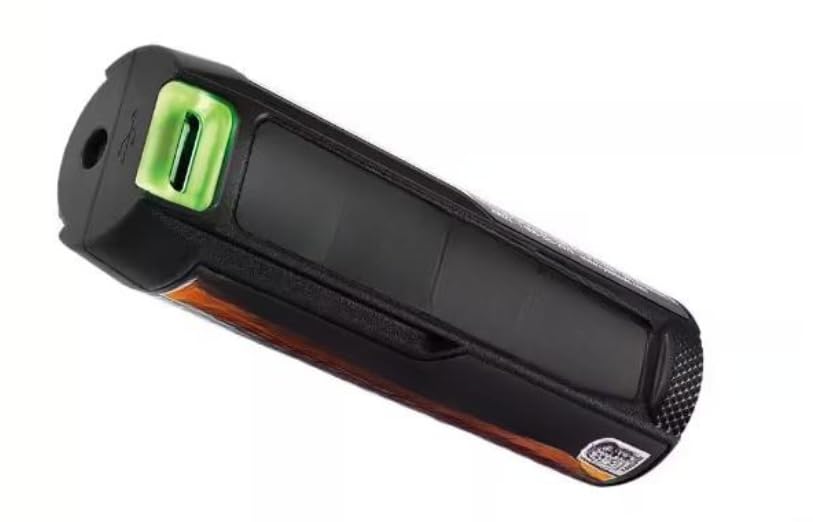
Figura 1: CUSHYBITE FVB02 USB Lithium 2.0 Ah Rechargeable Battery. This image shows the compact, black and green battery unit with its charging port and LED indicator.
Karatteristiċi ewlenin:
- Iċċarġjar ta' Apparat Mobbli: Charges phones and smartwatches via USB.
- LED Fuel Gauge: Provides a clear indication of the current battery level.
- USB Lithium System Compatibility: Powers all USB Lithium tools.
- Iċċarġjar faċli: Rechargeable with any USB-C cable or the USB Lithium 3-Port Charger.
- Kompatt u portabbli: Designed for efficient and cordless power needs.
4. Setup
Iċċarġjar inizjali:
- Connect a standard USB-C charging cable (not included) to the battery's USB-C port.
- Qabbad it-tarf l-ieħor tal-kejbil USB-C ma' sors ta' enerġija USB kompatibbli (eż., adapter tal-ħajt, port USB tal-kompjuter).
- Alternatively, use a USB Lithium 3-Port Charger (sold separately) for charging.
- The LED fuel gauge will indicate charging status. Allow the battery to fully charge before first use.
Installation into Tools:
Insert the FVB02 battery into the designated battery compartment of any compatible USB Lithium tool. Ensure it clicks securely into place.
5. Istruzzjonijiet Operattivi
Powering USB Lithium Tools:
Once installed, the battery will provide power to the USB Lithium tool. Refer to your specific tool's manual for operation instructions.
Iċċarġjar ta' Apparat Mobbli:
- Connect your mobile device's charging cable to the USB output port on the FVB02 battery.
- The battery will begin charging your device.
- Monitor the LED fuel gauge on the battery to track its remaining charge.
LED Fuel Gauge:
The on-board LED fuel gauge provides a visual indication of the battery's charge level. Consult the tool's manual or battery markings for specific interpretations of the LED patterns (e.g., solid green for full, flashing for low, etc.).
6. Manutenzjoni
Tindif:
Keep the battery terminals clean and free of debris. Use a clean, dry cloth to wipe the battery. Do not use solvents or harsh chemicals.
Ħażna:
- Aħżen il-batterija f'post frisk u niexef, 'il bogħod mix-xemx diretta u minn temperaturi estremi.
- Għal ħażna fit-tul, huwa rakkomandat li l-batterija tinħażen b'ċarġ parzjali (madwar 50%).
- Avoid storing the battery in a completely discharged state for extended periods, as this can reduce its lifespan.
7 Issolvi l-problemi
Batterija Mhux Iċċarġja:
- Kun żgur li l-kejbil USB-C huwa konness sew kemm mal-batterija kif ukoll mas-sors tal-enerġija.
- Ivverifika li s-sors tal-enerġija huwa attiv u qed jipprovdi l-enerġija.
- Check the USB-C cable for damage. Try a different cable if necessary.
- Ensure the battery is not too hot or too cold, as extreme temperatures can prevent charging.
Battery Not Powering Tool/Device:
- Check the LED fuel gauge to ensure the battery has sufficient charge.
- Ensure the battery is correctly inserted into the tool or that the charging cable is properly connected to the device.
- Verify that the tool or device is compatible with the FVB02 battery.
8. Speċifikazzjonijiet
| Attribut | Valur |
|---|---|
| Numru tal-Mudell | FVB02 |
| Brand | CUSHYBITE |
| Tip ta 'batterija | Lithium-ion |
| Kapaċità tal-batterija | 2.0 Ah |
| Voltage | 18 volts |
| Sors tal-Enerġija | Li jaħdem bil-batterija |
| Materjal | Plastik |
| Piż tal-oġġett | 1 lira |
| Dimensjonijiet tal-Prodott | 4 x 3 x 2.1 pulzieri |
9. Garanzija u Appoġġ
The CUSHYBITE FVB02 USB Lithium 2.0 Ah Rechargeable Battery is backed by a garanzija ta 'sena mid-data tax-xiri. Din il-garanzija tkopri difetti fil-materjali u l-abbilità taħt użu normali.
For warranty claims, technical support, or further inquiries, please contact CUSHYBITE customer service. Refer to the product packaging or the official CUSHYBITE websit għal informazzjoni ta' kuntatt.
Manifattur: CUSHYBITE