
1. Introduzzjoni
This manual provides comprehensive instructions for the INQMEGA ST-599-6M-20X-10W-4G-US-3 6MP Dual-Lens 20X Optical Zoom 4G Cellular Solar Security Camera. This advanced surveillance system is designed for outdoor use, offering high-resolution video, extensive zoom capabilities, and reliable operation through 4G cellular connectivity and solar power. Please read this manual carefully before installation and operation to ensure proper use and optimal performance.
Key features include a 6MP dual-lens system with 20X optical zoom, 4G LTE cellular connectivity (SIM card included), a 10W solar panel for continuous power, a 20000mAh built-in battery, PIR motion detection, and various night vision modes including color and laser infrared.
2. Kontenut tal-Pakkett
Iċċekkja li l-oġġetti kollha elenkati hawn taħt huma preżenti fil-pakkett tiegħek. Jekk xi oġġetti huma neqsin jew bil-ħsara, jekk jogħġbok ikkuntattja l-appoġġ għall-klijenti.
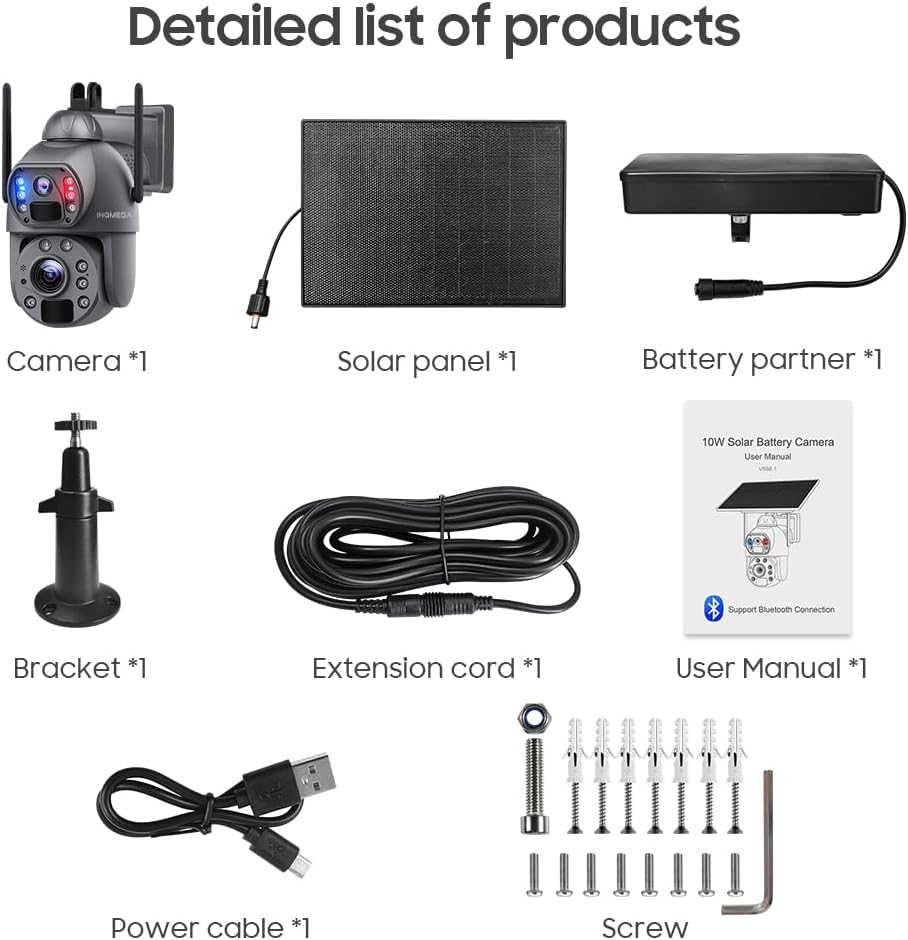
Stampa 2.1: Detailed list of products included in the package. This image shows the main camera unit, solar panel, battery partner, mounting bracket, extension cord, user manual, power cable, and various screws and anchors for installation.
- 1x INQMEGA Solar Camera Unit
- 1x 10W Solar Panel
- 1x Battery Partner (pre-installed 20000mAh battery)
- 1x Bracket tal-Immuntar
- 1x Extension Cord
- 1x Manwal tal-Utent (dan id-dokument)
- 1x Power Cable (USB)
- 1x 4G LTE SIM Card
- Viti u Ankri tal-Immuntar
3. Prodott Aktarview
Familiarize yourself with the components and features of your INQMEGA solar security camera.

Stampa 3.1: Component diagram of the INQMEGA solar camera. Labels include Wide-Angle Lens, Red-Blue Alarm Light, PIR Sensor, Microphone, ZOOM Lens, Photoresistance, LED Indicator, White & IR LEDs, Laser Infrared Lamp, Antenna, and overall dimensions.
3.1 Komponenti Ewlenin
- Wide-Angle Lens (2.8mm): Jipprovdi qasam wiesa' ta' view for general surveillance.
- ZOOM Lens (4.9+47.04mm): Offers 20X optical zoom for detailed distant viewing.
- Dawl tal-Allarm Aħmar-Blu: Flashes to deter intruders upon motion detection.
- Sensuri PIR: Passive Infrared sensors for accurate human motion detection (Max 12M).
- Mikrofonu u Speaker: Jippermetti komunikazzjoni awdjo f'żewġ direzzjonijiet.
- LEDs bojod u IR: Provide illumination for color night vision and infrared night vision.
- Laser Infrared Lamp: Enhances night vision clarity at longer distances, especially during zoom.
- Indikatur LED: Shows camera status (e.g., charging, operating, network status).
- Antenna: For 4G cellular signal reception.
- 10W Solar Panel: Charges the internal battery using sunlight.
4. Setup
4.1 Installazzjoni tal-Karta SIM u l-Karta SD
- Locate the SIM card slot and SD card slot on the camera unit. These are typically protected by a rubber cover.
- Insert the provided 4G LTE SIM card into the SIM card slot. Ensure it is inserted in the correct orientation.
- (Optional) Insert a Micro SD card (up to 128GB, not included) into the SD card slot for local video storage.
- Securely close the rubber cover to ensure weather resistance.
4.2 Initial Battery Charging and Solar Panel Connection
Before initial use, it is recommended to fully charge the camera's built-in 20000mAh battery using the provided USB power cable.
- Connect the USB power cable to the camera's charging port and a standard USB power adapter (not included).
- Allow the camera to charge until the LED indicator shows a full charge.
- Connect the 10W solar panel to the camera's solar input port. Ensure a secure connection.

Stampa 4.1: The camera connected to its solar panel, illustrating how solar energy provides continuous power throughout the day and night.
4.3 Immuntar tal-Kamera
- Choose a suitable outdoor location with good 4G signal reception and ampdawl tax-xemx dirett għall-pannell solari.
- Use the provided mounting bracket, screws, and anchors to securely attach the camera to a wall or pole.
- Adjust the camera's angle to cover the desired surveillance area. Ensure the solar panel is positioned to receive maximum sunlight.
4.4 Installazzjoni u Tqabbil tal-App
- Niżżel il- UBOX applikazzjoni mill-ħanut tal-apps tal-ismartphone tiegħek (iOS jew Android).
- Irreġistra għal kont ġdid jew idħol jekk diġà għandek wieħed.
- Follow the in-app instructions to add your new INQMEGA camera. This typically involves scanning a QR code on the camera or manually entering its device ID.
- Ensure your phone's Bluetooth is enabled during the pairing process if prompted.
5. Istruzzjonijiet Operattivi
5.1 Ħaj View u Daqq
Once paired, open the UBOX app to access the live feed from your camera. You can switch between the wide-angle and zoom lenses, and review irreġistrat footage.

Stampa 5.1: The INQMEGA camera alongside a smartphone displaying the UBOX app interface, showing live dual-lens views and various control icons.
5.2 20X Optical Zoom Functionality
The camera features a unique dual-lens system allowing for 20X optical zoom. In the UBOX app, the dual lenses are displayed as two separate screens, enabling simultaneous wide-angle and zoomed views.

Stampa 5.2: Visual representation of the 20X optical and digital zoom, showing how the camera can magnify distant objects from 1X to 20X, revealing details like a license plate number.

Stampa 5.3: A close-up of the camera's laser infrared lamps and a comparison between 1X zoom and 20X optical and digital zoom, highlighting enhanced detail at distance.
5.3 Modi ta' Viżjoni bil-Lejl
The camera supports multiple night vision modes for clear surveillance in low-light conditions.
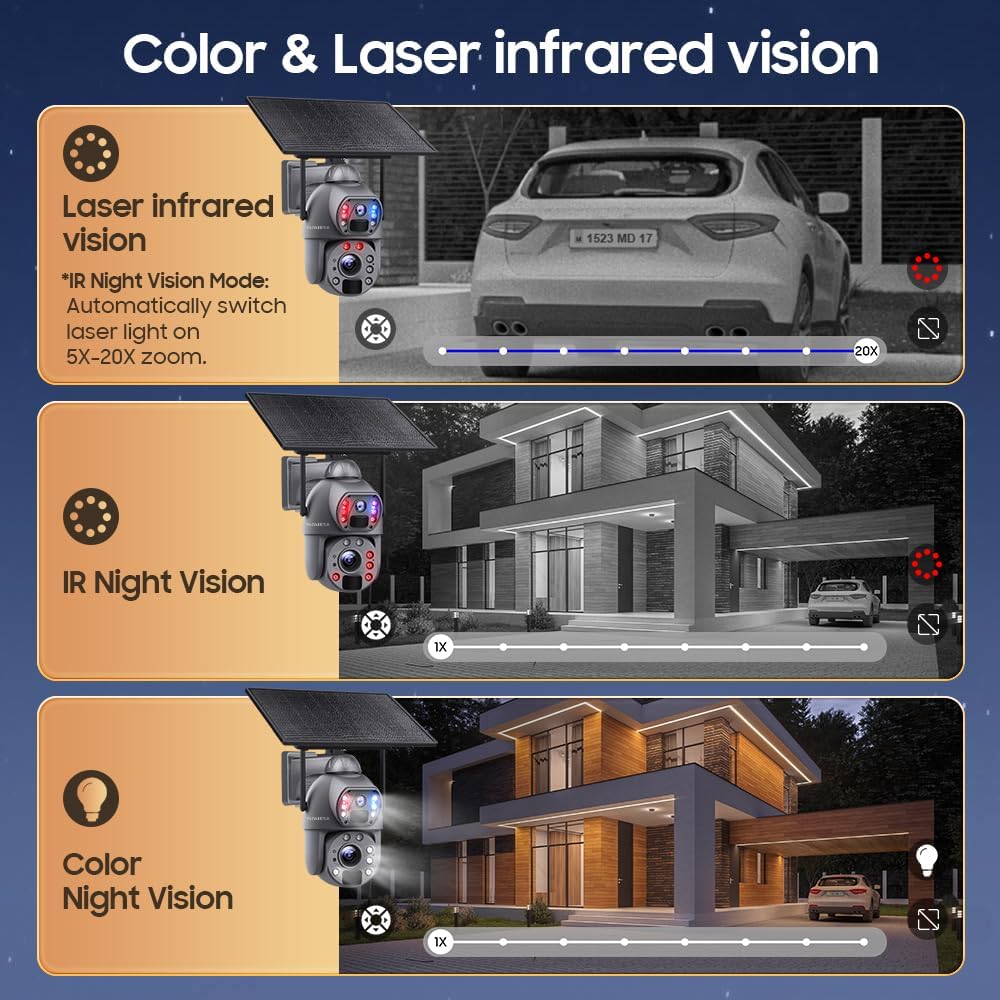
Stampa 5.4: This image demonstrates the three night vision modes: Laser Infrared Vision (automatically switches on for 5X-20X zoom), standard IR Night Vision (black and white), and Color Night Vision (requires ambient light or camera's white LEDs).
- Viżjoni Lejl IR: Standard black and white infrared vision, effective up to 50m.
- Viżjoni bil-lejl bil-kulur: Utilizes white LEDs to provide full-color video in low light.
- Viżjoni bil-Laser Infrared: Automatically activates laser lights for enhanced clarity during 5X-20X zoom in low light.
5.4 Sejbien u Twissijiet tal-Mozzjoni PIR
The camera's advanced PIR sensors detect human movement up to 12 meters. Upon detection, the camera will:
- Push real-time alarm notifications to your smartphone via the UBOX app.
- Trigger a loud siren and activate the spotlight (Red-Blue Alarm Light) to deter intruders.
- Begin recording the event.
Note: The camera does not support automatic tracking of moving objects.
5.5 Awdjo b'żewġ direzzjonijiet
The built-in microphone and speaker allow for two-way communication through the UBOX app. You can listen to audio from the camera's location and speak through the camera's speaker.

Stampa 5.5: An illustration showing the two-way audio functionality, where a user can speak through the camera to a person at the camera's location, such as a delivery person.
5.6 Ħażna tal-Vidjo
Recorded events can be stored in two ways:
- Karta Micro SD: Supports up to 128GB (not included). Recordings are stored locally on the card.
- Ħażna Cloud: A cloud storage service is available (30 days free trial). Refer to the UBOX app for subscription details.
6. Manutenzjoni
6.1 Tindif
- Regularly clean the solar panel surface to ensure maximum charging efficiency. Use a soft, damp cloth to wipe away dust and debris.
- Gently clean the camera lenses with a microfiber cloth to maintain clear image quality. Avoid abrasive materials or harsh chemicals.
6.2 Kura tal-Batterija
- Ensure the solar panel is positioned to receive adequate sunlight daily to keep the battery charged.
- In prolonged periods of low sunlight, the camera can operate for approximately 3 months on a full charge (based on 30 wake-ups per day, 20 seconds each).
- If the battery level becomes critically low, consider manually charging the camera via the USB port.
6.3 Aġġornamenti tal-Firmware
Periodically check the UBOX app for available firmware updates. Keeping your camera's firmware updated ensures optimal performance, security, and access to new features.
7 Issolvi l-problemi
- Il-kamera ma tixgħelx: Ensure the battery is charged. Check the solar panel connection and sunlight exposure. Try charging via USB.
- No 4G signal: Verify the SIM card is correctly inserted and activated. Check the signal strength in the camera's location. Relocate the camera if necessary.
- Is-sejbien tal-moviment mhux qed jaħdem: Check PIR sensor settings in the UBOX app. Ensure the sensor is clean and unobstructed. Adjust sensitivity if needed.
- Problemi bil-konnessjoni tal-app: Ensure your smartphone has a stable internet connection. Restart the UBOX app and the camera. Re-pair the camera if necessary.
- Kwalità fqira tal-immaġni: Clean the camera lenses. Check for obstructions. Ensure sufficient lighting for desired night vision mode.
- Il-karta SD mhux qed tirrekordja: Ensure the SD card is correctly inserted and formatted within the UBOX app. Check if the card is full.
8. Speċifikazzjonijiet
| Karatteristika | Speċifikazzjoni |
|---|---|
| Isem tal-Mudell | ST-599-6M-20X-10W-4G-US-3 |
| Riżoluzzjoni tal-Qbid tal-Vidjo | 6MP |
| Zoom ottiku | 20X |
| Lens 1 (Wide-Angle) | 2.8mm |
| Lens 2 (Zoom) | 4.9mm + 47.04mm |
| Teknoloġija tal-Konnettività | 4G LTE Cellular (SIM card included) |
| Sors tal-Enerġija | 10W Solar Panel, 20000mAh Built-in Battery |
| PIR Human Detection Range | Max 12M (20ft) |
| Distanza tal-Viżjoni bil-lejl infrared | Sa 50m |
| LEDs | 2x Laser Lights, 10x Infrared Lights/White Lights |
| Karatteristiċi Awdjo | 2-Way Audio (Microphone, Speaker) |
| Għażliet ta' Ħażna | Amazon Cloud, TF Card (Max 128GB, not included) |
| Ħin ta' Standby | Approx. 2 months (30 wake-ups/day, 20S each) |
| Piż tal-oġġett | 5.5 liri |
9. Garanzija u Appoġġ
9.1 Garanzija tal-Prodott
The INQMEGA ST-599-6M-20X-10W-4G-US-3 camera comes with a 12-il xahar garanzija from the date of purchase. This warranty covers manufacturing defects and malfunctions under normal use. It does not cover damage caused by misuse, accidents, unauthorized modifications, or natural disasters.
9.2 Appoġġ għall-Klijent
For technical assistance, troubleshooting, or warranty claims, please refer to your purchase documentation for contact information or visit the official INQMEGA website. When contacting support, please have your product model number (ST-599-6M-20X-10W-4G-US-3) and proof of purchase readily available.