
1. Prodott Aktarview
The llano NP-W235 Dual Battery Fast Charger is designed for efficient charging of Fujifilm NP-W235 batteries. This compact and travel-friendly charger offers simultaneous charging for two batteries, featuring a digital display for instant battery level recognition. It also functions as a secure storage box for batteries and SD cards.

Image 1.1: The llano NP-W235 Dual Battery Fast Charger, showcasing id-disinn kompatt tiegħu.
Karatteristiċi ewlenin:
- Iċċarġjar Super Fast: Supports PD3.0 & QC3.0, fully charging two batteries in approximately 3 hours.
- Instant Battery Level Recognition: Digital display shows individual battery power levels and charging status.
- Funzjonalità Doppju: Serves as both a charger and a storage box for two batteries and two SD cards.
- Kompatt u Faċli għall-Ivvjaġġar: Lightweight design with a magnetic flip-open lid for secure transport.
- Għażliet versatili għall-iċċarġjar: Compatible with various power sources including car chargers, computers, power banks, and USB-C wall adapters.
- Multiple Safeguards: Protezzjonijiet integrati kontra l-overvoltage, overcharge, overheating, overcurrent, and short circuits.
2. Istruzzjonijiet ta' Setup
- Spakkja l-Ċarġer: Carefully remove the llano NP-W235 Dual Battery Fast Charger from its packaging.
- Qabbad l-Enerġija: Use the provided USB-C charging cable to connect the charger to a suitable power source. This can be a PD3.0 or QC3.0 compatible wall adapter, a computer USB-C port, a power bank, or a car charger.
- Daħħal Batteriji: Open the magnetic flip-open lid. Insert up to two Fujifilm NP-W235 batteries into the designated slots. Ensure the battery contacts align correctly with the charger pins.
- Insert SD Cards (Optional): The charger includes slots for two SD cards for convenient storage. Insert your SD cards into these slots if desired.
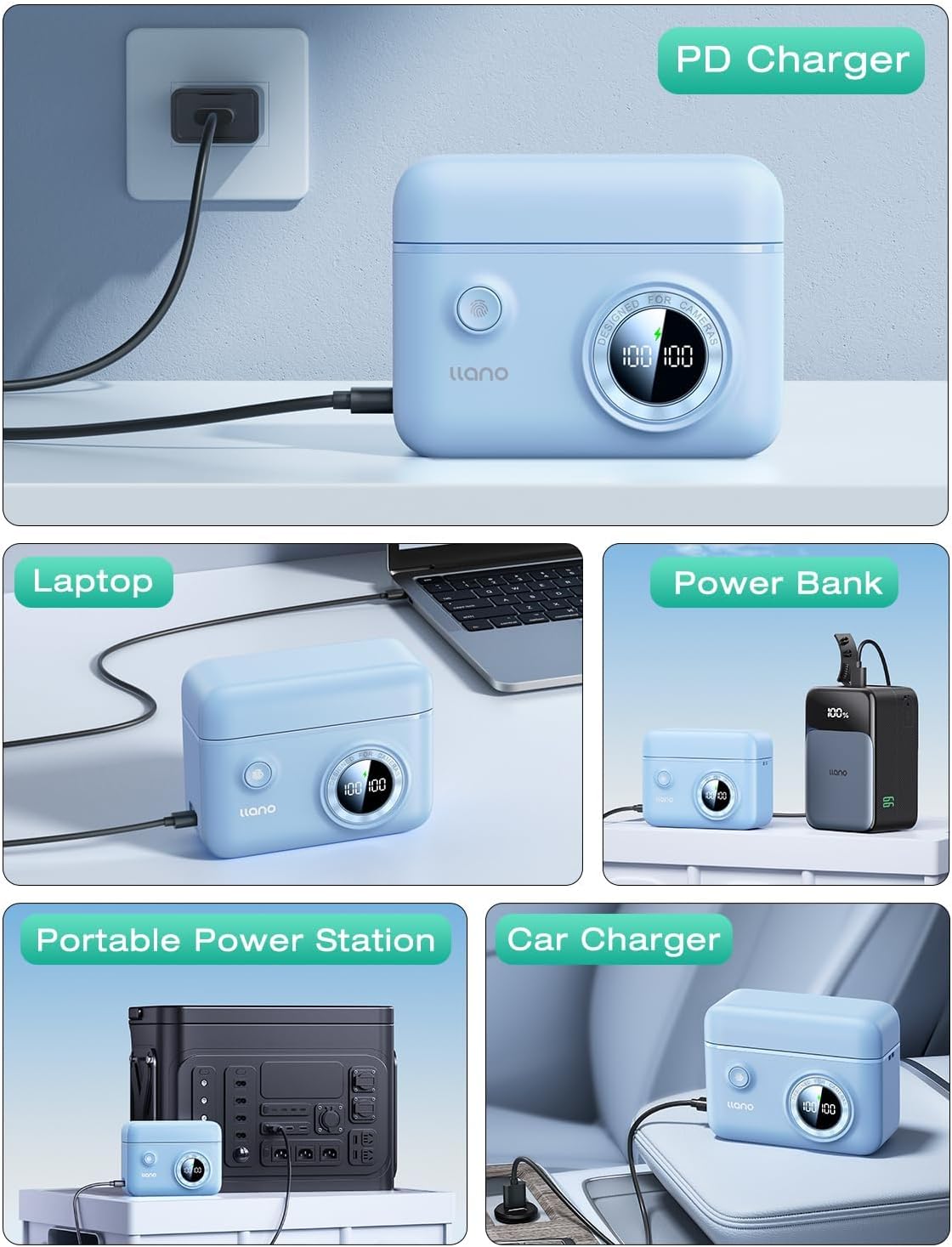
Image 2.1: The charger connected to a power source, demonstrating versatile charging options.
3. Istruzzjonijiet Operattivi
3.1 Proċess tal-Iċċarġjar
- Once batteries are inserted and the charger is connected to a power source, the digital display will activate.
- The display shows the current charge percentage for each battery independently. A lightning bolt icon indicates active charging.
- Charging typically takes about 3 hours for two fully depleted batteries when using a PD3.0 or QC3.0 compatible power source.
- The display will show "100%" when a battery is fully charged.

Image 3.1: Digital display indicating battery charge levels and charging status.
3.2 Iċċekkjar tal-Livelli tal-Batterija
- Even when not connected to a power source, pressing the button on the charger will briefly activate the digital display to show the current charge level of the inserted batteries.
- This allows for quick checks of battery readiness before use.
3.3 Funzjoni tal-Ħażna
- The magnetic flip-open lid securely holds batteries and SD cards in place, protecting them from dust and accidental disconnections.
- The compact design makes it suitable for travel and storage in camera bags.

Image 3.2: Features of the charger including the magnetic lid and SD card storage.
4. Manutenzjoni
- Tindif: Use a soft, dry cloth to clean the exterior of the charger. Avoid using liquid cleaners or solvents.
- Ħażna: Store the charger in a cool, dry place away from direct sunlight and extreme temperatures. Ensure the lid is closed to protect batteries and SD cards from dust.
- Kura tal-batterija: For optimal battery life, avoid fully discharging batteries frequently. Store batteries with a partial charge (around 50%) if not used for extended periods.
- Kura tal-Cable: Inspect the USB-C cable regularly for any signs of wear or damage. Replace if necessary.
5 Issolvi l-problemi
5.1 Charger Not Powering On
- Iċċekkja Sors tal-Enerġija: Ensure the USB-C cable is securely connected to both the charger and a functional power outlet or device.
- Ivverifika l-Kejbil: Ipprova uża kejbil USB-C differenti biex teskludi kejbil difettuż.
- Żbokk tat-Test: Plug another device into the power outlet to confirm it is working.
5.2 Batteriji Mhux Qed Jiċċarġjaw
- Daħħal kif suppost: Ensure batteries are correctly inserted into the slots with contacts aligned.
- Kundizzjoni tal-batterija: Check if the batteries themselves are damaged or at the end of their lifespan. Try charging a different, known-good battery.
- Funzjonalità tal-Ċarġer: If the display shows an error or no charging indication, refer to "Charger Not Powering On" steps.
5.3 Iċċarġjar bil-mod
- Output tal-Adapter tal-Enerġija: For fast charging, use a power adapter that supports PD3.0 or QC3.0 with sufficient wattage (e.g., 18W or higher). Standard USB ports on computers may charge slower.
- Kwalità tal-Kejbil: Kun żgur li qed tuża kejbil USB-C ta 'kwalità għolja li kapaċi jappoġġa l-iċċarġjar veloċi.
6. Speċifikazzjonijiet tal-Prodott
| Brand | llano |
| Numru tal-Mudell | LJN-CS008 |
| Batteriji Kompatibbli | Fujifilm NP-W235 |
| Input | USB-C (PD3.0 & QC3.0 compatible) |
| Ħruġ Voltage | 8.4 Volts |
| Ħin tal-Iċċarġjar | Approx. 3 hours for two batteries (with compatible fast charger) |
| Dimensjonijiet tal-Prodott | 4.3 x 3.3 x 1.7 pulzieri (10.9 x 8.4 x 4.3 ċm) |
| Piż tal-oġġett | 6.4 uqija (181 gramma) |
| Karatteristiċi Addizzjonali | Digital display, SD card storage, magnetic lid, portable lanyard attachment points, anti-slip pads. |
7. Garanzija u Appoġġ
For warranty information and customer support, please refer to the documentation included with your purchase or contact llano customer service directly through their official websit jew il-bejjiegħ bl-imnut minn fejn inxtara l-prodott.
Optional protection plans may be available for extended coverage. Please check with your retailer for details on available plans.