
1. Introduzzjoni
The ANCEL HD110 Heavy Duty Truck Scanner is a diagnostic tool designed for heavy-duty vehicles, offering DPF regeneration and fault code reset capabilities for Detroit and Paccar engines. This package also includes the ANCEL BST100 Car Battery Tester, providing accurate battery health assessment for various 12V batteries. This manual provides essential information for setting up, operating, and maintaining your devices.

Image: The ANCEL HD110 Heavy Duty Truck Scanner (left) and the ANCEL BST100 Car Battery Tester (right).
2. Karatteristiċi tal-prodott
2.1 ANCEL HD110 Heavy Duty Truck Scanner
- DPF Regeneration & Reset: Clears clogged filters, performs on-demand DPF regen, and resets for Detroit and Paccar engines (PX-7, PX-9, MX-11, MX-13, DD13, DD15, DD16).
- Comprehensive HDOBD/OBD2 Diagnostics: Monitors performance, identifies engine issues, and clears fault codes for a wide range of diesel engines. Provides real-time data for preventative maintenance.
- Kompatibbiltà tal-Magna: Specifically designed for Detroit and PACCAR engines, supporting various diesel trucks with 16-pin and 9-pin adapters.
- Konnettività Bluetooth: Connects to your smartphone via Bluetooth for easy operation through the ANCEL Trucker app.
2.2 ANCEL BST100 Car Battery Tester
- Preċiżjoni Għolja: Provides 99.8% accurate readings for battery health assessment.
- Kompatibilità Wiesgħa: Tests all 12V 100-2000CCA batteries, including ordinary lead-acid, AGM flat plate, AGM spiral, and Gel batteries.
- Multiple Tests: Capable of performing Battery Test, Cranking Test, and Charging Test.
- Karatteristiċi tas-Sigurtà: Equipped with reverse polarity protection for safe operation.
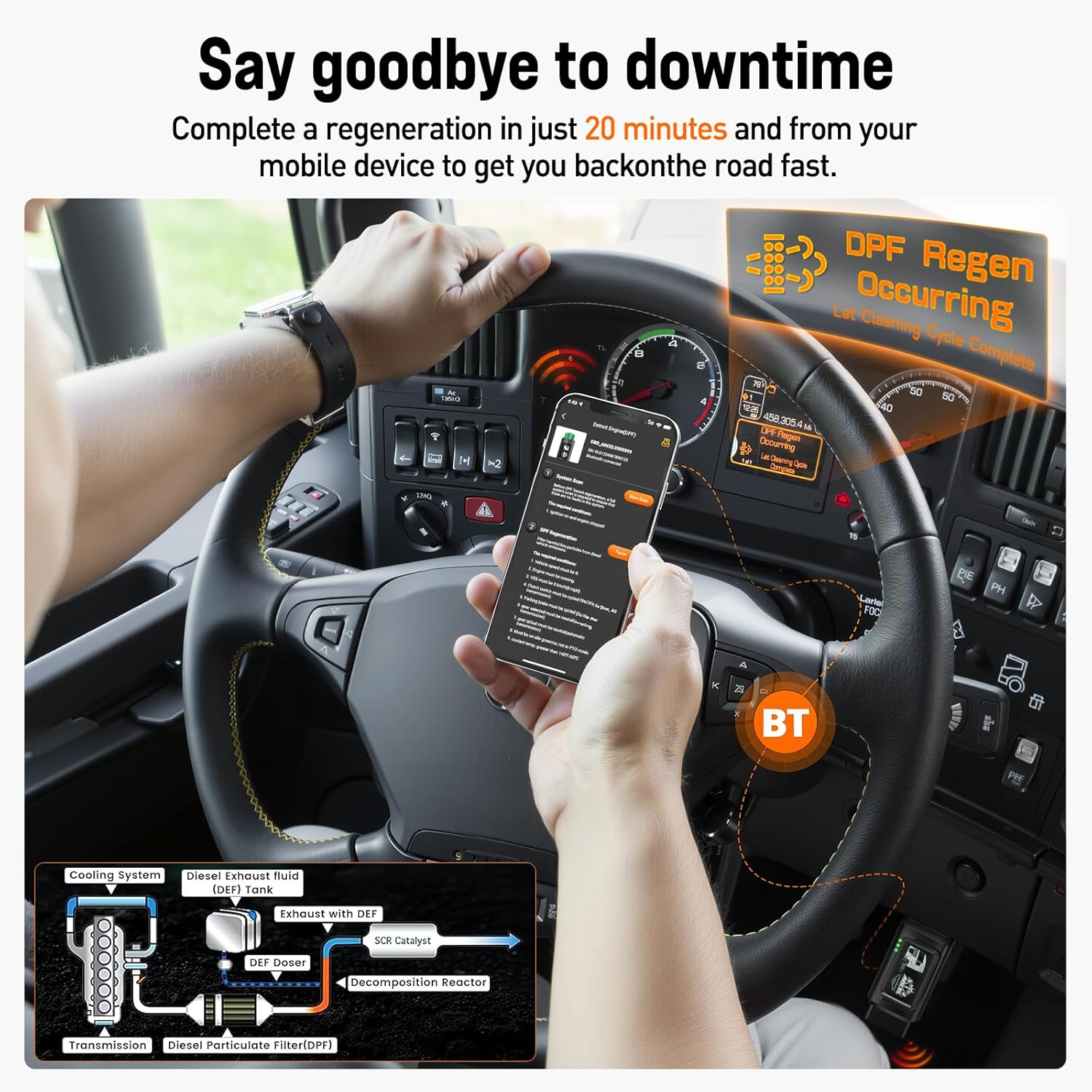
Image: A smartphone displaying "DPF Regen Occurring" while connected to the ANCEL HD110 scanner, illustrating the DPF regeneration process.
3. Setup
3.1 ANCEL HD110 Truck Scanner Setup
- Locate Diagnostic Port: Identify the diagnostic port in your heavy-duty truck, typically located on the driver's side dashboard.
- Qabbad l-Iskaner: Select the appropriate adapter (9-pin or 16-pin) and securely connect the ANCEL HD110 scanner to the vehicle's diagnostic port. Ensure a snug fit, and use the twist lock if available.
- Niżżel l-App: Download and install the "ANCEL Trucker" app on your smartphone (available for Android and iOS).
- Apparat Par: Open the app and add the device via Bluetooth. The app will scan for nearby Bluetooth devices; select "OBD_ANCEL" to connect.
- Ignition Mixgħul: Turn the vehicle's ignition to the ON position (or start the engine for live data monitoring).

Image: The ANCEL HD110 scanner plugged into a truck's diagnostic port, ready for use.
3.2 ANCEL BST100 Car Battery Tester Setup
- Qabbad Clamps: Waħħal il-cl aħmaramp mat-terminal pożittiv (+) tal-batterija ta' 12V u l-klamp iswedamp għat-terminal negattiv (-).
- Qawwa Mixgħul: L-apparat jinxtegħel awtomatikament ladarba jkun konness.
- Agħżel it-Test: Navigate the menu using the buttons to select the desired test (Battery Test, Cranking Test, or Charging Test).

Image: The ANCEL BST100 Car Battery Tester connected to a car battery with its red and black clamps.
4. Istruzzjonijiet Operattivi
4.1 ANCEL HD110 Truck Scanner Operation
- Select Vehicle Type: In the ANCEL Trucker app, select the appropriate vehicle type (e.g., Detroit Engine, Paccar Engine, HD OBD, OBDII).
- Agħmel Skennjar: Choose between "Standard protocol (Fast Scan)" or "Standard protocol (Complete Scan)" to initiate a diagnostic scan.
- Aqra l-Kodiċijiet tal-Ħsarat: Select "Read Fault Code" to view current or historical diagnostic trouble codes (DTCs).
- Ħassar il-Kodiċijiet tal-Ħsarat: After addressing the issue, select "Erase Fault Code" to clear the DTCs from the vehicle's system.
- Monitoraġġ tad-Data Live: Access "Live Data" to view real-time sensor data, consumable fluids, and emission-related components.
- Riġenerazzjoni tad-DPF: For DPF-equipped vehicles, select "DPF Regeneration" and follow the on-screen prompts to perform a forced regeneration. Ensure the engine is at idle and the vehicle is stopped.

Image: A smartphone screen showing diagnostic options like "Read Stored Codes," "Read Pending Codes," and "Clear Trouble Code" from the ANCEL Trucker app.
4.2 ANCEL BST100 Car Battery Tester Operation
- Test tal-batterija: Select "Battery Test" to assess the overall health of the battery, including its voltage u l-kapaċità.
- Test tal-Krankjar: Choose "Cranking Test" to evaluate the battery's ability to start the engine.
- Test tal-Iċċarġjar: Select "Charging Test" to check the vehicle's charging system performance.
- Review Data: Use the "Review Data" option to view riżultati tat-test preċedenti.

Image: The ANCEL BST100 Car Battery Tester displaying its main menu with options for Battery Test, Cranking Test, Charging Test, and Review Data.
5. Manutenzjoni
- Tindif: Wipe the devices with a soft, dry cloth after each use to remove dust and debris. Avoid using abrasive cleaners or solvents.
- Ħażna: Aħżen l-apparati f'post frisk u niexef 'il bogħod mix-xemx diretta u minn temperaturi estremi.
- Aġġornamenti tas-Software: Regularly check for software updates for the ANCEL HD110 scanner via the ANCEL Trucker app to ensure optimal performance and compatibility with new vehicle models.
6 Issolvi l-problemi
- No Power (HD110): Ensure the scanner is securely connected to the vehicle's diagnostic port and the vehicle's ignition is on.
- Connection Issues (HD110): Verify Bluetooth is enabled on your smartphone and the ANCEL Trucker app is open. Try restarting both the app and the scanner.
- Inaccurate Readings (BST100): Żgura li l-batterija clamps are securely attached to the correct battery terminals (positive to positive, negative to negative). Clean battery terminals if corroded.
- Falliment fir-Riġenerazzjoni tad-DPF: Check that all required conditions (engine at idle, vehicle stopped, sufficient engine temperature) are met before initiating DPF regeneration.

Image: A smartphone screen showing real-time data such as Engine RPM, Total Idle Fuel Used Value, and Battery Potential Value, which can aid in troubleshooting.
7. Speċifikazzjonijiet
| Karatteristika | Dettall |
|---|---|
| Brand | ANĊEL |
| Mudell | HD110 (Truck Scanner), BST100 (Battery Tester) |
| ASIN | B0D7ZWS67C |
| L-ewwel Disponibbli | 18 ta’ April, 2025 |
| Battery Tester Compatibility | 12V 100-2000CCA batteries (Lead-acid, AGM flat plate, AGM spiral, Gel) |
8. Garanzija u Appoġġ
For warranty information, technical support, or service inquiries, please refer to the official ANCEL webis-sit jew ikkuntattja lis-servizz tal-konsumatur ta' ANCEL direttament. Żomm l-irċevuta tax-xiri tiegħek għal talbiet ta' garanzija.
9. Vidjows tal-Prodott
ANCEL HD110 Heavy Duty Truck Scanner Overview
Vidjo: Deskrizzjoni komprensivaview of the ANCEL HD110 Heavy Duty Truck Scanner, demonstrating its features and connectivity options. This video highlights the ease of use and the various diagnostic capabilities of the device.
DPF Regen with HD120 (Preview)
Vidjo: Preċedenza qasiraview demonstrating the DPF regeneration process using an ANCEL HD120 scanner. This clip shows the device in action, initiating a DPF regen cycle on a truck.
ANCEL HD3300 PLUS+ Truck Scanner (Preview)
Vidjo: Preċedenza qasiraview wirjaasing the ANCEL HD3300 PLUS+ Truck Scanner. This video provides a quick look at the device's interface and its application in truck diagnostics.