
Introduzzjoni
The PGYTECH Camera Shoulder Strap Air is a versatile and durable accessory designed for mirrorless cameras. It features a quick-release system, adjustable length, and a comfortable, skin-safe surface. This manual provides instructions for proper setup, operation, and maintenance to ensure safe and effective use of your camera strap.
Setup
Attaching the Quick Connectors
The strap utilizes PGYTECH's original quick connector system for secure and easy attachment to your camera. Each quick connector consists of a ball quick bead and a reinforced plastic connector.
- Locate the strap lugs or attachment points on your camera.
- Thread the thin Dyneema lanyard loop of the quick bead through the camera's strap lug. Ensure the loop passes completely through.
- Pass the quick bead itself through the loop you just created, then pull it tight to secure it to the camera.
- Repeat this process for the second quick bead on the other side of your camera.
Once the quick beads are attached to the camera, you can connect them to the main strap by pressing the upper part of the quick connector on the strap and inserting the ball quick bead. The connector will audibly click into place, indicating a secure lock. To detach, simply press the upper part of the quick connector again and pull the quick bead out.
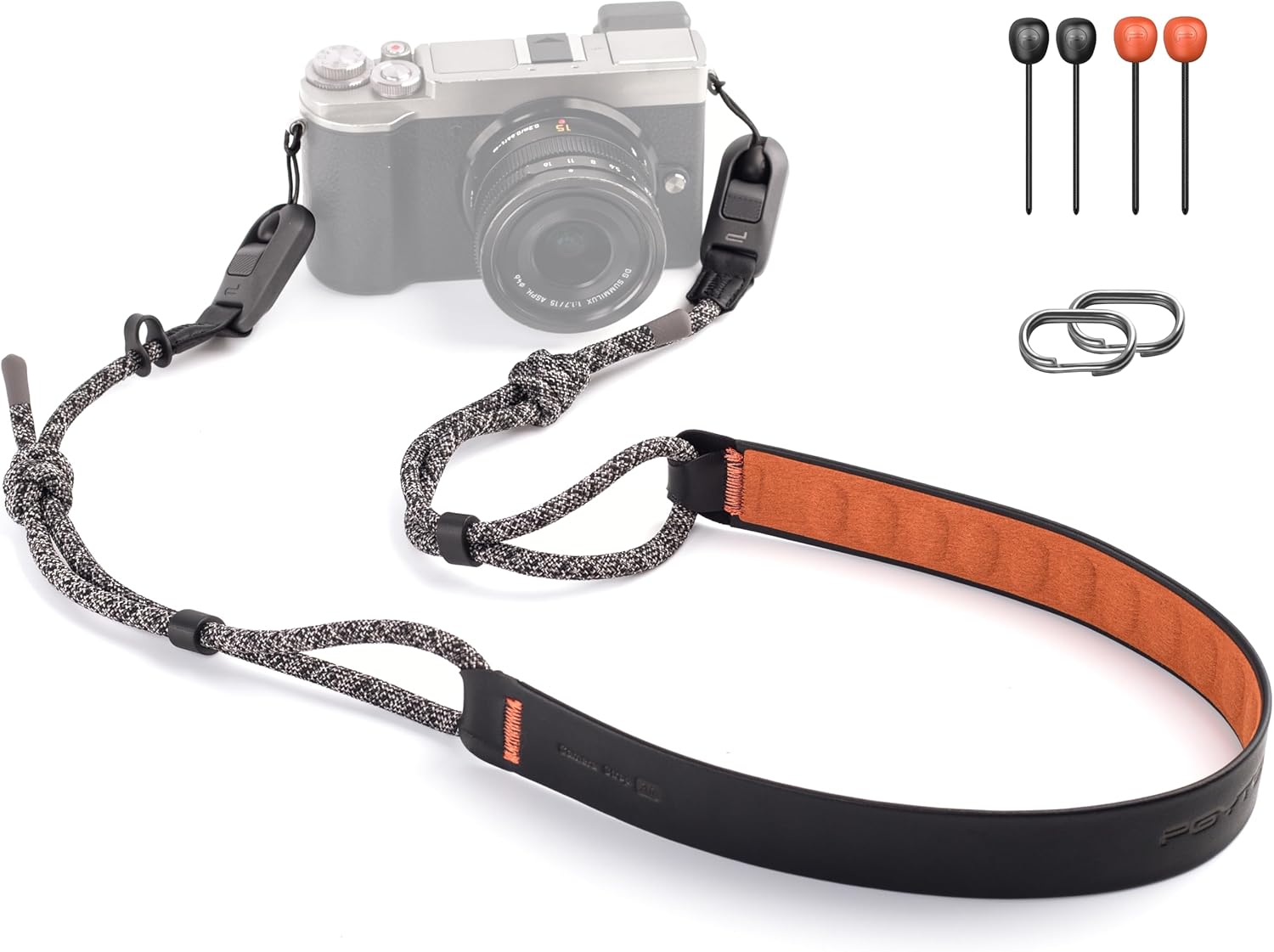
Image: The PGYTECH Camera Shoulder Strap Air securely attached to a mirrorless camera, demonstrating the quick-release system.

Immaġni: Close-up view of the Ball Quick Bead, highlighting its 360-degree rotation capability for flexible attachment without twisting.

Image: An illustration demonstrating the secure locking and instant detachment of the quick connector, ensuring camera safety regardless of the angle of force.
Operazzjoni
Aġġustament taċ-ċinga
The PGYTECH Camera Shoulder Strap Air features dual-sided knots for free length adjustment. To adjust the length, slide the knots along the braided ropes until the desired length is achieved. Ensure both sides are adjusted evenly for balanced carrying.

Image: A user demonstrating the adjustment of the strap length by sliding the dual-sided knots along the braided sections.
Stili Ġarr
The strap is designed to support various carrying configurations for comfort and convenience:
- Neck Carry: Wear the strap around your neck for quick access to your camera.
- Ġarr fuq l-ispalla: Drape the strap over one shoulder, allowing the camera to rest at your side.
- Crossbody Carry: Wear the strap across your body for enhanced stability and security, distributing the camera's weight more evenly.
Additionally, the strap can be converted into a single-sided TPU hanging loop for sling carry, even after detaching the camera, which helps save storage time.

Immaġni: Eżempju viżwaliamples illustrating the various ways to carry the camera with the strap, including neck, shoulder, crossbody, and a converted sling style.

Image: Step-by-step instructions showing how to convert the strap into a single-sided TPU hanging loop for convenient sling carry or storage.
Manutenzjoni
Kura tal-Materjal
The strap's surface fabric is eco-friendly and skin-safe, offering excellent color fastness and breathability. To maintain its quality, wipe the strap with a soft, damp drapp kif meħtieġ. Evita kimiċi ħarxa jew prodotti tat-tindif li joborxu.
Load-Bearing and Replacement Warning
The strap is constructed with tear-resistant Dyneema fiber, which is 15 times stronger than steel at the same weight, providing a strong load-bearing capacity of up to 90 kg (198 lbs). For your camera's safety, the Dyneema lanyard includes a yellow warning layer. Replace the strap promptly when the yellow layer becomes exposed, as this indicates wear and reduced strength.

Immaġni: Dettaljata view of the Dyneema fiber lanyard, highlighting the critical yellow warning layer that indicates when the strap needs replacement.

Image: An illustration demonstrating the 90KG load capacity of the strap and a visual reminder to replace the strap when the yellow inner layer is exposed.
Issolvi l-problemi
Kwistjonijiet Ġenerali
- Difficulty attaching quick connectors: Ensure the quick bead is fully inserted into the connector until a click is heard. Check for any obstructions.
- Iċ-ċinga tħossha skomda: Adjust the length using the dual-sided knots to find a comfortable fit for your body and carrying style.
- Strap appears worn: Inspect the Dyneema lanyard for any exposed yellow warning layer. If visible, replace the strap immediately to prevent potential camera damage.
Speċifikazzjonijiet
| Karatteristika | Dettall |
|---|---|
| Numru tal-Mudell | QP-CB-271-US |
| Dimensjonijiet tal-Pakkett | 9.29 x 3.86 x 1.61 pulzieri |
| Piż tal-oġġett | 5.8 uqija |
| Kapaċità tat-Tagħbija | 90 KG (198 lbs) |
| Materjal | Automotive-grade MicroSuede, Dyneema fiber, PA+GF Reinforced Plastic |
| Tul aġġustabbli | Normal (39.37"-55.1") |
| Kompatibilità | Mirrorless cameras (e.g., Canon G7 X, Sony ZV-E10, Sony A6400, Nikon Coolpix) |
Garanzija u Appoġġ
For warranty information, product support, or any inquiries not covered in this manual, please contact PGYTECH customer service directly. Refer to the product packaging or the official PGYTECH webis-sit għad-dettalji ta' kuntatt u l-politiki ta' garanzija l-aktar aġġornati.
You can visit the official PGYTECH store on Amazon for more information: PGYTECH Store