
1. Introduzzjoni
Grazzi tax-xiriasing the Minetom BL-HW02 Outdoor RGB Christmas Laser Light Projector. This device is designed to create dynamic and decorative light displays for various occasions, both indoors and outdoors. Featuring multiple color combinations, motion effects, and remote control operation, it offers a versatile lighting solution. Please read this manual thoroughly before use to ensure proper operation and safety.
2. Informazzjoni dwar is-Sigurtà
- Sigurtà tal-għajnejn: Do not look directly into the laser light beam. Direct exposure to laser light can cause eye damage.
- Sors tal-Enerġija: Żgura li s-sors tal-enerġija jaqbel mal-voltage requirements specified on the product label. Use only the provided power adapter.
- Użu fuq barra: While the projector is IP65 waterproof, ensure the power adapter and connections are protected from water exposure.
- Installazzjoni: Install the projector securely to prevent it from falling or being dislodged by wind or other environmental factors.
- Tfal u Pets: Keep the device out of reach of children and pets to prevent accidental damage or injury.
- Temperatura: Do not operate the device outside its specified temperature range (-30°F to 104°F).
- Manutenzjoni: Tippruvax tiftaħ jew issewwi l-apparat int stess. Irreferi għal kull manutenzjoni f'idejn persunal kwalifikat.
3. Kontenut tal-Pakkett
Ivverifika li l-oġġetti kollha huma preżenti fil-pakkett:
- Minetom RGB Christmas Laser Light Projector
- Kontroll mill-bogħod RF
- Art Stake
- Bażi Tonda
- Power Adapter (with 16.4ft extension cord)
- Manwal għall-Utent (dan id-dokument)
4. Setup
4.1 Choosing an Installation Method
The projector offers three installation options: ground-mounted, wall-mounted, or placed on a flat surface.
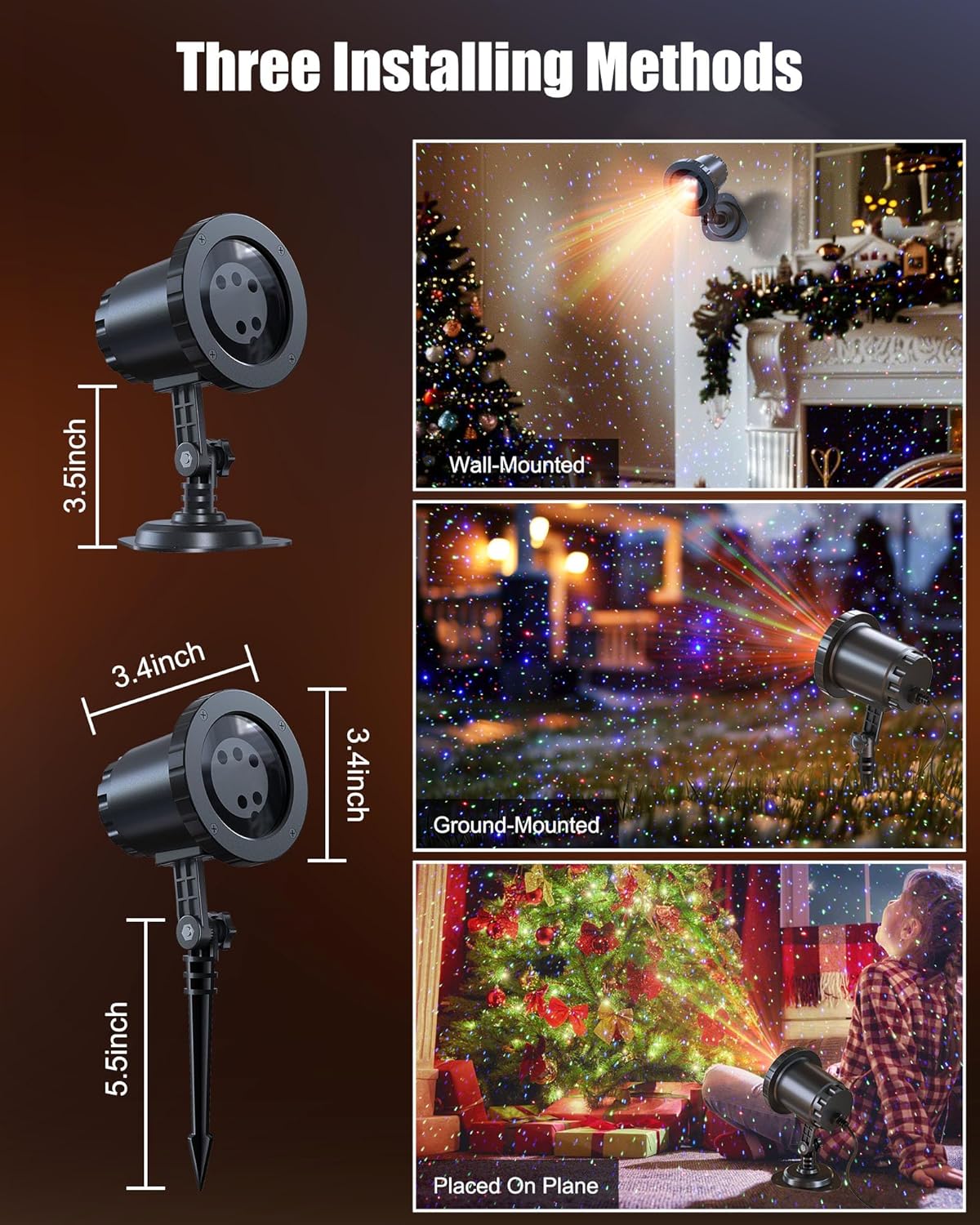
Image: The Minetom laser light projector can be installed in three ways: wall-mounted, ground-mounted, or placed on a flat surface using the included accessories.
- Ground-Mounted: Attach the ground stake to the projector. Insert the stake firmly into soft ground in your desired outdoor location.
- Imwaħħal mal-ħajt: Attach the round base to the projector. Secure the base to a wall using appropriate screws (not included) for a stable installation.
- Placed on Plane: Attach the round base to the projector. Place the projector on any stable, flat surface indoors or outdoors.
4.2 Konnessjoni tal-Enerġija
- Connect the projector to the provided power adapter.
- Use the 16.4ft extension cord to reach a suitable outdoor power outlet.
- Ensure all connections are secure and protected from moisture.
- Ipplaggja l-adapter tal-enerġija fi żbokk elettriku ertjat.
5. Istruzzjonijiet Operattivi
Once powered on, the projector will begin its default light show. Use the RF remote control to customize the display.
5.1 Funzjonijiet ta' Kontroll mill-bogħod
The RF remote control allows you to manage various settings from a distance. Ensure 2*AAA batteries (not included) are installed in the remote.

Image: RF Remote Control layout with functions for each button.
| Buttuna | Funzjoni |
|---|---|
| ON/OFF | Ixgħel jew jitfi l-proġekter. |
| 2H / 4H / 6H | Sets the timer for 2, 4, or 6 hours. |
| (H) Restore | Restores to default timing (6 hours on, 18 hours off). |
| Ċiklu tal-Kulur | Cycles through Green, Blue, Red-Green, Blue-Green, Red-Blue, Red-Green-Blue, and Red-Green-Blue cycle. |
| Mod ta 'Nifs | Activates a slow fade-in/fade-out effect. |
| Jumping Mode | Activates a rapid color change effect. |
| S0 (Static) | Sets the light display to static (no motion). |
| S- / S+ | Adjusts rotation speed (S- for slow, S+ for fast). |
| R / G / B | Selects Red, Green, or Blue light individually. |
| R/G/B Breathing | Activates breathing mode for individual Red, Green, or Blue colors. |
| R/G/B Strobe | Activates strobe mode for individual Red, Green, or Blue colors. Press sequentially to adjust speed (Slow, Medium, Fast, Stop). |
| R/G/B Steady | Sets individual Red, Green, or Blue colors to steady (non-flashing). |
5.2 Tagħqid tal-Kulur
The projector supports various color combinations to create diverse effects.

Immaġni: Eżamples of the 7 available color combinations.
- Aħmar
- Aħdar
- Blu
- Aħmar Aħmar
- Aħmar Blu
- Aħdar Blu
- Aħmar Aħdar Blu
6. Klassifikazzjoni tal-Ilma IP65
The projector body is designed with an IP65 waterproof rating, ensuring reliable performance in various weather conditions such as snow, rain, dust, and intense sunlight. It is cold-proof, operating effectively from -30°F to 104°F.

Image: The projector operating in rainy and snowy conditions, highlighting its IP65 waterproof and cold-proof features.
7. Coverage Area
The projector can cover a significant area, illuminating indoor ceilings, walls, or outdoor walls, gardens, lawns, trees, and rooftops. From a distance of 32.8 feet, it can cover approximately 3229.17 square feet.

Image: Coverage area chart illustrating how the projected area expands with increased distance from the surface.
8. Manutenzjoni
- Tindif: Gently wipe the projector lens and body with a soft, dry cloth. Do not use abrasive cleaners or solvents.
- Ħażna: Meta ma tkunx qed tuża l-proġettazzjoni, aħżenha f'post frisk u niexef, 'il bogħod mix-xemx diretta u minn temperaturi estremi.
- Spezzjoni tal-Cable: Periodically check the power cord and adapter for any signs of damage. Discontinue use if damage is found.
9 Issolvi l-problemi
| Problema | Soluzzjoni |
|---|---|
| Il-proġettur ma jixgħelx. |
|
| Il-kontroll remot mhux qed jirrispondi. |
|
| L-output tad-dawl huwa baxx jew inkonsistenti. |
|
| Multiple projectors interfere with each other. |
|
10. Speċifikazzjonijiet
| Karatteristika | Dettall |
|---|---|
| Numru tal-Mudell | BL-HW02 |
| Brand | Minetom |
| Kulur | Aħmar Aħdar Blu |
| Materjal | Plastik |
| Tip Finish | Proġekter |
| Tip ta' Sors tad-Dawl | Dajowd li Jarmi d-Dawl |
| Sors tal-Enerġija | Corded Elettriku |
| Tip ta 'Immuntar | Floor Mount, Wall Mount |
| Dimensjonijiet tal-Prodott | 2.75"T x 2.75"W x 11.02"Għ |
| Piż tal-oġġett | 14 uqija |
| Angolu tar-raġġ | 120 Grad |
| Klassifikazzjoni li ma jgħaddix ilma minnha | IP65 |
| Temperatura operattiva | -30°F sa 104°F |
| Coverage Area (approx.) | 3229.17 sq ft at 32.8 ft distance |
11. Garanzija u Appoġġ
For warranty information or technical support, please refer to the contact details provided at the point of purchase or visit the official Minetom websit. Żomm l-irċevuta tax-xiri tiegħek bħala prova tax-xiri.