
1. Introduzzjoni
The MUSE M-179 P Alarm Clock Radio is designed to provide reliable timekeeping and audio entertainment. This device features an FM PLL radio with the capacity to store 20 preset stations. It includes a time projection function, allowing you to adjust both the angle and rotation of the projected image for optimal viewing. As an alarm clock, it offers a dual alarm system, enabling you to wake up to either your preferred radio station or a standard buzzer. Additional functions include a snooze feature for extra sleep and a sleep timer for falling asleep to music.
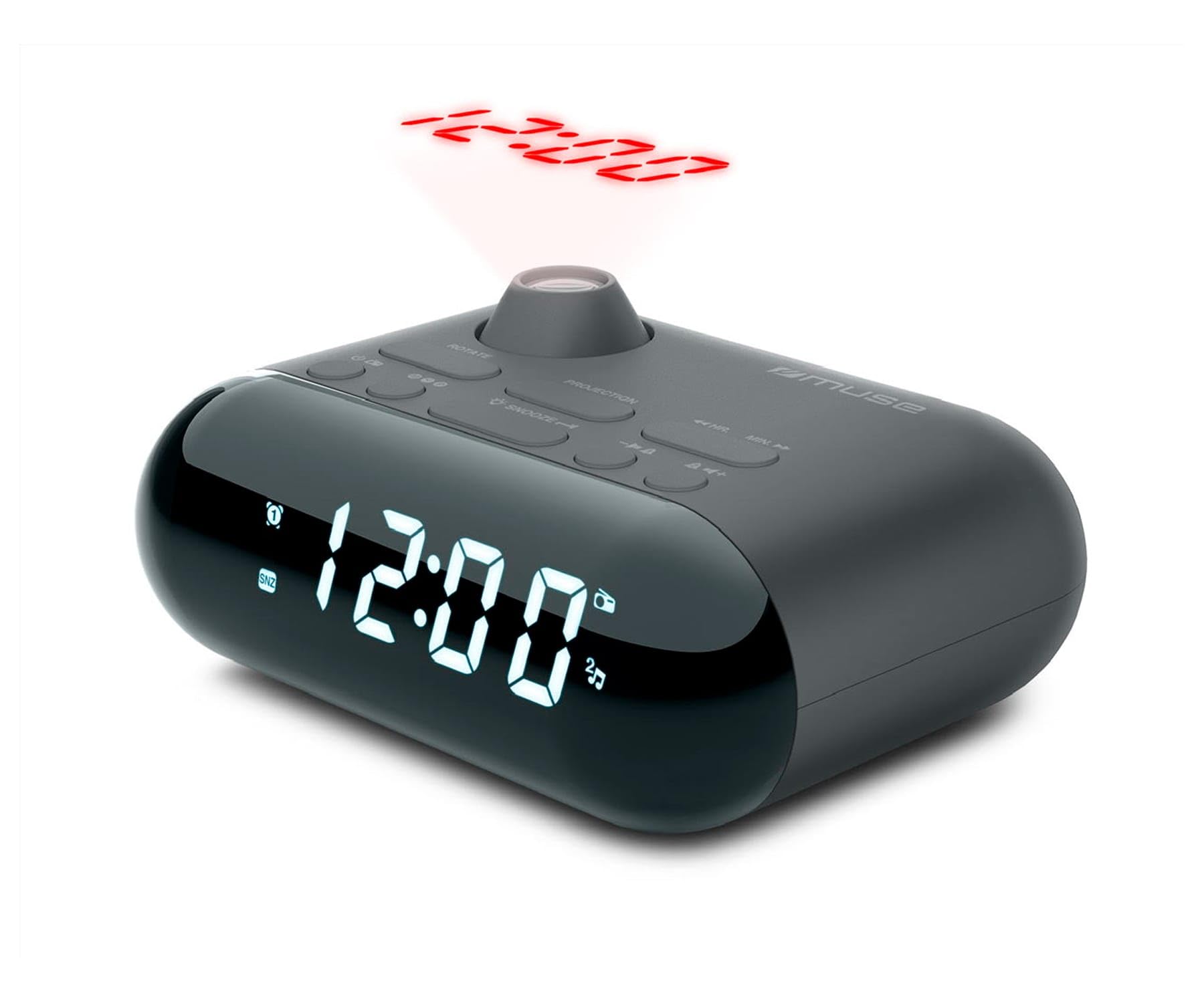
Image showing the front of the MUSE M-179 P Alarm Clock Radio, featuring the LED display and control buttons.
2. Istruzzjonijiet tas-Sigurtà
- Aqra l-istruzzjonijiet kollha bir-reqqa qabel ma tħaddem l-apparat.
- Żomm dan il-manwal għal referenza futura.
- Tesponix l-unità għal taqtir jew titjir ta' ilma.
- Aċċerta ruħek li jkun hemm ventilazzjoni xierqa; timblokkax xi fetħiet tal-ventilazzjoni.
- Tpoġġix l-unità ħdejn sorsi tas-sħana bħal radjaturi, reġistri tas-sħana, stufi, jew apparat ieħor (inkluż amplifiers) li jipproduċu sħana.
- Uża biss aċċessorji/aċċessorji speċifikati mill-manifattur.
- Armi l-batteriji użati b'mod responsabbli skont ir-regolamenti lokali.
- Do not attempt to disassemble or modify the unit. Refer all servicing to qualified service personnel.
3. Kontenut tal-Pakkett
Jekk jogħġbok iċċekkja li l-oġġetti li ġejjin huma inklużi fil-pakkett tiegħek:
- MUSE M-179 P Alarm Clock Radio Unit
- 1 x AA Battery (for backup or primary power, depending on model)
- Manwal għall-Utent (dan id-dokument)
4. Karatteristiċi tal-prodott
- Radju tal-Arloġġ tal-Allarm: Integrated alarm and radio functions.
- Projezzjoni tal-Ħin: Projects the current time onto a wall or ceiling.
- Allarm Doppju: Issettja żewġ allarmi indipendenti.
- Wake-up Options: Choose to wake up to FM radio or a buzzer sound.
- PLL FM Radio: Digital tuning for stable radio reception.
- 20 FM Presets: Store up to 20 of your favorite FM radio stations.
- Funzjoni Snooze: Temporarily pause the alarm.
- Timer ta 'l-Irqad: Fall asleep to radio with automatic shut-off.
- Arloġġ inkorporat: Accurate timekeeping.
- Disinn portabbli: Compact and easy to move.
5. Kontrolli u Wiri
The MUSE M-179 P features an intuitive layout for easy operation. While specific button labels may vary, common controls include:
- Wiri LED: Shows current time, alarm status, and radio frequency.
- Buttuna tas-Setjar tal-Ħin: For adjusting hours and minutes.
- Alarm 1/Alarm 2 Buttons: To set and activate individual alarms.
- Buttuna Snooze/Sleep: Activates snooze or sets the sleep timer.
- Radio/Tuning Buttons: For scanning and selecting radio stations.
- Kontroll tal-Volum: Jaġġusta l-output tal-awdjo.
- Projector On/Off & Adjustment: Controls the time projection feature.
6. Setup
6.1. Konnessjoni tal-Enerġija
- Open the battery compartment, usually located on the bottom or back of the unit.
- Insert 1 AA battery, ensuring correct polarity (+/-). This battery powers the unit.
- Agħlaq il-kompartiment tal-batterija sew.
6.2. Issettjar tal-Ħin Inizjali
- When the unit is first powered on, the display may flash or show a default time.
- Agħfas u żomm il- IL-ĦIN IPPOST button (or similar) until the hour digits begin to flash.
- Uża l- SIEGĦA u MINUTA buttons (or tuning buttons) to adjust the hour. Pay attention to AM/PM indicators if present.
- Agħfas IL-ĦIN IPPOST għal darb'oħra biex tikkonferma s-siegħa u tmur għall-aġġustament tal-minuti.
- Adjust the minutes using the appropriate buttons.
- Agħfas IL-ĦIN IPPOST one last time to save the current time.
7. Istruzzjonijiet Operattivi
7.1. Issettjar ta 'Allarmi
The M-179 P features two independent alarms (Alarm 1 and Alarm 2).
- Agħfas u żomm il- ALLARM 1 sakemm iċ-ċifri tas-siegħa tal-allarm jteptep.
- Uża l- SIEGĦA u MINUTA buttuni biex tissettja l-ħin tal-allarm mixtieq.
- Agħfas ALLARM 1 again to confirm the time and select the wake-up source (radio or buzzer). Use the tuning buttons to toggle between options.
- Agħfas ALLARM 1 once more to save the settings. The alarm indicator will light up on the display.
- Irrepeti l-proċess għal ALLARM 2 bl-użu tal- ALLARM 2 buttuna.
7.2. L-Użu tar-Radju FM
- Agħfas il- RADJU ON/OFF buttuna biex tixgħel ir-radju.
- Uża l- INTONA +/- buttuni biex taġġusta l-frekwenza manwalment.
- Biex tiskennja awtomatikament għall-istazzjonijiet, agħfas u żomm il-buttuna INTONA +/- button. The radio will stop at the next strong signal.
- Biex issalva stazzjon issettjat minn qabel: Sintonizza fuq l-istazzjon mixtieq, imbagħad agħfas u żomm il-buttuna Issettjat minn qabel buttuna (jew MEM). The preset number will flash. Use INTONA +/- biex tagħżel numru minn qabel (1-20), imbagħad agħfas Issettjat minn qabel mill-ġdid biex issalva.
- To recall a preset station: Press the Issettjat minn qabel Agħfas il-buttuna ripetutament biex tiċċaqlaq bejn l-istazzjonijiet salvati.
- Aġġusta l-volum billi tuża VOLUM +/- buttuni.
7.3. Time Projection
- Sib il- PROĠETTUR ON/OFF switch or button. Turn it on to activate the time projection.
- Adjust the projection angle by physically rotating the projector lens housing.
- Jekk disponibbli, uża l- ROTAZZJONI TAL-IMMAĠNI button or dial to flip the projected time display 180 degrees for optimal viewing on a ceiling or wall.
- Adjust the focus of the projected image by rotating the focus ring around the projector lens.
7.4. Funzjoni Snooze
Meta tinstema' allarm, agħfas il-buttuna SNOOZE button. The alarm will temporarily stop and sound again after a few minutes (typically 5-9 minutes, depending on the model's default setting).
7.5. Sleep Timer
- Waqt li r-radju jkun qed idoqq, agħfas il-buttuna L-IRQAD buttuna.
- Agħfas ripetutament il- L-IRQAD button to cycle through available sleep timer durations (e.g., 90, 60, 30, 15 minutes, or OFF).
- Ir-radju jintefa awtomatikament wara t-tul ta' żmien magħżul.
8. Manutenzjoni
8.1. Tindif
- Imsaħ l-unità b'ċarruta ratba u niexfa.
- Tużax prodotti tat-tindif li joborxu, xama', jew solventi.
8.2. Sostituzzjoni tal-batterija
- When the display dims or the unit malfunctions, it may be time to replace the battery.
- Open the battery compartment and replace the old AA battery with a new one, observing correct polarity.
- Dispose of the old battery according to local environmental regulations.
9 Issolvi l-problemi
| Problema | Kawża Possibbli | Soluzzjoni |
|---|---|---|
| L-unità ma tixgħel. | Il-batterija mejta jew imdaħħla ħażin. | Ibdel il-batterija jew iċċekkja l-polarità. |
| Riċeviment ħażin tar-radju. | L-antenna mhux estiża jew is-sinjal fiż-żona huwa fqir. | Extend the FM antenna fully. Reposition the unit for better reception. |
| L-allarm ma jdoqqx. | L-allarm mhux attivat jew issettjat ħażin. | Ensure alarm is set and activated (alarm indicator visible). Check alarm volume. |
| Time projection is blurry. | Il-fokus mhux aġġustat. | Dawwar iċ-ċirku tal-fokus fuq il-lenti tal-proġettazzjoni sakemm l-immaġni tkun ċara. |
| Projected time is upside down. | Image rotation needs adjustment. | Press the IMAGE ROTATION button or adjust the dial to flip the display. |
10. Speċifikazzjonijiet
- Ditta: MUSE
- Numru tal-Mudell: M-179 P
- Sors tal-Enerġija: Battery powered (1 AA battery required)
- Tip ta' wiri: LED
- Teknoloġija tal-Konnettività: Auxiliary (3.5 mm Audio Interface)
- Tip ta' tuner: FM
- Bands tar-Radju Appoġġjati: FM
- Karatteristiċi Speċjali: Built-in clock, Portable
- Dimensjonijiet tal-Prodott (L x W x H): 15 ċm x 12.4 ċm x 6.8 ċm
- Livell ta' Reżistenza għall-Ilma: Waterproof (Note: This specification should be interpreted with caution for electronic devices. Avoid direct exposure to water.)
- Internal Material: Plastik
- Użi Rakkomandati: Għall-użu fuq ġewwa
- Compatible Devices (Auxiliary): Headphones, Speaker, MP3 player, Laptop
11. Garanzija u Appoġġ
This product is covered by a standard manufacturer's warranty. For detailed warranty information, please refer to the warranty card included in your product packaging or visit the official MUSE website. For technical support, troubleshooting assistance, or to inquire about spare parts, please contact MUSE customer service through their official channels.
Jekk jogħġbok żomm il-prova tax-xiri tiegħek għal kwalunkwe talba ta' garanzija.