
COCOCAM ZY-Q6
COCOCAM AOV 4G LTE Security Camera User Manual
Model: ZY-Q6 | Brand: COCOCAM
1. Introduzzjoni
This user manual provides comprehensive instructions for the installation, operation, and maintenance of your COCOCAM AOV 4G LTE Security Camera. Please read this manual thoroughly before using the product to ensure proper functionality and safety.
1.1 Kontenut tal-Pakkett
- 1x COCOCAM AOV 4G LTE Security Camera
- 1x Solar Panel
- 1x Screw Package (for mounting)
- 1x Cable tad-Data
- 1x Manwal tal-Istruzzjonijiet (dan id-dokument)
- 1x Solar Panel Bracket
- 2x AA Batteries (pre-installed or included for initial setup)

Figure 1.1: COCOCAM AOV 4G LTE Security Camera and Solar Panel. The image displays the main camera unit with two antennas, a lens, and four LED lights, alongside a rectangular solar panel connected by a cable.
2. Informazzjoni dwar is-Sigurtà
- Ensure the camera and solar panel are installed securely to prevent falling.
- Tesponix il-kamera għal temperaturi estremi barra mill-medda operattiva tagħha.
- Żomm l-apparat 'il bogħod minn kampi manjetiċi qawwija.
- Tippruvax tiżżarma jew issewwi l-kamera int stess. Ikkuntattja l-appoġġ għall-għajnuna.
- Ensure all cables are properly connected and protected from environmental damage.
- This device is IP66 rated for water and dust resistance, but avoid submerging it in water.
3. Prodott Aktarview
3.1 Karatteristiċi ewlenin
- 24/7 Recording & Fast Alarm Trigger: Continuous recording with quick alarm activation.
- Intelligent Sound and Light Alarm: Customizable alarm areas with real-time notifications.
- 30 Meters Night Vision: Clear visibility in low-light conditions with white light and infrared options.
- AI Detection/Tracking: Human form detection and movement tracking up to 30 meters.
- Għażliet ta' Ħażna Flessibbli: Supports TF card (up to 128GB) and cloud storage.
- Awdjo f'żewġ direzzjonijiet: Mikrofonu u kelliem integrati għall-komunikazzjoni.
- Long-lasting Battery with Solar Panel: 15000mAh rechargeable battery with 8W solar panel for continuous power.
- IP66 Reżistenti għat-Temp: Designed for outdoor use, resistant to water and dust.
- 3MP High Definition Video: 2304*1296 resolution for clear footage.
- 355° Pan/90° Tilt: Wide area coverage with remote adjustable viewangoli.
- Remote Monitoring and Mobile Compatibility: Access via COCOCAM app on Android/iOS devices.
- Konnettività 4G LTE: Operates without Wi-Fi, includes a built-in SIM card with trial data.
4. Setup
4.1 Immuntar tal-Kamera u l-Pannell Solari
The camera and solar panel can be mounted on walls or ceilings. Choose a location that provides optimal sunlight exposure for the solar panel and a clear view għall-kamera.
- Identify a suitable mounting surface.
- Use the provided screw package to secure the camera bracket and solar panel bracket.
- Attach the camera to its bracket and the solar panel to its bracket.
- Qabbad il-kejbil tal-pannell solari mal-port tal-iċċarġjar tal-kamera. Kun żgur li l-konnessjoni hija sigura u reżistenti għall-ilma.

Figure 4.1: Easy installation of the COCOCAM camera and solar panel. The image shows a person installing the camera and solar panel unit under an eave, demonstrating the ease of setup.

Figure 4.2: Self-sustaining power setup with solar panel and battery. This image illustrates the camera and solar panel mounted on a building, highlighting the 8W solar panel and 15000mAh rechargeable battery for continuous power.
4.2 SIM Card and Storage Card Installation
The camera comes with a built-in SIM card for initial use. You can also install an external SIM card or a TF (microSD) card for local storage.
- Locate the SIM card slot and TF card slot on the camera (refer to the product diagram in the quick start guide).
- Insert the TF card (up to 128GB) into the TF card slot with the contacts facing down.
- If using an external SIM card, insert it into the designated slot. Ensure it is properly seated.
- Close the protective cover to maintain IP66 rating.

Figure 4.3: 3G/4G LTE Connection without Wi-Fi. This image highlights the camera's ability to operate using 3G or 4G LTE networks, making it suitable for locations without Wi-Fi, such as farms, construction sites, or RVs.
4.4 App Download and Initial Configuration
Download the COCOCAM app from your device's app store (Android or iOS).
- Fittex għal "COCOCAM" in the Google Play Store or Apple App Store.
- Installa l-app u oħloq kont.
- Segwi l-istruzzjonijiet fl-app biex iżżid il-kamera tiegħek. Dan tipikament jinvolvi l-iskennjar ta' kodiċi QR fuq il-kamera jew id-dħul manwali tal-ID tagħha.
- Once connected, you can configure network settings, recording preferences, and alarm settings.

Figure 4.4: COCOCAM app for 24/7 continuous recording. This image shows a smartphone displaying the COCOCAM app interface, with the security camera mounted on a wall in the background, indicating continuous monitoring capabilities.
5. Istruzzjonijiet Operattivi
5.1 24/7 Recording and Alarm Features
The camera supports continuous recording. When an alarm is triggered, the camera quickly switches to full-frame recording.
- Reġistrazzjoni Kontinwa: The camera records 2 seconds per frame during non-alarm periods.
- Fast Alarm Trigger: Upon detection, the camera initiates full-frame recording within 0.2 seconds.
- Customizable Alarm Areas: Iddefinixxi żoni speċifiċi fil-kamera view għall-iskoperta tal-moviment.
- Intelligent Sound and Light Alarm: The camera can emit sound and light warnings upon detecting suspicious activity.
- Notifiki f'ħin reali: Receive instant alerts on your mobile device when an alarm is triggered.
5.2 PTZ Control (Pan, Tilt, Zoom)
The camera offers extensive pan and tilt capabilities, allowing you to adjust the viewing angle remotely via the COCOCAM app.
- Ħobż: Dawwar il-kamera orizzontalment sa 355°.
- Mejjel: Aġġusta l-kamera vertikalment sa 90°.
- Żum diġitali: Use the app to digitally zoom into the live feed or recorded footage.

Figure 5.1: 355° Pan and 90° Tilt with AI Tracking. This image illustrates the camera's wide range of motion and its ability to track subjects, with icons for two-way audio, AI detection, and AI tracking.
5.3 AI Detection and Tracking
The camera's advanced AI capabilities allow for precise detection and tracking of human forms and vehicles.
- Sejbien tal-Bniedem: Identifies human shapes, reducing false alarms from animals or swaying branches.
- Vehicle Recognition: Distinguishes vehicles for specific alerts.
- Traċċar AI: The camera can automatically follow detected subjects within its field of view sa 30 metru.
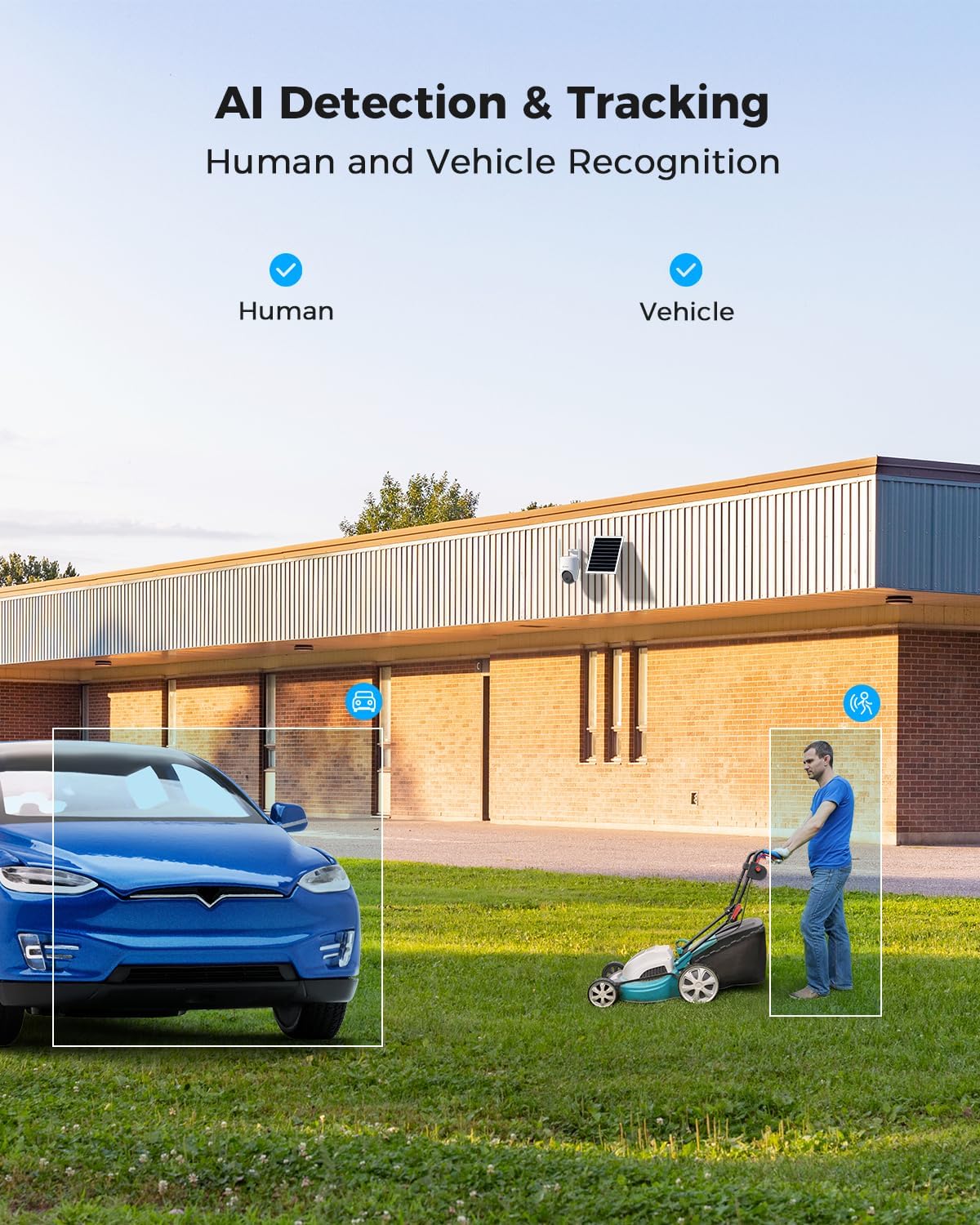
Figure 5.2: AI Detection & Tracking for Human and Vehicle Recognition. The image shows a security camera monitoring an outdoor area, with highlighted boxes indicating detected human and vehicle subjects, demonstrating its AI capabilities.
5.4 Awdjo b'żewġ direzzjonijiet
Ikkomunika mal-viżitaturi jew tiskoraġġixxi l-intrużi billi tuża l-mikrofonu u l-ispiker integrati.
- Access the two-way audio feature through the COCOCAM app.
- Speak into your phone's microphone to transmit audio through the camera's speaker.
- Listen to audio from the camera's surroundings through your phone.
5.5 Viżjoni bil-lejl
The camera provides clear visibility up to 30 meters in complete darkness.
- Viżjoni bil-lejl infrared: Automatically activates in low-light conditions for black and white video.
- Viżjoni bil-Lejl b'Kulur Sħiħ: Utilizes white light LEDs to provide color video at night when activated or upon detection.

Figure 5.3: 30m Night Vision and 2K Full Color Night Vision. This image compares standard black and white night vision with the camera's full-color night vision capability, showing enhanced detail and color in low light.
6. Manutenzjoni
6.1 Kura tal-Batterija u l-Pannelli Solari
The integrated 15000mAh battery is continuously charged by the 8W solar panel. To ensure optimal performance:
- Ensure the solar panel is positioned to receive maximum direct sunlight throughout the day.
- Regularly clean the surface of the solar panel to remove dust, dirt, or debris that may obstruct sunlight.
- Avoid placing the solar panel in shaded areas.

Figure 6.1: 8W Solar Panel for continuous power. This image focuses on the solar panel, highlighting its 8W power output and the 3-meter cable length for flexible installation.
6.2 Tindif tal-Kamera
- Uża artab, damp cloth to wipe the camera lens and body.
- Tużax kimiċi ħarxa jew tindif li joborxu.
- Ensure the camera is dry before prolonged exposure to the elements.
6.3 Aġġornamenti tal-Firmware
Periodically check the COCOCAM app for available firmware updates. Keeping your camera's firmware updated ensures optimal performance, new features, and security enhancements.
7 Issolvi l-problemi
| Problema | Kawża Possibbli | Soluzzjoni |
|---|---|---|
| Camera not connecting to app. | Incorrect pairing process, weak 4G signal, camera not powered on. | Ensure camera is powered on. Re-attempt pairing process. Check 4G signal strength at installation location. |
| Kwalità fqira tal-vidjo. | Dirty lens, low light conditions, weak 4G signal. | Clean the camera lens. Ensure adequate lighting or verify night vision is active. Check 4G signal strength. |
| Il-batterija mhix qed tiċċarġja. | Solar panel obstructed, faulty connection, insufficient sunlight. | Ensure solar panel is clean and receives direct sunlight. Check cable connection between solar panel and camera. |
| AI detection not working or too many false alarms. | Incorrect sensitivity settings, detection area not configured. | Adjust AI detection sensitivity in the app. Configure specific detection zones to exclude irrelevant areas. |
| Two-way audio issues. | Microphone/speaker obstruction, app permissions, network delay. | Ensure nothing is blocking the camera's microphone or speaker. Check app permissions for microphone access. Verify stable 4G connection. |
8. Speċifikazzjonijiet
| Karatteristika | Dettall |
|---|---|
| Isem tal-Mudell | AOV 4G Camera with 7x24 Recording |
| Numru tal-Mudell tal-Oġġett | ZY-Q6 |
| Brand | COCOCAM |
| Riżoluzzjoni tal-Qbid tal-Vidjo | 1440p (3MP, 2304*1296) |
| Medda Pan/Tilt | 355° Pan / 90° Tilt |
| Medda tal-Viżjoni Lejl | 30 Meters (Infrared & White Light) |
| Teknoloġija tal-Konnettività | Wireless (4G LTE) |
| Sors tal-Enerġija | Battery Powered (15000mAh) with 8W Solar Panel |
| Għażliet ta' Ħażna | Karta TF (sa 128GB), Ħażna fis-Sħab |
| Reżistenza għat-temp | IP66 |
| Materjal | Acrylonitrile Butadiene Styrene (ABS) |
| Dimensjonijiet tal-oġġett (L x W x H) | 20 x 15 x 12 ċm |
| Piż tal-oġġett | 620 g |
| Batteriji | 2 batteriji AA (inklużi) |
9. Garanzija u Appoġġ
COCOCAM provides a garanzija tul il-ħajja għal dan il-prodott, u b'hekk tiġi żgurata affidabbiltà fit-tul u sodisfazzjon tal-klijent.
For technical support, troubleshooting assistance, or warranty claims, please contact COCOCAM customer service:
- Manifattur: COCOCAM
- Uffiċjali Websit: www.cococamtech.com
- Email: service@cococamtech.com
Please have your model number (ZY-Q6) and purchase information ready when contacting support.
Ask a question about this manual
Ask about setup, troubleshooting, compatibility, parts, safety, or missing instructions. Manuals+ will review the question and use this page’s manual context to help answer it.