
1. Introduzzjoni
This manual provides detailed instructions for the installation, operation, and maintenance of your ZUMIMALL ZS-GX2S 3MP Wireless Outdoor Security Camera. Please read this manual thoroughly before using the product to ensure proper functionality and safety.
The ZUMIMALL ZS-GX2S is a solar-powered, wireless outdoor security camera designed for comprehensive surveillance. It features 3MP resolution, 360° pan and tilt capabilities, AI detection, two-way audio, and IP66 weatherproofing, making it suitable for various outdoor environments.
2. Prodott Aktarview
2.1 Kontenut tal-Pakkett
Il-pakkett jinkludi l-oġġetti li ġejjin:
- ZUMIMALL ZS-GX2S 3MP Wireless Outdoor Security Camera (2 units)
- Solar Panel (2 units)
- Bracket tal-Immuntar għall-Kamera
- Bracket tal-Immuntar għal Panel Solari
- Cable tal-Iċċarġjar tal-USB
- Screw Package (screws and wall anchors)
- Manwal ta' Istruzzjoni
- Tip Sticker ('Hey! YOU ARE ON CAMERA')
2.2 Komponenti tal-Kamera
Familiarize yourself with the main parts of the camera:
- Lenti tal-Kamera: Jaqbad video footage.
- Dawl abjad: Jipprovdi dawl għal viżjoni bil-lejl bil-kulur.
- Sensor PIR: Jiskopri mozzjoni.
- Mikrofonu: Jaqbad l-awdjo għal komunikazzjoni f'żewġ direzzjonijiet.
- Kelliem: Outputs audio for two-way communication and siren.
- Antenna Wi-Fi: Enhances wireless connectivity.
- Indikatur tal-Modalità: Juri l-istatus tal-kamera.
- Irrisettja Ċavetta: Used to reset the camera.
- Ċavetta tal-Enerġija: Jixgħel/jitfi l-kamera.
- Slot tal-Kard SD: Għal ħażna lokali tal-vidjow (jappoġġja sa 128GB).
- Port ta' Ċarġ tat-Tip C: For connecting the solar panel or charging.

2.3 Karatteristiċi ewlenin
- 3MP Full Color Image: Delivers 2K resolution, 1.5 times sharper than standard 1080p, with 4X digital zoom.
- 360° View: Offers 355° horizontal and 120° vertical rotation for comprehensive coverage.
- Solar Powered & 100% Wireless: Equipped with a high-efficiency solar panel and large-capacity rechargeable battery for continuous operation.
- Konnettività WiFi 2.4G: Features 4dBi dual antennas for stable wireless connection.
- Sejbien Intelliġenti tal-AI: Advanced PIR sensor and AI algorithms identify persons, pets, vehicles, and parcels, reducing false alarms.
- Twissijiet f'ħin reali: Sends instant notifications to your mobile app upon motion detection.
- Awdjo f'żewġ direzzjonijiet: Jippermetti komunikazzjoni f'ħin reali permezz tal-kamera.
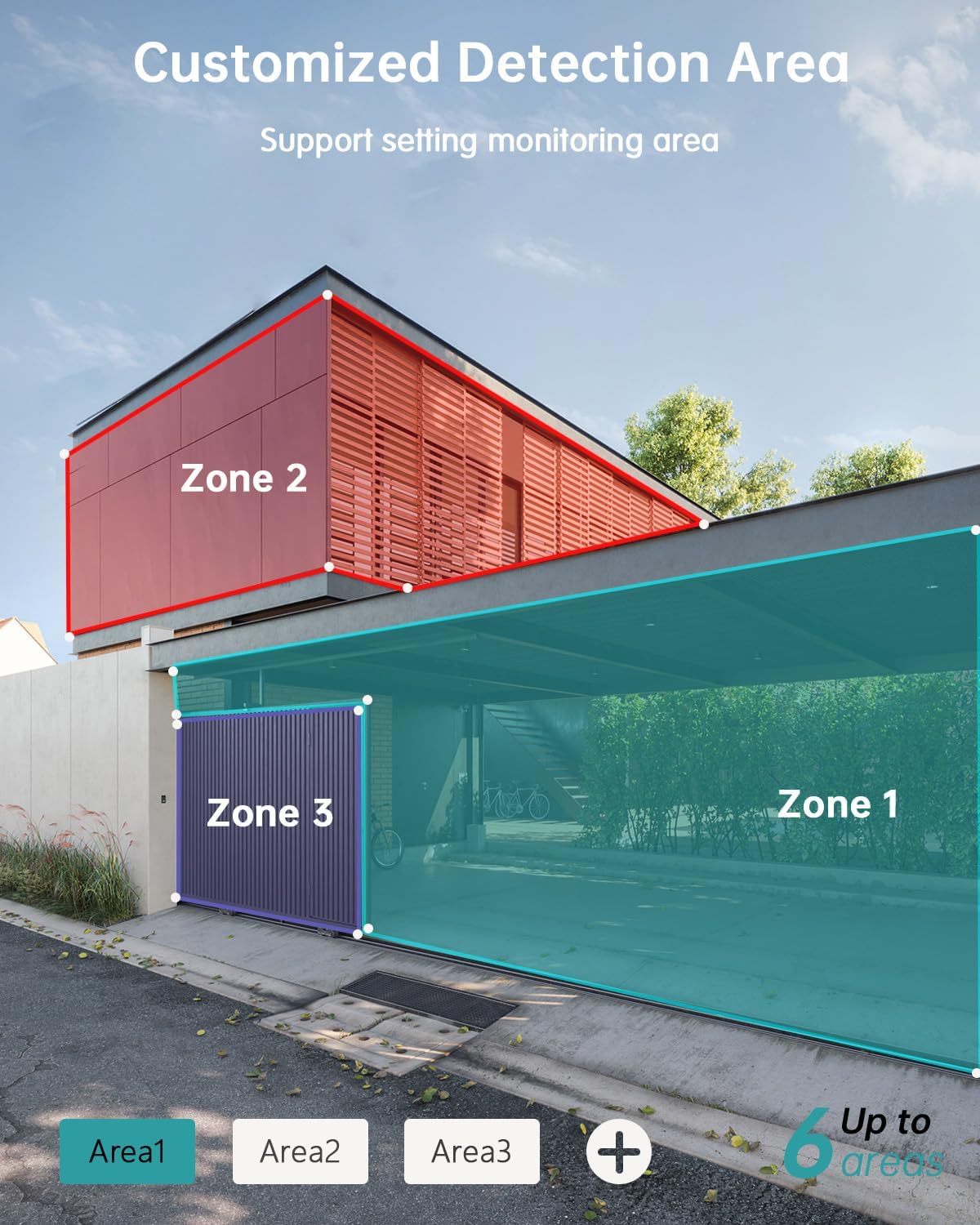
- Customizable Detection Areas: Set specific monitoring zones to focus on critical areas.
- IP66 Reżistenti għat-Temp: Designed to withstand various weather conditions, including rain, wind, and snow.
- Għażliet ta' Ħażna Multipli: Supports local storage via Micro SD card (up to 128GB) and cloud storage.
- Jaħdem ma 'Alexa: Integrate with Amazon Alexa for voice control and live view on compatible devices.
3. Setup
3.1 Installazzjoni Fiżika
Before permanent installation, ensure the camera has a strong 2.4G Wi-Fi signal in the desired location. The camera can be mounted on various surfaces including wood, drywall, stucco, or even gutters using appropriate fasteners.
- Waħħal il-Bażi tal-Immuntar: Secure the camera's mounting base to your chosen surface using the provided screws and wall anchors.
- Qabbad Solar Panel: Attach the solar panel to its bracket and position it to receive maximum sunlight. Connect the solar panel's Type-C cable to the camera's charging port. Ensure the cable is neatly managed to prevent damage.
- Mount Camera: Align the camera with the mounting base and slide it down until it locks securely.

3.2 Installazzjoni u Tqabbil tal-App
The ZUMIMALL app is required to operate your camera. Follow these steps to set up the app and pair your camera:
- Niżżel l-App: Scan the QR code provided in the manual or on the product packaging, or search for 'ZUMIMALL' in your device's app store.
- Irreġistra Kont: Open the ZUMIMALL app and follow the on-screen instructions to register a new account or log in if you already have one.
- Żid Apparat: In the app, select 'Add Device' or the '+' icon. Follow the prompts to select your camera model.
- Ixgħel il-Kamera: Kun żgur li l-kamera tiegħek hija mixgħula.
- Skennja l-Kodiċi QR: The app will display a QR code. Hold your camera's lens towards your phone screen to scan the QR code. You will hear a confirmation sound when successful.
- Qabbad mal-Wi-Fi: Follow the app's instructions to connect the camera to your 2.4G Wi-Fi network.
- Setup Tlesti: Once connected, you can name your camera and begin using it.

4. Operazzjoni
4.1 Ħaj View u Daqq
Access the live feed and review irreġistrat footage directly from the ZUMIMALL app.
- Live View: Iftaħ l-app u agħżel il-kamera tiegħek biex view the real-time feed.
- Daqq: Navigate to the 'History' or 'Cloud' section in the app to review avvenimenti rreġistrati.

4.2 Sejbien tal-Mozzjoni u Twissijiet
The camera's AI detection system identifies specific objects and sends alerts.
- Sejbien AI: The camera can distinguish between persons, pets, vehicles, and parcels.
- Custom Areas: Set specific detection zones within the app to monitor areas of interest and reduce unnecessary alerts.
- Notifiki f'ħin reali: Receive instant alerts on your phone when motion is detected.

4.3 Awdjo b'żewġ direzzjonijiet
Engage in real-time conversations through the camera using the app's two-way audio feature.
4.4 Kontroll PTZ
Control the camera's pan (horizontal) and tilt (vertical) movements directly from the app to adjust your viewangolu tal-ing.
- Ħobż: Rotazzjoni orizzontali ta' 355°.
- Mejjel: Rotazzjoni vertikali ta' 120°.

4.5 Għażliet ta' Ħażna
Your camera offers flexible storage solutions for recorded footage.
- Karta Micro SD: Insert a Micro SD card (up to 128GB) into the designated slot for local storage.
- Ħażna Cloud: ZUMIMALL offers cloud storage services for convenient access and backup of your recordings.
4.6 Integrazzjoni ta' Alexa
The ZUMIMALL ZS-GX2S camera is compatible with Amazon Alexa. You can use voice commands to view the live feed on compatible Alexa-enabled devices.
5. Manutenzjoni
5.1 Battery and Solar Charging
The integrated solar panel is designed to keep your camera's battery charged, providing continuous operation.
- Ensure the solar panel is positioned in an area that receives direct sunlight for several hours daily.
- In periods of low sunlight or high usage, the camera's battery may require manual charging via the USB port.
5.2 Tindif
Tindif regolari jgħin biex iżomm l-aħjar prestazzjoni.
- Imsaħ bil-mod il-lenti tal-kamera u l-pannell solari b'ċarruta ratba u damp drapp biex tneħħi t-trab u d-debris.
- Evita li tuża kimiċi ħarxa jew materjali li joborxu li jistgħu jagħmlu ħsara lill-wiċċ jew lill-lenti tal-kamera.
6 Issolvi l-problemi
If you encounter issues with your ZUMIMALL ZS-GX2S camera, consider the following common solutions:
- Ebda Qawwa: Ensure the solar panel is receiving adequate sunlight or manually charge the camera using the USB cable.
- Kwistjonijiet ta' Konnessjoni Wi-Fi: Verify your Wi-Fi network is 2.4Ghz. Check the camera's proximity to the router and ensure a strong signal. Restart your router and camera if necessary.
- Allarmi Foloz: Adjust the motion detection sensitivity settings in the app. Utilize the custom detection area feature to exclude irrelevant zones.
- No Recordings: Check if the Micro SD card is properly inserted and formatted. Ensure cloud storage is active if you are using that service.
- Kwalità Fqira tal-Immaġni: Naddaf il-lenti tal-kamera. Kun żgur li m'hemm l-ebda ostaklu fil-kamp tal-kamera. view.
- Problemi bl-Awdjo f'Żewġ Direzzjonijiet: Check the volume settings on your phone and in the app. Ensure there are no obstructions blocking the camera's microphone or speaker.
For further assistance, please refer to the ZUMIMALL app's help section or contact customer support.
7. Speċifikazzjonijiet
| Karatteristika | Dettall |
|---|---|
| Numru tal-Mudell | ZS-GX2S |
| Riżoluzzjoni | 3MP (2K) |
| Sors tal-Enerġija | Solar Powered (with rechargeable Lithium Ion battery) |
| Konnettività | Wi-Fi 2.4G |
| Medda Pan/Tilt | 355° Orizzontali, 120° Vertikali |
| Lenti Wide Angle | 130° |
| Viżjoni bil-lejl | 3MP Color Night Vision (with 2 IR and 2 white lights) |
| Zoom Diġitali | 4X |
| Sejbien AI | Person, Pet, Vehicle, Parcel |
| Awdjo | Awdjo Two-Way |
| Ħażna | Karta Mikro SD (sa 128GB), Ħażna fis-Sħab |
| Reżistenza għat-temp | IP66 |
| Temperatura operattiva | -4°F sa 120°F (-20°C sa 50°C) |
| Apparati Kompatibbli | Smartphone, Amazon Alexa |
| Dimensjonijiet tal-Prodott | 13.7 x 7.4 x 5.4 pulzieri |
| Piż tal-oġġett | 4.71 liri |
8. Garanzija u Appoġġ
ZUMIMALL is committed to providing high-quality products and customer satisfaction. For warranty information, technical support, or any inquiries regarding your ZS-GX2S camera, please refer to the ZUMIMALL app's support section or visit the official ZUMIMALL website. You can also contact ZUMIMALL customer service directly for assistance.


