
1. Introduzzjoni
This manual provides detailed instructions for the setup, operation, maintenance, and troubleshooting of your TouchWo 17.3-inch Touchscreen Industrial Computer Monitor. This versatile device is designed for various applications, including office, classroom, retail, and industrial environments, offering a responsive 10-point touch display with robust performance.

Figure 1.1: TouchWo 17.3-inch Touchscreen Industrial Computer Monitor in use, demonstrating its touch capabilities.
1.1 Prodott Fuqview
The TouchWo TD173 is a 17.3-inch industrial-grade touchscreen monitor featuring a 1080P display, powered by a Core i7 processor with 8GB RAM and a 512GB SSD, running Windows 11 Pro. Its 10-point capacitive touch screen allows for intuitive interaction, similar to a tablet. The monitor is designed with a true flat seamless design and an IP65 standard touch screen, making it suitable for demanding environments. It supports various connectivity options including USB, VGA, HDMI, LAN, and WiFi, and includes built-in speakers.
1.2 Kontenut tal-Pakkett
Jekk jogħġbok ivverifika li l-oġġetti kollha elenkati hawn taħt huma preżenti fil-pakkett tiegħek:
- 1 x PC Intelliġenti bit-Touchscreen
- 1 x Adapter tal-Enerġija
- 1 x Kejbil tal-Enerġija (1.5m)
- 1 x Manwal tal-Prodott (dan id-dokument)
- 1 x Wall-Mounted Bracket (standard)
- 1 x Wifi Antenna

Figure 1.2: Contents included in the product packaging.
1.3 Informazzjoni dwar is-Sigurtà
Biex tiżgura tħaddim sikur u tevita ħsara, jekk jogħġbok aqra u segwi l-linji gwida ta' sigurtà li ġejjin:
- Tesponix il-monitor għal temperaturi jew umdità estremi.
- Use only the provided power adapter and power line.
- Evita li timblokka l-fetħiet tal-ventilazzjoni.
- Tippruvax tiżżarma jew issewwi l-apparat int stess. Irreferi għal persunal tas-servizz kwalifikat.
- Naddaf l-iskrin b'ċarruta ratba u mingħajr suf. Evita prodotti tat-tindif li joborxu.
2. Setup
2.1 Metodi ta 'Installazzjoni
The TouchWo TD173 monitor offers flexible installation options to suit various environments. The standard package includes a wall-mounted bracket. Other bracket types (Simple Bracket, VESA Bracket, Desktop Folding Bracket, Desktop Stand) may need to be purchased separately.
- Muntaġġ tal-ħajt: Use the included wall-mounted bracket for secure installation on a vertical surface.
- Muntatura VESA: The monitor features 100x100 VESA holes, allowing compatibility with various VESA-compliant arms and stands.
- Stand tad-Desktop: For desktop use, a compatible stand can be attached to the monitor.

Figure 2.1: Available installation methods for the monitor.
2.2 Konnessjoni tal-Periferali
The monitor is equipped with multiple interfaces for connecting external devices:
- Portijiet USB (4x): Connect keyboards, mice, external storage, or other USB devices.
- VGA & HDMI: For video input from external sources if using the monitor as a display only.
- LAN (Ethernet): Għal konnettività ta' netwerk bil-fili.
- WiFi u Bluetooth: Built-in wireless connectivity for internet access and pairing Bluetooth devices.
- 3.5mm Audio & Mic Jack: For connecting external headphones, speakers, or microphones.
To connect the WiFi antenna, screw it into the designated port on the back of the monitor until secure.
2.3 Tixgħel Inizjali
- Qabbad l-adapter tal-enerġija mal-port tad-dħul tal-enerġija tal-monitor.
- Plug the power line into a suitable electrical outlet.
- Press the power button, usually located on the side or back of the monitor.
- The monitor will boot up, displaying the Windows 11 Pro operating system. Follow the on-screen prompts for initial Windows setup if this is the first use.
3. Istruzzjonijiet Operattivi
3.1 Funzjonalità tat-Touchscreen
The TouchWo monitor features advanced 10-point capacitive touch technology, allowing for precise and responsive interaction. No additional drivers are required for basic touch functionality.
- Tektek Uniku: Functions like a mouse click to select items or open applications.
- Tektek doppju: Jiftaħ files or folders, similar to a double-click.
- Iddreggja: Touch and hold an item, then move your finger to drag it across the screen.
- Agħfas biex Tiżżumja: Use two fingers to pinch in (zoom out) or spread out (zoom in) on images, maps, or documents.
- Ġesti b'ħafna swaba': The 10-point touch supports various multi-finger gestures for navigation and control within Windows 11 and compatible applications.

Figure 3.1: Demonstrating 10-point touch screen interaction.

Figure 3.2: Common touchscreen gestures for interaction.
3.2 Xenarji ta' Użu
The TouchWo TD173 is a versatile smart PC suitable for a wide range of applications:
- Kontroll Industrijali: Ideal for factory automation, monitoring systems, and interactive displays in industrial settings.
- Retail & POS: Can be integrated into Point-of-Sale (POS) systems, interactive kiosks, or menu screens in restaurants and bars.
- Office & Classroom: Functions as a smart board for presentations, collaborative work, or general computing tasks.
- Monitoraġġ tas-Sigurtà: Can serve as a CCTV monitor for security camera systems.
- Self-Service Kiosks: Suitable for interactive information points or self-service terminals.

Figura 3.3: Eżamples of multiple usage scenarios for the monitor.

Figure 3.4: Diverse applications of the TouchWo monitor in different environments.
4. Manutenzjoni
4.1 Tindif tal-Monitor
Regular cleaning helps maintain the monitor's performance and appearance. The IP65 standard touch screen offers protection against dust and water splashes.
- Skrin: Imsaħ l-iskrin bil-mod b'ċarruta ratba u mingħajr suf. Għal tbajja' persistenti, nixxef ftit.ampLaħlaħ id-drapp bl-ilma jew b'soluzzjoni tat-tindif speċifika għall-iskrin. Tisprejjax likwidu direttament fuq l-iskrin.
- Korp: Use a soft, dry cloth to wipe the aluminum alloy frame and back-shell.
- Evita: Do not use abrasive cleaners, alcohol, ammonia, or benzene-based solvents, as these can damage the screen or finish.
4.2 Kura Ġenerali
- Żgura ventilazzjoni xierqa madwar il-monitor biex tevita sħana żejda.
- Evita li tpoġġi oġġetti tqal fuq il-monitor jew il-kejbils tiegħu.
- Protect the monitor from direct sunlight and heat sources.
- When moving the monitor, handle it carefully to avoid drops or impacts.
5 Issolvi l-problemi
Din it-taqsima tipprovdi soluzzjonijiet għal kwistjonijiet komuni li tista' tiltaqa' magħhom. Jekk il-problema tippersisti, jekk jogħġbok ikkuntattja l-appoġġ għall-klijenti.
| Problema | Kawża Possibbli | Soluzzjoni |
|---|---|---|
| Il-monitor ma jixgħelx. | No power, faulty power adapter/cable, or power button issue. |
|
| It-touchscreen ma jirrispondix jew ma juri l-ebda preċiżjoni. | Screen dirty, calibration needed, or software issue. |
|
| No display/black screen. | Power issue, input source not selected (if external), or system crash. |
|
| L-ebda ħoss mill-kelliema. | Volume too low, muted, or audio driver issue. |
|
6. Speċifikazzjonijiet
Detailed technical specifications for the TouchWo 17.3-inch Touchscreen Industrial Computer Monitor (Model TD173):
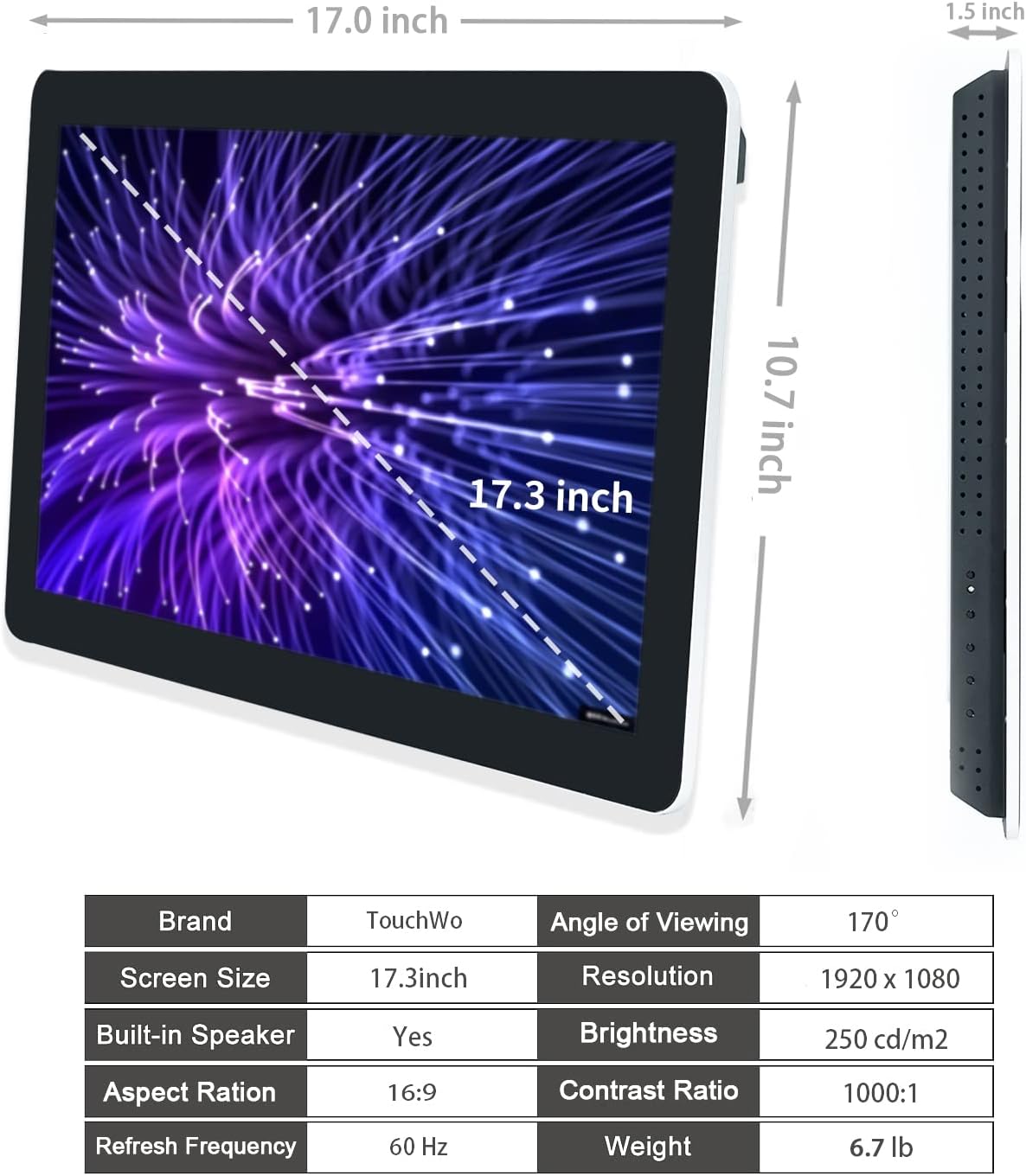
Figure 6.1: Dimensions and key specifications of the monitor.

Figura 6.2: Aktarview of TD Series Touchscreen HD Monitor features.

Figure 6.3: Performance and durability features of the monitor.
| Karatteristika | Speċifikazzjoni |
|---|---|
| Numru tal-Mudell | TD173 |
| Daqs tal-Iskrin | 17.3 Pulzier |
| Riżoluzzjoni | 1920 x 1080 Pixel (FHD 1080p) |
| Proporzjon ta' l-aspett | 16:9 |
| Luminożità | 250 cd/m² (250 lm) |
| Proporzjon ta' Kuntrast | 1000:1 |
| ViewIng Angolu | 178° |
| Touch Teknoloġija | 10 Punti Touch Capacitiv |
| Sistema Operattiva | Windows 11 Pro (Core i7, 8GB RAM, 512GB SSD configuration) |
| Konnettività | 4x USB, VGA, HDMI, LAN, WiFi, Bluetooth, 3.5mm Audio & Mic Jack |
| Kelliema Inkorporati | Iva |
| Klassifikazzjoni tal-IP | IP65 (Panew ta' Quddiem) |
| Dimensjonijiet tal-Prodott | 1.5 x 17 x 10.7 pulzieri |
| Piż tal-oġġett | 6.7 liri |
| Voltage | 12 Volts (DC) |
| Ċertifikazzjonijiet | FCC, CE, RoHS |
7. Garanzija u Appoġġ
7.1 Politika ta' Garanzija
TouchWo offers a one-year warranty for this touchscreen monitor, covering manufacturing defects and malfunctions under normal use. The factory holds ISO9001 quality management certification, ensuring product quality.
For warranty claims, please retain your proof of purchase. The warranty does not cover damage caused by misuse, accidents, unauthorized repairs, or natural disasters.
7.2 Appoġġ għall-Klijent
For any assistance, technical support, or inquiries, please feel free to reach out to TouchWo customer service. We are committed to providing 24/7 online customer support.
- Email Uffiċjali: touchwoamz@outlook.com
- Paġna tal-Bejjiegħ tal-Amazon: For more information or to contact the seller directly, visit the Paġna tal-Bejjiegħ ta' TouchWo fuq Amazon.
- Bulk or Custom Orders: Please reach out to the provided email for inquiries regarding bulk purchases or custom orders.

Figure 7.1: Contact information for customer assistance.