
1. Introduzzjoni
The ATuMan LS6 is a versatile 3-in-1 laser distance meter designed for high-precision measurements. It combines distance measurement, laser projection, and angle detection, making it suitable for a wide range of applications from home DIY projects to professional construction and interior design. This manual provides detailed instructions on how to set up, operate, and maintain your device to ensure optimal performance and longevity.

Image 1.1: The ATuMan LS6 Laser Distance Meter, showcasing id-disinn kompatt u l-wiri integrat tiegħu.
2. Kontenut tal-Pakkett
Please verify that all items are present in the package before use:
- Laser Distance Meter (LS6) x1
- Charging Cable (USB Type-C) x1
- Lanyard x1
- Manwal għall-Utent x1

Image 2.1: Contents of the ATuMan LS6 package, including the device, charging cable, and lanyard.
3. Informazzjoni dwar is-Sigurtà
The ATuMan LS6 uses a Class 1 laser. While generally safe, please observe the following precautions:
- Tħaresx direttament fir-raġġ tal-lejżer.
- Timmirax ir-raġġ tal-lejżer lejn nies jew annimali.
- Żomm l-apparat fejn ma jintlaħaqx mit-tfal.
- Tippruvax tiżżarma jew timmodifika l-apparat.
- Uża l-apparat biss għall-iskop maħsub tiegħu kif deskritt f'dan il-manwal.
- Evita li tesponi l-apparat għal temperaturi estremi, umdità, jew dawl tax-xemx dirett.
4. Prodott Aktarview
The ATuMan LS6 features a durable aluminum body and a clear TFT color display. Its intuitive user interface allows for effortless one-handed operation.
4.1 Komponenti Ewlenin
- Emittent/Riċevitur tal-Lejżer: Located at the top of the device for sending and receiving laser signals.
- Wiri bil-Kulur TFT: High-definition screen for displaying measurements, modes, and settings.
- Buttuni tal-Kontroll: For power, measurement activation, mode selection, and settings adjustment.
- Port USB tat-Tip Ċ: Għall-iċċarġjar tal-batterija interna.

Immaġni 4.1: Mill-qrib view of the ATuMan LS6 laser emitter, highlighting its precision.

Image 4.2: The TFT color display of the LS6, showing clear and easy-to-read data with an intuitive user interface.
5. Setup
5.1 Iċċarġjar tal-Apparat
The ATuMan LS6 is equipped with a 300mAh rechargeable battery. Before first use, or when the battery indicator shows low power, charge the device using the provided USB Type-C cable.
- Qabbad il-kejbil USB tat-Tip Ċ mal-port tal-iċċarġjar fuq l-apparat.
- Qabbad it-tarf l-ieħor tal-kejbil ma' adapter tal-enerġija USB standard (mhux inkluż) jew port USB tal-kompjuter.
- L-indikatur tal-batterija fuq id-displej se juri l-istatus tal-iċċarġjar.
- Ladarba tkun iċċarġjata kompletament, skonnettja l-kejbil.

Image 5.1: The ATuMan LS6 connected to a USB Type-C charger, illustrating its long battery life feature.
5.2 Tixgħel/Jitfi
- Biex Tixgħel: Press and hold the main control button (center button) for a few seconds until the display lights up.
- Biex Tifi: Press and hold the main control button again for a few seconds. The device also features an auto-off function after 180 seconds of inactivity to conserve battery.
6. Operazzjoni
The ATuMan LS6 offers 19 measurement functions. Familiarize yourself with the control buttons and display icons for efficient use.
6.1 Basic Measurement (Distance)
- Kun żgur li l-apparat ikun mixgħul.
- Ipponta l-emittent tal-lejżer lejn il-wiċċ fil-mira.
- Press the main control button once to activate the laser beam.
- Press the main control button a second time to take the measurement. The distance will be displayed on the screen.
6.2 Modi ta' Kejl
The device supports various measurement modes. Use the side button(s) to cycle through the available modes. The current mode will be indicated on the display.
- Kejl Kontinwu: Jipprovdi aġġornamenti tad-distanza f'ħin reali hekk kif iċċaqlaq l-apparat.
- Kejl taż-Żona: Measure two sides (length and width) to automatically calculate the area.
- Kejl tal-Volum: Measure three sides (length, width, and height) to automatically calculate the volume.
- Pythagorean Measurement (Pythagoras-1 & Pythagoras-2): Used for indirect measurements where direct measurement is not possible. Follow the on-screen prompts to take the required measurements (e.g., hypotenuse and one leg).
- Kejl tal-Angolu: Utilizes the visual aligning beam for precise angle detection.
- Addition & Subtraction: Allows for adding or subtracting measurements.
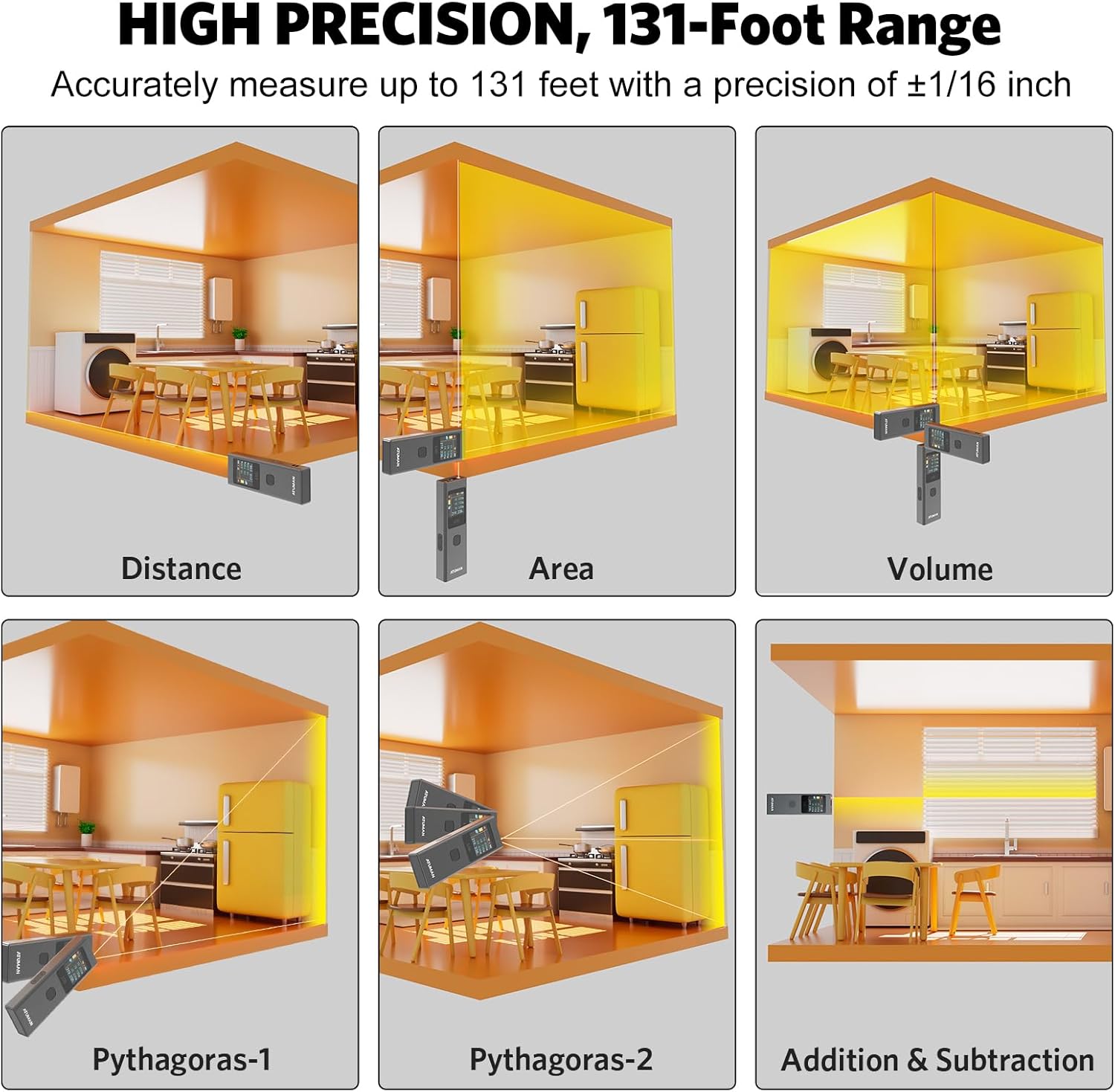
Image 6.1: Visual representation of various measurement modes including Distance, Area, Volume, and Pythagorean calculations.

Immaġni 6.2: Eż.amples of advanced measurement types, including various Pythagorean calculations and area/volume measurements in different settings.

Immaġni 6.3: Fuqview of the 19+ built-in functions for versatile use, including linear, continuous, area, volume, and various Pythagorean modes.
6.3 Switching Units
The device supports switching between meters (M), inches (IN), and feet (FT). Refer to the user manual's specific instructions for unit switching, as it may involve multiple button presses.

Image 6.4: The ATuMan LS6 display showing measurements in meters, inches, and feet, demonstrating unit switching capability.
6.4 Ħażna tad-Dejta
The LS6 can store up to 20 sets of measurement data. This feature allows for efficient data management and review of past measurements.

Image 6.5: The ATuMan LS6 displaying multiple stored measurement data sets, indicating its 20-data set storage capacity.
7. Manutenzjoni
Proper care and maintenance will extend the life of your ATuMan LS6.
- Tindif: Use a soft, dry cloth to clean the device. Do not use abrasive cleaners or solvents. For the lens, use a lens cleaning cloth.
- Ħażna: Store the device in a cool, dry place away from direct sunlight and extreme temperatures. If storing for extended periods, ensure the battery is partially charged (around 50%) and recharge every few months to prevent deep discharge.
- Evita l-Impatt: While durable, avoid dropping the device or subjecting it to strong impacts.
8 Issolvi l-problemi
If you encounter issues with your ATuMan LS6, refer to the following common problems and solutions:
| Problema | Kawża Possibbli | Soluzzjoni |
|---|---|---|
| L-apparat ma jixgħelx. | Batterija baxxa. | Charge the device using the USB Type-C cable. |
| Display is difficult to read outdoors. | Dawl ambjentali għoli. | The TFT color display may be less visible in direct bright sunlight. Try to shade the screen or use in less direct light. |
| Kejl mhux preċiż. | Obstruction in laser path, unstable surface, or incorrect measurement mode. | Ensure a clear path for the laser. Measure from a stable surface. Verify you are in the correct measurement mode for the task. |
| Difficulty changing settings (e.g., units). | Unfamiliarity with button combinations. | Refer to the detailed instructions in the full printed user manual for specific button sequences for settings adjustments. Practice the button presses. |
| Laser dot not visible at long distances. | Environmental factors (bright light) or target surface. | In very bright conditions or on non-reflective surfaces, the laser dot may be hard to see. Consider using a target plate or measuring at closer distances if possible. For very long distances, a tripod may help stabilize the device. |
If the problem persists after trying these solutions, please contact ATuMan customer support.
9. Speċifikazzjonijiet
Technical specifications for the ATuMan LS6 Laser Distance Meter:
| Karatteristika | Speċifikazzjoni |
|---|---|
| Brand | ATuMan |
| Isem tal-Mudell | LS6 Laser Distance Meter |
| Medda ta' Kejl | Sa 131 pied (40 metri) |
| Eżattezza | +/- 1/16 pulzier |
| Klassi tal-Laser | Klassi 1 |
| Output tal-Laser | 0.081mW |
| Tip ta' Laser | 520nm±10nm |
| Tip ta 'batterija | Lithium (300mAh rechargeable) |
| Port tal-Iċċarġjar | USB Tip-Ċ |
| Materjal | Aluminju |
| Kulur | Iswed |
| Dimensjonijiet (L x W x H) | 5.04 x 2.76 x 0.75 pulzieri |
| Piż | Madwar 0.1 Kilogrammi |
| Ħażna tad-Data | 20 sett tad-dejta |
| Tifi awtomatiku | 180 sekonda |
10. Garanzija u Appoġġ
10.1 Garanzija tal-Manifattur
The ATuMan LS6 Laser Distance Meter comes with a 2-Year Manufacturer Warranty. This warranty covers defects in materials and workmanship under normal use. Please retain your proof of purchase for warranty claims.
10.2 Appoġġ għall-Klijent
For technical assistance, troubleshooting not covered in this manual, or warranty inquiries, please contact ATuMan customer support through their official channels or the retailer from whom you purchased the product.
You can visit the official ATuMan store on Amazon for more information and support: ATuMan Amazon Store