
Andoer 0226b5d0-9fdc-46fa-87a1-023ef5ed8edc
Andoer 4K Digital Camera User Manual
Model: 0226b5d0-9fdc-46fa-87a1-023ef5ed8edc
Introduzzjoni
This manual provides detailed instructions for the safe and effective use of your Andoer 4K Digital Camera. Please read this manual thoroughly before operating the camera and retain it for future reference. This camera is designed for capturing high-quality photos at 48MP and videos at 4K resolution, featuring a 2.8-inch screen, 16X digital zoom, auto-focus, anti-shake technology, and a built-in flash.
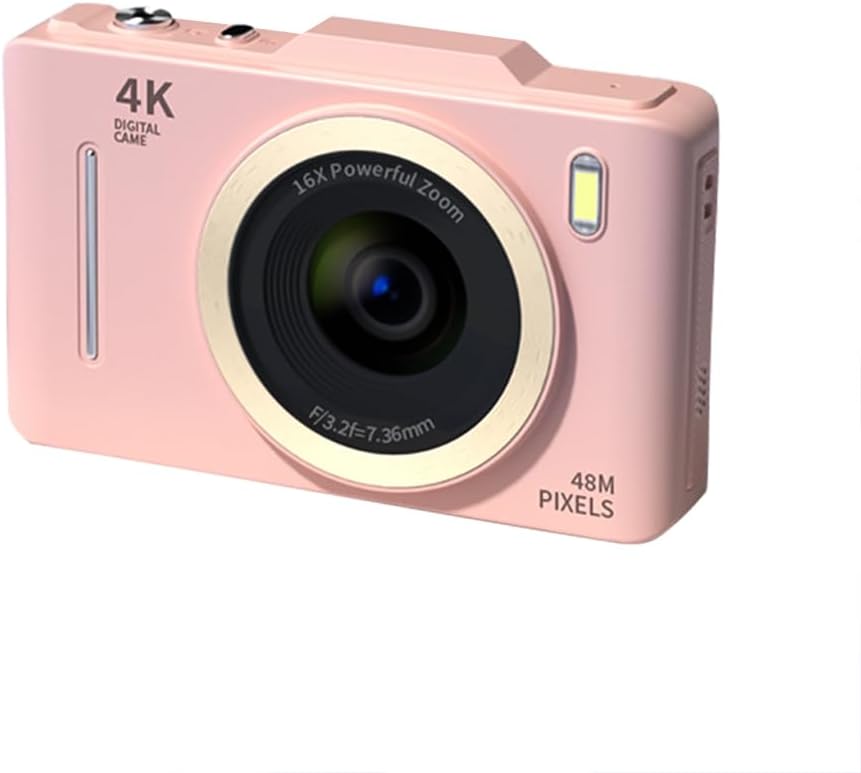
Immaġni: Quddiem view of the Andoer 4K Digital Camera in pink, showcasing its lens, flash, and 4K Digital Camera branding.
Informazzjoni Importanti dwar is-Sigurtà
Twissija:
- Not suitable for children. Please read the product instructions and applicable age range carefully before purchase and use.
- Do not expose the camera to water or excessive moisture.
- Evita li twaqqa’ l-kamera jew li tissottomettiha għal impatti qawwija.
- Use only specified batteries and charging methods.
- Tippruvax tiżżarma jew timmodifika l-kamera.

Image: A warning label indicating that the product is not suitable for children, with the warning translated into multiple languages.
Kontenut tal-Pakkett
Jekk jogħġbok iċċekkja li l-oġġetti kollha huma preżenti fil-pakkett:
- Andoer 4K Digital Camera
- Cable USB
- Batterija tal-litju rikarikabbli
- Manwal għall-Utent
- Ċinga tal-polz (tista' tvarja skont il-pakkett)
Prodott Overview
Iffamiljarizza ruħek mal-komponenti tal-kamera:
- Lenti: Komponent ottiku ewlieni għall-qbid tal-immaġni.
- Flash: Provides additional light in low-light conditions.
- Skrin LCD ta' 2.8 pulzieri: Għal viewing live feed, reviewing photos/videos, and navigating menus.
- Buttuni tal-Kontroll: Power, Shutter, Zoom (W/T), Menu, OK, Display, Delete.
- Port USB: Għall-iċċarġjar u t-trasferiment tad-dejta.
- Kompartiment tal-batterija: Fiha l-batterija rikarikabbli.
- Slot tal-Kard tal-Memorja: For inserting an SD card (not included).

Immaġni: Wara view of the camera highlighting the 2.8-inch display screen and various control buttons for navigation and operation.
Setup
1. Installazzjoni u Iċċarġjar tal-batterija
- Iftaħ l-għatu tal-kompartiment tal-batterija li jinsab fil-qiegħ tal-kamera.
- Insert the provided lithium battery, ensuring the correct polarity.
- Agħlaq l-għatu tal-kompartiment tal-batterija sew.
- Connect the camera to a power source using the USB cable for charging. The charging indicator light will illuminate.
- L-iċċarġjar jitlesta meta d-dawl indikatur jintefa.
2. Installazzjoni tal-Kard tal-Memorja
A memory card (SD card, not included) is required to store photos and videos.
- Sib is-slott tal-karta tal-memorja, ġeneralment ħdejn il-kompartiment tal-batterija.
- Daħħal il-kard SD bil-kuntatti tal-metall iħarsu lejn quddiem il-kamera sakemm tikklikkja f'postha.
- Biex tneħħiha, agħfas il-karta bil-mod sakemm toħroġ 'il barra.
Istruzzjonijiet Operattivi
Qawwa mixgħul/mitfi
- Agħfas u żomm il- Qawwa buttuna biex tixgħel jew titfi l-kamera.
Jieħdu Ritratti
- Ixgħel il-kamera.
- Agħmel qafas għar-ritratt tiegħek billi tuża l-iskrin LCD ta' 2.8 pulzieri.
- Agħfas il- Shutter button halfway down to activate auto-focus (AF).
- Once focused, press the Shutter button fully to capture the photo.
Reġistrar Vidjows
- Ixgħel il-kamera.
- Switch to video mode (refer to the on-screen icons or menu for mode selection).
- Agħfas il- Shutter buttuna biex tibda tirrekordja.
- Agħfas il- Shutter buttuna għal darb'oħra biex tieqaf tirrekordja.
Funzjoni Zoom
- Uża l- W (Wide) and T (Telephoto) buttons to adjust the 16X digital zoom.

Image: A visual comparison demonstrating the effect of 1x digital zoom versus 16x digital zoom, showing how the camera can magnify distant subjects.
Bl-użu tal-Flash
- The built-in flash can be activated in low-light conditions. Access flash settings via the menu to select modes like Auto Flash, Fill-in Flash, or Flash Off.

Image: Illustrates the effect of the built-in flash, showing a scene with and without flash to demonstrate improved lighting in dark environments.
Anti-Shake Feature
- The camera features digital anti-shake technology to reduce blur caused by camera movement. This feature is typically active by default or can be enabled in the settings menu.

Image: Demonstrates the effectiveness of the anti-shake feature by comparing a clear image taken with anti-shake mode to a blurry image without it, both showing people in motion.
Beauty Filters
- Access the menu to apply various beauty filters (e.g., Original, Cool colors, Retro, Black and white) to your photos for creative effects.

Image: Displays different beauty filter options available on the camera, including Original, Cool colors, Retro, and Black and white, applied to a portrait.
Vidjow ta' Sejbien ta' Moviment
- Enable motion detection in the video settings. The camera will automatically start recording when movement is detected within the frame.

Image: Illustrates the motion detection feature, showing a dog in motion with a white square indicating the detection area.
Daqq u Riproduzzjoniview
- Agħfas il- Daqq button (often labeled with a play icon) to view ritratti u vidjows maqbudin.
- Use the navigation buttons to scroll through your media.
- Agħfas il- Ħassar button to remove unwanted files.
Konnessjoni ma' Kompjuter
- Qabbad il-kamera mal-kompjuter tiegħek billi tuża l-kejbil USB ipprovdut.
- The camera will appear as a removable disk drive, allowing you to transfer files.
Manutenzjoni
- Tindif tal-Lenti: Uża drapp artab u mingħajr suf iddisinjat speċifikament għal-lentijiet tal-kameras. Tużax materjali li joborxu jew kimiċi ħarxa.
- Tindif tal-Iskrin: Wipe the LCD screen gently with a soft, dry cloth.
- Ħażna: When not in use for extended periods, remove the battery and store the camera in a cool, dry place away from direct sunlight.
- Kura tal-batterija: Iċċarġja l-batterija kompletament qabel l-ewwel użu. Evita li tbattal il-batterija kompletament ta' spiss biex ittawwal il-ħajja tagħha.
Issolvi l-problemi
| Problema | Soluzzjoni Possibbli |
|---|---|
| Il-kamera ma tixgħelx. | Kun żgur li l-batterija tkun installata sew u kompletament iċċarġjata. |
| Ma nistax nieħu ritratti/nirrekordja vidjows. | Check if a memory card is inserted and has sufficient free space. Ensure the camera is in the correct mode (photo/video). |
| L-immaġini huma mċajpra. | Ensure the lens is clean. Check lighting conditions. Enable anti-shake feature. Hold the camera steady. |
| Flash is not working. | Check flash settings in the menu; ensure it's not set to 'Flash Off'. |
| Kamera mhux rikonoxxuta mill-kompjuter. | Ensure the USB cable is securely connected. Try a different USB port or cable. Restart both camera and computer. |
Speċifikazzjonijiet
| Karatteristika | Dettall |
|---|---|
| Brand | Andoer |
| Numru tal-Mudell | 0226b5d0-9fdc-46fa-87a1-023ef5ed8edc |
| Riżoluzzjoni Għadha Effettiva | 48 MP |
| Riżoluzzjoni tal-vidjo | 4K (2160p) |
| Daqs tal-Iskrin | 2.8 Pulzier |
| Zoom Diġitali | 16X |
| Auto Focus | Yes (Contrast Detection) |
| Stabbilizzazzjoni tal-Immaġni | Diġitali Kontra t-Tħawwad |
| Flash inkorporat | Iva |
| Tip ta 'batterija | Jonju tal-litju |
| Format tar-ritratti | JPEG |
| Format tal-vidjo | MP4 |
| Interface Esterna | USB |
| Tip tas-Sensor | CMOS |
| Kulur | Pink (variant) |
| Livell ta 'Reżistenza għall-Ilma | Mhux Reżistenti għall-Ilma |
Garanzija u Appoġġ
For warranty information and technical support, please refer to the documentation included with your purchase or visit the official Andoer websit. Żomm il-prova tax-xiri tiegħek għal talbiet ta' garanzija.
Andoer Official Store: Visit Andoer Store on Amazon
Ask a question about this manual
Ask about setup, troubleshooting, compatibility, parts, safety, or missing instructions. Manuals+ will review the question and use this page’s manual context to help answer it.