
BONTEC MDM001A
BONTEC Single Monitor Desk Mount MDM001A Instruction Manual
Model: MDM001A
Introduzzjoni
This manual provides detailed instructions for the safe and proper installation, operation, and maintenance of your BONTEC Single Monitor Desk Mount MDM001A. Please read this manual thoroughly before installation and retain it for future reference.
Informazzjoni Importanti dwar is-Sigurtà
- Kapaċità tal-piż: Do not exceed the maximum weight capacity of 22 lbs (10 kg). Overloading may result in property damage or personal injury.
- Daqs tal-iskrin: Din il-muntatura hija ddisinjata għal monitors bejn 13 u 34 pulzier.
- Kompatibbiltà VESA: Kun żgur li l-monitor tiegħek għandu mudelli ta' mmuntar VESA ta' 75x75mm jew 100x100mm.
- Desk Stability: Verify that your desk surface is stable and strong enough to support the combined weight of the mount and your monitor.
- Installazzjoni: Segwi l-passi kollha tal-installazzjoni bir-reqqa. Jekk m'intix ċert dwar xi parti tal-installazzjoni, fittex għajnuna professjonali.
- Partijiet li jiċċaqilqu: Be cautious when adjusting the mount to avoid pinching fingers or other body parts.
Kontenut tal-Pakkett
Jekk jogħġbok ivverifika li l-komponenti kollha huma preżenti u mhux imħassra qabel ma tipproċedi bl-installazzjoni. Jekk xi partijiet huma neqsin jew imħassra, ikkuntattja l-appoġġ għall-klijenti.
- Assemblea tad-Driegħ tal-Monitor
- Desk Clamp Komponent
- Komponent tal-Bażi tal-Grommet
- Pjanċa VESA
- Kit tal-Ħardwer (viti, woxers, spacers)
- Allen Keys
- Klipps għall-Immaniġġjar tal-Kejbils

Immaġni: Fuqview of the BONTEC Single Monitor Desk Mount MDM001A, illustrating the main components and both desk clamp and grommet base installation options.
Setup u Installazzjoni
The BONTEC Single Monitor Desk Mount offers two installation methods: Desk Clamp and Grommet Base. Choose the method best suited for your desk.
Kontroll tal-Kompatibbiltà
- Daqs tal-Monitor: 13-34 pulzier
- Piż tal-monitor: Sa 22 lbs (10 kg)
- Mudelli VESA: 75x75mm jew 100x100mm
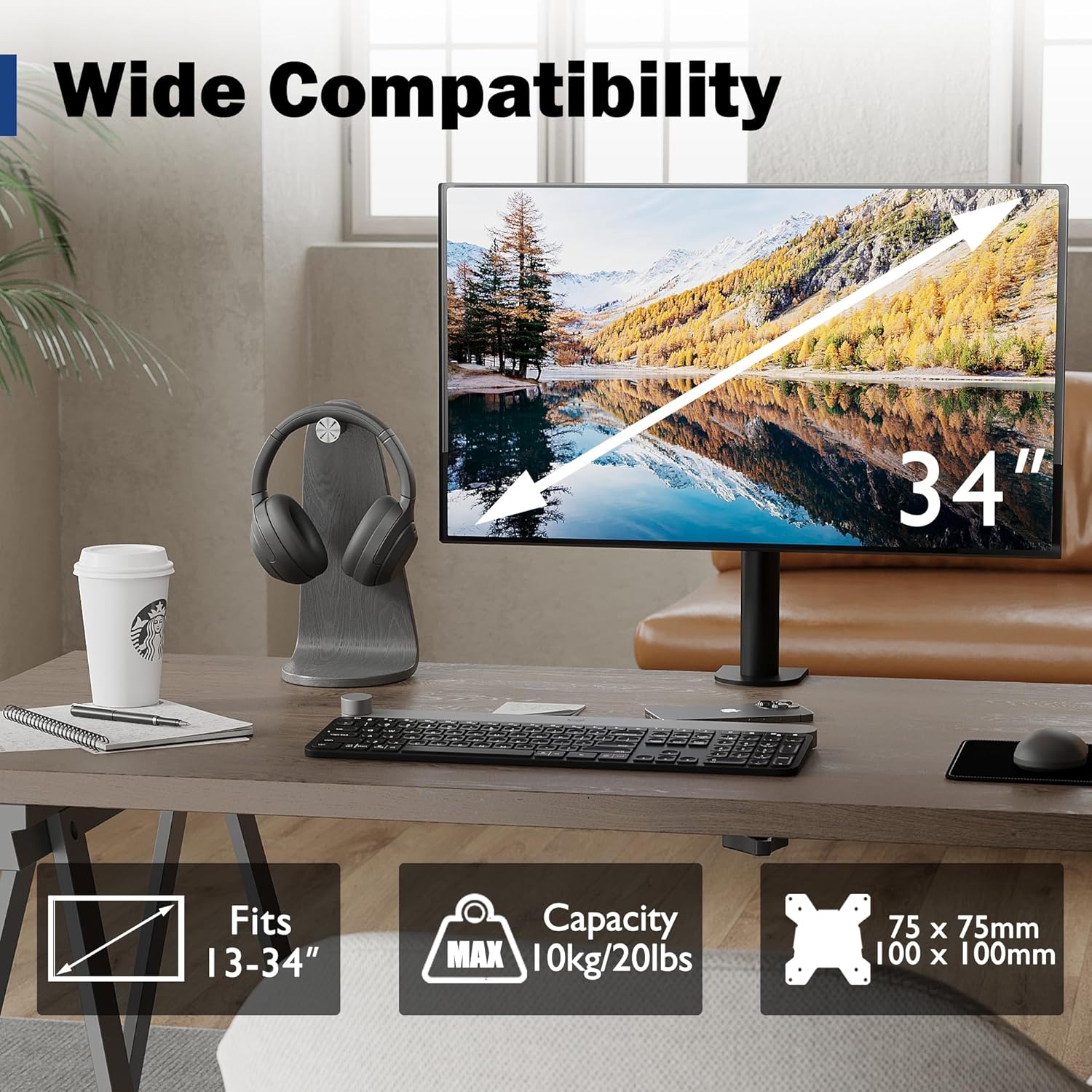
Image: Visual representation of monitor compatibility requirements, including screen size, weight, and VESA patterns.
Metodi ta' Installazzjoni
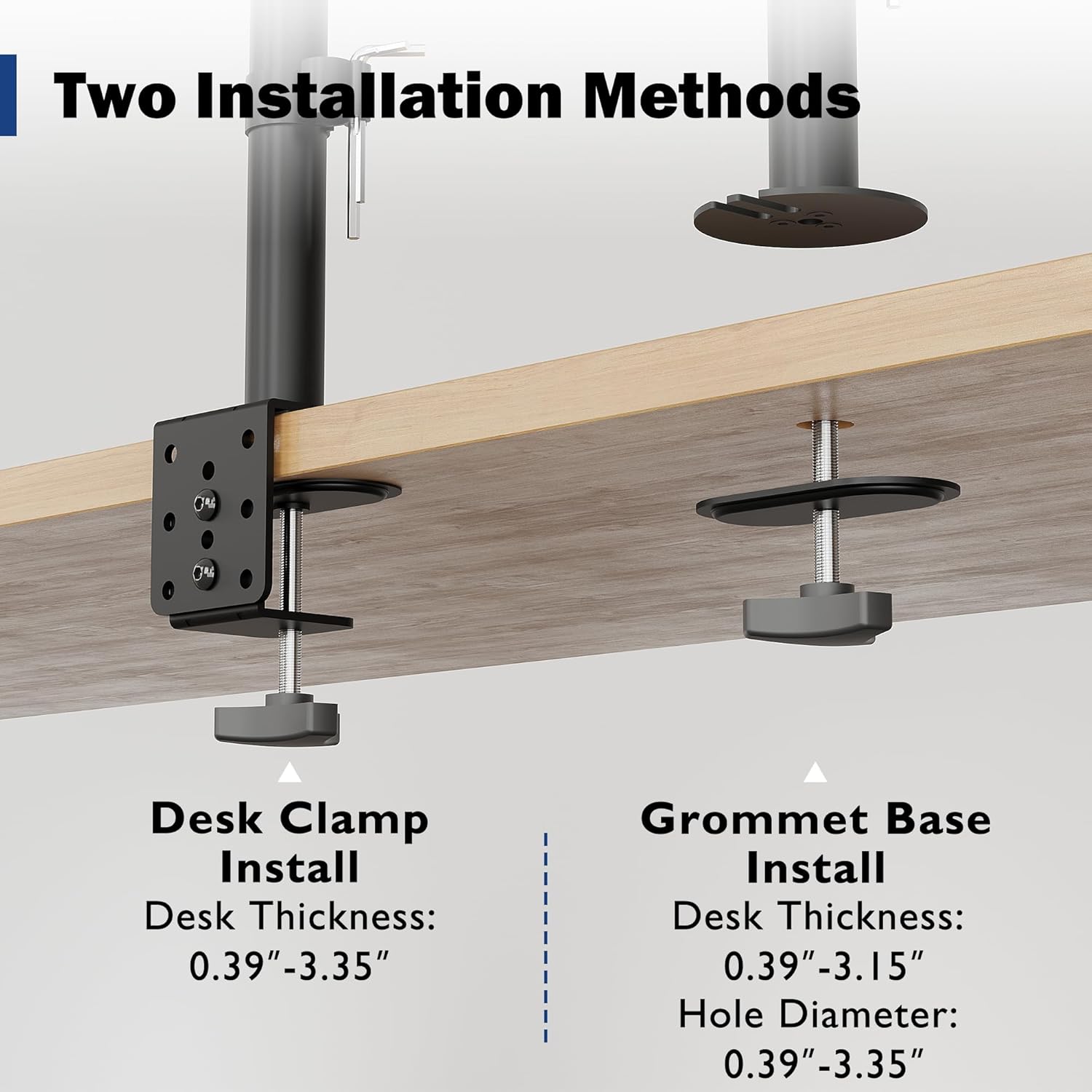
Image: Detailed illustration comparing the Desk Clamp and Grommet Base installation methods, including compatible desk thickness and hole diameter specifications.
Method 1: Desk Clamp Installazzjoni
- Waħħal l-iskrivanija clamp component to the main pole.
- Poġġi l-clamp on the edge of your desk. Ensure the desk thickness is between 0.39" and 3.35".
- Issikka l-clamp screw firmly until the mount is securely fixed to the desk.
Method 2: Grommet Base Installation
- If your desk has a bolt-through hole, ensure its diameter is between 0.39" and 3.35" and the desk thickness is between 0.39" and 3.15".
- Żarma l-klamp tal-iskrivanijaamp and use the grommet base plate and screw.
- Insert the grommet screw through the desk hole and secure it from underneath with the provided nut.
- Attach the main pole to the grommet base.
It-twaħħil tal-Monitor
- Attach the VESA plate to the back of your monitor using the appropriate screws and spacers from the hardware kit. Ensure a secure fit.
- Carefully slide the monitor (with the attached VESA plate) onto the mounting head of the arm.
- Tighten any security screws on the mounting head to prevent accidental dislodging.
Tħaddim u Aġġustamenti
The BONTEC monitor mount offers various adjustments to optimize your viewing experience and ergonomic posture.
Aġġustament Għoli
The monitor can be raised or lowered along the 16.73-inch pole. Loosen the collar on the pole, adjust the monitor to the desired height, and then re-tighten the collar to secure its position.

Image: Illustration of the monitor mount's vertical height adjustment capability along the central pole.
Inklinazzjoni, Dawra, u Rotazzjoni
The special swivel head design allows for flexible positioning:
- Mejjel: Adjust the screen vertically by ±15° to reduce glare and find the optimal viewangolu tal-ing.
- Dawwar: Rotate the monitor horizontally up to 360° to share your screen or change viewing direzzjoni.
- Rotazzjoni: Rotate the screen 360° from landscape to portrait mode for different tasks.
After adjusting the angle, use the back screw lock on the VESA plate to provide extra security and maintain the desired position.

Image: Visual guide to the tilt, swivel, and rotation adjustments available on the monitor mount.
Ġestjoni tal-Cable
Utilize the integrated cable management clips along the pole to route and organize your monitor cables. This helps maintain a tidy workspace and prevents cable clutter.
An integrated storage slot for Allen keys is also provided on the pole for convenient access to adjustment tools.

Immaġni: Close-up view of the cable management clips and the Allen key storage slot on the mount's pole.
Manutenzjoni
- Tindif: Naddaf il-muntatura b'ċarruta ratba, damp drapp. Evita prodotti tat-tindif jew solventi li joborxu li jistgħu jagħmlu ħsara lill-finitura.
- Kontrolli perjodiċi: Iċċekkja l-viti u l-konnessjonijiet kollha perjodikament biex tiżgura li jibqgħu ssikkati u siguri. Erġa' ssikka jekk meħtieġ.
- Lubrikazzjoni: No lubrication is typically required for this product.
Issolvi l-problemi
| Problema | Kawża Possibbli | Soluzzjoni |
|---|---|---|
| Il-monitor jinżel jew ma jżommx il-pożizzjoni. | Mounting screws are loose; monitor weight exceeds capacity. | Ensure all screws, especially the back screw lock on the VESA plate, are tightened. Verify monitor weight is within 22 lbs (10 kg). |
| Il-muntatura mhix stabbli fuq l-iskrivanija. | Desk clamp/grommet base is not tightened sufficiently. | Erġa' ssikka l-klampi tal-iskrivanijaamp or grommet base screw. Ensure desk thickness is within specified limits. |
| Difficulty adjusting monitor height. | Height adjustment collar is too tight. | Loosen the height adjustment collar on the pole before attempting to adjust height. Re-tighten once desired height is achieved. |
| Il-kejbils huma maħmuġin. | Il-ġestjoni tal-kejbil mhux utilizzata. | Route cables through the integrated cable management clips on the pole. |
Speċifikazzjonijiet
- Ditta: BONTEC
- Mudell: MDM001A
- Kompatibbiltà tad-Daqs tal-Iskrin: 13-34 pulzier
- Kapaċità tal-piż: 22 lbs (10 kg)
- Kompatibbiltà VESA: 75x75mm, 100x100mm
- Firxa ta 'Tilt: ± 15°
- Medda ta' Dawwar: 360°
- Rotazzjoni: 360°
- Aġġustament Għoli: Up to 16.73 inches (along pole)
- Desk Clamp Ħxuna: 0.39" - 3.35"
- Grommet Base Desk Thickness: 0.39" - 3.15"
- Dijametru tat-Toqba tal-Grommet: 0.39" - 3.35"
- Materjal: Metall
- Kulur: Iswed
Garanzija u Appoġġ
Specific warranty details are not provided within this manual. For warranty information, technical support, or to inquire about replacement parts, please visit the official BONTEC webis-sit jew ikkuntattja lis-servizz tal-klijenti tagħhom direttament.
Websit: BONTEC Store on Amazon
Ask a question about this manual
Ask about setup, troubleshooting, compatibility, parts, safety, or missing instructions. Manuals+ will review the question and use this page’s manual context to help answer it.