
Mibro XPEJ010WW
Manwal tal-Utent tal-Earbuds Wireless Mibro Earbuds AC1
Model: XPEJ010WW
1. Introduzzjoni
Thank you for choosing the Mibro Earbuds AC1 Wireless Earbuds. These earbuds combine an elegant design with exceptional audio performance, offering clear, immersive sound for your favorite music. With stable Bluetooth connectivity and a comfortable ergonomic fit, they are designed for convenience and quality audio on the go. This manual provides detailed instructions to help you get the most out of your new earbuds.
2. Informazzjoni dwar is-Sigurtà
Please read all safety instructions before using this product.
- Tesponix il-earbuds jew il-kaxxa tal-iċċarġjar għal temperaturi estremi, umdità, jew likwidi.
- Evita li twaqqa', tħalli impatt fuq, jew tiżżarma l-apparat.
- Żomm 'il bogħod mit-tfal u l-annimali domestiċi.
- Uża biss il-kejbil tal-iċċarġjar ipprovdut jew iċċertifikat.
- Smigħ fit-tul f'livelli ta' volum għoli jista' jikkawża ħsara fis-smigħ.
3. Kontenut tal-Pakkett
Kun żgur li l-oġġetti kollha huma preżenti fil-pakkett tiegħek:
- Mibro Earbuds AC1 (Left and Right)
- Kawża tal-Iċċarġjar
- Iċċarġjar Cable
- Manwal għall-Utent (dan id-dokument)
4. Prodott Aktarview
Familiarize yourself with the components of your Mibro Earbuds AC1.

Figura 4.1: Mibro Earbuds AC1 removed from their open charging case, displaying the earbuds and the case.
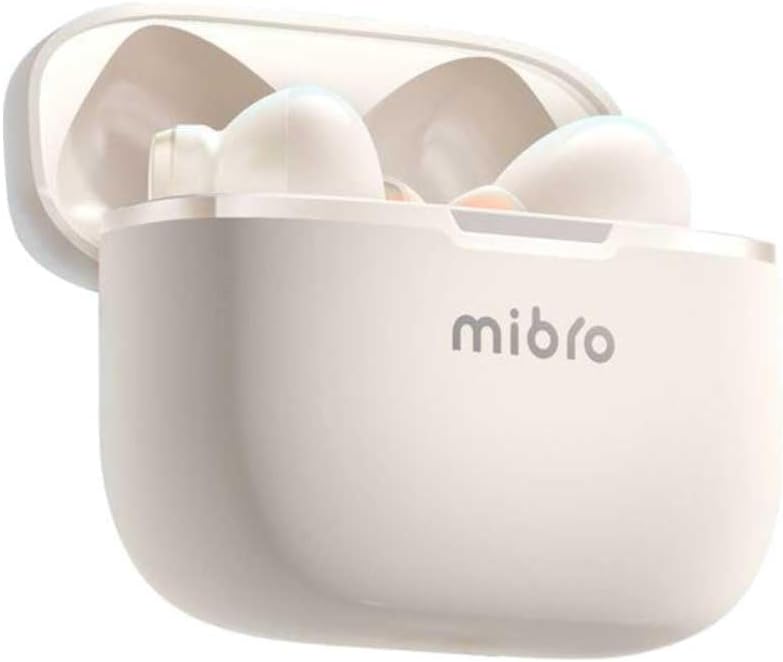
Figura 4.2: Mibro Earbuds AC1 placed inside their open charging case, showing the compact design.
The earbuds feature an ergonomic design for a secure and comfortable fit. The charging case protects the earbuds and recharges them on the go.
5. Setup
5.1 Iċċarġjar tal-Earbuds u l-Kaxxa
Qabel l-ewwel użu, iċċarġja l-earbuds u l-kaxxa tal-iċċarġjar kompletament.
- Poġġi l-earbuds fil-każ tal-iċċarġjar.
- Qabbad il-kejbil tal-iċċarġjar mal-port tal-iċċarġjar fuq il-kaxxa u ma' sors ta' enerġija USB.
- The indicator light on the case will show charging status. A full charge may take up to 1 day (Note: This is an unusual specification, typically measured in hours. Please refer to product packaging for precise charging time).
- Ladarba tkun iċċarġjata kompletament, skonnettja l-kejbil.
5.2 Tqabbil ma' Apparat Bluetooth
To connect your Mibro Earbuds AC1 to your smartphone or other Bluetooth-enabled device:
- Kun żgur li l-earbuds huma ċċarġjati u mqiegħda fil-kaxxa tal-iċċarġjar.
- Open the charging case lid. The earbuds will automatically enter pairing mode (indicator lights will flash).
- Fuq it-tagħmir tiegħek, mur fis-settings tal-Bluetooth u ixgħel il-Bluetooth.
- Fittex għal available devices and select "Mibro AC1" from the list.
- Ladarba jkunu konnessi, id-dwal indikatur fuq il-earbuds jieqfu jteptpu.
- Il-earbuds jerġgħu jikkonnettjaw awtomatikament mal-aħħar apparat imqabbad meta jitneħħew mill-kaxxa, jekk il-Bluetooth ikun attivat fuq l-apparat.
6. Istruzzjonijiet Operattivi
6.1 Power On/Off
- Qawwa Mixgħul: Open the charging case lid, or take the earbuds out of the case. They will power on automatically.
- Itfi: Place the earbuds back into the charging case and close the lid. They will power off automatically and begin charging.
6.2 Daqq tal-Mużika
Use the touch controls on the earbuds to manage music:
- Play/Pawsa: Tektek wieħed fuq kull earbud.
- Track li jmiss: Tektek darbtejn fuq il-earbud tal-lemin.
- Track preċedenti: Tektek darbtejn fuq il-earbud tax-xellug.
6.3 Ġestjoni tas-Sejħiet
Immaniġġja t-telefonati bil-kontrolli touch:
- Tweġiba/Tmiem Sejħa: Tektek wieħed fuq kull earbud.
- Irrifjuta Sejħa: Agħfas u żomm kwalunkwe earbud għal 2 sekondi.
6.4 Kanċellazzjoni tal-Istorbju
The Mibro AC1 Earbuds feature noise cancellation. Specific controls for activating or deactivating this feature are typically managed via a long press or a specific tap sequence. Refer to the quick start guide included in your package for precise instructions, as these can vary.
7. Manutenzjoni
7.1 Tindif
- Imsaħ il-earbuds u l-kaxxa tal-iċċarġjar b'ċarruta ratba, niexfa u mingħajr suf.
- Tużax prodotti tat-tindif li joborxu, alkoħol, jew solventi kimiċi.
- Kun żgur li l-kuntatti tal-iċċarġjar huma nodfa u niexfa.
7.2 Ħażna
Meta ma tkunx qed tużahom, aħżen il-earbuds fil-kaxxa tal-iċċarġjar tagħhom biex tipproteġihom u żżommhom iċċarġjati. Aħżen f'post frisk u niexef 'il bogħod mix-xemx diretta.
8 Issolvi l-problemi
If you encounter issues with your Mibro Earbuds AC1, try the following solutions:
| Problema | Soluzzjoni |
|---|---|
| Earbuds ma jingħaqdux |
|
| L-ebda ħoss mill-earbuds |
|
| Earbuds ma jiċċarġjawx |
|
9. Speċifikazzjonijiet
| Karatteristika | Dettall |
|---|---|
| Isem tal-Mudell | XPEJ010WW (AC1) |
| Brand | Mibro |
| Teknoloġija tal-Konnettività | Wireless (Bluetooth) |
| Karatteristiċi Speċjali | Kanċellazzjoni tal-Ħoss |
| Kulur | Abjad sħun |
| Fattur tal-Formola | Fil-widnejn |
| Materjal | Plastik |
| Livell ta 'Reżistenza għall-Ilma | Mhux reżistenti għall-ilma |
| Ħin tal-Iċċarġjar | Up to 1 day (Note: This is an unusual specification, typically measured in hours. Please refer to product packaging for precise charging time.) |
10. Garanzija u Appoġġ
Mibro products are designed and manufactured to the highest quality standards. For detailed warranty information, please refer to the warranty card included with your purchase or visit the official Mibro websit.
For further assistance, technical support, or to explore other Mibro products, please visit the Mibro Store on Amazon.
Ask a question about this manual
Ask about setup, troubleshooting, compatibility, parts, safety, or missing instructions. Manuals+ will review the question and use this page’s manual context to help answer it.