
1. Introduzzjoni
This user manual provides comprehensive instructions for the installation, configuration, and operation of your KuWFi CPE120 and CPE130 2.4G Wireless WiFi Bridge and Outdoor Access Point. Please read this manual carefully before using the device to ensure proper setup and optimal performance. Keep this manual for future reference.
2. Prodott Aktarview
The KuWFi CPE120 and CPE130 are 300Mbps outdoor wireless devices designed to extend Wi-Fi coverage over long distances, up to 1KM. They support Point-to-Point (PTP) and Point-to-Multi-Point (PTMP) connections, functioning as both a wireless bridge and an access point. These devices are built for outdoor use, featuring waterproof, dustproof, and lightning protection.
2.1. CPE120 Features
- 300Mbps Outdoor Wireless WiFi Bridge.
- Supports 1KM Long Range WiFi Extender functionality.
- LED display for configuring PTP/PTMP connections.
- Supports AP and Bridge operation modes.
- Waterproof, dustproof, and lightning protection.
- Temperatura tat-Tħaddim: -30℃ sa 55℃.
2.2. CPE130 Features
- Economic 300Mbps outdoor CPE.
- LED display support for 1KM Long Range.
- Improved wireless networking for extended coverage.
- Seamless wireless connectivity for homes and secondary buildings.
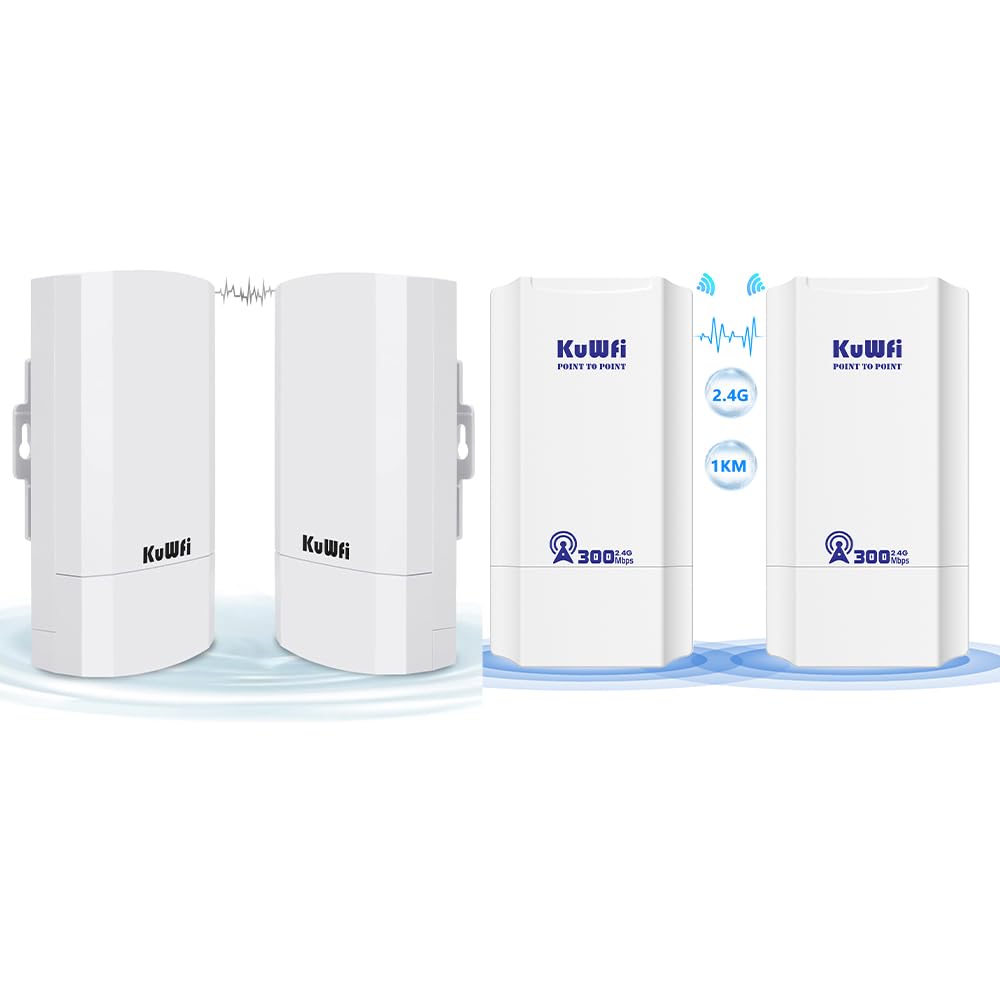
Figure 2.1: KuWFi CPE120/CPE130 Wireless Bridge Devices.

Figure 2.2: KuWFi CPE device highlighting 1KM long-range capability.
3. Kontenut tal-Pakkett
Malli tiftaħ il-pakkett, jekk jogħġbok ivverifika li l-oġġetti kollha elenkati hawn taħt huma preżenti u f'kundizzjoni tajba:
- KuWFi CPE120/CPE130 Wireless Bridge Device(s)
- PoE (Power over Ethernet) Injector(s)
- Kejbil(i) Ethernet
- Mounting Accessories (e.g., zip ties)
- Manwal għall-Utent (dan id-dokument)

Figure 3.1: Included accessories and device dimensions.
4. Hardware Matulview
Familiarize yourself with the physical components of the CPE device.
4.1. Portijiet u Indikaturi
Each CPE device features the following ports and LED indicators on its underside:
- Port WAN: Used for connecting to the network (e.g., router, NVR) and for Power over Ethernet (PoE) input.
- Port tal-LAN: Used for connecting to client devices (e.g., IP camera, PC).
- Buttuna RESET: Used to reset the device to factory defaults. Press and hold for approximately 5-10 seconds while the device is powered on.
- Wiri LED: A digital display showing configuration status (e.g., '8.8.8.8' for Master, '8.8.8.9' for Slave, or other status codes).
- Dwal indikaturi:
- LED tal-qawwa: Jindika l-istatus tal-enerġija.
- WAN LED: Indicates WAN port activity.
- LED LAN: Jindika attività tal-port tal-LAN.
- LEDs tal-Qawwa tas-Sinjal: Multiple LEDs indicating wireless signal strength.

Figure 4.1: CPE Device Ports and Indicators (Master and Slave examples).

Figura 4.2: Dettaljat view of CPE device ports and controls.
5. Setup u Installazzjoni
The KuWFi CPE devices can be configured for Point-to-Point (PTP) or Point-to-Multi-Point (PTMP) connections. One device will act as the Master, and the other(s) as Skjav(i).
5.1. Basic Connection Diagram (PTP)
For a basic Point-to-Point setup, you will need two CPE devices. One acts as the Master, connected to your network source (e.g., router), and the other as the Slave, connected to your client device (e.g., IP camera, PC).
- Master Device Setup:
- Connect an Ethernet cable from your router/NVR to the WAN port of the Master CPE device.
- Power the Master CPE device using the provided PoE injector.
- Ensure the LED display on the Master device shows the correct configuration (e.g., '8.8.8.8').
- Slave Device Setup:
- Connect an Ethernet cable from the LAN port of the Slave CPE device to your client device (e.g., IP camera, PC).
- Power the Slave CPE device using the provided PoE injector.
- Ensure the LED display on the Slave device shows the correct configuration (e.g., '8.8.8.9').
- Immuntar: Mount the devices outdoors in a clear line of sight for optimal signal transmission. Use the provided mounting accessories.

Figure 5.1: Point-to-Point Extended Network Diagram.

Figure 5.2: Point-to-Point and Point-to-Multi-Point Extended Camera Monitoring Range.
Figure 5.3: Wireless Bridge Master and Slave Connection Examples.
5.2. Configuring Master/Slave Roles
The CPE devices typically use an LED display for initial configuration. Refer to the device's quick start guide or the manufacturer's website for specific steps on how to set one device as Master and the other(s) as Slave(s) using the LED display or a web interface.
- Master: Connects to the main network source (e.g., router).
- Skjav: Connects to the remote client device(s).
6. Modi Operattivi
The KuWFi CPE devices support two primary operating modes:
- Modalità AP (Punt ta' Aċċess): In this mode, the device acts as a wireless access point, broadcasting a Wi-Fi signal for other devices to connect to. This is typically used when the CPE is connected to a wired network and needs to provide wireless access.
- Modalità Bridge: In this mode, the device creates a wireless link between two wired networks or extends a wired network wirelessly. This is the primary mode for PTP/PTMP connections, where one CPE bridges the network to another CPE.
7. Manutenzjoni
To ensure the longevity and optimal performance of your KuWFi CPE devices, follow these maintenance guidelines:
- Tindif: Periodically clean the exterior of the devices with a soft, dry cloth. Do not use liquid cleaners or aerosols.
- Aġġornamenti tal-Firmware: Check the KuWFi official websit (www.kuwfi.com) for the latest firmware updates. Keeping the firmware updated can improve performance, add new features, and fix bugs.
- Protezzjoni Ambjentali: Ensure the devices are securely mounted and protected from extreme weather conditions beyond their specified operating range.
8 Issolvi l-problemi
If you encounter issues with your KuWFi CPE devices, refer to the following common troubleshooting steps:
- Ebda Qawwa:
- Ensure the PoE injector is properly connected and receiving power.
- Iċċekkja l-konnessjonijiet kollha tal-kejbil.
- L-ebda Konnessjoni man-Netwerk:
- Verify that the Master and Slave devices are correctly configured (e.g., LED display shows correct codes).
- Check the WAN/LAN LED indicators for activity.
- Ensure there is a clear line of sight between the Master and Slave devices.
- Try resetting both devices to factory defaults and reconfiguring them.
- Confirm that the connected router/NVR is functioning correctly.
- Sinjal Dgħajjef/Veloċità Baxxa:
- Adjust the alignment of the devices to ensure optimal signal strength.
- Check for obstructions between the devices.
- Ensure the distance between devices does not exceed the recommended range (1KM).
- Imminimizza l-interferenza minn apparati oħra mingħajr fili ta' 2.4GHz.
- Ma nistax naċċessa Web Interface (if applicable):
- Ensure your computer is connected to the CPE's LAN port or a network segment that can reach the CPE's IP address.
- Verify the CPE's default IP address (refer to the quick start guide or device label).
- Temporarily disable your computer's firewall.
For further assistance, please visit the KuWFi support websit jew ikkuntattja lis-servizz tal-konsumatur.
9. Speċifikazzjonijiet
| Karatteristika | Deskrizzjoni |
|---|---|
| Brand | KuWFi |
| Isem tal-Mudell | CPE120, CPE130 |
| Karatteristika Speċjali | Modalità tal-Punt ta' Aċċess, WPS |
| Klassi ta' Banda ta' Frekwenza | Banda Unika (2.4GHz) |
| Komunikazzjoni mingħajr fili Standard | 802.11n |
| Apparati Kompatibbli | Laptop, Kompjuter Personali, Smartphone, Tablet |
| Teknoloġija tal-Konnettività | Wi-Fi |
| Tip ta' Antenna | Fiss |
| Protokoll ta 'Sigurtà | WPS (Setup Protett mill-Wi-Fi) |
| Metodu ta' Kontroll | Touch (referring to LED display interaction) |
| Wisa' tal-Banda tal-Port LAN | 1000 Mbps |
| Rata Massima ta' Trasferiment ta' Dejta 'l fuq | 300 Megabits Kull Sekonda |
| Is Modem Compatible | Nru |
| Kopertura | 1KM Long Range |
| Temperatura operattiva | -30℃ sa 55℃ |
| Temperatura tal-Ħażna | -40℃ sa 70℃ |
| Li ma jgħaddix ilma / trab | Iva |
| Protezzjoni mis-sajjetti | Iva |
10. Informazzjoni dwar is-Sigurtà
Jekk jogħġbok osserva l-prekawzjonijiet tas-sigurtà li ġejjin:
- Tiftaħx l-apparat casing. Irreferi s-servizz kollu lil persunal kwalifikat.
- Ensure proper grounding for lightning protection.
- Use only the power adapter and PoE injector provided by the manufacturer.
- Avoid placing the device near heat sources or in direct sunlight for prolonged periods.
- Żomm l-apparat 'il bogħod mill-ilma jew minn umdità eċċessiva.
11. Garanzija u Appoġġ
Specific warranty information is not provided within this manual. For details regarding warranty coverage, technical support, or customer service, please refer to the product packaging, the official KuWFi websit (www.kuwfi.com), or contact your retailer.