
Phomemo TP88
Phomemo TP88 Tattoo Transfer Stencil Printer User Manual
Mudell: TP88
1. Prodott Aktarview
The Phomemo TP88 Tattoo Transfer Stencil Printer is a compact, portable thermal printer designed for tattoo artists and enthusiasts. It utilizes HD thermal technology to produce clear tattoo stencils without the need for ink. The device supports both A4 and US Letter size transfer paper and offers wide compatibility with smartphones (iOS and Android) via Bluetooth and PCs (Windows, Mac OS, Chrome OS, Linux) via USB connection. Its built-in 1200 mAh battery ensures long-lasting operation, capable of printing up to 140 sheets on a full charge.
Il-karatteristiċi ewlenin jinkludu:
- Konnettività Wireless: Bluetooth for smartphones and USB for PCs.
- Stampar Termali mingħajr Linka: High-definition stencils without ink cartridges.
- Disinn portabbli: Kompatt u ħfief għal trasport faċli.
- Kompatibilità Wiesgħa tal-Karta: Supports A4 and US Letter size tattoo transfer paper.
- Anti-Wrinkle Function: Designed to prevent paper rolling during printing.
- Powerful Mobile App: Features image editing, cropping, and tattoo preview funzjonijiet.
2. X'hemm fil-Kaxxa
Upon unboxing your Phomemo TP88 Tattoo Transfer Stencil Printer, you should find the following items:
- 1x Phomemo TP88 Tattoo Transfer Stencil Printer
- 10x Thermal Transfer Paper sheets
- 1x Cable tal-Iċċarġjar tat-Tip-Ċ
- 1x Docking Station (USB-A to USB-C adapter)
- 1x Velvet Pouch for carrying
- 1x Gwida tal-Bidu Mgħaġġel

Image: The Phomemo TP88 printer shown with its accessories, including transfer paper, charging cable, adapter, and velvet pouch.
Video: An unboxing demonstration of the Phomemo TP88 tattoo machine, showcasing all included components.
3. Setup and Paper Loading
Follow these steps to prepare your TP88 printer for use:
- Qawwa Mixgħul: Agħfas u żomm il-buttuna tal-qawwa fuq il-printer sakemm id-dawl indikatur jixgħel.
- Iftaħ il-Printer: Press the two side buttons simultaneously to open the printer cover.
- Ipprepara l-Karta tat-Trasferiment:
- Remove the yellow backing paper from the thermal transfer sheet.
- Carefully peel off the transparent protective paper.
- Karga tal-Karta: Insert the white transfer paper (with the white side facing up) into the printer's paper slot until it is gently gripped by the rollers. Ensure the paper is aligned straight to prevent misprints.

Image: Visual instructions demonstrating how to prepare and load the thermal transfer paper into the TP88 printer.
Video: A demonstration of preparing and loading Phomemo tattoo thermal paper into the printer.
4. Istruzzjonijiet Operattivi
4.1. Printing from a Smartphone (Bluetooth)
- Niżżel l-App: Niżżel l-app "Phomemo" mill-App Store (iOS) jew Google Play Store (Android).
- Qabbad permezz tal-Bluetooth: Open the Phomemo app and enable Bluetooth on your smartphone. Fittex għal and select "TP88" from the list of available devices to connect.
- Select/Edit Design: Within the app, you can choose from massive material templates, upload your own images, or use the free editing tools to adjust, crop, or splice designs. The app also allows you to convert pictures into transfer lines and preview tattoo patterns.
- Stampa: Adjust print parameters as needed within the app, then initiate printing. The printer will feed the paper and create your stencil.

Image: A smartphone screen showing the Phomemo app interface with options for editing and printing, connected to the TP88 printer.
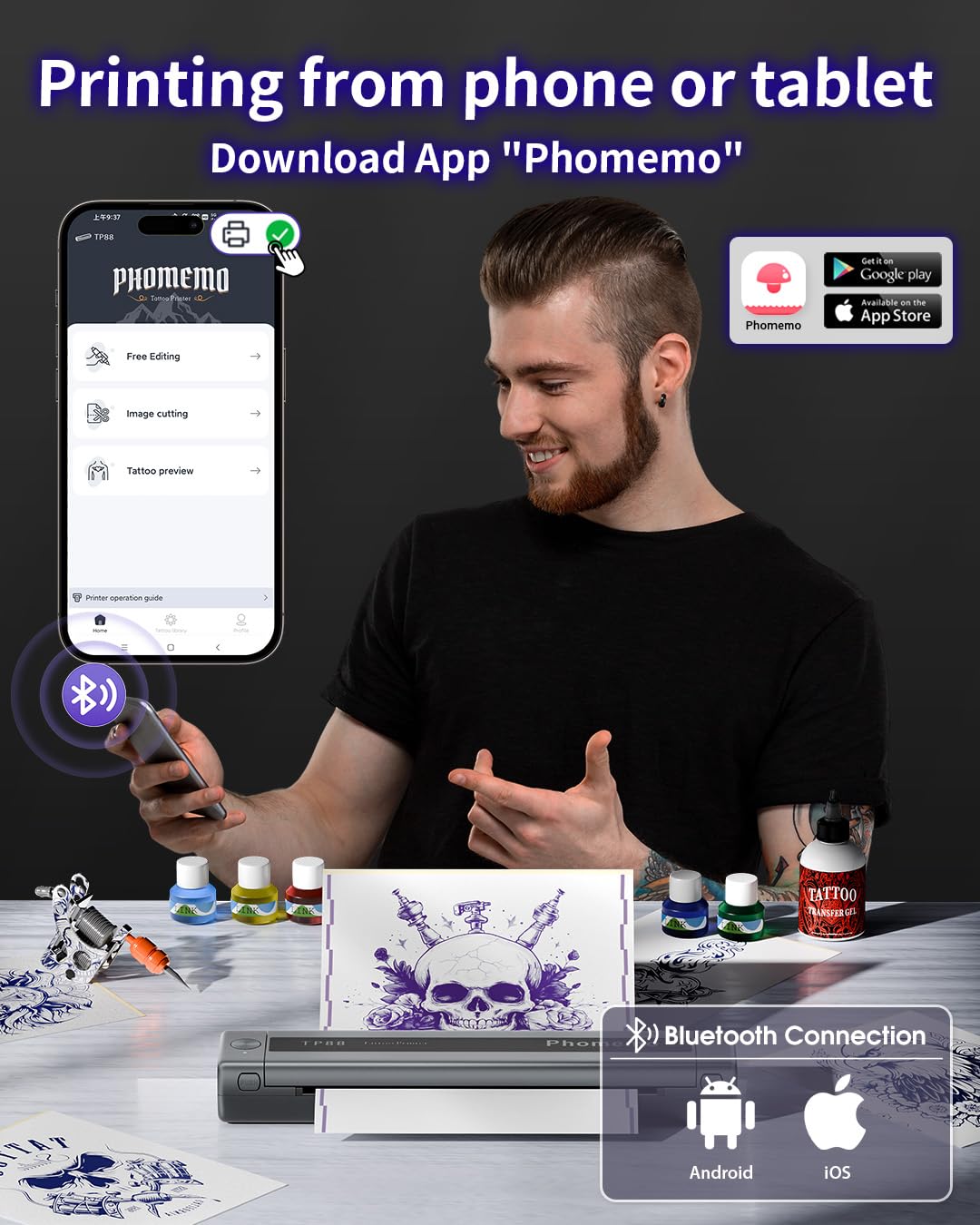
Immaġni: Dettaljata view of the Phomemo app's features, including tattoo library, image cutting, and tattoo preview.
4.2. Printing from a Computer (USB)
- Niżżel is-sewwieq: Żur il-Phomemo uffiċjali website (pages.phomemo.com/#/TP88) to download the appropriate driver for your operating system (Windows, Mac OS, Chrome OS, or Linux).
- Installa Driver: Follow the on-screen instructions to install the printer driver on your computer.
- Qabbad l-istampatur: Connect the TP88 printer to your computer using the provided Type-C charging cable. If your computer lacks a USB-A port, use the included docking station (USB-A to USB-C adapter).
- Stampa: Open your desired image or design on your computer, select the TP88 printer from your print options, and initiate printing.

Image: A laptop connected to the Phomemo TP88 printer, demonstrating the process of printing a tattoo stencil from a computer.
Video: A step-by-step guide on how to use the Phomemo TP88 tattoo machine to print stencils via a computer connection.
5. Manutenzjoni
To ensure the longevity and optimal performance of your Phomemo TP88 printer, regular maintenance is recommended:
- Tindif: Periodically clean the paper path and thermal print head with a soft, lint-free cloth. If necessary, use a small amount of isopropyl alcohol on the cloth for stubborn residue, ensuring the printer is powered off and disconnected from power.
- Ħażna: Aħżen il-printer f'post frisk u niexef 'il bogħod mix-xemx diretta u minn temperaturi estremi.
- Kura tal-batterija: For extended storage, ensure the battery is charged to approximately 50-70% to maintain battery health. Avoid fully discharging the battery for long periods.
- Immaniġġjar tal-Karta: Always use high-quality thermal transfer paper designed for stencil printers. Store paper in its original packaging to protect it from light and moisture.
6 Issolvi l-problemi
If you encounter issues with your Phomemo TP88 printer, consider the following common solutions:
- L-istampatur ma jixgħelx: Ensure the printer is fully charged. Connect it to a power source using the provided Type-C cable and a standard 5V/2A (10W) charger.
- Kwalità Fqira tal-Istampar:
- Check if the thermal transfer paper is loaded correctly (white side up).
- Ensure the paper is not wrinkled or damaged.
- Naddaf ir-ras tal-istampar termali kif deskritt fit-taqsima tal-Manutenzjoni.
- Verify the image resolution and settings in the app or computer driver.
- Kwistjonijiet ta' Konnessjoni (Bluetooth):
- Make sure Bluetooth is enabled on your smartphone and the printer is within range.
- Erġa' ibda kemm il-printer kif ukoll l-ismartphone tiegħek.
- Kun żgur li l-ebda apparat ieħor ma jkun qed jinterferixxi mal-konnessjoni Bluetooth.
- Re-pair the device through the Phomemo app.
- Connection Issues (USB):
- Verify that the USB cable is securely connected to both the printer and the computer.
- Ensure the correct printer driver is installed and updated for your operating system.
- Ipprova port jew kejbil USB differenti.
- Ġamm tal-Karta: Power off the printer, gently open the cover, and carefully remove any jammed paper. Ensure no small pieces of paper remain inside before closing the cover and powering on.
7. Speċifikazzjonijiet
| Karatteristika | Dettall |
|---|---|
| Numru tal-Mudell | TP88 |
| Dimensjonijiet tal-Prodott | 12.2 x 1.57 x 2.64 pulzieri |
| Piż | 2.47 Liri |
| Batterija | 1 Lithium Polymer battery (1200 mAh), included |
| Teknoloġija tal-Istampar | Termali (Mingħajr Linka) |
| Kompatibilità tal-karta | A4, US Letter size thermal transfer paper |
| Konnettività | Bluetooth (iOS, Android), USB (Windows, Mac OS, Chrome OS, Linux) |
| Komponenti Inklużi | TP88 Tattoo Machine, 10x Thermal Transfer Paper, Type-C Charging Cable, Docking Station, Velvet Pouch |
| Kulur | Iswed |
| Livell ta 'Reżistenza għall-Ilma | Mhux Reżistenti għall-Ilma |
8. Garanzija u Appoġġ
For any product inquiries, technical support, or warranty claims, please contact Phomemo customer service:
- Email: bestservice2012@outlook.com
- Tel: +1 833 879 0321 (Bla ħlas)
- WhatsApp: +1 971 476 7804
- Ħinijiet tal-Uffiċċju: Monday - Friday, 9 AM - 5 PM (EST)
Jekk jogħġbok irreferi għad-dokumentazzjoni tax-xiri tiegħek għal dettalji speċifiċi tal-garanzija.
Dokumenti Relatati - TP88
 |
Printer Portabbli Phomemo M08F: Gwida għall-Bidu Mgħaġġel u Istruzzjonijiet għas-Setup Gwida komprensiva ta' bidu rapidu għall-istampatur portabbli Phomemo M08F. Tgħallem dwar il-kontenut tal-pakkett, il-komponenti tal-istampatur, id-dwal indikaturi, il-funzjonijiet tal-buttuni, is-setup, il-konnessjoni tal-app, l-installazzjoni tad-drajver, it-tipi ta' karta, u prekawzjonijiet importanti. Tinkludi twissijiet tal-FCC u tal-IC. |
 |
Phomemo TP81 Tatwaġġ Printer Manwal għall-Utent Manwal tal-utent għall-istampatur tal-istensil tat-tatwaġġi mingħajr fili Phomemo TP81, li jkopri l-kontenut tal-pakkett, l-identifikazzjoni tal-komponenti, gwida tal-indikaturi, prekawzjonijiet, twissijiet dwar il-batterija, struzzjonijiet tas-setup, installazzjoni tal-konsumabbli, tipi ta' karta, dikjarazzjonijiet regolatorji, informazzjoni dwar il-garanzija, u speċifikazzjonijiet tekniċi. |
 |
Phomemo A887 Tattoo Printer User Guide Comprehensive user guide for the Phomemo A887 Tattoo Printer. Includes instructions for setup, mobile app and computer driver installation, paper loading, printing, and maintenance. |
 |
Gwida għall-Bidu Mgħaġġel tal-Printer tat-Tatwaġġi Termali Portabbli Phomemo M08F Din il-gwida ta' bidu rapidu tipprovdi struzzjonijiet essenzjali għat-twaqqif u t-tħaddim tal-istampatur termali portabbli tat-tatwaġġi Phomemo M08F, inkluż l-identifikazzjoni tal-komponenti, it-tifsiriet tad-dwal indikatur, il-konnettività tal-app mobbli u l-kompjuter, l-installazzjoni tal-karta, u informazzjoni dwar il-konformità. |
 |
Gwida ta' Bidu Mgħaġġel tal-Phomemo M08F: Stampar minn Kompjuter u Smartphone Gwida konċiża dwar kif twaqqaf u tuża l-istampatur portabbli Phomemo M08F għall-istampar minn kompjuters (Windows, Mac, Linux) permezz tal-USB u minn smartphones permezz tal-Bluetooth, inklużi struzzjonijiet ta' setup u informazzjoni regolatorja. |
 |
TK32 Tattoo Sticker Printer Quick Start Guide Quick start guide for the TK32 Tattoo Sticker Printer by Phomemo, covering setup, app download, printing, cleaning, maintenance, and safety information. |
Ask a question about this manual
Ask about setup, troubleshooting, compatibility, parts, safety, or missing instructions. Manuals+ will review the question and use this page’s manual context to help answer it.