
COCOCAM ZY-C5
COCOCAM 4G LTE Outdoor Solar Security Camera User Manual
Mudell: ZY-C5
Introduzzjoni
Thank you for choosing the COCOCAM 4G LTE Outdoor Solar Security Camera. This manual provides detailed instructions for the installation, operation, and maintenance of your camera. Please read this manual thoroughly before use to ensure proper functionality and to maximize the benefits of your device. This camera is designed for outdoor surveillance in areas without Wi-Fi access, utilizing 4G LTE connectivity and solar power for continuous operation.
Informazzjoni dwar is-Sigurtà
Jekk jogħġbok osserva l-prekawzjonijiet ta' sigurtà li ġejjin biex tevita ħsara lill-prodott jew korriment lilek innifsek u lil ħaddieħor:
- Ensure the camera is installed securely to prevent it from falling.
- Tesponix il-kamera għal temperaturi estremi barra mill-medda operattiva tagħha (-20°C sa 50°C).
- Żomm il-kamera u l-pannell solari 'l bogħod minn fjammi mikxufa jew sorsi ta' sħana.
- Tippruvax tiżżarma jew timmodifika l-kamera. Dan jannulla l-garanzija.
- Use only the provided accessories and power sources.
- Ensure all cables are properly connected and secured to prevent tripping hazards or damage.
- Armi l-batteriji skont ir-regolamenti lokali.
Kontenut tal-Pakkett
Ivverifika li l-oġġetti kollha huma preżenti fil-pakkett tiegħek:
- 1x 4G Camera
- 1x Solar Panel
- 1x USB Iċċarġjar Cable
- 1x Solar Panel Bracket
- 1x Screw Bag for Camera
- 1x Screw Bag for Solar Panel
- 1x Manwal ta 'Istruzzjoni
Prodott Overview
The COCOCAM 4G LTE Outdoor Solar Security Camera (Model ZY-C5) is a wireless surveillance solution designed for remote locations without Wi-Fi. It features 2K resolution, pan-tilt-zoom (PTZ) capabilities, and is powered by a 10000mAh battery and a 6W solar panel. The camera supports 4G LTE connectivity via a SIM card for real-time monitoring and alerts.

Image: The COCOCAM 4G LTE Outdoor Solar Security Camera, featuring its main unit, solar panel, and a smartphone displaying the live camera feed.
Setup
1. Installazzjoni ta' SIM Card
The camera operates using a 4G LTE SIM card, making it ideal for areas without Wi-Fi. A SIM card is pre-installed for convenience.

Image: The COCOCAM 4G LTE camera installed outdoors, connected to its solar panel, highlighting its independence from Wi-Fi.
- Sib is-slott tal-kard SIM fuq il-kamera, ġeneralment protett b'għatu tal-gomma.
- If replacing, gently press the existing SIM card to eject it.
- Insert the Nano-SIM (4FF) card into the slot, ensuring correct orientation.
- Close the rubber cover firmly to maintain IP66 water resistance.
2. Charging and Solar Panel Setup
The camera is powered by a 10000mAh rechargeable battery, continuously charged by the included 6W solar panel.

Image: The COCOCAM 4G LTE camera and its solar panel mounted on an exterior wall, illustrating the solar power connection for uninterrupted power.
- Connect the solar panel cable to the charging port on the camera.
- Position the solar panel in a location that receives maximum direct sunlight throughout the day for optimal charging efficiency.
- For initial setup or if the battery is low, you can also charge the camera using the provided USB cable.
3. Immuntar tal-Kamera
The camera is designed for easy wall mounting.
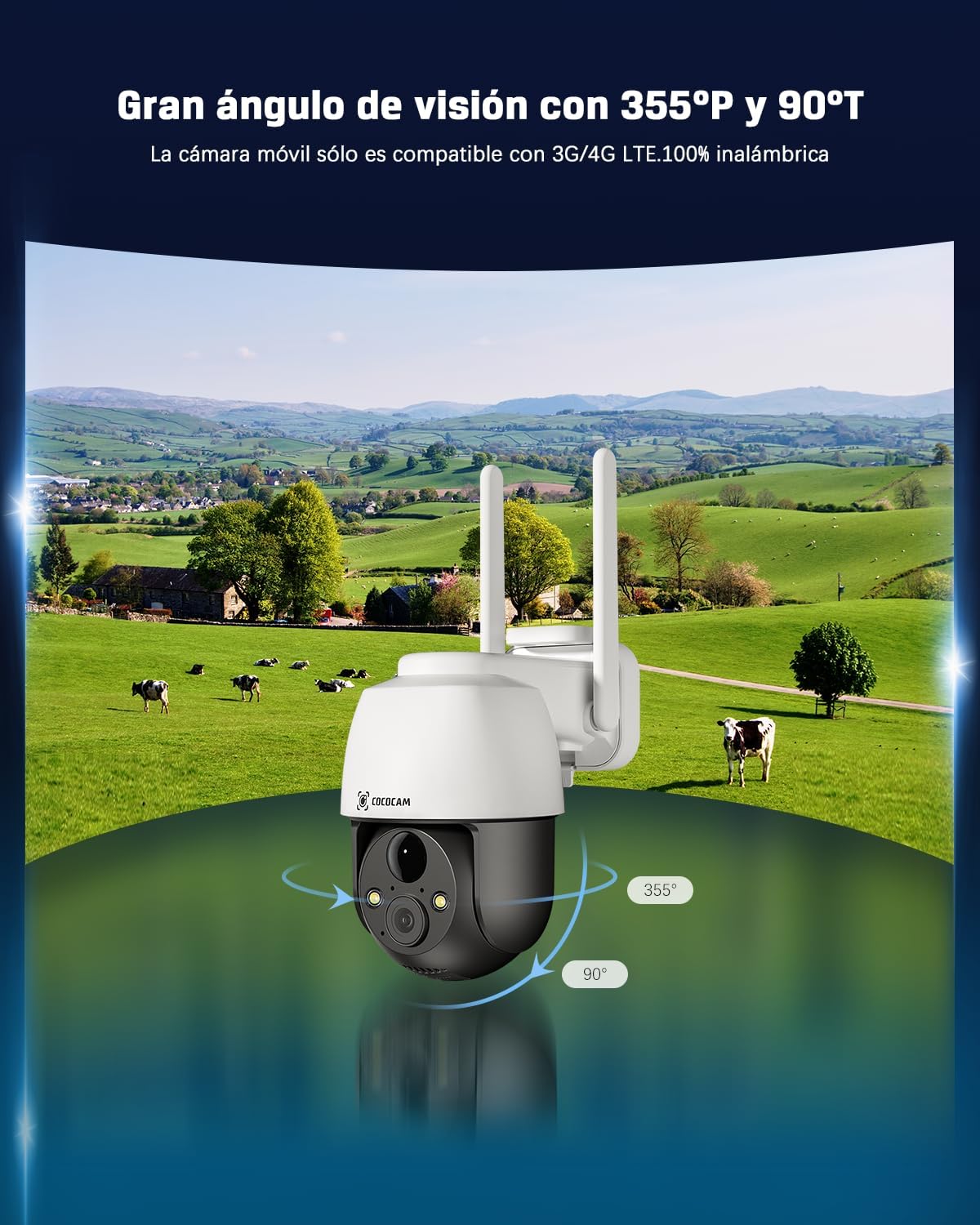
Image: The COCOCAM 4G LTE camera demonstrating its wide field of view with 355-degree horizontal pan and 90-degree vertical tilt.
- Agħżel post adattat għall-immuntar li jipprovdi l-aspett mixtieq viewing angle and is within reach of the solar panel cable.
- Use the provided screw bag to securely attach the camera bracket to the wall.
- Waħħal il-kamera mal-bracket immuntat.
- Aġġusta l-angolu tal-kamera biex tkopri ż-żona ta' sorveljanza mixtieqa.
4. Installazzjoni tal-App u Konnessjoni Inizjali
Control and monitor your camera remotely via the dedicated mobile application.
- Download the CloudEdge app from your smartphone's app store (Android/iOS).
- Irreġistra għal kont u illoggja.
- Follow the in-app instructions to add your COCOCAM camera. This typically involves scanning a QR code on the camera or entering its device ID.
- Once connected, you can access the live feed and configure settings.
It-tħaddim tal-Kamera
1. Ħaj View u Kontroll PTZ
Access real-time video and control the camera's movement.
- Open the CloudEdge app and select your camera to view l-għalf ħaj.
- Use the on-screen controls to pan (355° horizontal) and tilt (90° vertical) the camera, providing comprehensive coverage of your area.
2. Awdjo b'żewġ direzzjonijiet
Ikkomunika mal-viżitaturi jew tiskoraġġixxi l-intrużi billi tuża l-mikrofonu u l-ispiker integrati.
- Tektek l-ikona tal-mikrofonu fil-live view biex titkellem permezz tal-kamera.
- L-ispiker tal-kamera se jittrażmetti leħnek, u tista' tisma' l-awdjo mill-post fejn tinsab il-kamera.
3. Viżjoni bil-lejl
The camera provides clear visibility even in low-light conditions.

Image: Comparison of day and 2K full-color night vision captured by the COCOCAM camera, demonstrating its clarity in various lighting conditions.
- Il-kamera taqleb awtomatikament għall-modalità tal-viżjoni bil-lejl f'dawl baxx.
- Enjoy full-color night vision up to 25 meters with white light, and up to 30 meters with infrared.
4. Smart Detection and AI Analysis
Receive accurate alerts with advanced detection features.

Image: The COCOCAM 4G LTE camera demonstrating its AI-powered human detection, distinguishing people from other movements and sending precise alerts.
- The PIR human detection technology reduces false alarms by focusing on human shapes.
- Customize alarm areas and utilize the smart light and sound alarm system for enhanced security.
5. Għażliet ta 'Ħażna
Irreġistrat footage can be stored locally or in the cloud.
- Ħażna tal-Kard TF: The camera supports local storage on a TF (microSD) card up to 128GB (card not included). Ensure the card is formatted before use.
- Ħażna Cloud: Recorded 6-second fragments can be stored for 7 days of loop coverage (compatible when using the camera's built-in SIM card). COCOCAM offers unlimited data packages and a 7-day free trial for cloud storage.
6. Integrazzjoni tal-Assistent tal-Vuċi
Control your camera with voice commands.
- The COCOCAM 4G security camera works with Alexa and Google Assistant.
- Link your camera to your smart home system for convenient voice control and access to live streams.
Manutenzjoni
- Tindif: Imsaħ il-lenti tal-kamera u l-pannell solari regolarment b'ċarruta ratba u damp cloth to ensure clear images and efficient charging. Do not use harsh chemicals.
- Kura tal-batterija: While the solar panel provides continuous charging, ensure the camera receives adequate sunlight. If the camera is stored for extended periods, fully charge the battery before storage and recharge every few months to maintain battery health.
- Aġġornamenti tas-Software: Check the CloudEdge app periodically for firmware updates to ensure optimal performance and access to new features.
Issolvi l-problemi
| Problema | Kawża Possibbli | Soluzzjoni |
|---|---|---|
| Il-kamera mhux qed tikkonnettja man-netwerk 4G. | No SIM card, incorrect SIM installation, no 4G coverage, SIM PIN active. | Ensure SIM card is correctly inserted and activated. Check 4G signal strength in the area. Disable SIM PIN on another device before inserting. |
| Il-batterija mhix qed tiċċarġja. | Solar panel not receiving enough sunlight, panel dirty, cable disconnected. | Relocate solar panel to a sunnier spot. Clean the solar panel surface. Check cable connection between panel and camera. |
| Kwalità fqira tal-immaġni. | Lens dirty, low light conditions, network issues. | Clean the camera lens. Ensure adequate lighting for optimal image quality. Check 4G signal strength. |
| Allarmi foloz frekwenti. | Motion detection sensitivity too high, non-human triggers. | Adjust motion detection sensitivity in the app. Utilize human detection and customize alarm zones. |
| L-awdjo f'żewġ direzzjonijiet mhux qed jaħdem. | Microphone/speaker blocked, app permissions, volume settings. | Ensure nothing is obstructing the microphone or speaker. Check app permissions for audio access. Adjust volume settings in the app. |
Speċifikazzjonijiet Tekniċi
| Karatteristika | Speċifikazzjoni |
|---|---|
| Mudell | ZY-C5 |
| Riżoluzzjoni tal-Qbid tal-Vidjo | 2K (2304*1296) |
| Teknoloġija tal-Konnettività | Wireless (4G LTE) |
| Medda Pan/Tilt | Orizzontali 355°, Vertikali 90° |
| Medda tal-Viżjoni Lejl | Up to 25 meters (color), 30 meters (infrared) |
| Sors tal-Enerġija | Solar powered, Battery powered (10000mAh) |
| Solar Panel Wattage | 6W |
| Livell ta 'Reżistenza għall-Ilma | IP66 |
| Temperatura operattiva | -20°C sa 50°C |
| Kapaċità tal-Ħżin | TF card up to 128GB (not included) |
| Apparati Kompatibbli | Smartphone, Tablet (Android/iOS) |
| Tip ta' Kontrollur | Amazon Alexa, Android, Google Assistant, CloudEdge, iPhone |
| Materjal | Acrylonitrile Butadiene Styrene (ABS) |
| Dimensjonijiet tal-Prodott | 0.4 x 0.4 x 4 ċm; 490 g |
Garanzija u Appoġġ għall-Klijent
COCOCAM is committed to providing high-quality products and excellent customer service. Your product is covered by a standard warranty. For specific warranty details, please refer to the documentation included with your purchase or contact COCOCAM customer support.
If you encounter any issues or have questions regarding your COCOCAM 4G LTE Outdoor Solar Security Camera, please do not hesitate to contact our support team. We offer professional technical support to assist you.
Visit the official COCOCAM store for more information and support: COCOCAM Store
Ask a question about this manual
Ask about setup, troubleshooting, compatibility, parts, safety, or missing instructions. Manuals+ will review the question and use this page’s manual context to help answer it.