
1. Prodott Aktarview
The Lenovo Legion Pro 7 Gen 8 is a high-performance 16-inch gaming laptop designed for demanding applications and gaming. It features an AMD Ryzen 9 7945HX processor, NVIDIA GeForce RTX 4090 graphics, 32GB of DDR5 RAM, and a 2TB NVMe SSD. The laptop is equipped with a 16-inch WQXGA (2560 x 1600) IPS display with a 240Hz refresh rate, offering a vibrant and smooth visual experience. Advanced thermal management, including Legion Coldfront 5.0 and liquid metal CPU cooling, ensures optimal performance during intensive use. The device runs on Windows 11 Home.
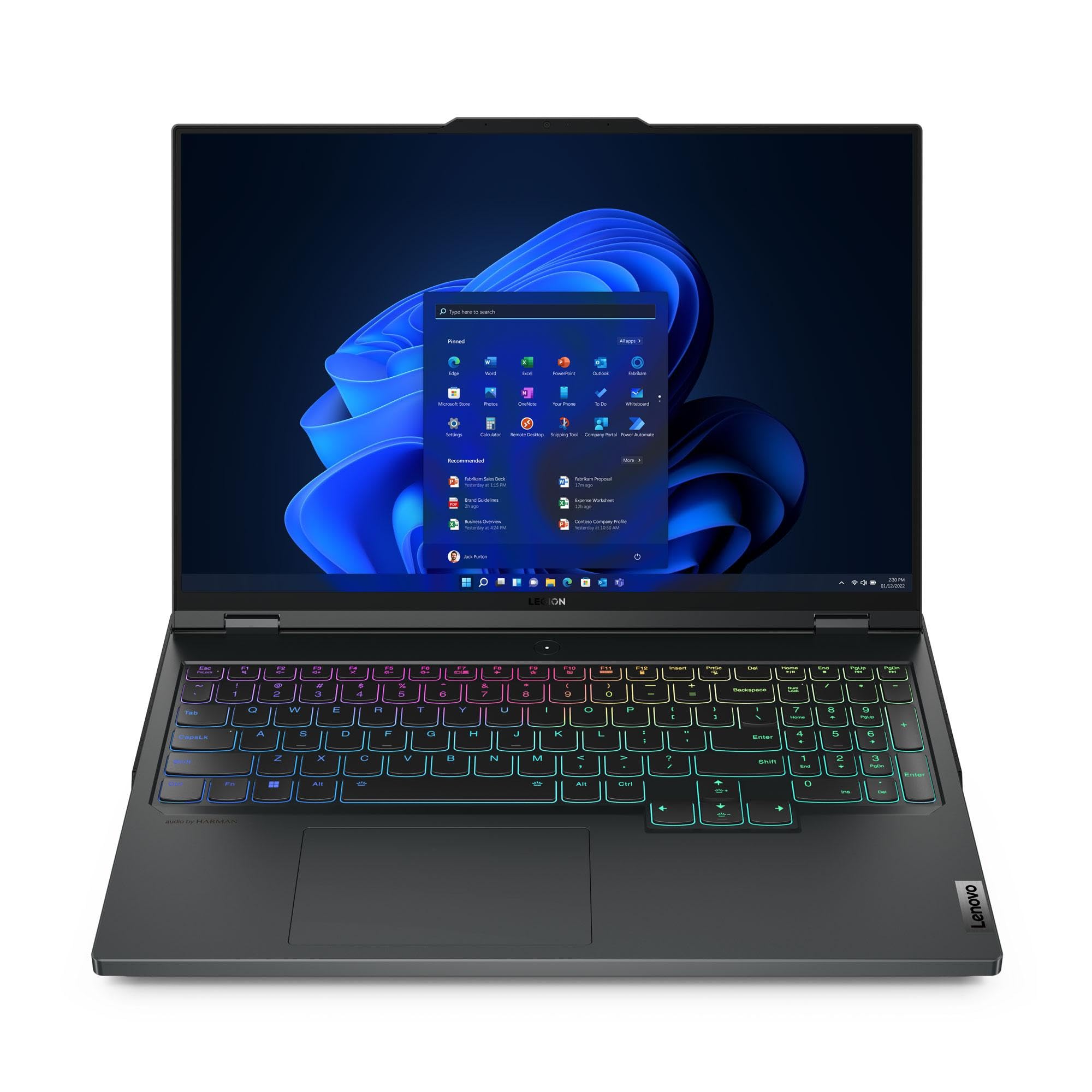
Figura 1: Quddiem view of the Lenovo Legion Pro 7 Gen 8 Gaming Laptop.

Figura 2: Angolat view of the Lenovo Legion Pro 7 Gen 8.
Karatteristiċi ewlenin:
- Proċessur: AMD Ryzen 9 7945HX (2.50 GHz up to 5.40 GHz)
- Grafika: NVIDIA GeForce RTX 4090 Laptop GPU 16GB GDDR6
- Memorja: 32 GB DDR5-5200MHz (2 x 16 GB)
- Ħażna: 2 TB SSD M.2 2280 PCIe Gen4 TLC (2 x 1 TB)
- Wiri: 16" WQXGA (2560 x 1600) IPS, Anti-Glare, HDR 400, 100% sRGB, 500 nits, 240Hz
- Sistema Operattiva: Windows 11 Home 64
- Kamera: 1080P FHD with Dual Microphone and Electronic Privacy Shutter
- Tastiera: Per-Key RGB Backlit, English (US)
- Konnettività: WiFi 6E 2x2 AX & Bluetooth 5.1 or above
2. Setup
2.1 Il-Ftuħ tal-Kaxxa u l-Inizzjali Tixgħel
- Carefully remove the laptop and its accessories from the packaging. Ensure all components listed in the "What's in the Box" section are present: Laptop, AC Adapter, Product Manuals.
- Connect the AC adapter to the laptop's power input port (refer to Figure 3, item 5) and then to a power outlet.
- Open the laptop lid and press the power button, typically located on the keyboard deck, to turn on the device.
- Segwi l-istruzzjonijiet fuq l-iskrin biex tlesti s-setup inizjali tal-Windows 11 Home, inkluż l-għażla tal-lingwa, il-konnessjoni tan-netwerk, u l-ħolqien tal-kont tal-utent.
2.2 Connecting Peripherals and Port Overview
The Legion Pro 7 Gen 8 offers a variety of ports for connecting external devices. Familiarize yourself with the port layout for optimal connectivity.

Figure 3: Port layout of the Lenovo Legion Pro 7 Gen 8.
| Oġġett Nru. | Port | Deskrizzjoni |
|---|---|---|
| 1 | Ethernet (RJ45) | Għal konnessjoni ta' netwerk bil-fili. |
| 2 | USB-C 3.2 Gen 2 (DisplayPort™ 1.4, power delivery 140W) | Multi-functional port for data transfer, video output, and power delivery. |
| 3 | HDMI 2.1 | Għall-konnessjoni ma' displays jew televiżjonijiet esterni. |
| 4 | USB-A 3.2 Gen 1 (1 always on 5V2A) | Standard USB port, one supports charging devices even when the laptop is off. |
| 5 | Input tal-enerġija | Qabbad l-AC adapter hawn. |
| 6 | Combo tal-headphone / mic | Għall-konnessjoni ta' headphones jew headset ma' mikrofonu. |
| 7 | Webcam privacy e-shutter | Physical switch to disable the webcam for privacy. |
| 8 | USB-A 3.2 Ġen 1 | Port USB standard għall-periferali. |
| 9 | USB-A 3.2 Ġen 1 | Port USB standard għall-periferali. |
| 10 | USB-C 3.2 Gen 2 (DisplayPort™ 1.4) | Multi-functional port for data transfer and video output. |
3. Operazzjoni
3.1 Ġestjoni tal-Enerġija
- Qawwa Mixgħul: Agħfas il-buttuna tal-qawwa.
- Modalità Sleep: Agħlaq l-għatu jew agħżel "Sleep" mill-menu Start tal-Windows.
- Itfi: Agħżel "Itfi" mill-menù Start tal-Windows.
- Ibda mill-ġdid: Agħżel "Irritorna" mill-menu Start tal-Windows.
3.2 Tastiera u Touchpad
The laptop features a Per-Key RGB Backlit keyboard and a precision touchpad. The keyboard backlight can be adjusted through system settings or dedicated function keys (Fn + Spacebar, typically). The touchpad supports multi-touch gestures for navigation and control within Windows 11.

Figura 4: It-tqassim tat-tastiera u t-touchpad.
3.3 Settings tal-wiri
The 16-inch WQXGA (2560 x 1600) IPS display offers a 240Hz refresh rate. You can adjust display settings such as brightness, resolution, and refresh rate through Windows Display Settings. For optimal gaming, ensure the display is set to its maximum refresh rate.
3.4 Awdjo u Kamera
The laptop includes stereo speakers and dual microphones. The 1080P Full HD camera is equipped with an electronic privacy shutter (Figure 3, item 7). Slide the shutter to cover the camera lens when not in use to ensure privacy.
3.5 Gaming Performance Features
- Lenovo Legion AI Engine+: This intelligent system, powered by the LA2-Q AI chip, optimizes game performance in real-time by leveraging system sensors to maximize FPS. The Smart Engine adapts and improves over time.
- Legion Coldfront 5.0: An advanced thermal solution featuring thin fan blades, a massive intake and exhaust system, liquid metal for CPU heat transfer, and a wide vapor chamber for both CPU and GPU. This technology ensures efficient cooling during intense gaming sessions.

Figura 5: Qiegħ view illustrating the cooling system.
4. Manutenzjoni
4.1 Tindif tal-Laptop Tiegħek
- Skrin: Uża ċarruta ratba u mingħajr ħelu dampLaħlaħ bl-ilma jew b'soluzzjoni għat-tindif tal-iskrin. Evita kimiċi ħarxa.
- Tastiera u Chassis: Uża drapp artab u niexef. Għal ħmieġ iebes, neħħi ftit drapp.amp cloth can be used. Compressed air can help remove dust from between keys.
- Ventijiet: Periodically inspect and gently clean the air vents (located on the sides and bottom) to ensure unobstructed airflow. Use compressed air to remove dust buildup.
4.2 Aġġornamenti tas-Software
Regularly update your operating system, drivers, and firmware to ensure optimal performance, security, and compatibility. Windows Update will handle OS updates, and Lenovo VantagIs-softwer jista' jgħin bl-aġġornamenti tas-sewwieqa u tal-firmware.
4.3 Kura tal-Batterija
To prolong battery life, avoid consistently discharging the battery completely or keeping it at 100% charge for extended periods. Lenovo Vantage software may offer battery health management features to optimize charging behavior.
5 Issolvi l-problemi
Din it-taqsima tindirizza kwistjonijiet komuni li tista' tiltaqa' magħhom. Għal problemi aktar kumplessi, irreferi għas-servizz ta' appoġġ ta' Lenovo. websit jew ikkuntattja lis-servizz tal-konsumatur.
5.1 Kwistjonijiet Komuni u Soluzzjonijiet
- Il-laptop ma jixgħelx:
- Kun żgur li l-adapter tal-AC huwa konness sew kemm mal-laptop kif ukoll ma' sokit tal-enerġija li jaħdem.
- Ivverifika li s-sokit tal-enerġija jaħdem billi tqabbad apparat ieħor.
- Jekk il-batterija tkun ixxotta kompletament, ħalliha tiċċarġja għal ftit minuti qabel ma tipprova tixgħelha.
- L-iskrin huwa vojt jew iswed:
- Iċċekkja jekk il-laptop huwiex mixgħul (dawl indikatur tal-enerġija).
- Press Fn + F10 (or the appropriate function key for display output) to cycle through display modes.
- Qabbad monitor estern biex tiċċekkja jekk l-output tal-vidjo hux qed jaħdem.
- Problemi ta' konnettività Wi-Fi jew Bluetooth:
- Kun żgur li l-Wi-Fi/Bluetooth huwa attivat fis-settings tal-Windows.
- Erġa' ibda r-router/modem tiegħek.
- Update wireless drivers through Lenovo Vantage or Device Manager.
- System performance is slow:
- Agħlaq l-applikazzjonijiet bla bżonn li jkunu qed jaħdmu fl-isfond.
- Iċċekkja u installa kwalunkwe aġġornament pendenti tal-Windows jew tas-sewwieq.
- Ensure adequate ventilation and clean cooling vents to prevent thermal throttling.
- Mexxi skennjar tal-malware.
6. Speċifikazzjonijiet
| Karatteristika | Dettall |
|---|---|
| Brand | Lenovo |
| Isem tal-Mudell | Legion Pro 7 Gen 8 16" AMD |
| Numru tal-Mudell | 82WS003UUS |
| Daqs tal-Iskrin | 16 Pulzier |
| Riżoluzzjoni | 2560 x 1600 pixel (WQXGA) |
| Riffriskar Rata | 240 Hz |
| Teknoloġija tal-Wiri | IPS, Anti-Glare, HDR 400, 100% sRGB, 500 nits |
| Mudell tas-CPU | AMD Ryzen 9 7945HX |
| Veloċità tal-Proċessur | Sa 5.4 GHz |
| Koproċessur tal-Grafika | NVIDIA GeForce RTX 4090 |
| RAM tal-Karta tal-Grafika | 16 GB GDDR6 |
| Daqs tal-Memorja RAM Installata | 32 GB DDR5-5200MHz |
| Daqs Massimu tal-Memorja RAM | 64 GB |
| Daqs tal-Hard Disk | 2 TB SSD (M.2 2280 PCIe Gen4 TLC) |
| Sistema Operattiva | Windows 11 Home |
| Webcam | 1080P FHD with Dual Microphone and Electronic Privacy Shutter |
| Tastiera | Per-Key RGB Backlit, English (US) |
| WLAN | WiFi 6E 2x2 AX |
| Bluetooth | Bluetooth 5.1 jew ogħla |
| Kontenut tal-Enerġija tal-Batterija | 99.99 Watt Hours (Lithium Ion) |
| Portijiet USB totali | 5 |
| Portijiet HDMI | 1 (HDMI 2.1) |
| Portijiet Ethernet | 1 (RJ45) |
| Dimensjonijiet tal-oġġett (L x W x Ħxuna) | 14.3"T x 1.01"W x 10.32"Ħ |
7. Garanzija u Appoġġ
7.1 Informazzjoni dwar Garanzija
This Lenovo Legion Pro 7 Gen 8 laptop comes with a One Year Legion Ultimate Support warranty. This warranty covers manufacturing defects and hardware failures under normal use conditions. For specific terms and conditions, please refer to the warranty documentation included with your product or visit the official Lenovo support websit.
7.2 Appoġġ għall-Klijent
For technical assistance, warranty claims, or further inquiries, please contact Lenovo customer support. You can find contact information and additional resources on the official Lenovo support websit:
Please have your laptop's model number (82WS003UUS) and serial number ready when contacting support.