
1. Prodott Aktarview
The ULTRAK 495 Professional 100-Lap Digital Stopwatch is designed for precise timekeeping in various sports and training activities. It features a large, easy-to-read display and multiple functions to support athletes, coaches, and referees.
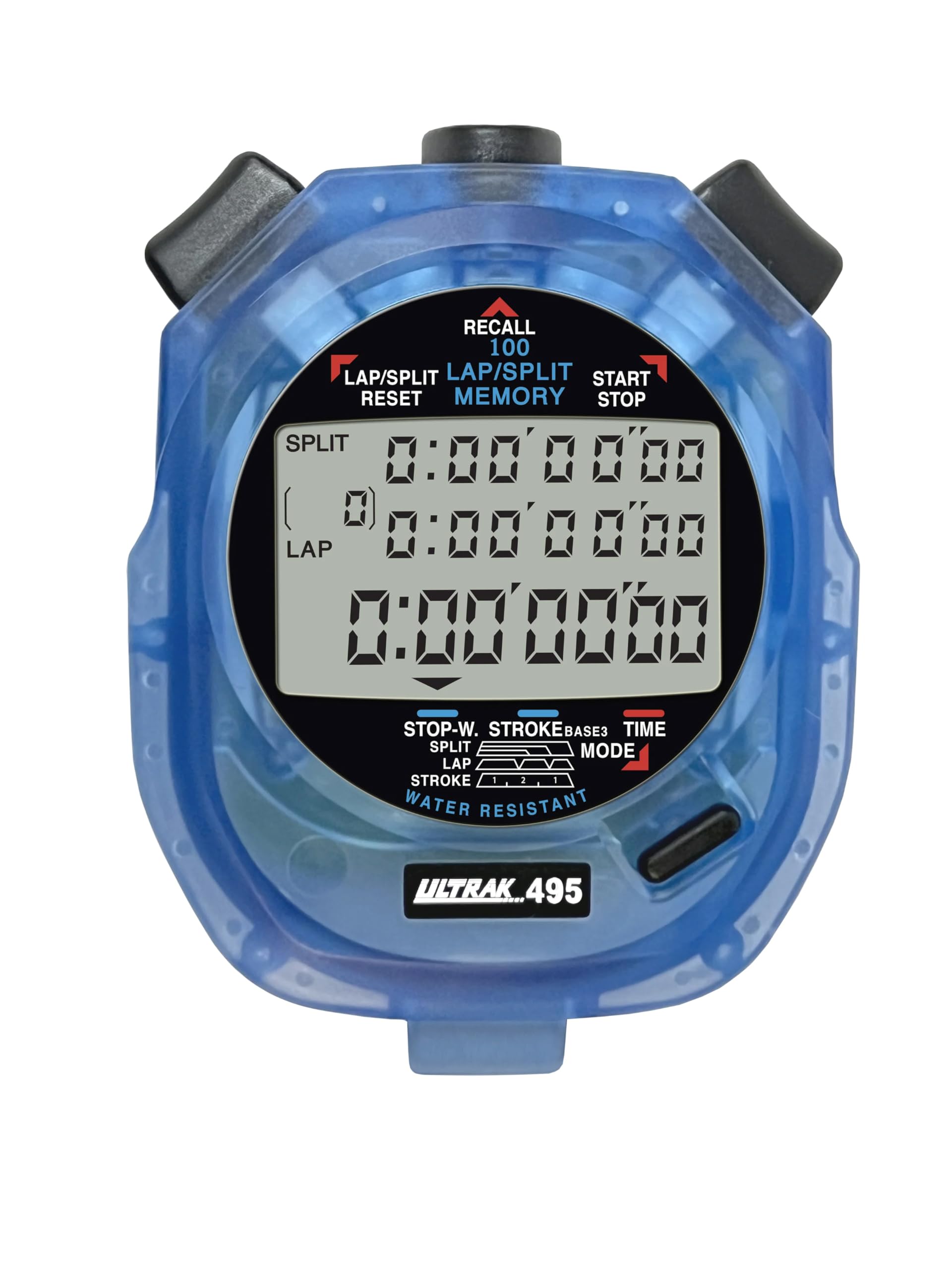
Figure 1: ULTRAK 495 Stopwatch in blue.
Karatteristiċi ewlenin:
- 100 Dual Split Recallable Memory: Enhances accuracy for track and field events, ideal for athletes and coaches requiring precise timekeeping.
- Funzjonijiet versatili: Includes stroke/frequency, time, and calendar functions, suitable for diverse sports activities.
- Disinn Reżistenti għall-Ilma: Allows for outdoor use in various weather conditions.
- Large 3-Row Display: Facilitates easy viewing of multiple lap times simultaneously.
- Durable Lithium Battery: Ensures reliability for extended use.
2. Setup
2.1. Installazzjoni tal-batterija
The ULTRAK 495 Stopwatch comes with one Lithium Metal battery pre-installed. If battery replacement is needed, refer to the Maintenance section.
2.2. Issettjar Inizjali tal-Ħin u d-Data
Biex tissettja l-ħin u d-data:
- Agħfas il- MODALITÀ button repeatedly until the time/calendar display mode is active.
- Agħfas u żomm il- SET button (usually located on the top right) until the digits begin to flash.
- Uża l- LAP/SPLIT/RESET button (top left) to adjust the flashing digit.
- Agħfas il- SET button to move to the next digit or setting (e.g., hours, minutes, seconds, month, day, year).
- Ladarba s-settings kollha jkunu korretti, agħfas il-buttuna MODALITÀ buttuna biex toħroġ mill-modalità ta' l-issettjar.

Figure 2: Stopwatch displaying various modes, including Time/Calendar.
3. Operazzjoni
3.1. Stopwatch Mode (Standard Timing)
This mode is used for basic timing of events.
- Ensure the stopwatch is in the standard stopwatch mode (usually indicated by "STOPWATCH" on the display). If not, press MODALITÀ sakemm jidher.
- Agħfas BIDU/WAQQF (top right button) to begin timing.
- Agħfas BIDU/WAQQF għal darb'oħra biex twaqqaf it-tajmer.
- Agħfas BIDU/WAQQF biex terġa' tibda l-ħin.
- To reset the timer to zero, ensure it is stopped, then press LAP/SPLIT/RESET (top left button).
3.2. Lap/Split Timing with Memory Recall
The ULTRAK 495 can record up to 100 lap and split times.
- In stopwatch mode, press BIDU/WAQQF biex tibda timing.
- Agħfas LAP/SPLIT/RESET to record a split time. The display will momentarily show the split time while the main timer continues running in the background. The bottom row displays the running event or lap time.
- Repeat step 2 for each lap or split you wish to record.
- Agħfas BIDU/WAQQF to end the timing session.
- To recall recorded times, press the IFAKKAR button (top center). Use the LAP/SPLIT/RESET u BIDU/WAQQF buttons to navigate through the stored lap and split times.
- To exit recall mode, press MODALITÀ. To clear memory, ensure the stopwatch is stopped and not in recall mode, then press and hold LAP/SPLIT/RESET.

Figure 3: Display showing simultaneous split, lap, and total times.
3.3. Modalità tat-Tajmer tal-Countdown
The stopwatch includes a countdown timer function.
- Agħfas MODALITÀ sakemm jidher l-iskrin tal-arloġġ tal-countdown.
- Agħfas u żomm SET biex tidħol fil-mod ta' l-issettjar.
- Użu LAP/SPLIT/RESET biex taġġusta l-ħin u SET biex tiċċaqlaq bejn sigħat, minuti u sekondi.
- Ladarba l-ħin tal-countdown mixtieq ikun issettjat, agħfas MODALITÀ biex toħroġ mill-modalità tas-settings.
- Agħfas BIDU/WAQQF biex tibda l-countdown. Se tinstema' allarm meta t-tajmer jilħaq iż-żero.
3.4. Stroke/Frequency Measuring Mode
This mode is useful for measuring stroke rates in swimming or other repetitive actions.
- Agħfas MODALITÀ until the stroke/frequency mode is displayed.
- Agħfas BIDU/WAQQF to begin measuring.
- Agħfas LAP/SPLIT/RESET at the start of each stroke or cycle. The stopwatch will calculate and display the frequency.
- Agħfas BIDU/WAQQF biex tieqaf tkejjel.
4. Manutenzjoni
4.1. Tindif
Wipe the stopwatch with a soft, dry cloth. For stubborn dirt, use a slightly damp drapp u sapun ħafif, imbagħad nixxef sew. Evita kimiċi ħarxa jew prodotti tat-tindif li joborxu.
4.2. Reżistenza għall-Ilma
The ULTRAK 495 is water-resistant, making it suitable for use in various weather conditions. However, it is not designed for submersion. Avoid pressing buttons while the stopwatch is wet to prevent water ingress.
4.3. Sostituzzjoni tal-batterija
The stopwatch uses one Lithium Metal battery. When the display becomes dim or functions become erratic, it's time to replace the battery. Carefully open the battery compartment (usually on the back, secured by small screws) and replace with a new battery of the same type. Ensure proper polarity and securely close the compartment.
5 Issolvi l-problemi
- Id-displej huwa vojt jew mudlam: Iċċekkja l-batterija. Ibdelha jekk meħtieġ.
- Stopwatch resets unexpectedly during timing: This can sometimes occur due to low battery or a temporary electrical glitch. Try replacing the battery. If the issue persists, ensure buttons are not being pressed inadvertently.
- Il-buttuni ma jirrispondux: Ensure the stopwatch is not in a locked mode (if applicable, check manual for specific lock features). If wet, ensure it is completely dry. If still unresponsive, try replacing the battery.
- Ħin jew data mhux korretti: Irreferi għat-taqsima 2.2 biex terġa' tissettja l-ħin u d-data.
6. Speċifikazzjonijiet
| Karatteristika | Dettall |
|---|---|
| Numru tal-Mudell | 495 |
| Memorja | 100 Dual Split Recallable Laps |
| Wiri | Large 3-Row Display |
| Funzjonijiet | Stopwatch, Lap/Split, Countdown Timer, Stroke/Frequency, Time, Calendar |
| Reżistenza għall-Ilma | Yes (Water Resistant) |
| Tip ta 'batterija | 1 batterija tal-Lithium Metal (inkluża) |
| Materjal | Plastik |
| Dimensjonijiet tal-Prodott | 0.2"D x 2.5"W x 3.5"H |
| Piż tal-oġġett | 3.2 uqija |
7. Garanzija u Appoġġ
For specific warranty information and customer support, please refer to the documentation included with your product or visit the official Ultrak websit. Żomm l-irċevuta tax-xiri tiegħek bħala prova tax-xiri għal kwalunkwe talba ta' garanzija.