
KALI AUDIO IN-8W V2
Manwal tal-Utent tal-Monitor tal-Istudjo bi 3 Direzzjonijiet Imħaddem minn Kali Audio IN-8W V2 ta' 8 pulzieri
Model: IN-8W V2
1. Introduzzjoni
The Kali Audio IN-8W V2 is a 3-way powered studio monitor designed for critical listening and mixing applications. It features an 8-inch woofer, a 4-inch midrange driver, and a 1-inch soft dome tweeter, with the midrange and tweeter arranged coaxially for precise imaging. These near-field monitors deliver accurate, extended low frequencies and detailed high frequencies with low distortion, suitable for monitoring at various volume levels. With a flat frequency response and neutral tonality, the IN-8W V2 allows users to hear subtle details in their mixes. Its balanced XLR and 1/4" TRS inputs, along with RCA inputs, ensure easy integration into any studio setup.

Quddiem view of the Kali Audio IN-8W V2 8-inch powered 3-way studio monitor in white, showcasing the coaxial midrange and tweeter above the main woofer.
2. Istruzzjonijiet Importanti dwar is-Sigurtà
- Aqra dawn l-istruzzjonijiet bir-reqqa qabel ma tħaddem il-prodott.
- Żomm dawn l-istruzzjonijiet għal referenza futura.
- Oqgħod attent għat-twissijiet kollha fuq il-prodott u fl-istruzzjonijiet tat-tħaddim.
- Follow all instructions for safe use and operation.
- Tużax dan l-apparat ħdejn l-ilma jew l-umdità.
- Naddaf biss b'ċarruta niexfa.
- Timblokkax il-fetħiet tal-ventilazzjoni. Installa skont l-istruzzjonijiet tal-manifattur.
- Tinstallax ħdejn xi sorsi tas-sħana bħal radjaturi, reġistri tas-sħana, stufi, jew apparat ieħor (inkluż amplifiers) li jipproduċu sħana.
- M'għandekx tegħleb l-iskop tas-sigurtà tal-plagg polarizzat jew tat-tip ta 'l-ert. Plagg polarizzat għandu żewġ xfafar b'waħda usa 'mill-oħra. Plagg tat-tip ta 'l-ert għandu żewġ xfafar u t-tielet prong ta' l-ert. Ix-xafra wiesgħa jew it-tielet prong huma pprovduti għas-sigurtà tiegħek. Jekk il-plagg ipprovdut ma jidħolx fl-iżbokk tiegħek, ikkonsulta elettriċista għas-sostituzzjoni tal-iżbokk skadut.
- Ipproteġi l-korda tad-dawl milli timxi fuqha jew maqrusa, partikolarment fil-plakek, ir-reċipjenti tal-konvenjenza, u l-punt fejn joħorġu mill-apparat.
- Uża biss aċċessorji/aċċessorji speċifikati mill-manifattur.
- Aqla’ dan l-apparat waqt maltempati tas-sajjetti jew meta ma jintużax għal perjodi twal ta’ żmien.
- Irreferi l-manutenzjoni kollha lil persunal tas-servizz kwalifikat. Is-servizz huwa meħtieġ meta l-apparat ikun ġie bil-ħsara b'xi mod, bħal korda tal-provvista tal-enerġija jew plagg ikun bil-ħsara, likwidu jkun inxtered jew oġġetti jkunu waqgħu fl-apparat, l-apparat ikun ġie espost għax-xita jew umdità, ma jaħdimx b'mod normali , jew twaqqgħet.
3. Kontenut tal-Pakkett
Upon unpacking your Kali Audio IN-8W V2 studio monitor, please ensure all items are present and in good condition:
- One Kali Audio IN-8W V2 Studio Monitor
- Kejbil tal-Enerġija Wieħed
4. Karatteristiċi ewlenin
- Prestazzjoni qawwija: 140-watt Class D digital amplifier system delivers clear and accurate sound for studio mixing and mastering.
- Kontroll preċiż: Independent level controls, low-cut filters, and input selection allow customization of the monitors for any application or room environment.
- Studio Reference: 8-inch woofer, 4-inch midrange driver, and 1-inch soft dome tweeter (coaxially mounted) reproduce a wide frequency response from 42Hz to 22kHz.
- Konnettività versatili: Balanced XLR and 1/4" TRS inputs, along with unbalanced RCA inputs, ensure broad compatibility with studio equipment.

Quddiem angolat view of the Kali Audio IN-8W V2 studio monitor, highlighting its sleek design and driver arrangement.
5. Setup
5.1 Tqegħid
Proper placement of your studio monitors is crucial for accurate sound reproduction. Position the monitors to form an equilateral triangle with your listening position. The tweeters should ideally be at ear level. Avoid placing monitors directly against walls or in corners without utilizing the boundary compensation settings.
5.2 Konnessjonijiet
The IN-8W V2 offers three types of audio inputs:
- XLR Input (+4 dBu): For balanced professional audio equipment.
- TRS Input (+4 dBu): For balanced or unbalanced 1/4-inch connections.
- RCA Input (-10 dBV): For unbalanced consumer audio equipment.
Connect your audio source to one of these inputs. Only use one input at a time. Ensure the volume knob on the monitor is set to its lowest position before connecting the power cable.
5.3 Tixgħel
After connecting your audio source, plug the power cable into the monitor and then into a suitable AC outlet. Flip the power switch to the 'On' position. The LED indicator on the front of the monitor will illuminate.
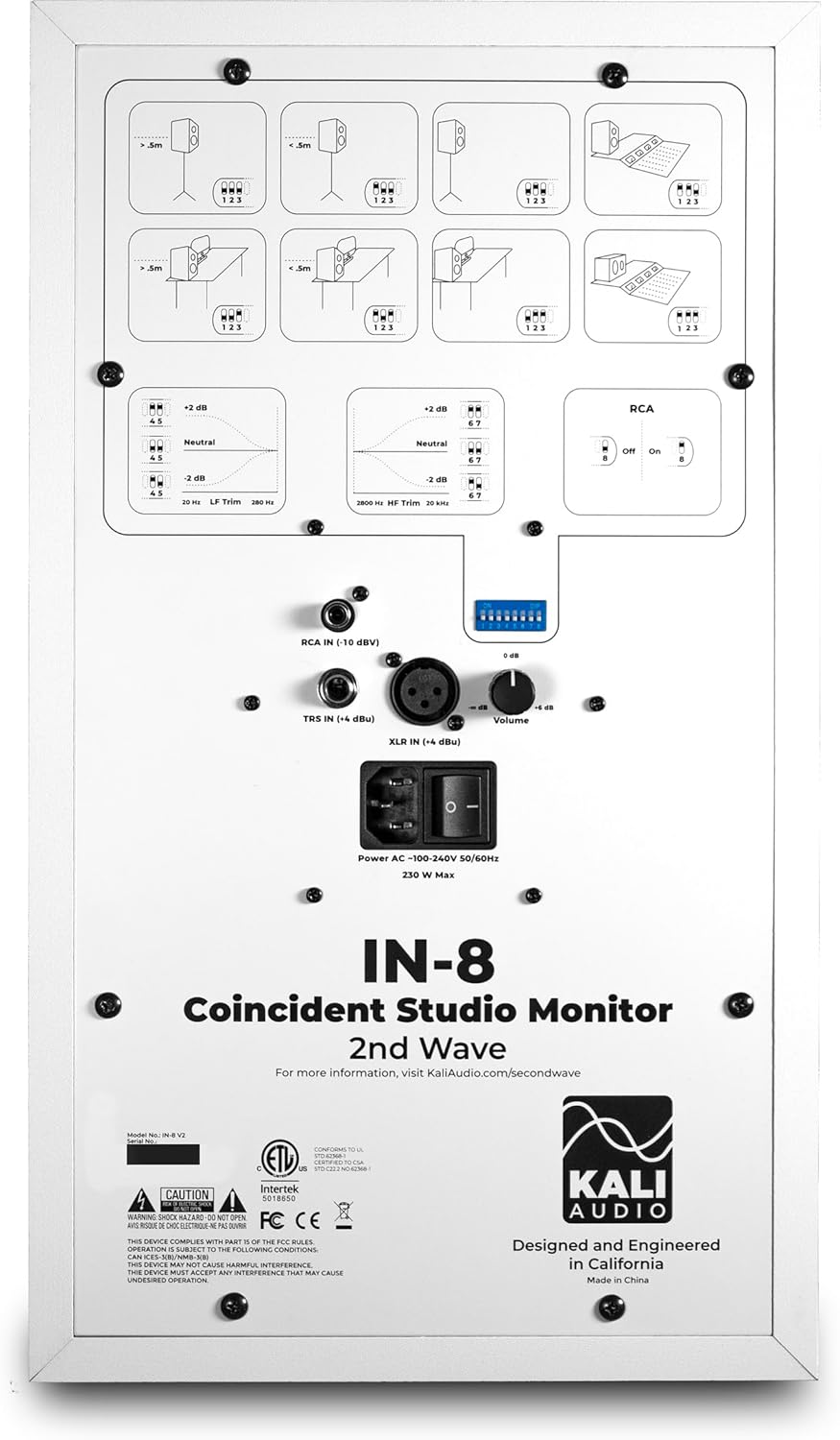
Dettaljati view of the rear panel of the Kali Audio IN-8W V2 studio monitor, displaying input connections (XLR, TRS, RCA), volume control, and DIP switches for boundary compensation and EQ settings.
6. Istruzzjonijiet Operattivi
6.1 Kontroll tal-Volum
The large knob on the rear panel controls the output volume of the monitor. Start with a low volume and gradually increase it to a comfortable listening level.
6.2 Għażla tal-Input
The IN-8W V2 automatically detects which input is active. If multiple inputs are connected, ensure only one source is playing audio at a time to avoid signal conflicts.
6.3 Boundary Compensation EQ Settings
The IN-8W V2 features a series of DIP switches on the rear panel to adjust the monitor's frequency response based on its placement in your room. These settings help to compensate for acoustic anomalies caused by boundaries (walls, desks, etc.). Refer to the diagrams printed on the rear panel for recommended settings based on your monitor's position.
- Trim tal-LF: Jaġġusta r-rispons ta' frekwenza baxxa.
- Trim tal-HF: Jaġġusta r-rispons ta' frekwenza għolja.
- RCA Input On/Off: Activates or deactivates the RCA input. Ensure this is set correctly if using RCA.
Experiment with these settings to achieve the most neutral and accurate sound in your listening environment.
7. Manutenzjoni
7.1 Tindif
To clean the monitor, use a soft, dry cloth. Do not use abrasive cleaners, waxes, or solvents, as these can damage the cabinet finish or drivers. Avoid spraying liquids directly onto the monitor.
7.2 Ħażna
If storing the monitor for an extended period, ensure it is powered off and disconnected from the power source. Store it in a cool, dry place, ideally in its original packaging, to protect it from dust and physical damage.
8 Issolvi l-problemi
| Problema | Kawża Possibbli | Soluzzjoni |
|---|---|---|
| L-ebda ħoss |
|
|
| Ħoss distort |
|
|
| Ħum jew storbju |
|
|
9. Speċifikazzjonijiet
| Isem tal-Mudell | IN-8W V2 |
| Tip ta' Kelliem | 3-Way Powered Studio Monitor |
| Dijametru tal-Woofer | 8 Pulzier |
| Sewwieq Midrange | 4 Inches (Coaxial) |
| Dijametru tat-Tweeter | 1 Inch (Coaxial) |
| AmpEnerġija aktar ħajja | 140 Watt (Klassi D) |
| Rispons ta' Frekwenza | 42 Hz - 22 kHz |
| Inputs | XLR (+4 dBu), TRS (+4 dBu), RCA (-10 dBV) |
| Dimensjonijiet tal-Prodott (P x W x H) | 10" x 15" x 12" |
| Piż tal-oġġett | 25.9 liri |
| Kulur | Abjad |
| Sors tal-Enerġija | Corded Elettriku |
10. Garanzija u Appoġġ
This Kali Audio IN-8W V2 studio monitor is covered by a manufacturer's warranty. For specific details regarding the warranty period and terms, please refer to the documentation included with your product or visit the official Kali Audio website. For technical support, troubleshooting assistance beyond this manual, or warranty claims, please contact Kali Audio customer service directly.
You can find more information and support resources on the official Kali Audio websit: www.kaliaudio.com
Ask a question about this manual
Ask about setup, troubleshooting, compatibility, parts, safety, or missing instructions. Manuals+ will review the question and use this page’s manual context to help answer it.