
Chasing Dory
Chasing Dory Underwater Drone User Manual
Model: Dory
1. Introduzzjoni
Welcome to the Chasing Dory Underwater Drone user manual. This guide provides essential information for setting up, operating, maintaining, and troubleshooting your Dory drone. The Chasing Dory is a palm-sized, 1080p Full HD underwater drone designed for real-time viewing and exploration, controlled via an intuitive app.
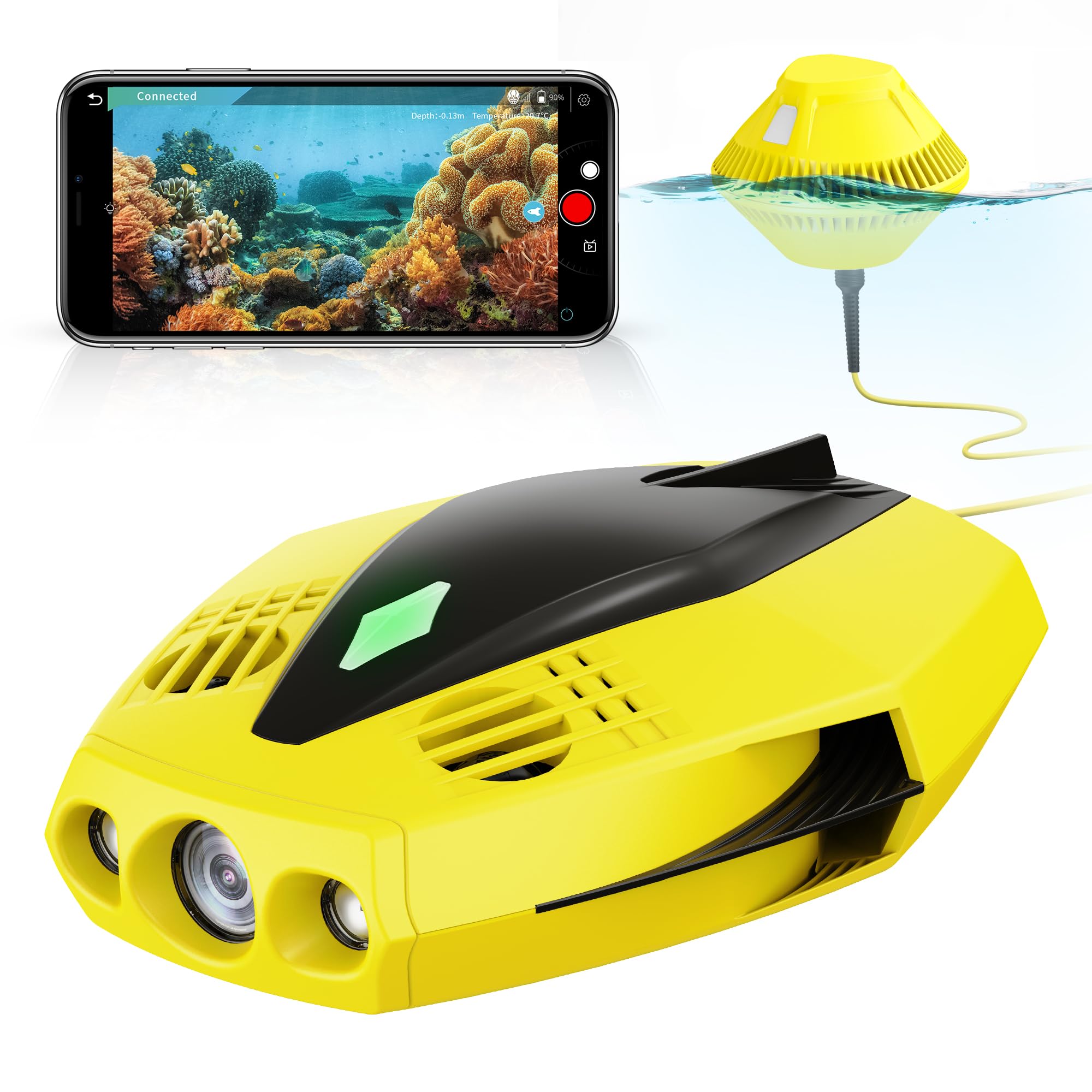
Figura 1: Kap.asing Dory Underwater Drone
2. X'hemm fil-Kaxxa
Upon opening your Chasing Dory package, you should find the following components:
- Chasing Dory Underwater Drone (Yellow)
- Floating WiFi Buoy with 49ft Tether
- Power Adapter and Charging Cable
- Interchangeable Power Plugs (for various regions)
- Kawża tal-Ħażna
- Manwal għall-Utent u Dokumentazzjoni

Figura 2: Kap.asing Dory drone connected via its yellow tether, floating on the water surface.
3. Setup
3.1 Charging the Drone
- Connect the charging cable to the Dory drone's charging port.
- Attach the appropriate power plug to the power adapter.
- Ipplaggja l-adapter tal-enerġija f'iżbokk tal-ħajt.
- Allow the drone to charge fully before first use. The battery life is approximately 1 hour.
3.2 Installazzjoni u Konnessjoni tal-App
- Niżżel il- CHASING GO2 app mill-ħanut tal-apps tat-tagħmir tiegħek (iOS jew Android).
- Power on the Dory drone.
- Place the floating WiFi Buoy on the water surface.
- On your smartphone or tablet, connect to the WiFi network broadcast by the Dory WiFi Buoy.
- Open the CHASING GO2 app. The app should automatically detect and connect to the drone.

Figure 3: Real-time underwater view and controls displayed on a smartphone via the CHASING GO2 app.
4. Operazzjoni
4.1 It-Tnedija tad-Drone
Gently place the Dory drone into the water, ensuring the tethered WiFi Buoy remains on the surface. The drone will automatically stabilize.
4.2 Basic Controls (via CHASING GO2 App)
Il-CHASING GO2 app provides a virtual gamepad interface for controlling the drone:
- Dive/Ascend: Control vertical movement.
- Quddiem/Lura: Control horizontal movement.
- Mejjel 'l fuq/'l isfel: Adjust the camera angle by ±45 degrees.
- Depth-Lock Mode: Maintain a specific depth automatically.

Figure 4: The Dory drone's flexible movement capabilities, including tilt and depth-lock.
4.3 Fotografija u Reġistrazzjoni tal-Vidjo
The Dory features a 1080p F1.6 camera with two 250-lumen headlights for clear underwater imaging. Use the app to:
- Capture 1080p photos and videos.
- Utilize the true color restoration algorithm for accurate colors.
- Store media on a Micro SD card (not included, supports up to 128GB V60).
4.4 Dual Play Mode and Sharing
Engage dual play mode to allow two users to control the drone simultaneously. Share live-streaming video and captured content directly to social media platforms via the CHASING GO2 app.

Figure 5: Dual play mode allows two users to operate the drone and capture footage collaboratively.
4.5 Vidjows Uffiċjali tal-Prodott
Vidjo 1: Il-prodott uffiċjali spiċċaview of the CHASING Dory Underwater Drone, highlighting its features and capabilities.
Video 2: A concise demonstration of the Dory Underwater Drone's palm-sized design and 1080p underwater capabilities.
5. Manutenzjoni
5.1 Tindif
After each use, rinse the drone and tether with fresh water to remove salt, sand, or other debris. Ensure all ports are clean and dry before storage.
5.2 Spezzjoni tal-Iskrun
Regularly inspect the propellers for any entanglement or damage. Clear any debris to ensure optimal performance.
5.3 Kura tal-Batterija
Store the drone with a partially charged battery (around 50-60%) if not using for extended periods. Avoid fully discharging or overcharging the battery.
6 Issolvi l-problemi
| Problema | Kawża Possibbli | Soluzzjoni |
|---|---|---|
| Drone not connecting to app | Incorrect WiFi connection, drone/buoy not powered on | Ensure WiFi is connected to the Dory Buoy, power cycle drone and buoy, restart app. |
| Poor video quality/signal loss | Weak WiFi signal, water turbidity, tether interference | Ensure buoy is close to your device, operate in clearer water, check tether for kinks. |
| Drone not moving correctly | Propeller entanglement, low battery | Check and clear propellers, recharge battery. |
7. Speċifikazzjonijiet
- Ditta: Chasing
- Isem tal-Mudell: CHASING Dory Underwater Drone
- Riżoluzzjoni tal-Qbid tal-Vidjo: 1080p
- Teknoloġija tas-Sensor tar-Ritratti: CMOS
- Fond Massimu: 49ft
- Dwal: Two 250-lumen headlights
- Qasam ta View: 100 grad
- Konnettività: Wi-Fi (via floating buoy)
- Ħajja tal-batterija: Approximately 1 hour (4800 mAh)
- Piż: Less than 2.5 lbs (1 Pound listed in specs, clarifying with feature bullet)
- Ħażna: Micro SD (C10, V30, up to 128GB recommended)
- Apparati Kompatibbli: Smartphone, Tablet (iOS, Android)
8. Garanzija u Appoġġ
8.1 Informazzjoni dwar Garanzija
Il-Chasing Dory Underwater Drone comes with a 2-year limited warranty. Please refer to the included warranty card for full terms and conditions.
8.2 Appoġġ għall-Klijent
For technical assistance, troubleshooting, or warranty claims, please visit the official Chasing website or contact their customer support team. You can find more information and resources at Chasing Official Store.
Ask a question about this manual
Ask about setup, troubleshooting, compatibility, parts, safety, or missing instructions. Manuals+ will review the question and use this page’s manual context to help answer it.