
1. Introduzzjoni
This manual provides essential instructions for the safe and effective operation, assembly, and maintenance of your LASER TREE K1 Pro 30W Laser Engraver. This high-precision machine is designed for engraving and cutting various materials including wood, metal, paper, acrylic, glass, and leather. Please read this manual thoroughly before initial use to ensure optimal performance and safety.

Image 1.1: The LASER TREE K1 Pro 30W Laser Engraver with examples of its engraving capabilities on different materials.
2. Informazzjoni dwar is-Sigurtà
The LASER TREE K1 Pro 30W is a Class 4 laser product. Improper use can result in serious injury, including eye damage, skin burns, and fire. Adhere to all safety guidelines.
- Protezzjoni tal-għajnejn: Always wear appropriate laser safety goggles (OD6+) when operating the machine. Never look directly into the laser beam or its reflection.
- Ventilazzjoni: Operate the engraver in a well-ventilated area to dissipate fumes and smoke produced during engraving and cutting.
- Waqfien ta' Emerġenza: Familiarize yourself with the emergency stop button and its location. In case of any malfunction or emergency, press it immediately.
- Superviżjoni: Qatt tħalli l-magna waħedha waqt it-tħaddim.
- Sigurtà tal-Materjal: Ensure materials being processed are safe for laser engraving/cutting and do not produce toxic fumes or ignite easily.
- Physical Protections: The machine is equipped with limit switches, temperature alerts, position movement protection (15° tilt detection), and beam detection for enhanced safety. For additional safety resources and product information, you may visit din il-link.
- Tfal u Pets: Żomm it-tfal u l-annimali domestiċi 'l bogħod miż-żona tal-operat.

Immaġni 2.1: Fuqview of the K1 Pro's safety features, including limit switches, temperature alert, position movement protection, and the emergency stop switch.

Image 2.2: Further details on safety mechanisms such as tilt detection, eye protection, beam detection, and the emergency stop.
3. Kontenut tal-Pakkett
Verify that all components are present and undamaged upon opening the package. If any items are missing or damaged, contact customer support.

Image 3.1: Complete packing list for the LT-K1 Pro 30W kit.
| Oġġett | Kwantità |
|---|---|
| Assemblea X-Axis | 1 |
| Y-Axis Frame | 2 |
| Qafas ta 'Quddiem | 1 |
| Qafas ta 'wara | 1 |
| Appoġġ Saqajn | 3 |
| Kaxxa tal-Kontroll Prinċipali | 1 |
| Y-Axis Timing Belt | 2 |
| Cable USB | 1 |
| Tubu ta' l-Ajru | 1 |
| Modulu tal-Laser | 1 |
| TF Card | 1 |
| Spare Laser Protective Lens | 2 |
| Cable Clamp | 1 |
| Qarrej tal-Kard | 1 |
| Adapter tal-Enerġija | 1 |
| Kejbil AC | 1 |
| Cables (Main, Motor, Laser) | 3 |
| M5 * 20 Round Screw | 16 |
| M5 * 10 Round Screw | 3 |
| M5*20 Flat Screw | 1 |
| Limiting Column Sleeve | 1 |
| T-slot | 4 |
| M4*5 Fasten Screw | 4 |
| L-Allen Wrench (2mm, 2.5mm, 3mm, 4mm) | 4 |
| Irbit tal-kejbil | 1 |
| Xkupilja Naddaf | 1 |
4. Assemblaġġ u Setup
The LASER TREE K1 Pro 30W requires assembly before use. Refer to the included instructions and the official installation video for detailed guidance. Ensure all connections are secure and components are correctly aligned.
- Spakkjar: Carefully remove all components from the packaging and verify against the package contents list.
- Assemblaġġ tal-qafas: Assemble the X-axis and Y-axis frames according to the provided diagrams.
- Installazzjoni tal-Modulu: Install the laser module onto the X-axis assembly.
- Wiring: Connect all necessary cables (power, USB, motor, laser) to the main control box and respective components.
- Air Assist Pump Connection: Connect the air assist pump to the laser module using the air tube.
- Aġġustament tat-Tul Fokali: Utilize the Z-shaped lifting device to adjust the height of the laser module and quickly set the focal length.
- Installazzjoni tas-Softwer: Install the recommended software (LightBurn or LaserGRBL) on your computer (Mac OS/Windows).
- Test Inizjali: Perform a small test engraving on a scrap piece of material to confirm proper functionality and calibration.
For visual assistance, please refer to the official installation video provided by LASER TREE (if available).
5. Istruzzjonijiet Operattivi
5.1 Operazzjoni Bażika
- Qawwa Mixgħul: Connect the power adapter and press the power button on the main control box.
- Inċiżjoni Offline: The machine supports offline engraving using a TF card. Load your G-code files onto the TF card and insert it into the designated slot.
- Y-axis Locking Switch: Use the Y-axis locking switch to secure the Y-axis during setup or when moving the machine.
- Laser Head Temperature Display: Monitor the temperature display on the laser head to ensure it operates within safe limits.
5.2 Kompatibilità tas-Software
The LASER TREE K1 Pro 30W is compatible with popular laser control software:
- LightBurn: A powerful, paid laser control software known for its extensive features and intuitive interface.
- LaserGRBL: A free, open-source software suitable for basic engraving tasks.
Both software options are compatible with Mac OS and Windows operating systems. Refer to the respective software documentation for detailed usage instructions.

Image 5.1: Software compatibility with LightBurn and LaserGRBL on Windows and Mac OS.
5.3 Air Assist System
The integrated electromagnetic air assist pump significantly improves cutting and engraving quality by clearing smoke and debris from the laser's path, reducing charring, and preventing material discoloration.
- Aġġustament manwali: The air assist can be manually adjusted steplessly via a knob on the pump.
- Kontroll Awtomatiku: The system supports automatic air assist control through LightBurn, allowing the software to manage airflow based on the operation (engraving vs. cutting).
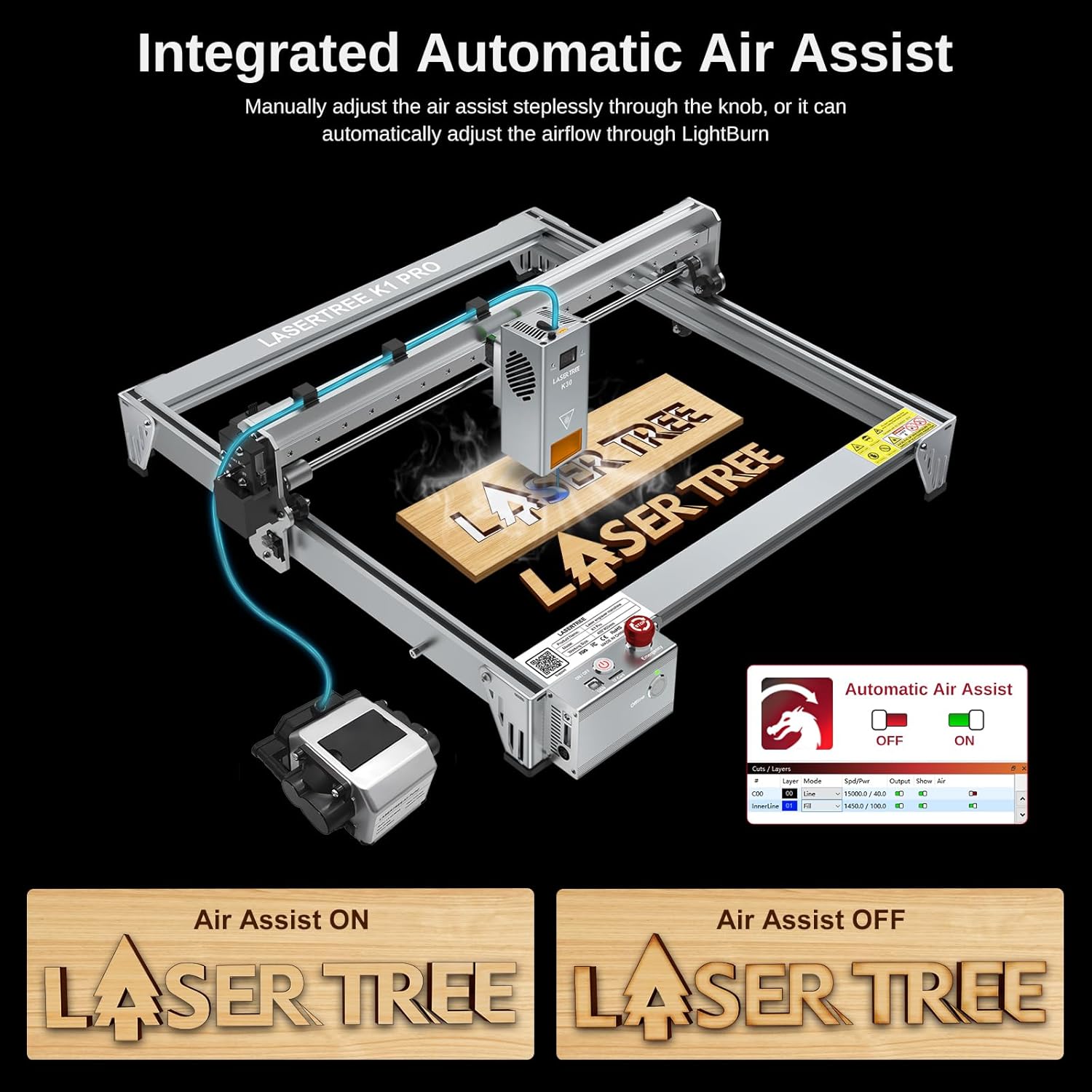
Image 5.2: The integrated air assist system and its control interface.
5.4 Material Compatibility and Cutting/Engraving Parameters
The K1 Pro 30W laser engraver offers powerful cutting capabilities across various materials. Optimal parameters may vary based on material density and desired outcome.

Immaġni 5.3: Eż.amples of one-pass cutting capabilities with recommended speeds.
| Materjal | Ħxuna | Veloċità |
|---|---|---|
| Plywood tal-basswood | 15mm | 100mm/min |
| Injam tal-Arżnu | 20mm | 95mm/min |
| Akriliku Iswed | 15mm | 25mm/min |
| MDF | 9mm | Mhux speċifikat |
Nota: These parameters are starting points. Always perform test cuts on scrap material to determine the best settings for your specific material and desired outcome.
6. Manutenzjoni
Manutenzjoni regolari tiżgura l-lonġevità u l-prestazzjoni ottimali tal-inċiżur bil-lejżer tiegħek.
- Naddaf il-Lenti: Periodically clean the laser lens with a specialized lens cleaning solution and cloth to maintain beam quality.
- Naddaf il-Magna: Use the provided clean brush to remove dust and debris from the machine's frame, rails, and moving parts.
- Illubrika l-Partijiet li Jiċċaqilqu: Apply a small amount of appropriate lubricant to the linear guides and screws as needed to ensure smooth movement.
- Spezzjona Kejbils: Regularly check all cables for wear or damage. Replace any damaged cables immediately.
7 Issolvi l-problemi
Din it-taqsima tindirizza kwistjonijiet komuni li tista' tiltaqa' magħhom. Għal problemi aktar kumplessi, ikkuntattja l-appoġġ għall-klijenti.
| Problema | Kawża Possibbli | Soluzzjoni |
|---|---|---|
| Il-lejżer mhux qed jispara jew il-ħruġ tiegħu huwa dgħajjef | Dirty lens, incorrect focus, low power setting, damaged laser module. | Clean the laser lens. Adjust focal length. Increase power setting in software. Inspect laser module for damage. |
| Il-magna mhux qed tikkonnettja mal-kompjuter | USB cable issue, driver not installed, incorrect COM port selected, software conflict. | Try a different USB cable. Install necessary drivers. Select the correct COM port in LightBurn/LaserGRBL. Restart software and machine. |
| Engraving/cutting quality is poor (burnt edges, uneven lines) | Incorrect speed/power settings, no air assist, dirty lens, material issues. | Adjust speed and power settings. Ensure air assist is active and properly configured. Clean the laser lens. Test on different material. |
| Machine movement is jerky or inaccurate | Loose belts, dirty linear guides, motor issues, incorrect software settings. | Check and tighten Y-axis timing belts. Clean and lubricate linear guides. Verify software settings for speed and acceleration. |
| Emergency Stop activated unexpectedly | Safety sensor triggered (e.g., tilt, limit switch), electrical issue. | Check for any obstructions or machine tilt. Inspect limit switches. Power cycle the machine. |
If you encounter issues not listed here or require further assistance, please contact LASER TREE technical support.
8. Speċifikazzjonijiet
| Karatteristika | Dettall |
|---|---|
| Mudell | K1 Pro 30W Kit |
| Qawwa tal-Ħruġ tal-Laser | 30000mW (30W) |
| Preċiżjoni tal-Inċiżjoni | 0.01mm |
| Veloċità tal-inċiżjoni | Sa 20,000mm/min |
| Żona tax-Xogħol | 400mm x 400mm |
| Dimensjonijiet tal-Prodott | 17.5 x 17.5 x 7.5 pulzieri |
| Piż tal-oġġett | 25.8 liri |
| Air Assist System | Integrated Electromagnetic Pump, LightBurn control compatible |
| Inċiżjoni Offline | Supported via TF Card |
| Kompatibilità tas-Software | LightBurn, LaserGRBL |
| Sistema Operattiva | Mac OS, Windows |
| Karatteristiċi tas-Sigurtà | Limit Switches, Temperature Alert, Position Movement Protection (15°), Beam Detection, Emergency Stop Switch, Eye Protection |
| Materjal tal-qafas | All Aluminum Frame with Industrial Grade Linear Guide |

Image 8.1: Industrial-grade linear bearings for enhanced precision and speed.
9. Garanzija u Appoġġ
LASER TREE is committed to providing excellent customer service and support for your K1 Pro 30W Laser Engraver.
- Politika ta' Ritorn: Enjoy a 30-day return guarantee for any reason.
- Garanzija: The product is backed by a 1-year warranty from the date of purchase.
- Appoġġ Tekniku: Lifetime technical support is available. A dedicated technical and support team is ready to assist with any questions or issues you may encounter.
For support, please visit the official LASER TREE website or contact their customer service directly. You can also find more information and resources on the LASER TREE Store on Amazon.
10. Vidjows Uffiċjali tal-Prodott
No official seller videos were provided in the product data for this manual.