
1. Introduzzjoni
This manual provides instructions for the Varmilo Koi 73 JIS Keyboard with Sakura Switches (Model: VMMA73A039SAKURA). This keyboard features a unique design inspired by traditional Chinese Koi fish and water elements, combined with a modern aesthetic. It is a compact 65% size keyboard with a Japanese Industrial Standard (JIS) layout, designed for both functionality and portability. The keyboard is equipped with Cherry-style stabilizers for a stable typing experience.
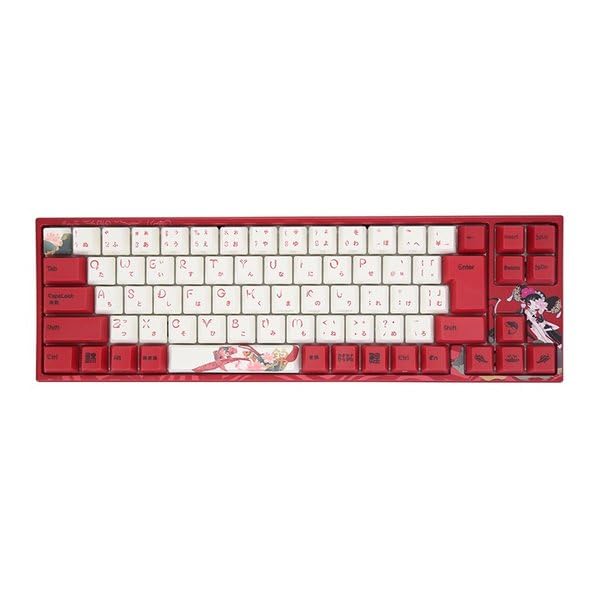
Image: Varmilo Koi 73 JIS Keyboard overview.
2. Karatteristiċi ewlenin
- Unique Koi Design: Features vibrant koi fish illustrations and a red aesthetic, developed in collaboration with illustrator Li Huan.
- JIS Layout: 73-key Japanese Industrial Standard layout for specific regional input needs.
- Compact 65% Size: Optimizes desk space while retaining essential function and arrow keys.
- Customizable Switches: Offers a choice of Varmilo mechanical electrostatic capacity switches to suit individual typing preferences.
- Cherry-Style Stabilizers: Ensures consistent and stable key presses, especially for larger keys.
- Konnettività USB: Reliable wired connection for stable performance.
3. Gwida ta' Setup
3.1 Kontenut tal-Pakkett
Qabel ma tibda, jekk jogħġbok kun żgur li l-oġġetti kollha huma preżenti fil-pakkett:
- Varmilo Koi 73 JIS Keyboard
- Cable USB
- Manwal għall-Utent (dan id-dokument)
3.2 Konnessjoni tat-Tastiera
To connect your Varmilo Koi 73 keyboard to your computer, follow these steps:
- Sib il-port USB-C fuq wara tat-tastiera.
- Qabbad tarf wieħed tal-kejbil USB provdut mal-port USB-C tat-tastiera.
- Qabbad it-tarf l-ieħor tal-kejbil USB ma 'port USB disponibbli fuq il-kompjuter tiegħek.
- It-tastiera għandha tiġi rikonoxxuta awtomatikament mis-sistema operattiva tiegħek.
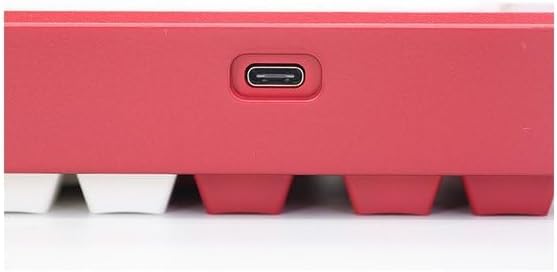
Image: USB-C port for keyboard connection.
3.3 Installazzjoni tas-Sewwieq (Mhux obbligatorja)
For advanced customization and optimal performance, it is recommended to install the Varmilo driver software. This software allows you to remap keys, adjust performance settings, and customize lighting effects.
Video: This video demonstrates the driver installation process and software usage for Varmilo keyboards. While it features the Muse65 model, the steps for driver installation and basic software navigation are generally applicable to other Varmilo keyboards like the Koi 73.
Please visit the official Varmilo website for the latest driver downloads specific to your keyboard model. Follow the on-screen instructions during installation.
4. Istruzzjonijiet Operattivi
4.1 Funzjonijiet Bażiċi tat-Tastiera
The Varmilo Koi 73 keyboard features a standard JIS layout. Most keys function as labeled. For special functions, refer to the combination keys below.
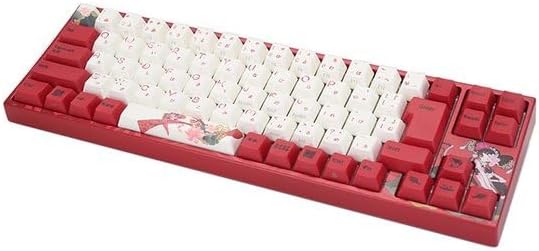
Immaġni: Fuqview of the Varmilo Koi 73 JIS Keyboard layout.
4.2 Function (Fn) Key Combinations
Since this is a 73-key layout, some functions are accessed via the Fn key. Hold down the Fn key and press the corresponding key to activate its secondary function. Common Fn combinations include:
- Fn + F1-F12: Multimedia controls (e.g., volume, play/pause).
- Fn + Tasti tal-Vleġġa: Page Up/Down, Home/End (specific to model, refer to keycap legends).
- Fn + Win Key: Locks/unlocks the Windows key.

Image: Left side keys, often used with Fn for additional functions.
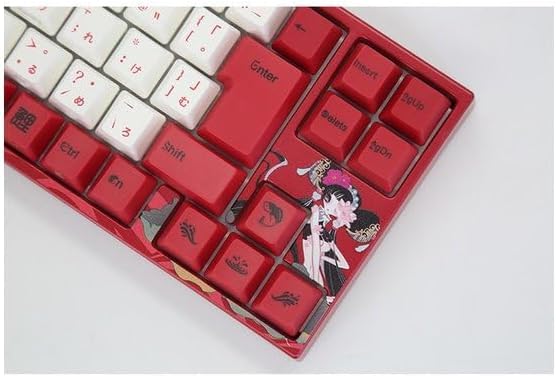
Image: Right side keys, including navigation and utility keys.
4.3 Effetti tad-Dawl
The Varmilo Koi 73 keyboard supports various RGB lighting effects. You can cycle through different modes and adjust brightness using specific key combinations. Refer to your keyboard's specific keycap legends or the driver software for detailed lighting controls.
Video: This video showcases various RGB lighting effects on a Varmilo keyboard. While the model shown is Muse65, it provides a general idea of the dynamic lighting capabilities available on Varmilo keyboards, including the Koi 73.
5. Manutenzjoni u Kura
Proper maintenance ensures the longevity and optimal performance of your Varmilo Koi 73 keyboard.
- Tindif tal-Għotjien taċ-Ċwievet: Gently remove keycaps using a keycap puller. Clean the keycaps with a soft cloth dampLaħlaħ b'sapun ħafif u ilma. Kun żgur li jkunu niexfa għalkollox qabel ma terġa' twaħħalhom.
- Tindif tal-Korp tat-Tastiera: Use a soft, dry cloth to wipe down the keyboard body. For stubborn dirt, a slightly damp cloth with a small amount of isopropyl alcohol can be used. Avoid excessive moisture.
- Tneħħija tat-Trab: Uża arja kkompressata biex tneħħi t-trab u l-fdalijiet minn bejn iċ-ċwievet.
- Evita Likwidi: Żomm il-likwidi 'l bogħod mit-tastiera biex tevita l-ħsara.
- Kura tal-Cable: Do not bend or crimp the USB cable excessively.
6 Issolvi l-problemi
If you encounter issues with your Varmilo Koi 73 keyboard, try the following solutions:
- It-Tastiera Mhux Tirrispondi:
- Kun żgur li l-kejbil USB huwa konness sew kemm mat-tastiera kif ukoll mal-kompjuter.
- Ipprova qabbad it-tastiera ma' port USB differenti fuq il-kompjuter tiegħek.
- Ibda mill-ġdid il-kompjuter tiegħek.
- Jekk qed tuża hub USB, ipprova qabbad direttament mal-kompjuter.
- Ċwievet Mhux Reġistrazzjoni:
- Check for any debris or foreign objects under the keycaps.
- If specific keys are not working, consider reinstalling the keyboard driver.
- Kwistjonijiet ta' Dawl:
- Ensure the keyboard driver is installed and up to date.
- Use the Fn key combinations or driver software to adjust lighting modes and brightness.
- Windows Key Locked:
- Agħfas Fn + Ċavetta tar-Riċeviment biex taqleb il-illokkjar taċ-ċwievet tal-Windows.
If the problem persists, please contact Varmilo customer support for further assistance.
7. Speċifikazzjonijiet
| Brand | Varmilo |
| Numru tal-Mudell | VMMA73A039SAKURA |
| Layout tat-Tastiera | 73-key JIS (Japanese Industrial Standard) |
| Konnettività | USB bil-fili |
| Tip ta' Swiċċ | Mechanical (Linear) |
| Apparati Kompatibbli | Laptop |
| Dimensjonijiet tal-Prodott | 34.2 ċm (L) x 34.2 ċm (W) x 5.1 ċm (H) |
| Komponenti Inklużi | Cable USB |
8. Garanzija u Appoġġ
Varmilo products typically come with a manufacturer's warranty. Please refer to the warranty card included with your product or visit the official Varmilo websit għal termini u kundizzjonijiet dettaljati tal-garanzija.
For technical support, driver downloads, or further inquiries, please visit the official Varmilo support page or contact their customer service.
Official Varmilo Websit: www.varmilo.com