
SECUKEY Vcontrol 4K MF
SECUKEY Vcontrol 4K MF Access Control System User Manual
Model: Vcontrol 4K MF
1. Introduzzjoni
The SECUKEY Vcontrol 4K MF is an advanced access control system designed for various applications, including Bed and Breakfasts (B&B), hostels, agritourism, and holiday homes. This device integrates Mifare card reading, PIN code entry, and smartphone control via Wi-Fi and Bluetooth connectivity.
It features a built-in camera for video calls and video surveillance, enhancing security and convenience. The system is managed through the Tuya Smart or Smart Life application, available for both iOS and Android devices, offering comprehensive user management and access logging capabilities.
With its robust IP65 rating and anti-vandal metal casing, the Vcontrol 4K MF is suitable for outdoor installation, providing reliable access management in various environmental conditions.
2. Informazzjoni dwar is-Sigurtà
- Ensure the power supply (DC 12-18V) meets the specified requirements to prevent damage to the device. Power supply is not included.
- Installation should be performed by qualified personnel to ensure proper wiring and functionality.
- Do not expose the device to extreme temperatures outside the specified range (-40 °C to 60 °C) or humidity levels (0% to 92% RH).
- Avoid using corrosive cleaners or solvents on the device surface. Use a soft, damp drapp għat-tindif.
- Żomm l-apparat 'il bogħod minn interferenza elettromanjetika qawwija.
3. Prodott Aktarview
The Vcontrol 4K MF features a sleek design with a backlit keypad and integrated camera. Its zinc alloy casing provides durability and an IP65 protection rating, making it resistant to dust and water jets.

Figura 3.1: Quddiem view of the Vcontrol 4K MF access control device alongside a smartphone showing its video calling feature.
3.1. Dimensjonijiet
The compact design of the Vcontrol 4K MF allows for discreet installation. Refer to the diagram below for precise measurements.

Figure 3.2: Physical dimensions of the Vcontrol 4K MF device (Height: 142mm, Width: 48mm, Depth: 22mm).
3.2. Karatteristiċi ewlenin
- Modi ta' Aċċess: Mifare Card (13.56 MHz), PIN Code (4-6 digits), Smartphone App.
- Kapaċità tal-Utent: Up to 1,000 users (990 PIN/card users + 10 visitor users); up to 500 users via app.
- Konnettività: Integrated Wi-Fi (2.4G) and Bluetooth.
- Kamera: For video calls and video surveillance.
- Protezzjoni: IP65 rated, anti-vandal metal casing.
- Ħruġ tar-Relay: One internal relay for door/gate opening, adjustable time (0-99 seconds, default 5 seconds).
- Wiegand: Wiegand 26-44 bit In&Out (default 34 bit).
- Kompatibilità tal-App: Tuya Smart or Smart Life (iOS/Android).
4. Setup
4.1. Konsiderazzjonijiet tal-Installazzjoni
For optimal performance, ensure stable Wi-Fi coverage at each installation point. The device requires a DC 12-18V power supply (not included).

Figura 4.1: Eżample of Vcontrol 4K MF installation on a door, highlighting Wi-Fi connectivity and mobile app integration.
4.2. Dijagramma tal-Wajers (Kunċettwali)
The Vcontrol 4K MF provides connections for relay output, an exit button, and Wiegand In&Out. Consult a professional electrician for detailed wiring based on your specific access control setup.
- Ħruġ tar-Relay: Connects to the electronic lock or gate mechanism.
- Buttuna tal-Ħruġ: For internal door release.
- Wiegand In&Out: For integration with external Wiegand readers or controllers.
4.3. Installazzjoni tal-App u Setup Inizjali
Download the "Tuya Smart" or "Smart Life" application from the Google Play Store (for Android) or Apple App Store (for iOS). The app is free and available in English and Italian.
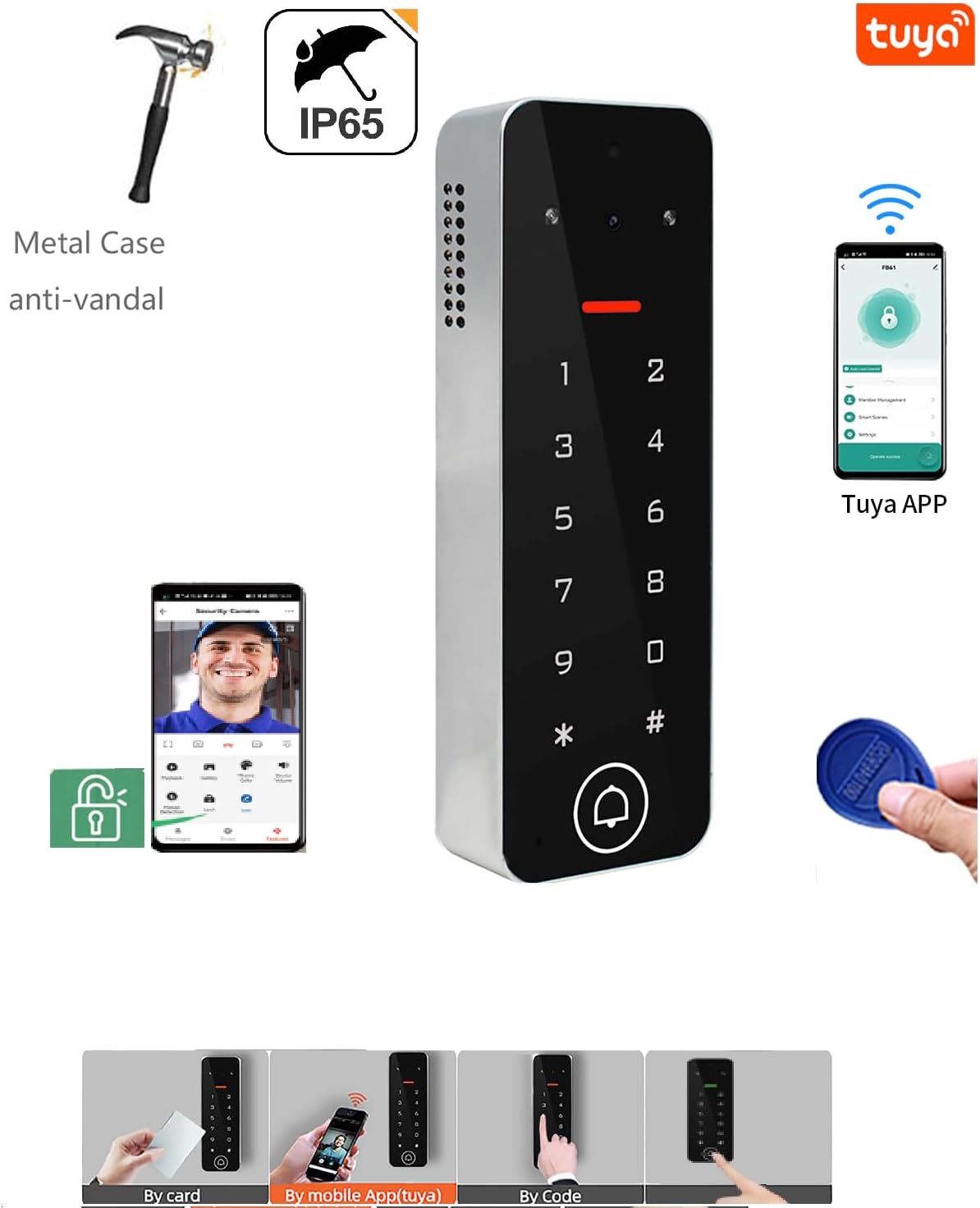
Figura 4.2: Aktarview of device features including Tuya App integration and multiple access methods.
Follow the in-app instructions to register an account and add your Vcontrol 4K MF device. Ensure your smartphone is connected to a 2.4GHz Wi-Fi network during the pairing process.

Figure 4.3: TuyaSmart app interface for managing access, including temporary passwords and user cards.
5. Istruzzjonijiet Operattivi
5.1. Metodi ta' Aċċess
- Mifare Card: Present a registered Mifare 13.56 MHz card to the reader area (2-4 cm reading distance).
- Kodiċi PIN: Enter your 4-6 digit PIN code on the backlit keypad.
- App għal Smartphone: Use the Tuya Smart/Smart Life app to remotely unlock the door/gate.
5.2. User Management via App
The app allows for comprehensive management of users and access permissions.
- Adding/Deleting Users: Super Admin or Admin users can add or delete up to 500 users (guests) directly through the app.
- Temporary Codes: Generate PIN codes with a specific validity period or one-time use.
- Aċċess Skedat: Set weekly access schedules for specific users.
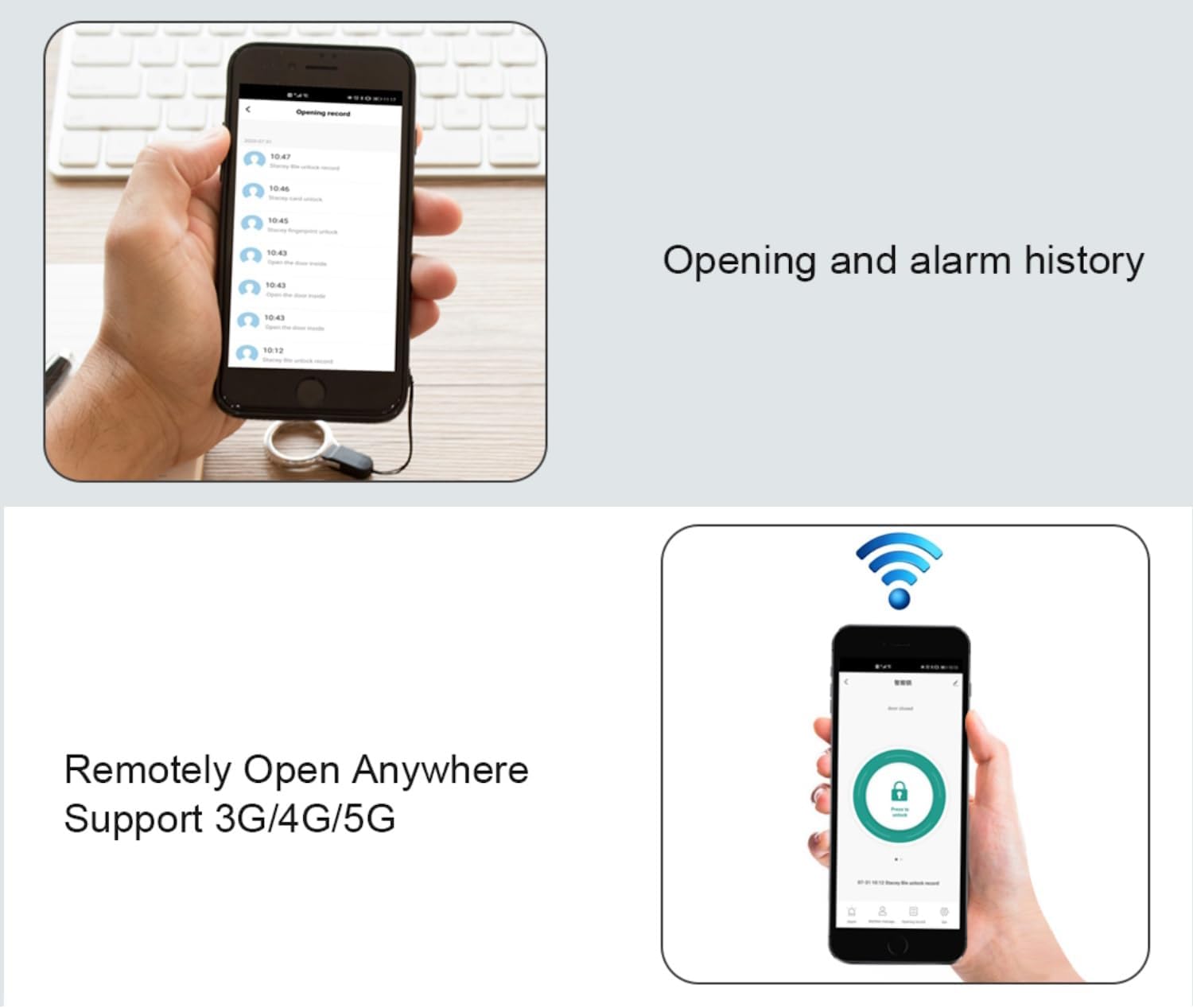
Figure 5.1: User management interface for adding and deleting users.
5.3. Video Calling and Surveillance
The integrated camera enables real-time video communication and surveillance of the surrounding area.
- Videophone Function: Receive audio/video calls from visitors at the access point directly on your smartphone. You can then remotely unlock the door.
- Video Surveillance: Monitor the area around the access control device at any time through the app.
- Viżjoni bil-lejl: The device supports IR-CUT for clear night vision, displaying images in black and white during low-light conditions.

Figure 5.2: Smartphone interface for receiving video calls from the Vcontrol 4K MF.

Figure 5.3: Day and Night Vision capabilities of the Vcontrol 4K MF.
5.4. Access Reports and History
The app provides detailed reports of authorized access and logs of attempted access, including photos for verification.
- Check In/Out: Track access events by badge or PIN code.
- Remote Open: Unlock the door remotely from anywhere using 3G/4G/5G network connectivity on your smartphone.

Figure 5.4: Access history and remote unlock features in the app.
6. Manutenzjoni
- Tindif: Regularly wipe the device surface with a soft, slightly damp drapp. Tużax tindif jew solventi li joborxu.
- Kundizzjonijiet Ambjentali: Ensure the device operates within its specified temperature (-40 °C to 60 °C) and humidity (0% to 92% RH) ranges to prolong its lifespan.
- Aġġornamenti tal-Firmware: Check the Tuya Smart/Smart Life app periodically for any available firmware updates for your device to ensure optimal performance and security.
7 Issolvi l-problemi
| Problema | Kawża Possibbli | Soluzzjoni |
|---|---|---|
| Apparat mhux mixgħul. | L-ebda provvista tal-enerġija jew volum mhux korretttage. | Ensure DC 12-18V power supply is connected correctly. Check power source. |
| Ma tistax tikkonnettja mal-Wi-Fi. | Password tal-Wi-Fi mhux korretta, netwerk ta' 5GHz, jew sinjal dgħajjef. | Verify Wi-Fi password. Ensure you are connecting to a 2.4GHz network. Move device closer to router or use a Wi-Fi extender. |
| Card/PIN access denied. | Card not registered, incorrect PIN, or user permissions expired. | Register the card/PIN via the app. Verify the PIN code. Check user validity period in the app. |
| Video call not working. | Poor network connection, app not running in background, or camera obstruction. | Check Wi-Fi/mobile data signal strength. Ensure app permissions allow background activity and notifications. Clean camera lens. |
| Remote unlock unresponsive. | No internet connection on device or smartphone, or relay issue. | Verify device's Wi-Fi connection. Check smartphone's internet connectivity. Consult an installer if relay is suspected. |
8. Speċifikazzjonijiet
| Karatteristika | Dettall |
|---|---|
| Brand | SECUKEY |
| Numru tal-Mudell | Vcontrol 4K MF |
| Kulur | Fidda u Iswed |
| Provvista tal-Enerġija | DC 12-18V (Power supply not included) |
| Lock Output Tagħbija | 2 Amps max |
| Relay Opening Time | Adjustable 0-99 seconds (Default: 5 seconds) |
| Tip ta' Karta | Mifare 13.56 MHz |
| Badge Reading Distance | 2-4 ċm |
| Tul tal-Kodiċi PIN | 4-6 ċifri |
| Kapaċità tal-Utent | Up to 1,000 (990 PIN/Card + 10 Visitor); Up to 500 via App |
| Konnettività | Integrated Wi-Fi (2.4G), Bluetooth |
| Klassifikazzjoni tal-Protezzjoni | IP65 |
| CasinMaterjal | Liga taż-żingu |
| Dimensjonijiet (HxWxD) | 142 x 48 x 22 mm |
| Piż | 315 g |
| Firxa tat-Temperatura | -40 °C ~ 60 °C |
| Umdità | 0% ~ 92% RH |
| Kompatibilità tal-App | Tuya Smart, Smart Life (iOS, Android) |
9. Garanzija u Appoġġ
This product is covered by a standard manufacturer's warranty. Please refer to the purchase documentation for specific warranty terms and conditions.
For technical support, troubleshooting assistance, or warranty claims, please contact your retailer or the manufacturer's customer service. Keep your purchase receipt and product model number (Vcontrol 4K MF) readily available when seeking support.
Ask a question about this manual
Ask about setup, troubleshooting, compatibility, parts, safety, or missing instructions. Manuals+ will review the question and use this page’s manual context to help answer it.