
Introduzzjoni
Thank you for choosing the TECKNET Ergonomic Wireless Rechargeable Mouse. This manual provides essential information for setting up, operating, and maintaining your new mouse. Please read it carefully to ensure optimal performance and longevity of your device.
Prodott Overview
Karatteristiċi ewlenin:
- Disinn Ergonomiku: Vertical orientation to reduce wrist strain and promote a natural hand posture.
- Batterija rikarikabbli: Built-in 600 mAh battery, providing up to 2 months of use on a 1.5-hour charge.
- DPI aġġustabbli: Ħames livelli ta' sensittività (800/1600/2400/3200/4800 DPI) għal kontroll preċiż.
- Klikks Siekta: Reduces click noise by over 90% for a quiet working environment (forward/backward buttons are not silent).
- Konnettività bla fili 2.4G: Stable connection with a range of up to 10 meters.
- 6 Buttuni: Left, Right, Scroll Wheel, DPI Switch, Forward, and Backward buttons.
- Kompatibilità Wiesgħa: Supports Windows 11/10/8/7/XP/2003/2000, Mac, PC, and Linux systems. (Note: Side buttons are not available for Mac or iOS systems).
Kontenut tal-Pakkett:
- TECKNET Ergonomic Wireless Rechargeable Mouse
- 2.4G USB Riċevitur
- Cable tal-Iċċarġjar tal-USB
- Manwal għall-Utent

Image: The TECKNET Ergonomic Wireless Rechargeable Mouse in black, showcasinid-disinn vertikali tiegħu.
Setup Istruzzjonijiet
- Iċċarġja l-Ġurdien: Before first use, connect the mouse to a USB power source using the provided USB charging cable. The LED indicator will show charging status. A full charge takes approximately 1.5 hours.
- Daħħal ir-Riċevitur USB: Locate the 2.4G USB receiver stored in the compartment at the bottom of the mouse. Plug the receiver into an available USB port on your computer.
- Qawwa Mixgħul: Turn on the mouse using the ON/OFF switch located on the bottom of the mouse.
- Konnessjoni Awtomatika: The mouse should automatically connect to your computer. If it does not, ensure the receiver is securely plugged in and the mouse is powered on.

Image: The ergonomic mouse connected to a charging cable, illustrating the charging process.

Image: A visual representation of the 2.4G wireless connection, showing the mouse and the USB receiver plugged into a laptop.
Istruzzjonijiet Operattivi
Funzjonijiet tal-buttuna:

Image: A diagram illustrating the location and function of each button on the ergonomic mouse.
- Buttuna tax-Xellug: Funzjoni standard tal-ikklikkjar tax-xellug.
- Buttuna tal-lemin: Funzjoni standard tal-ikklikkjar tal-lemin.
- Scroll Wheel: Skrollja 'l fuq/'l isfel, ikklikkja bil-buttuna tan-nofs.
- Buttuna tas-Swiċċ tad-DPI: Located on top, cycles through DPI settings (800/1600/2400/3200/4800).
- Buttuna 'l quddiem: Jinnaviga 'l quddiem ġewwa web browsers jew file explorers. (Not available for Mac/iOS).
- Buttuna b'lura: Jinnaviga lura ġewwa web browsers jew file explorers. (Not available for Mac/iOS).
Aġġustament DPI:
Press the DPI switch button (located behind the scroll wheel) to cycle through the five available DPI settings: 800, 1600, 2400, 3200, and 4800. Each press changes the sensitivity, allowing you to adjust cursor speed to your preference or task requirements.
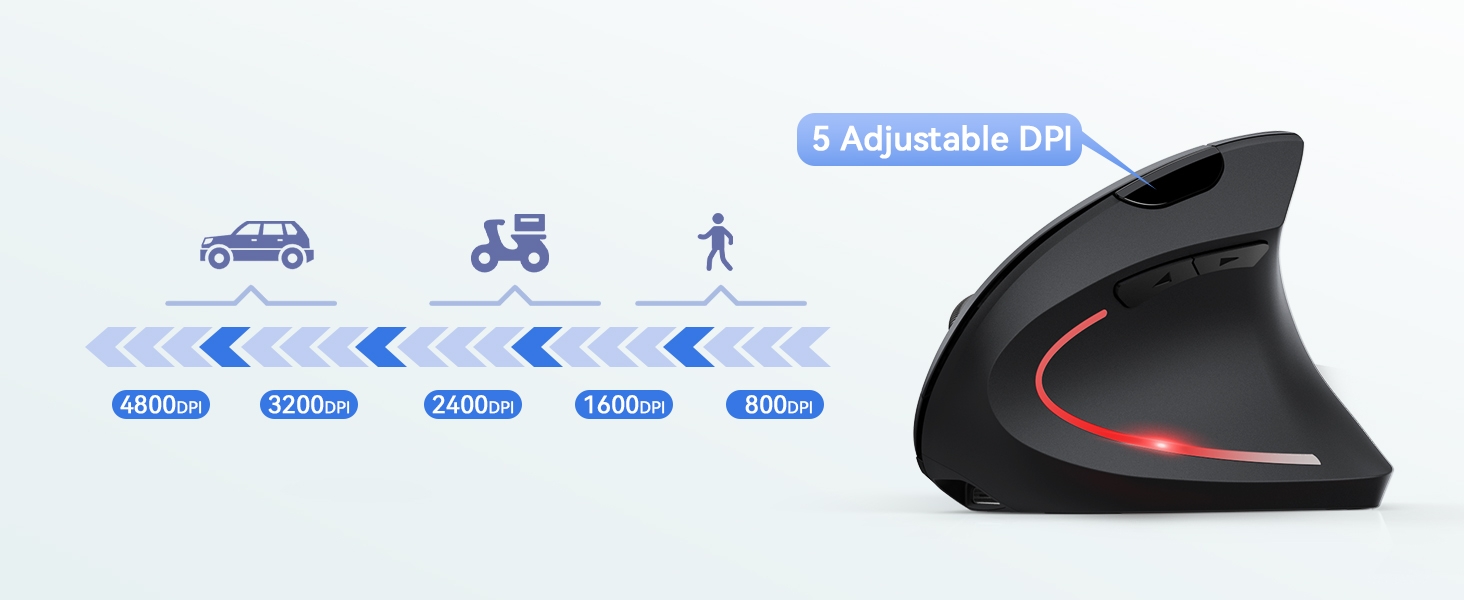
Image: A diagram illustrating the 5 adjustable DPI levels (800-4800) and the DPI switch button.
Ergonomic Usage:
The vertical design of this mouse is intended to promote a more natural hand and wrist posture, reducing pronation and potential discomfort associated with traditional mice. Position your hand comfortably over the mouse, allowing your wrist to remain in a neutral, handshake-like position.

Image: A technical diagram showing the 52-degree ergonomic grip angle of the mouse, with illustrations of correct and incorrect hand positions.

Image: A woman using the ergonomic mouse at a desk, highlighting the natural wrist alignment.
Manutenzjoni
- Tindif: Uża drapp artab u niexef biex tnaddaf il-maws. Evita li tuża kimiċi ħarxa jew materjali li joborxu.
- Ħażna: When not in use for extended periods, turn off the mouse to conserve battery life. Store it in a cool, dry place.
- Kura tal-batterija: Recharge the mouse when the battery indicator is low. Avoid fully draining the battery frequently to prolong its lifespan.
Issolvi l-problemi
| Problema | Soluzzjoni |
|---|---|
| Il-ġurdien ma jirrispondix |
|
| Il-moviment tal-cursor huwa irregolari jew bil-mod |
|
| Side buttons not working on Mac/iOS | The forward and backward buttons are not supported on Mac or iOS operating systems due to system limitations. This is normal operation. |
Speċifikazzjonijiet
| Karatteristika | Dettall |
|---|---|
| Isem tal-Mudell | TK-MS007 |
| Teknoloġija tal-Konnettività | 2.4G Wireless (Riċevitur USB) |
| Teknoloġija ta 'Sejbien tal-Moviment | Ottiċi |
| Livelli DPI | 800 / 1600 / 2400 / 3200 / 4800 |
| Numru ta' Buttuni | 6 |
| Orjentazzjoni tal-Idejn | Dritt |
| Tip ta 'batterija | Rechargeable (600 mAh) |
| Ħin tal-Iċċarġjar | Appross. 1.5 sigħat |
| Ħajja tal-batterija | Up to 2 months (average use) |
| Firxa Wireless | Sa 10 metri |
| Piż | 120 Gramm |
| Dimensjonijiet (L x W) | 12L x 7.5W cm |
| Sistemi Operattivi Kompatibbli | Windows, Mac, PC, Linux |
Garanzija u Appoġġ
TECKNET joffri 36-il xahar garanzija for this product from the date of purchase. This warranty covers manufacturing defects and ensures reliable performance under normal use.
For technical support, warranty claims, or any questions regarding your TECKNET product, please visit the official TECKNET website or contact their customer service. You can find more information and contact details on the TECKNET brand store page: Ħanut TECKNET.