1. Introduzzjoni
Thank you for choosing the Generic Q18 Gimbal Stabilizer. This device is designed to enhance your smartphone photography and videography experience by providing stable footage, versatile shooting modes, and intelligent features. Please read this manual carefully before use to ensure proper operation and to maximize the product's potential.
2. Prodott Aktarview u Karatteristiċi
The Q18 Gimbal Stabilizer combines multiple functionalities into one compact device, offering a seamless experience for content creators.
- Extendable Selfie Stick and Tripod: This feature provides versatility in shooting styles. Users can extend the selfie stick for wider shots or use the integrated tripod for stable shots on flat surfaces. This flexibility allows for various shooting scenarios, whether capturing landscapes, group photos, or vlogs.
- Stabbilizzazzjoni bi 3 Assi: The 3-axis stabilization system helps reduce shake and vibrations, resulting in smoother footage. This feature is essential for professional-looking videos, especially when shooting in motion or dynamic environments.
- Traċċar tal-wiċċ: Integrated face tracking technology allows the gimbal to automatically follow a person's face, keeping them centered within the frame. This is particularly useful for vlogs, live streaming, or any scenario where the subject moves but needs to remain in focus.
- Rotazzjoni ta' 360 Grad: The 360-degree rotation capability enables users to capture shots from various angles, adding dynamism to their content. It empowers creators to explore different perspectives and compose their shots creatively.
- Portable 4-in-1 Tripod Holder: The tripod function adds stability to shots, especially in situations where using the selfie stick alone may not be sufficient. It also enhances convenience by providing multiple functions in one compact device.
- Kompatibilità Wiesgħa: The Q18 Gimbal Stabilizer is compatible with both iPhone and Android smartphones, ensuring broad usability with popular devices.
3. Kontenut tal-Pakkett
Jekk jogħġbok iċċekkja l-pakkett għall-oġġetti li ġejjin:
- Q18 Stabbilizzatur tal-Gimbal
- Cable tal-Iċċarġjar tal-USB
- Manwal għall-Utent
Note: Specific contents may vary slightly. If any items are missing or damaged, please contact customer support.
4. Gwida ta' Setup
4.1 Iċċarġjar tal-Apparat
Before first use, fully charge the gimbal stabilizer. Connect the provided USB charging cable to the charging port on the device and to a standard USB power adapter (not included).
- Id-dawl indikatur se juri l-istatus tal-iċċarġjar.
- Charging time is approximately [Insert typical charging time, e.g., 2 hours].
4.2 L-Immuntar tal-Ismartphone Tiegħek
- Gently extend the phone clamp fuq il-gimbal.
- Poġġi l-ismartphone tiegħek bir-reqqa fil-klampamp, ensuring it is securely held and balanced.
- Adjust the phone's position to be as centered as possible to optimize stabilization.
4.3 Tixgħel/Jitfi
- Biex Tixgħel: Press and hold the power button for 3 seconds until the indicator light illuminates.
- Biex Tifi: Agħfas u żomm il-buttuna tal-enerġija għal 3 sekondi sakemm id-dawl indikatur jintefa.
4.4 Tqabbil tal-Bluetooth
- Kun żgur li l-gimbal huwa mixgħul.
- Attiva l-Bluetooth fuq l-ismartphone tiegħek.
- Fittex għal available devices and select "Q18" (or similar device name) to pair.
- Once paired, the indicator light on the gimbal will typically turn solid blue.
5. Istruzzjonijiet Operattivi
5.1 Kontrolli Bażiċi
Familiarize yourself with the main buttons and controls on your Q18 gimbal:
- Buttuna tal-Qawwa: Long press to power on/off. Short press for mode switching (if applicable).
- Buttuna tas-shutter: Press once to take a photo or start/stop video recording after Bluetooth pairing.
- Buttuna tal-Modalità: (If present) Short press to cycle through different gimbal modes (e.g., Pan Follow, Lock Mode).
5.2 Using Selfie Stick Mode
To use the Q18 as an extendable selfie stick:
- Ensure your phone is securely mounted.
- Extend the telescopic rod to your desired length.
- Adjust the angle of the phone holder.
- Use the Bluetooth shutter button to capture photos or videos.
5.3 Using Tripod Mode
For stable, hands-free shooting:
- Fold out the tripod legs at the base of the gimbal.
- Poġġi t-tripod fuq wiċċ ċatt u stabbli.
- Adjust the height using the extendable rod and the phone angle as needed.
5.4 Activating Face Tracking
The Q18 features intelligent face tracking for dynamic shots:
- Ensure the gimbal is powered on and your phone is paired via Bluetooth.
- Open the recommended companion app (if available, otherwise some phones may have native tracking).
- Select the face tracking feature within the app.
- Position yourself in front of the camera; the gimbal will automatically rotate to follow your face.

Image: The Q18 Gimbal Stabilizer actively tracking a person and child, keeping them centered in the frame during recording.
5.5 Utilizing 360-Degree Rotation and Inception Mode
The 360-degree rotation allows for creative panoramic shots and dynamic video effects:
- Panoramic Shots: In the companion app, select the panorama mode. The gimbal will rotate automatically to capture a wide-angle image.
- Mod tal-bidu: This mode allows the phone to rotate 360 degrees along its roll axis, creating a spinning effect. Activate this feature through the gimbal's mode button or companion app.
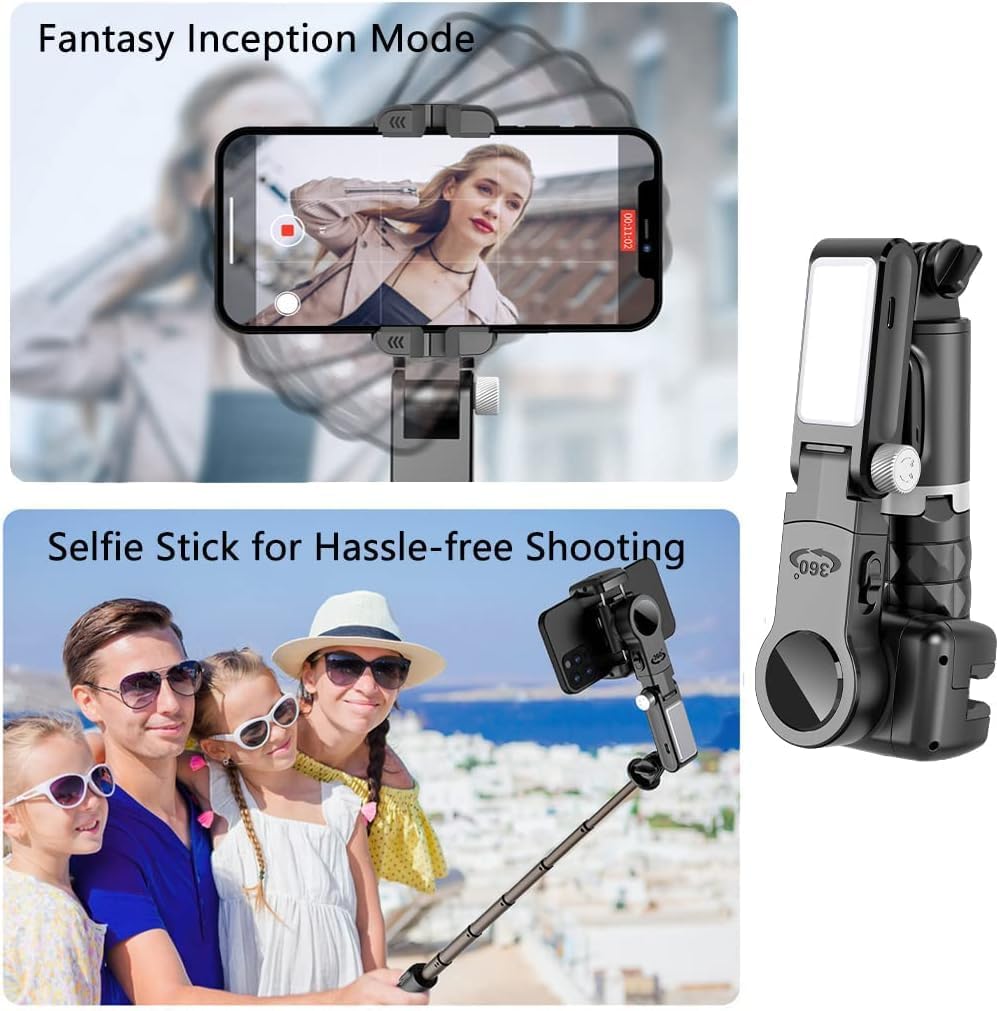
Image: Top shows the 'Fantasy Inception Mode' where the phone rotates for a dynamic video effect. Bottom shows the Q18 in selfie stick mode, used by a family for easy group photos.

Image: Top illustrates the gimbal's capability for panoramic shooting by rotating the phone horizontally. Bottom shows the gimbal in tripod mode, capturing a dynamic action shot, labeled 'Crossing creativity'.
5.6 Switching Between Portrait and Landscape Modes
The Q18 allows for quick switching between shooting orientations:
- Manually rotate the phone clamp to switch between portrait (vertical) and landscape (horizontal) orientations.
- Some models may offer an automatic rotation button; refer to the device's specific controls.
6. Manutenzjoni
To ensure the longevity and optimal performance of your Q18 Gimbal Stabilizer, follow these maintenance guidelines:
- Tindif: Use a soft, dry cloth to wipe the surface of the gimbal. Do not use liquid cleaners or solvents.
- Ħażna: Store the gimbal in a cool, dry place away from direct sunlight and extreme temperatures. When not in use for extended periods, ensure it is fully charged before storage and recharge every 3 months to maintain battery health.
- Immaniġġjar: Avoid dropping or subjecting the gimbal to strong impacts. Do not attempt to disassemble the device, as this will void the warranty.
7 Issolvi l-problemi
If you encounter issues with your Q18 Gimbal Stabilizer, please refer to the following common problems and solutions:
| Problema | Kawża Possibbli | Soluzzjoni |
|---|---|---|
| Il-gimbal ma jixgħelx. | Batterija baxxa. | Iċċarġja l-gimbal kompletament. |
| Ma tistax tikkonnettja permezz tal-Bluetooth. | Bluetooth not enabled on phone; gimbal not in pairing mode; interference. | Ensure Bluetooth is on. Restart gimbal and phone. Try pairing in a different location. |
| Phone is not stable or balanced. | Phone not centered in clamp; clamp not tight enough. | Re-position phone to be perfectly centered. Ensure clamp holds phone firmly. |
| It-traċċar tal-wiċċ mhux qed jaħdem. | App not open or feature not activated; poor lighting; face obscured. | Ensure companion app is running and tracking is enabled. Provide adequate lighting. Ensure face is clearly visible. |
Jekk il-problema tippersisti wara li tipprova dawn is-soluzzjonijiet, jekk jogħġbok ikkuntattja l-appoġġ għall-klijenti għal aktar assistenza.
8. Speċifikazzjonijiet
| Karatteristika | Dettall |
|---|---|
| Isem tad-Ditta | Ġeneriċi |
| Numru tal-Mudell | Q18 |
| Dimensjonijiet tal-Prodott | 7.5 x 6.6 x 15.5 ċm |
| Piż tal-oġġett | 250 gramma |
| Daqs mitwi | 15.5 ċentimetru |
| Apparati Kompatibbli | Smartphones (iPhone, Android) |
| ASIN | B0CZ7MLZJT |
9. Garanzija u Appoġġ
The Generic Q18 Gimbal Stabilizer comes with a standard manufacturer's warranty. Please refer to the warranty card included in your package for specific terms and conditions. For technical support, troubleshooting assistance, or warranty claims, please contact the retailer or manufacturer's customer service department.
Żomm l-irċevuta tax-xiri tiegħek bħala prova tax-xiri għal skopijiet ta' garanzija.


