
Introduzzjoni
This manual provides detailed instructions for the safe and effective use of your Andoer Portable Digital Camera. Please read this manual thoroughly before operating the device and retain it for future reference.
Kontenut tal-Pakkett
Iċċekkja li l-oġġetti kollha elenkati hawn taħt huma inklużi fil-pakkett tiegħek:
- 1 x Andoer Digital Camera
- Karta tal-Memorja 1 x 32GB
- 1 x Kejbil USB (Tip Ċ)
- 1 x Drapp tat-Tindif
- 1 x Lanyard
- 1 x Borża tal-Ħażna
- 1 x Manwal għall-Utent
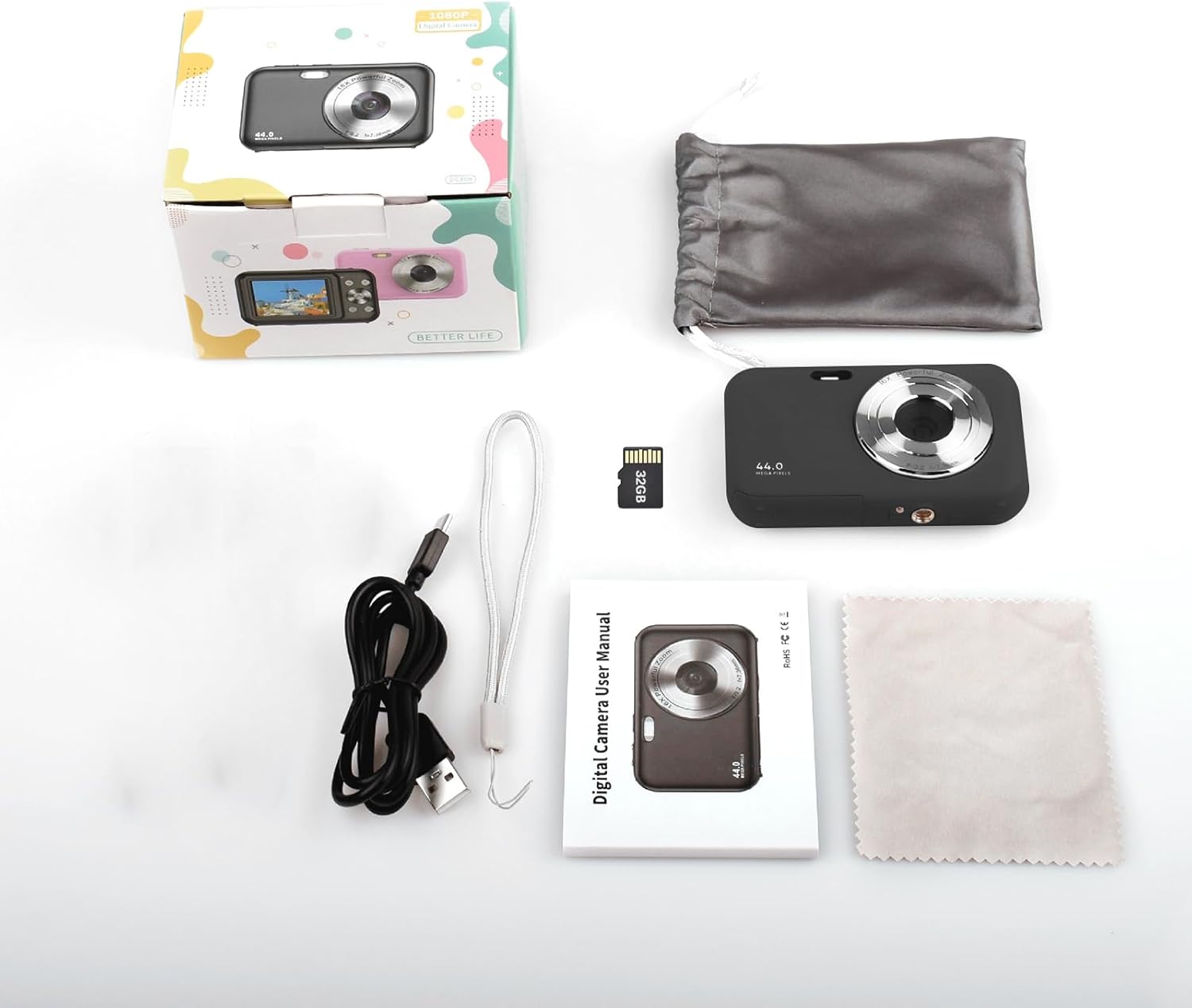
Image: Contents of the Andoer Digital Camera package.
Camera Matulview
Iffamiljarizza ruħek mad-diversi partijiet tal-kamera tiegħek.

Image: Multi-angle view of the Andoer Digital Camera, highlighting its compact design and button layout.
- Quddiem: Lens, Flash, Microphone.
- Fuq: Power Button, Shutter Button.
- Dahar: 2.4-inch IPS Screen, Navigation Buttons (Up, Down, Left, Right, OK), Menu Button, Mode Button, Zoom (W/T).
- In-naħa: USB Type-C Port.
- Qiegħed: Battery/Memory Card Compartment.
Setup
1. Iċċarġjar tal-batterija
The camera is equipped with a built-in 700mAh rechargeable lithium battery. Before first use, fully charge the battery.
- Connect the included USB Type-C cable to the camera's USB port.
- Qabbad it-tarf l-ieħor tal-kejbil USB ma' adapter tal-enerġija USB (mhux inkluż) jew mal-port USB tal-kompjuter.
- Id-dawl indikatur tal-iċċarġjar se jixgħel. Se jintefa jew jibdel il-kulur ladarba l-iċċarġjar ikun komplut.
Nota: The camera can be used while charging. A full charge provides approximately 150 minutes of continuous shooting or 90 minutes of video recording.

Image: Battery life information for the 700mAh battery.
2. Daħħal il-Kard tal-Memorja
The camera supports a 32GB memory card (included). Ensure the camera is powered off before inserting or removing the memory card.
- Locate the battery/memory card compartment cover on the bottom of the camera.
- Iftaħ il-qoxra.
- Insert the 32GB memory card into the designated slot with the metal contacts facing the correct direction (refer to the diagram inside the compartment if available) until it clicks into place.
- Agħlaq l-għatu tal-kompartiment sew.
Importanti: Format the memory card in the camera's settings menu before first use to ensure optimal performance.
Istruzzjonijiet Operattivi
1. Tixgħil / Mitfi
- Biex tixgħel, agħfas u żomm il-buttuna Buttuna tal-Qawwa on the top of the camera.
- Biex tintefa, agħfas u żomm il-buttuna Buttuna tal-Qawwa again. The camera also features an auto power-off function (configurable in settings).
2. Teħid tar-Ritratti
The camera captures photos up to 44MP resolution.
- Ixgħel il-kamera.
- Ensure the camera is in photo mode (indicated on the 2.4-inch IPS screen). If not, press the Buttuna tal-Modalità biex taqleb.
- Frame your shot using the IPS screen.
- Agħfas il- Buttuna tax-Xatt halfway down to focus, then press it fully to take the picture.

Immaġni: Eżample of a high-resolution photo taken with the 44MP camera.
3. Reġistrar Vidjows
The camera records videos in 1080P resolution.
- Ixgħel il-kamera.
- Agħfas il- Buttuna tal-Modalità to switch to video recording mode.
- Agħfas il- Buttuna tax-Xatt to start recording. A red indicator will typically appear on the screen.
- Agħfas il- Buttuna tax-Xatt għal darb'oħra biex tieqaf tirrekordja.

Image: Screen view during 1080P video recording.
4. L-użu taż-Zoom Diġitali
The camera features 16X digital zoom.
- In photo or video mode, press the T (Telephoto) button biex iżżid.
- Agħfas il- W (Wide-angle) button biex iżżom.

Image: Comparison of 1x and 16x digital zoom effects.
5. Funzjonijiet Oħra
- Self-Timer: Set a delay (e.g., 2s, 5s, 10s) before a photo is taken. Access this option in the camera's menu.
- Sparar Kontinwu: Take multiple photos in quick succession. This setting is also found in the menu.
- Anti-Tħawwad: Digital image stabilization helps reduce blur from camera movement. This feature is typically enabled by default or can be toggled in settings.
- Daqq: Agħfas il- Buttuna ta 'Daqq (often indicated by a triangle icon) to view photos and videos. Use the navigation buttons to browse.
- Settings tal-menu: Agħfas il- Buttuna tal-menu to access various camera settings, including resolution, white balance, exposure, date/time, and formatting the memory card.
Trasferiment Files to a Computer or Phone
You can transfer photos and videos from the camera to a computer or a mobile phone.
1. Via USB Cable (to Computer)
- Connect the camera to your computer using the provided USB Type-C cable.
- Ixgħel il-kamera.
- The camera should appear as a removable disk or media device on your computer.
- Open the camera's folder and copy the desired files għall-kompjuter tiegħek.
2. Via Memory Card Reader (to Computer/Phone)
For direct transfer from the memory card, you can use a card reader.
- Remove the memory card from the camera.
- Insert the memory card into a compatible card reader.
- Connect the card reader to your computer or mobile phone (via an OTG adapter if necessary).
- Aċċess għall- files on the memory card and transfer them.

Image: OTG usage diagram for transferring files from memory card to phone.
Manutenzjoni
- Tindif tal-Korp tal-Kamera: Uża drapp artab u niexef biex timsaħ il-korp tal-kamera. Għal ħmieġ iebes, nixxef ftit.ampLaħlaħ id-drapp bl-ilma. Evita kimiċi ħarxa.
- Tindif tal-Lenti: Use the included cleaning cloth or a specialized lens cleaning cloth. Gently wipe the lens in a circular motion. Do not use abrasive materials.
- Kura tal-Iskrin: The 2.4-inch IPS screen can be cleaned with a soft, lint-free cloth. Avoid pressing too hard.
- Ħażna: When not in use for extended periods, store the camera in the provided storage bag in a cool, dry place, away from direct sunlight and extreme temperatures.
- Kura tal-batterija: Recharge the battery regularly, even if the camera is not used frequently, to maintain battery health. Avoid fully discharging the battery for long periods.
Issolvi l-problemi
| Problema | Kawża Possibbli | Soluzzjoni |
|---|---|---|
| Il-kamera ma tixgħelx. | Il-batterija hija eżawrita jew mhux imdaħħla sew. | Charge the battery fully. Ensure the battery is correctly inserted. |
| Ma nistax nieħu ritratti/nirrekordja vidjows. | Il-karta tal-memorja hija mimlija, mhux imdaħħla, jew korrotta. | Iċċekkja l-inserzjoni tal-karta tal-memorja. Ħassar il-memory cards mhux meħtieġa. files or replace the card. Format the card (this will erase all data). |
| L-immaġini huma mċajpra. | Lens is dirty, insufficient light, or camera shake. | Clean the lens. Ensure adequate lighting. Hold the camera steady or enable anti-shaking. |
| Il-kamera tiffriża jew ma tibqax tirrispondi. | Glitch tas-softwer jew batterija baxxa. | Remove and reinsert the battery (if possible) or press and hold the power button for 10 seconds to force a shutdown. Recharge the battery. |
| Ma jistax jittrasferixxi files għall-kompjuter. | Konnessjoni USB mhux korretta jew problema bis-sewwieq. | Ensure the USB cable is securely connected. Try a different USB port or computer. Check if the camera is recognized as a device. |
Speċifikazzjonijiet
| Karatteristika | Dettall |
|---|---|
| Wiri | 2.4 pulzier IPS Screen |
| Riżoluzzjoni tal-vidjo | 1080P/720P/480P |
| Riżoluzzjoni tal-Immaġni | 44MP/42MP/36MP/24MP (Effective Still Resolution: 44 MP) |
| File Format | JPG (Image), AVI (Video) |
| Zoom Elettroniku | 16X |
| Port USB | Tip-Ċ |
| Batterija | 3.7V/ 700mAh Rechargeable Lithium Battery |
| Tul Fokali | f=7.36mm |
| Apertura | F/3.2 |
| Iffranka l-Enerġija | Auto power off in 1Min/2Mins/3Mins/4Mins/5Mins/10Mins |
| Sistema Appoġġjata | Windows XP, Vista, 7, 8, 10, Mac 10.2 and above |
| Kapaċità tal-Ħżin tal-Memorja | 32 GB (inklużi) |
| Auto Focus Teknoloġija | Sejbien tal-kuntrast |
| Stabbilizzazzjoni tal-Immaġni | Diġitali |
| Deskrizzjoni tal-Firxa ta' Età | Kid |
Garanzija u Appoġġ
For warranty information and technical support, please refer to the contact details provided with your purchase documentation or visit the official Andoer websit. Żomm il-prova tax-xiri tiegħek għal talbiet ta' garanzija.