
PECSU G5
PECSU G5 32GB MP3 Player with Bluetooth and WiFi User Manual
Mudell: G5
1. Introduzzjoni
This manual provides detailed instructions for the operation and maintenance of your PECSU G5 32GB MP3 Player. Please read this manual thoroughly before using the device to ensure proper functionality and to maximize your user experience. The PECSU G5 is an Android-based music player designed for versatile media consumption, featuring parental controls, extensive app support, and robust connectivity.
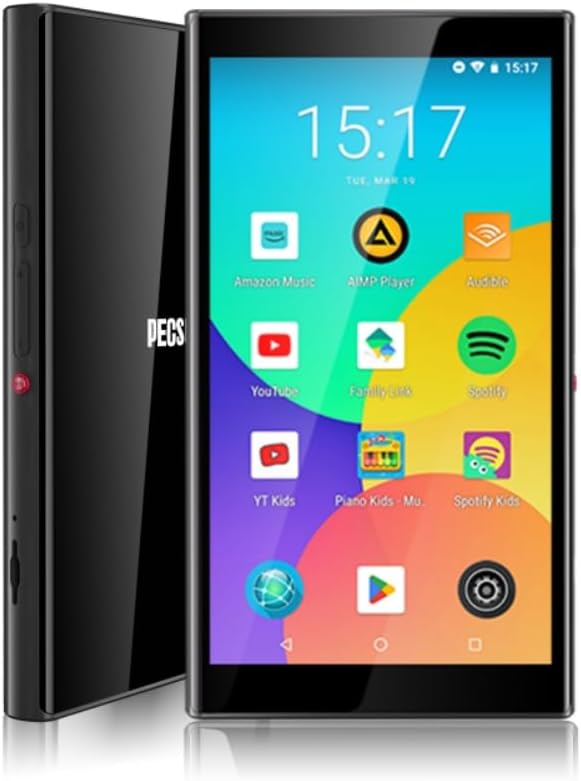
Immaġni 1.1: Minn quddiem u mill-ġenb view of the PECSU G5 MP3 Player, displaying its user interface with various application icons.
2. X'hemm fil-Kaxxa
Ivverifika li l-oġġetti kollha huma preżenti fil-pakkett:
- 1 × PECSU G5 Music Player
- 1 × Manwal għall-Utent
- 1 × Extra Screen Protector
- 1 × Cable tal-Iċċarġjar tat-Tip-Ċ
3. Prodott Aktarview
3.1 Karatteristiċi Fiżiċi

Image 3.1: A diagram illustrating the dimensions (5.24" height, 2.89" width, 0.47" thickness) and button layout of the PECSU G5. Labels indicate the On/Off button, Volume Up/Down, Recording Key, TF Card Port, Type-C Port, and 3.5mm Port.
The PECSU G5 features a sleek design with a 5-inch full touch screen. Key physical components include:
- Buttuna mixgħul/mitfi: Located on the side for powering the device on or off.
- Buttuni tal-Volum: Separate buttons for increasing u tnaqqisasinvolum ta' g.
- Recording Key: A dedicated button for one-touch voice recording.
- Port tal-Karta TF: Slot for inserting a Micro SD card to expand storage.
- Port tat-Tip-C: Għall-iċċarġjar u t-trasferiment tad-dejta.
- Jack Awdjo 3.5mm: Għall-konnessjoni ta' headphones bil-fili.
3.2 Karatteristiċi ewlenin
- Kontrolli tal-Ġenituri: Pre-installed Family Link application allows monitoring, setting usage times, and disabling apps. All app downloads require parental permission.
- Sistema Operattiva: Android 8.1 system with an Octa-core 64-bit MTK chipset.
- Google Play Store: Pre-installed for downloading popular music, video, and reading applications such as Spotify, YouTube, Amazon Music, Audible, and Libby.
- Wiri: 5-inch HD IPS full touchscreen with 1080P video playback (720*1280 PX resolution).
- Konnettività: Bluetooth 5.0 for stable connections to speakers, earphones, and car audio systems. Dual-band Wi-Fi (2.4G & 5G) for fast data transfer and online streaming.
- Batterija: Built-in 3000mAh LCO Battery, providing approximately 15 hours of continuous music playback or 6 hours of video playback.
- Ħażna: 32GB internal ROM and 3GB RAM, expandable up to 1TB via Micro SD card (FAT32 format).
- Kwalità tal-Awdjo: Supports HiFi lossless music playback.
- Reġistratur tal-Vuċi: One-touch recording function.

Image 3.2: The PECSU G5 screen highlighting its 5-inch 1080P HD IPS display, emphasizing fast response, 720x1280 pixel resolution, and wider viewangoli.

Image 3.3: The PECSU G5 displaying its storage capabilities, including 3GB RAM, 32GB ROM, and support for up to 1TB TF Card expansion.

Image 3.4: An illustration of the PECSU G5's 3000mAh LCO battery, indicating up to 5 hours of video playback and up to 15 hours of music playback.

Image 3.5: A visual representation of the PECSU G5's 2-Way Bluetooth 5.0 feature, showing connections to headphones/earbuds, a portable speaker, and car audio systems.
4. Setup
4.1 Iċċarġjar tal-Apparat
- Connect the provided Type-C charging cable to the device's Type-C port.
- Plug the other end of the cable into a compatible USB power adapter (not included) or a computer's USB port.
- The device will indicate charging status on the screen. A full charge typically takes 2-3 hours.
4.2 Tixgħel/Jitfi
- Biex Tixgħel: Press and hold the On/Off button located on the side of the device until the screen illuminates.
- Biex Tifi: Press and hold the On/Off button until a power menu appears on the screen. Select "Power off" and confirm.
- Biex terġa' tibda: From the power menu, select "Restart."
4.3 Konfigurazzjoni Inizjali
Upon first power-on, you will be guided through an initial setup process:
- Agħżel il-lingwa preferuta tiegħek.
- Connect to a Wi-Fi network to enable internet access and app downloads.
- Sign in with your Google account. This is necessary for accessing the Google Play Store and utilizing parental controls.
- Follow on-screen prompts to complete the setup.
4.4 Daħħal Micro SD Card
To expand the device's storage:
- Locate the TF Card Port on the side of the device (refer to Image 3.1).
- Gently insert a Micro SD card (up to 1TB, FAT32 format recommended) into the slot until it clicks into place.
- The device will detect the new storage. You may need to format the card if prompted.
5. Istruzzjonijiet Operattivi
5.1 Navigazzjoni
The PECSU G5 features a full touchscreen interface. Use standard Android gestures:
- Tektek: Biex tagħżel oġġett jew tiftaħ app.
- Swipe: Biex tiskrollja minn listi jew taqleb bejn l-iskrins.
- Agħfas biex tiżżumja: In supported applications like image galleries or web browsers.
5.2 Konnessjoni mal-Wi-Fi
- Mur fuq Settings > Netwerk u internet > Wi-Fi.
- Ixgħel il-Wi-Fi On.
- Agħżel in-netwerk mixtieq tiegħek mil-lista u daħħal il-password jekk meħtieġ.
5.3 Tqabbil tal-Bluetooth
- Mur fuq Settings > Apparati konnessi > Bluetooth.
- Toggle Bluetooth On.
- Ensure your Bluetooth accessory is in pairing mode.
- Tektek Par apparat ġdid and select your accessory from the list.
5.4 Using Google Play Store
The Google Play Store allows you to download and install a wide variety of applications.

Image 5.1: The PECSU G5 screen displaying the Google Play Store icon prominently, surrounded by various popular app icons like Spotify, YouTube, and Amazon Music, indicating broad app compatibility.
- Tektek il- Play Store ikona fuq l-iskrin tad-dar.
- Fittex għal desired apps (e.g., Spotify, Pandora, Amazon Music, Libby, Audible).
- Tektek Installa biex tniżżel u tinstalla l-app.
5.5 Parental Controls (Family Link)
The PECSU G5 is designed with parental controls via the pre-installed Family Link app.

Image 5.2: The PECSU G5 screen showing the Family Link parental control interface, with options for daily limits, downtime, and blocked apps. The image also depicts a child sleeping with the device nearby, suggesting its use for controlled media consumption.
- Ensure Family Link is set up on both the PECSU G5 (for children) and your personal smartphone (for parents).
- From your parent device, you can:
- Monitor app usage and screen time.
- Set daily usage limits and device downtime.
- Block specific applications.
- App downloads from the Play Store will require parental approval.
5.6 Daqq ta' Mużika u Vidjow
- Use pre-installed music/video players or download your preferred apps from the Google Play Store.
- The device supports HiFi lossless audio formats and 1080P video playback.
5.7 Reġistrazzjoni tal-Vuċi
To use the voice recorder function:
- Agħfas iddedikat Ċavetta tar-Reġistrazzjoni on the side of the device (refer to Image 3.1).
- Alternatively, open the pre-installed Reġistratur applikazzjoni.
- Follow the on-screen prompts to start, pause, and save recordings.
5.8 File Trasferiment
Tista 'tittrasferixxi files to and from the PECSU G5 using the Type-C cable or wirelessly.
- Via USB Cable: Connect the device to a computer using the Type-C cable. On the device, select "File transfer" when prompted. The device will appear as a removable drive on your computer.
- Trasferiment bla fili: Utilize pre-installed file sharing apps or download third-party apps from the Play Store for wireless file ġestjoni.
6. Manutenzjoni
6.1 Tindif
- Uża drapp ratba u mingħajr lint biex tnaddaf l-iskrin u l-korp tal-apparat.
- Avoid using harsh chemicals or abrasive materials, as they may damage the screen or finish.
6.2 Kura tal-Batterija
- Biex ittawwal il-ħajja tal-batterija, evita li tesponi l-apparat għal temperaturi estremi.
- Tħallix il-batterija tiċċarġja kompletament ta' spiss. Iċċarġja l-apparat meta l-livell tal-batterija jkun baxx.
- Jekk l-apparat ma se jintużax għal perjodu twil ta' żmien, iċċarġjah sa madwar 50% qabel ma taħżnu.
6.3 Aġġornamenti tas-Software
- Iċċekkja perjodikament għal aġġornamenti tas-sistema biex tiżgura prestazzjoni u sigurtà ottimali.
- Mur fuq Settings > Sistema > Aġġornament tas-sistema biex tiċċekkja u tinstalla aġġornamenti disponibbli.
7 Issolvi l-problemi
If you encounter issues with your PECSU G5, refer to the following common problems and solutions:
| Problema | Soluzzjoni Possibbli |
|---|---|
| L-apparat ma jixgħelx | Ensure the device is charged. Connect to a power source and try again. If unresponsive, press and hold the power button for 10-15 seconds to force a restart. |
| Device freezes or is unresponsive | Press and hold the power button for 10-15 seconds to force a restart. If the issue persists, consider performing a factory reset (backup data first). |
| No sound from speaker or headphones | Check the volume level. Ensure headphones are properly connected or Bluetooth device is paired and connected. Test with different headphones or speakers. |
| Il-batterija tiskula malajr | Reduce screen brightness. Close unused background applications. Disable Wi-Fi and Bluetooth when not in use. Check for power-intensive apps. |
| Cannot connect to Wi-Fi or Bluetooth | Ensure Wi-Fi/Bluetooth is enabled in settings. Restart the device and your router/Bluetooth accessory. Verify network password. |
| App download issues from Play Store | Check Wi-Fi connection. Ensure sufficient storage space. Verify parental permissions if Family Link is active. Clear Play Store cache and data in settings. |
8. Speċifikazzjonijiet
| Karatteristika | Dettall |
|---|---|
| Isem tal-Mudell | G5 |
| Brand | PECSU |
| Sistema Operattiva | Android 8.1 |
| Proċessur | Octa-core 64-bit MTK chipset |
| Ħażna Interna (ROM) | 32 GB |
| RAM | 3 GB |
| Ħażna espansibbli | Up to 1 TB (Micro SD, Micro SDHC, Micro SDXC, FAT32 format) |
| Daqs tal-Iskrin | 5 Pulzier |
| Riżoluzzjoni tal-Iskrin | 1080P HD IPS (720*1280 PX) |
| Konnettività | Bluetooth 5.0, Dual-band Wi-Fi (2.4G & 5G) |
| Batterija | 3000mAh LCO Lithium Polymer |
| Ħajja tal-Batterija (Mużika) | Approx. 15 hours (Lab. Data) |
| Ħajja tal-Batterija (Vidjo) | Approx. 6 hours (Lab. Data) |
| Ħin tal-Iċċarġjar | 2-3 sigħat |
| Dimensjonijiet tal-Prodott | 0.47 x 2.83 x 5.2 pulzieri (12 x 72 x 133 mm) |
| Piż tal-oġġett | 6.5 uqija |
| Karatteristiċi Speċjali | Metal & Glass Back, One-Key Recording, Parental Controls, Split-screen Mode, App Store Support |
9. Garanzija u Appoġġ
The PECSU G5 MP3 Player is covered by a manufacturer's warranty. For specific warranty terms and conditions, please refer to the documentation included with your purchase or contact PECSU customer support.
For technical assistance, troubleshooting, or warranty claims, please contact PECSU customer support through the retailer where the product was purchased or visit the official PECSU websit għal informazzjoni ta' kuntatt.