
1. Introduzzjoni
Thank you for choosing the MAIRDI M890DCBTENC Bluetooth Headset. This manual provides essential information for setting up, operating, and maintaining your headset to ensure optimal performance and longevity. Please read this manual carefully before using the product.

Image 1: MAIRDI M890DCBTENC Bluetooth Headset.
Karatteristiċi ewlenin:
- Konnettività bla xkiel: Bluetooth V5.2 for stable and fast wireless connections.
- Awdjo HD: APTX and low latency technology for high-fidelity sound.
- Mikrofonu li Jħassar l-Istorbju bl-AI: Dual-mic technology filters out 98% of background noise for crystal-clear calls.
- Ħajja Estiża tal-Batterija: Up to 40 hours of talk and music time on a single charge.
- Tqabbil multipunt: Connects to two devices simultaneously (e.g., PC/laptop and mobile phone).
- Comfort & Adjustability: 330-degree rotatable microphone boom, adjustable headband, and super soft leather ear cushions.
- Iċċarġjar versatili: Includes a charging stand with an in-built Bluetooth receiver for plug-and-play PC connectivity, or charge via USB cable.
2. X'hemm fil-Kaxxa
Upon opening your MAIRDI M890DCBTENC Bluetooth Headset package, you should find the following items:
- MAIRDI M890DCBTENC Bluetooth Headset
- Charging Base (with integrated Bluetooth receiver)
- Cable tal-Iċċarġjar tal-USB
- Gwida għall-Utent
- Ġorru Borża
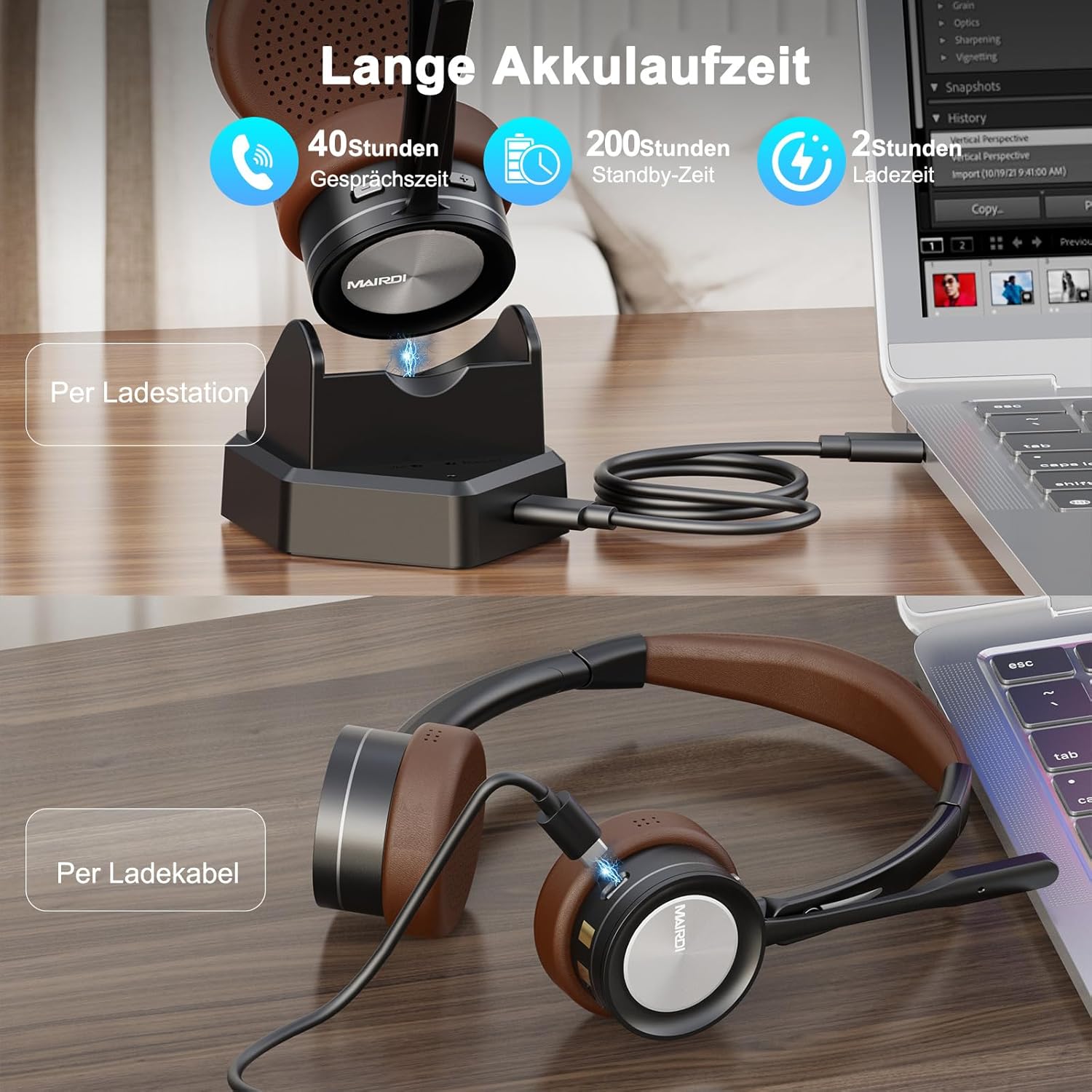
Image 2: The MAIRDI M890DCBTENC Headset with its charging base and USB cable.
3. Setup
3.1 Iċċarġjar inizjali
Before first use, fully charge your headset. Connect the USB charging cable to the charging base and a power source (e.g., computer USB port or wall adapter). Place the headset on the charging base. The indicator light will show charging status.

Image 3: The headset can be charged via the charging station or directly with the USB cable.
3.2 Konnessjoni ma' Apparat
Your headset offers two primary connection methods: via the charging base (with integrated Bluetooth receiver) for PCs without Bluetooth, or directly via Bluetooth to any compatible device.
3.2.1 Connecting via Charging Base (for PC)
- Connect the charging base to your PC's USB port using the provided USB cable. The base acts as a plug-and-play Bluetooth receiver.
- Turn on the headset. It will automatically attempt to pair with the connected charging base.
- Once connected, your PC should recognize the headset as an audio device. Select it as your input/output device in your system's sound settings.
3.2.2 Connecting via Bluetooth (Direct)
- Ensure the headset is powered on and in pairing mode (usually indicated by a flashing LED).
- On your device (PC, laptop, Mac, smartphone), go to Bluetooth settings.
- Fittex għal available devices and select "MAIRDI M890DCBTENC" from the list.
- Once paired, the headset's LED indicator will show a steady light.

Image 4: The headset supports multipoint pairing, allowing simultaneous connection to a laptop and a smartphone.
3.3 Tqabbil ta' diversi punti
The headset supports connecting to two Bluetooth devices simultaneously. After pairing with the first device, put the headset back into pairing mode and connect to the second device. The headset will manage audio switching between the two connected devices.
4. Istruzzjonijiet Operattivi
4.1 Power On/Off
- To power on, slide the power switch to the 'ON' position.
- Biex titfi, żżerżaq is-swiċċ tal-enerġija għall-pożizzjoni 'MITFI'.
4.2 Ġestjoni tas-Sejħiet
- Tweġiba/Tmiem Sejħa: Agħfas il-buttuna multifunzjonali darba.
- Irrifjuta Sejħa: Agħfas u żomm il-buttuna multifunzjonali għal 2 sekondi.
- Mute tal-mikrofonu: Press the mute button on the microphone boom. An audible prompt will indicate 'Mute On' or 'Mute Off'.

Image 5: The headset features a microphone with noise cancellation and a dedicated mute button.
4.3 Volume Control & Music Playback
- Volum 'il fuq/Niżżel: Uża l-buttuni tal-volum apposta fuq il-earcup.
- Play/Pawsa: Agħfas il-buttuna multifunzjonali darba.
- Track li jmiss: Agħfas u żomm il-buttuna 'Volum 'il fuq'.
- Track preċedenti: Agħfas u żomm il-buttuna 'Volum 'l isfel'.
4.4 Microphone Adjustment
The microphone boom can be rotated 330 degrees to position it optimally for your voice or to move it out of the way when not in use. Ensure the microphone is positioned close to your mouth for best voice pickup and noise cancellation.

Image 6: The headset features a soft earpad, 330° rotatable microphone arm, and an adjustable headband for comfort.
4.5 Busy Light Indicator
The headset features a busy light indicator to signal to others when you are on a call or in a meeting, helping to minimize interruptions.
5. Manutenzjoni
To ensure the longevity and optimal performance of your MAIRDI M890DCBTENC headset, follow these maintenance guidelines:
- Tindif: Use a soft, dry cloth to clean the headset and charging base. Avoid using harsh chemicals or abrasive materials.
- Ħażna: When not in use, store the headset in the provided carry pouch or on the charging base to protect it from dust and damage.
- Kura tal-batterija: Avoid fully discharging the battery frequently. Charge the headset regularly, even if not in daily use, to maintain battery health.
- Kundizzjonijiet Ambjentali: Do not expose the headset to extreme temperatures, humidity, or direct sunlight. Keep it away from water and other liquids.
6 Issolvi l-problemi
Jekk tiltaqa' ma' problemi bil-headset tiegħek, irreferi għall-problemi u s-soluzzjonijiet komuni li ġejjin:
| Problema | Soluzzjoni Possibbli |
|---|---|
| Il-headset ma jixgħelx. | Ensure the headset is fully charged. Connect it to the charging base or directly via USB cable. |
| Ma tistax tqabbad ma' apparat. | Ensure the headset is in pairing mode (flashing LED). Turn off and on Bluetooth on your device. Move the headset closer to the device. Clear previous Bluetooth connections on your device. |
| L-ebda awdjo jew kwalità tal-awdjo fqira. | Check volume levels on both the headset and your connected device. Ensure the headset is selected as the default audio input/output device. Re-pair the headset. |
| Il-mikrofonu mhux qed jaħdem. | Ensure the microphone is not muted. Check that the headset is selected as the default microphone in your device's sound settings. Position the microphone boom correctly. |
| Ħajja qasira tal-batterija. | Ensure the headset is fully charged before use. Battery life can vary based on usage patterns and volume levels. |
7. Speċifikazzjonijiet
| Karatteristika | Dettall |
|---|---|
| Brand | MAIRDI |
| Numru tal-Mudell | M890DCBTENC |
| Kulur | Kannella |
| Teknoloġija tal-Konnettività | Wireless (Bluetooth) |
| Verżjoni Bluetooth | 5.2 |
| Tqegħid tal-widnejn | Fuq Widnejn |
| Kontroll tal-Ħoss | Iżolament tal-Ħoss |
| Mikrofonu | AI Noise-Canceling, 330° Rotatable |
| Ħajja tal-Batterija (Medja) | 40 Sigħat |
| Medda ta' Frekwenzi | 20 Hz - 20,000 Hz |
| Tip ta' Sewwieq Awdjo | Sewwieq Dinamika |
| Tip ta' Kontroll | Kontroll tal-Volum, Remot |
| Apparati Kompatibbli | PC, Laptop, Desktop, Mac, Smartphone, Cell Phone |
| Piż tal-oġġett | 0.53 Kilogrammi |
| Materjal | Ġilda (kuxxini tal-widnejn) |
8. Garanzija u Appoġġ
For warranty information and customer support, please refer to the official MAIRDI webis-sit jew ikkuntattja lill-bejjiegħ tiegħek. Żomm l-irċevuta tax-xiri tiegħek bħala prova tax-xiri għal talbiet ta' garanzija.
9. Vidjows tal-Prodott
Bluetooth Headset with Microphone for PC
Vidjo 1: Overview of the MAIRDI Bluetooth Headset with Microphone for PC, highlighting its features and design.