
Introduzzjoni
Thank you for choosing the Thunderobot K87 Wired Mechanical Keyboard. This manual provides essential information for the proper setup, operation, maintenance, and troubleshooting of your new keyboard. Please read this manual thoroughly before using the product to ensure optimal performance and longevity.

Figura 1: Angolat view of the Thunderobot K87 Mechanical Keyboard.
Setup
Kontenut tal-Pakkett
Before proceeding, please verify that your package contains the following items:
- Tastiera Mekkanika bil-Wajer Thunderobot K87
- Cable USB
- Manwal għall-Utent (dan id-dokument)
Tqabbad it-Tastiera
- Unpack the Thunderobot K87 keyboard and the included USB cable.
- Connect the USB-C end of the cable to the port located on the keyboard.
- Qabbad it-tarf USB-A tal-kejbil ma' port USB disponibbli fuq il-kompjuter tiegħek.
- It-tastiera tiġi rikonoxxuta awtomatikament mis-sistema operattiva tiegħek. Normalment ma jkun hemm bżonn ta' l-ebda sewwieq addizzjonali għall-funzjonalità bażika.

Figura 2: Qiegħ view of the keyboard, illustrating adjustable feet and cable management options.
Istruzzjonijiet Operattivi
Funzjonijiet Bażiċi
The Thunderobot K87 is a standard 87-key (TKL) layout mechanical keyboard. Simply plug it into your computer, and it is ready for typing. The keyboard features Red mechanical switches, known for their linear feel and quiet operation, making them suitable for both typing and gaming.
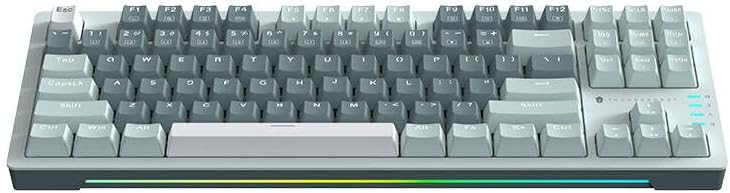
Figura 3: Minn fuq għal isfel view of the Thunderobot K87 keyboard layout.
Ċwievet Multimedia u tal-Funzjoni
The keyboard includes a Function (Fn) key, typically located near the right Alt key. This key, when pressed in combination with the F1-F12 keys, activates various multimedia and system functions. Refer to the keycap legends for specific functions.
- Fn + F1-F12: Typically control media playback, volume, and other system shortcuts.
- Fn + Ċavetta tal-Windows: Jissakkar/jiftaħ iċ-ċavetta tal-Windows biex jipprevjeni tagħfis aċċidentali waqt il-logħob.
Kontroll tad-Dawl ta' Wara
The Thunderobot K87 keyboard features customizable RGB backlighting. Specific key combinations allow you to change lighting modes, brightness, and speed. Consult the keyboard's keycap legends or the manufacturer's website for detailed instructions on lighting customization.

Figura 4: Quddiem view showing the RGB lighting strip.

Figura 5: Proġett tal-ġenbfile view demonstrating keycap height and keyboard angle.
Manutenzjoni
Tindif tat-Tastiera
Tindif regolari jgħin biex tinżamm id-dehra u l-funzjonalità tat-tastiera.
- Skonnettja: Dejjem skonnettja t-tastiera mill-kompjuter tiegħek qabel ma tnaddafha.
- Tneħħija tat-Trab: Uża bott ta' arja kkompressata biex tneħħi t-trab u l-fdalijiet minn bejn il-keycaps.
- Tindif tal-wiċċ: Imsaħ bil-mod il-keycaps u l-wiċċ tat-tastiera b'ċarruta ratba u mingħajr suf.ampLaħlaħ bl-ilma jew b'soluzzjoni tat-tindif ħafifa u mhux abrażiva. Evita umdità eċċessiva.
- Evita: Do not use harsh chemicals, solvents, or abrasive materials, as these can damage the keyboard's finish or keycap legends.
Ħażna
When not in use for extended periods, store the keyboard in a dry, cool place away from direct sunlight and extreme temperatures. Consider covering it to prevent dust accumulation.
Issolvi l-problemi
If you encounter issues with your Thunderobot K87 keyboard, please refer to the following common solutions:
| Problema | Kawża Possibbli | Soluzzjoni |
|---|---|---|
| It-tastiera ma tirrispondix | Konnessjoni USB maħlula, port USB difettuż, problema bis-sewwieq. | Kun żgur li l-kejbil tal-USB huwa konness sew. Ipprova port USB differenti fuq il-kompjuter tiegħek. Erġa' ibda l-kompjuter tiegħek. |
| Ċwievet speċifiċi mhux qed jaħdmu | Debris taħt l-għatu taċ-ċwievet, malfunzjoni tas-swiċċ. | Use compressed air to clear debris. If the issue persists, contact customer support. |
| Id-dawl ta' wara mhux qed jaħdem jew mhux korrett | Lighting mode disabled, software conflict. | Check keyboard's lighting control key combinations (Fn + specific keys). Ensure no conflicting software is running. |
| Dewmien fl-input tat-tastiera | USB port issues, system performance. | Try a different USB port. Close unnecessary background applications. |
If the problem persists after trying these solutions, please contact Thunderobot customer support for further assistance.
Speċifikazzjonijiet
| Karatteristika | Dettall |
|---|---|
| Numru tal-Mudell | JM03NQ002 |
| Brand | Thunderbot |
| Konnettività | Bil-fili (USB) |
| Tip ta' Swiċċ | Swiċċijiet mekkaniċi ħomor |
| Tqassim | 87-key (Tenkeyless) |
| Backlighting | RGB |
| Manifattur | Thunderbot |
| ASIN | B0CWS77B83 |
| Garanzija | 2 years manufacturer |
Informazzjoni dwar Garanzija
The Thunderobot K87 Wired Mechanical Keyboard (Model JM03NQ002) comes with a Garanzija ta' 2 snin mill-manifattur from the date of purchase. This warranty covers defects in materials and workmanship under normal use. It does not cover damage caused by accident, misuse, abuse, neglect, unauthorized modification, or improper installation.
To claim warranty service, please retain your proof of purchase. For detailed warranty terms and conditions, or to initiate a warranty claim, please contact Thunderobot customer support.
Appoġġ
For technical assistance, product inquiries, or warranty claims, please visit the official Thunderobot website or contact their customer support team. Please have your product model number (JM03NQ002) and proof of purchase ready when seeking support.
Official Thunderobot Websit: www.thunderobot.com (Jekk jogħġbok innota: Dan huwa terminu riżervat) URL peress li m'hemm l-ebda appoġġ speċifiku URL was provided in the product data. Refer to your product packaging or official Thunderobot documentation for the correct support contact information.)