1. Introduzzjoni
This manual provides detailed instructions for the safe and effective use of your N35 LED Display Low Latency Wireless Earphone TWS 5.3. Please read this manual thoroughly before using the product and retain it for future reference.
The N35 earbuds are designed to deliver a seamless and immersive audio experience with features such as low latency technology, intuitive touch controls, and an LED display for battery status and connectivity.
2. Informazzjoni dwar is-Sigurtà
- Tesponix il-earbuds jew il-kaxxa tal-iċċarġjar għal temperaturi estremi, umdità, jew likwidi.
- Evita li twaqqa', tħalli impatt fuq, jew tiżżarma l-apparat.
- Uża biss il-kejbil tal-iċċarġjar ipprovdut u adapter tal-enerġija kompatibbli.
- Espożizzjoni fit-tul għal livelli għoljin ta' volum tista' tikkawża ħsara fis-smigħ. Aġġusta l-volum għal livell sigur.
- Żomm fejn ma jintlaħaqx mit-tfal u l-annimali domestiċi.
- Naddaf il-earbuds u l-kaxxa tal-iċċarġjar b'ċarruta ratba u niexfa.
3. Kontenut tal-Pakkett
Jekk jogħġbok iċċekkja l-pakkett għall-oġġetti li ġejjin:
- N35 Wireless Earbuds (Left and Right)
- Kawża tal-Iċċarġjar
- Cable tal-Iċċarġjar tal-USB
- Manwal għall-Utent
4. Prodott Aktarview
Familiarize yourself with the components of your N35 earbuds and charging case.
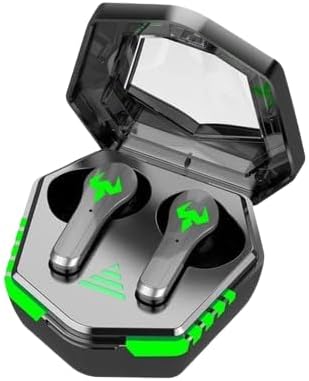
Figure 4.1: N35 Earbuds and Charging Case. The earbuds feature a sleek design with green accents, housed within a transparent-lidded charging case that displays battery status.
4.1 Earbuds
- Żona tal-Kontroll tal-Messi: Għall-immaniġġjar tal-plejbek, is-sejħiet, u l-modi.
- Indikatur LED: Shows pairing status and battery level.
- Mikrofonu: Għal sejħiet bil-vuċi.
- Kuntatti tal-Iċċarġjar: Jikkonnettja mal-kaxxa tal-iċċarġjar.
4.2 Każ ta 'Iċċarġjar
- Wiri LED: Indicates charging status and battery level of the case and individual earbuds.
- Port tal-Iċċarġjar: Port USB għall-iċċarġjar tal-kaxxa.
- Slots għall-Earbuds: Iżomm u jiċċarġja l-earbuds b'mod sigur.
5. Setup
5.1 Iċċarġjar inizjali
Qabel l-ewwel użu, iċċarġja l-earbuds u l-kaxxa tal-iċċarġjar kompletament.
- Poġġi ż-żewġ earbuds fil-kaxxa tal-iċċarġjar.
- Connect the USB charging cable to the charging port on the case and to a power source (e.g., computer USB port, wall adapter).
- The LED display on the case will show the charging progress. A full charge typically takes 1-2 hours.
- Once fully charged, the LED display will indicate a full battery.

Figure 5.1: Charging the N35 Earbuds. The image suggests the earbuds' long battery life, suitable for extended use with devices like laptops and smartphones.
5.2 Tqabbil ma' Apparat
Il-earbuds jidħlu awtomatikament fil-modalità ta' tqabbil meta jinħarġu mill-kaxxa.
- Iftaħ il-kaxxa tal-iċċarġjar u neħħi ż-żewġ earbuds. Dawn jixegħlu awtomatikament u jippruvaw jingħaqdu ma' xulxin.
- Fuq l-apparat tiegħek (smartphone, tablet, kompjuter), attiva l-Bluetooth.
- Fittex għal available Bluetooth devices. You should see "N35" or a similar name in the list.
- Select "N35" to connect. Once connected, the earbud LED indicators will turn off or flash slowly, and you may hear a confirmation tone.
- Jekk l-akkoppjar ma jirnexxix, poġġi l-earbuds lura fil-kaxxa, agħlaq l-għatu, stenna ftit sekondi, u mbagħad erġa' rrepeti l-passi.
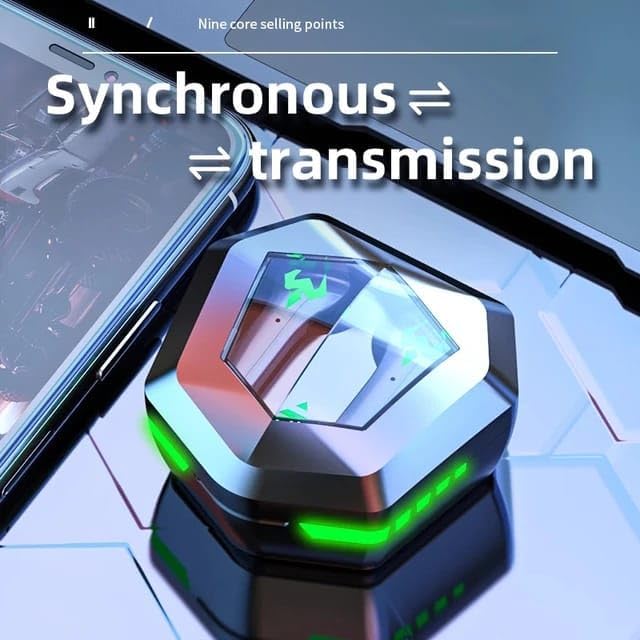
Figure 5.2: Synchronous Transmission. The closed case indicates the earbuds are ready for seamless connection and audio transmission.
6. Istruzzjonijiet Operattivi
6.1 Kontrolli touch
The N35 earbuds feature intuitive touch controls on each earbud. The functions may vary slightly depending on the specific model variant.
| Azzjoni | Funzjoni |
|---|---|
| Tektek Waħda (X/L) | Daqq/Pawża l-Mużika, Tweġiba/Tmiem is-Sejħa |
| Tektek Doppju (L) | Track Preċedenti |
| Tektek Doppju (R) | Track li jmiss |
| Tektek Tlieta (Xellug/Lemin) | Attiva l-Assistent tal-Vuċi |
| Agħfas Twil (2s) (Xellug/Lemin) | Irrifjuta Sejħa |
| Agħfas Twil (3s) (Xellug/Lemin) | Aqleb il-Modalità tal-Logħob/Mużika |
6.2 Modalità Doppja tal-Mużika/Logħob
The N35 earbuds support a dual mode for optimized audio experience, switching between music and gaming modes.

Figure 6.1: Music/Game Dual Mode. This image emphasizes the low latency and high sound quality for both music listening and gaming.
- Modalità Mużika: Provides balanced audio for general listening.
- Mod tal-Logħob: Inaqqas il-latenza tal-awdjo għal esperjenza tal-logħob aktar sinkronizzata.
- To switch modes, perform a long press (3 seconds) on either earbud's touch control area. You will hear an audible prompt indicating the mode change.

Figure 6.2: Bluetooth 5.2 Chip. This image showcases the advanced Bluetooth technology within the earbud, contributing to its low latency performance.
7. Manutenzjoni
7.1 Tindif
- Naddaf il-earbuds u l-kaxxa tal-iċċarġjar regolarment biex tiżgura prestazzjoni u iġjene ottimali.
- Uża drapp artab, niexef u mingħajr suf biex timsaħ l-uċuħ tal-earbuds u l-kaxxa.
- For earwax or debris in the earbud tips, use a small, soft brush or cotton swab. Do not use sharp objects.
- Tużax prodotti tat-tindif li joborxu, alkoħol, jew solventi kimiċi.
7.2 Ħażna
- Meta ma tkunx qed tużahom, aħżen il-earbuds fil-kaxxa tal-iċċarġjar tagħhom biex tipproteġihom u żżommhom iċċarġjati.
- Aħżen l-apparat f'post frisk u niexef, 'il bogħod mix-xemx diretta u minn temperaturi estremi.
8 Issolvi l-problemi
| Problema | Soluzzjoni Possibbli |
|---|---|
| Il-earbuds mhux qed jitqabbdu mat-tagħmir | Ensure Bluetooth is enabled on your device. Place earbuds back in case, close lid, then reopen and try pairing again. Forget "N35" from your device's Bluetooth list and re-pair. |
| Earbud wieħed biss jaħdem | Ensure both earbuds are charged. Place both earbuds back in the case, close the lid, then reopen. This often re-syncs them. |
| L-ebda ħoss jew volum baxx | Check volume levels on both the earbuds and your connected device. Ensure earbuds are properly seated in your ears. Clean earbud tips if necessary. |
| Każ tal-iċċarġjar mhux iċċarġjar | Check the USB cable and power adapter. Ensure the charging cable is securely connected to both the case and the power source. |
| Il-kontrolli tal-mess ma jirrispondux | Kun żgur li subgħajk huma nodfa u niexfa. Ipprova erġa' ibda l-earbuds billi tpoġġihom fil-kaxxa u oħroġhom mill-ġdid. |

Figure 8.1: Clear Call Performance. The image highlights the earbuds' capability for clear communication, even in potentially noisy environments.
9. Speċifikazzjonijiet
| Karatteristika | Dettall |
|---|---|
| Isem tal-Mudell | N35 |
| Teknoloġija tal-Konnettività | Mingħajr fili (Bluetooth 5.3) |
| Kontroll tal-Ħoss | Kanċellazzjoni Attiva tal-Ħoss |
| Tqegħid tal-widnejn | Fil-widnejn |
| Metodu ta' Kontroll | Mess |
| Materjal | Plastik |
| Livell ta 'Reżistenza għall-Ilma | Waterproof |
| Impedenza | 8 Ohm |
| Kulur | Iswed |
10. Garanzija u Appoġġ
Għal informazzjoni dwar il-garanzija u appoġġ tekniku, jekk jogħġbok irreferi għad-dettalji ta' kuntatt ipprovduti max-xiri tiegħek jew żur is-sit uffiċjali tal-manifattur. websit.
Jekk jogħġbok żomm il-prova tax-xiri tiegħek għal pretensjonijiet ta' garanzija.


