
1. Introduzzjoni
This manual provides detailed instructions for the assembly, operation, and maintenance of your Flysky Ergonomic Office Desk Chair, Model FS-5001H-BK. Please read this manual thoroughly before assembly and use to ensure proper function and longevity of your chair.
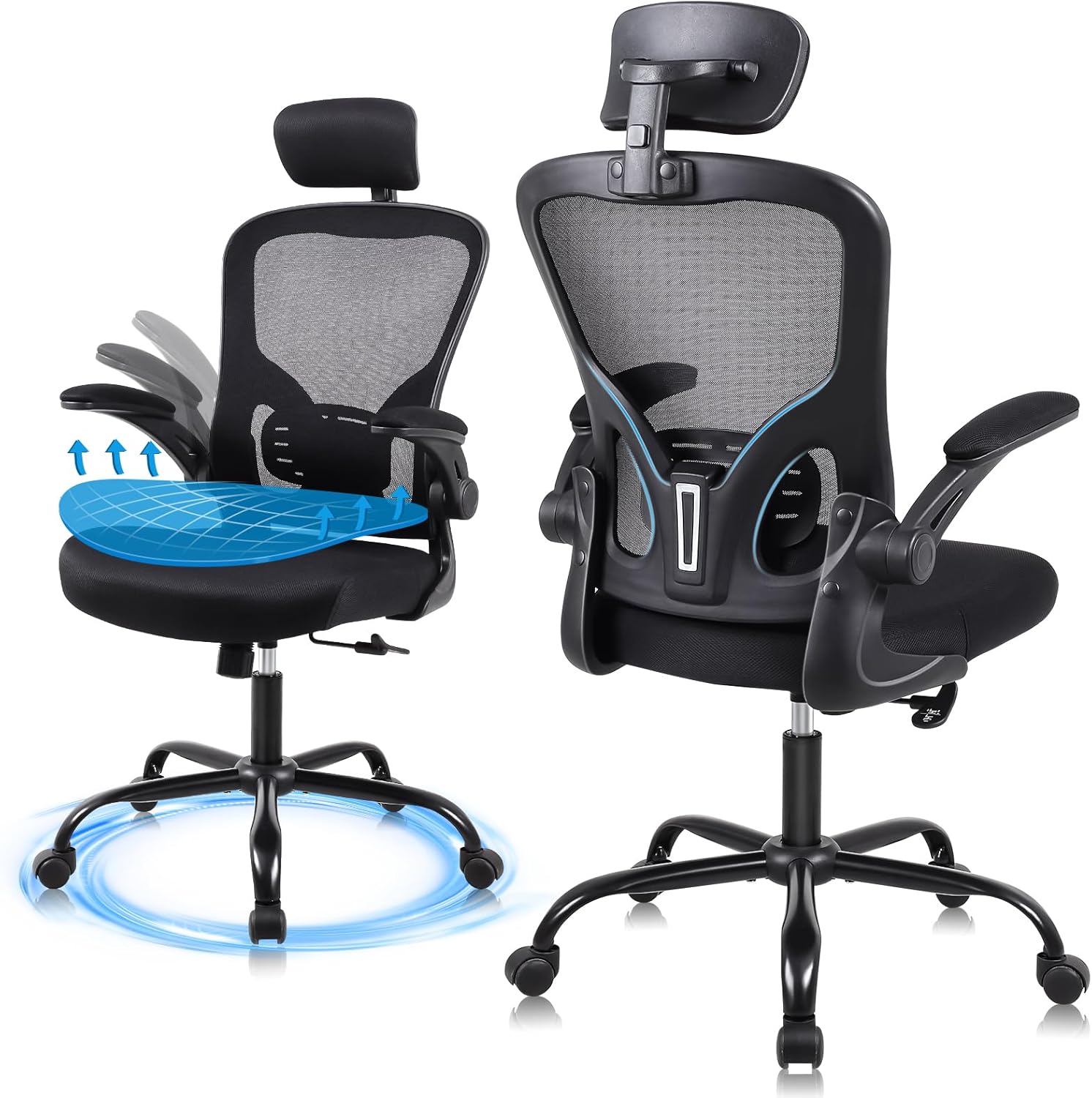
This image displays the Flysky Ergonomic Office Desk Chair from both front and rear angles, highlighting its mesh back, adjustable headrest, and armrests.
2. Kontenut tal-Pakkett
Qabel tibda l-assemblaġġ, ivverifika li l-komponenti kollha huma preżenti u mhux imħassra. Jekk xi partijiet huma neqsin jew imħassra, jekk jogħġbok ikkuntattja l-appoġġ għall-klijenti.
- Dahar tas-siġġu
- Kuxxin tas-Sedil
- Armrests (2)
- Ċilindru tal-Lift tal-Gass
- Bażi tal-Istilla
- Xandara (5)
- Pjanċa tal-Mekkaniżmu
- Serħan tar-ras
- Kit tal-Ħardwer (viti, woxers, Allen wrench)
3. Istruzzjonijiet tal-Assemblea
Assembly typically takes approximately 20 minutes. Refer to the included installation manual for detailed diagrams. Ensure all connections are secure before use.
- Waħħal ir-Roti mal-Bażi: Daħħal il-ħames roti fit-toqob fit-tarf ta’ kull sieq tal-bażi tal-istilla. Imbotta sew sakemm jidħlu f’posthom.
- Daħħal il-Gass Lift: Poġġi ċ-ċilindru tal-irfigħ tal-gass fit-toqba taċ-ċentru tal-bażi tal-istilla.
- Waħħal il-Pjanċa tal-Mekkaniżmu mas-Sedil: Align the mechanism plate with the pre-drilled holes on the underside of the seat cushion. Secure with screws using the provided Allen wrench. Ensure the front of the mechanism plate faces the front of the seat.
- Waħħal id-Dirgħajn mas-Sedil: Waħħal id-dirgħajn mal-ġnub tal-kuxxin tas-sedil billi tuża l-viti apposta.
- Waħħal id-Dahar tas-Sedil: Connect the backrest to the seat assembly. Secure with screws.
- Waħħal ir-Rasrest: Slide the headrest into the designated slot at the top of the backrest.
- Qabbad l-Assemblea tas-Sedil mal-Lift tal-Gass: Poġġi s-sedil immuntat bir-reqqa fuq iċ-ċilindru tal-irfigħ tal-gass, waqt li tiżgura li jkun iċċentrat.

An fuqview of the chair's superior components: SGS Class III pneumatic rod, 360-degree silent universal wheels, high-load-bearing metal five-claw base, and explosion-proof steel connectors.
4. Operational Adjustments
Your Flysky office chair offers several adjustment features to customize your seating experience for optimal comfort and support.
4.1 Aġġustament tal-Għoli tas-Sedil
To adjust the seat height, locate the lever on the right side beneath the seat. Pull the lever up while seated to lower the chair, or pull the lever up while standing to raise the chair. Release the lever at your desired height. The chair offers a 4-inch vertical adjustment range.

An image showing a user adjusting the seat height using the lever, demonstrating the 4-inch vertical adjustment range.
4.2 Backrest Recline Function
The backrest can be tilted between 90 and 120 degrees. To adjust the recline, locate the knob beneath the seat. Loosen the knob to allow the backrest to tilt, then tighten it at your preferred angle to lock it in place.

An image showing a user reclining in the chair, illustrating the 90-120 degree backrest tilt adjustment for various sitting postures.
4.3 Aġġustament ta 'l-serħan tar-ras
The 3D headrest can be adjusted vertically by 2 inches and rotated by 15 degrees to provide optimal support for your head and neck. Simply grasp the headrest and move it to your desired position.

An image showing a user adjusting the 3D headrest, which offers 2 inches of vertical adjustment and a 15-degree rotatable angle for personalized neck support.
4.4 Aġġustament ta' Armrest
The armrests feature a 90-degree flip-up design, allowing them to be raised and stowed under a desk to save space. Simply lift the armrests upwards to engage the flip-up mechanism.

This image illustrates the 90-degree flip-up armrests, designed to allow the chair to be stowed under a desk, optimizing space.
5. Karatteristiċi Ergonomiċi
The Flysky Ergonomic Office Desk Chair is designed to provide comprehensive support for extended periods of sitting.
5.1 S-Shaped Bionic Backrest
The backrest is engineered to conform to the natural curve of the human spine, offering support to the head, shoulders, back, hips, and lumbar region. This design aims to alleviate discomfort associated with prolonged sitting.

Illustration demonstrating how the ergonomic mesh backrest provides support to the neck, chest, and waist, aligning with the natural curve of the human spine.
5.2 High Resilience Sponge Cushion
The seat cushion is constructed from high-density foam, designed for comfort and breathability. Its high elasticity ensures it retains its shape and provides consistent support, preventing fatigue during long periods of use.

Cross-section view of the 3.22-inch thick high-resilience sponge cushion, highlighting its ability to fit the body curve, high elasticity, and resistance to collapse.
6. Speċifikazzjonijiet
| Brand | Flysky |
| Isem tal-Mudell | FS-5001H-BK |
| Kulur | Iswed |
| Dimensjonijiet tal-Prodott (P x W x H) | 28"D x 32"W x 20"H |
| Piż tal-oġġett | 26 liri |
| Rakkomandazzjoni tal-Piż Massimu | 320 Pounds (SGS Class III pneumatic rod certified for 300 lbs max load) |
| Għoli Rakkomandat tal-Utent | 1.65m - 1.88m |
| Aġġustament tal-Għoli tas-Sedil | 4 pulzieri |
| Backrest Recline Angle | 90° - 120° |
| Aġġustament ta' l-Appoġġ tar-ras | 2" up/down, 15° rotatable |
| Stil tad-dirgħajn | 90° Flip-up |

Detailed diagram showing the dimensions of the chair, including height, width, and depth, along with a maximum load capacity of 320 lbs and recommended user height range of 5'2" to 6'2".
7. Manutenzjoni
Regular maintenance will help preserve the appearance and functionality of your office chair.
- Tindif: Imsaħ il-partijiet tal-plastik u tal-metall b'ċarruta ratba u damp cloth. For mesh and fabric areas, use a mild soap solution and a soft brush, then blot dry. Avoid harsh chemicals or abrasive cleaners.
- Iċċekkja l-Konnessjonijiet: Iċċekkja l-viti u l-boltijiet kollha perjodikament biex tiżgura li huma ssikkati. Issikkahom mill-ġdid jekk meħtieġ biex iżżomm l-istabbiltà u s-sigurtà.
- Kura tal-Caster: Żomm ir-roti ħielsa minn xagħar u debris biex tiżgura li jirrumblaw bla xkiel.
8 Issolvi l-problemi
Jekk tiltaqa' ma' xi problemi bis-siġġu tiegħek, irreferi għall-problemi u s-soluzzjonijiet komuni li ġejjin:
- Chair Will Not Adjust Height:
- Kun żgur li l-lieva tal-irfigħ tal-gass tkun ingaġġata għalkollox.
- Iċċekkja jekk iċ-ċilindru tal-irfigħ tal-gass huwiex imqiegħed sew fil-bażi u l-pjanċa tal-mekkaniżmu.
- Verify that no obstructions are preventing the lever from moving freely.
- Chair Squeaks or Wobbles:
- Iċċekkja l-viti u l-boltijiet kollha tal-assemblaġġ. Issikka kwalunkwe konnessjoni maħlula.
- Ensure the casters are fully inserted into the base.
- Ir-Roti Mhux Jirruljaw Bla Xkiel:
- Neħħi kwalunkwe xagħar, trab, jew debris mir-roti tal-caster.
9. Garanzija u Appoġġ
Your Flysky Ergonomic Office Desk Chair comes with a Servizz ta' wara l-bejgħ ta' sena. If you experience any issues or require assistance, please contact our professional support team. Provide your model number (FS-5001H-BK) and purchase details for efficient service.
For support, please refer to the contact information provided at your point of purchase or on the official Flysky websit.