
MRCARTOOL C210
MRCARTOOL C210 Plastic Welder Instruction Manual
Mudell: C210
1. Introduzzjoni
The MRCARTOOL C210 Plastic Welder is a versatile 2-in-1 tool designed for efficient and durable repair of plastic components. This device is ideal for repairing car bumpers, motorcycle parts, boat hulls, and other plastic items. It features adjustable power settings and rapid heating capabilities to ensure optimal welding results across various plastic materials. This manual provides essential information for safe operation, setup, maintenance, and troubleshooting.

Image: The MRCARTOOL C210 Plastic Welder unit with its handle, control panel, and attached welding head. Various welding nails, a smoothing head, and pliers are also displayed, indicating a complete repair kit.
2. Informazzjoni dwar is-Sigurtà
Jekk jogħġbok aqra u ifhem it-twissijiet u l-istruzzjonijiet kollha tas-sigurtà qabel ma tħaddem l-apparat. Jekk ma ssegwix dawn l-istruzzjonijiet, dan jista' jirriżulta f'xokk elettriku, nar, jew korriment serju.
- Sigurtà Elettrika: Kun żgur li l-provvista tal-enerġija taqbel mal-volum tal-apparattage (220V). Do not operate the welder with wet hands or in damp conditions. Always unplug the device when not in use or before cleaning.
- Periklu tas-Sħana: The welding head and staples become extremely hot during operation. Avoid direct contact with skin. Allow the device to cool completely before handling or storing.
- Protezzjoni mis-sħana żejda: The machine has built-in high-temperature protection. If the transformer temperature exceeds 120℃, the plastic welder will stop operating. Allow it to cool down before resuming work.
- Ventilazzjoni: Use the device in a well-ventilated area to avoid inhaling fumes from melting plastic.
- Tagħmir Protettiv Personali (PPE): Always wear appropriate safety glasses and heat-resistant gloves when operating the welder.
- Tfal u Pets: Żomm l-apparat fejn ma jintlaħaqx mit-tfal u l-annimali domestiċi.
3. Kontenut tal-Pakkett
Iċċekkja li l-oġġetti kollha elenkati hawn taħt huma inklużi fil-pakkett tiegħek:
- MRCARTOOL C210 Plastic Welder Unit
- Welding Head with integrated LED light
- 600 Welding Nails (various types: flat, M-shaped, wave, V-shaped)
- Heat Smoothing Head
- Tnalji tal-Qtugħ
- Kawża tal-Ħażna
- Power Cord (10mm thick)
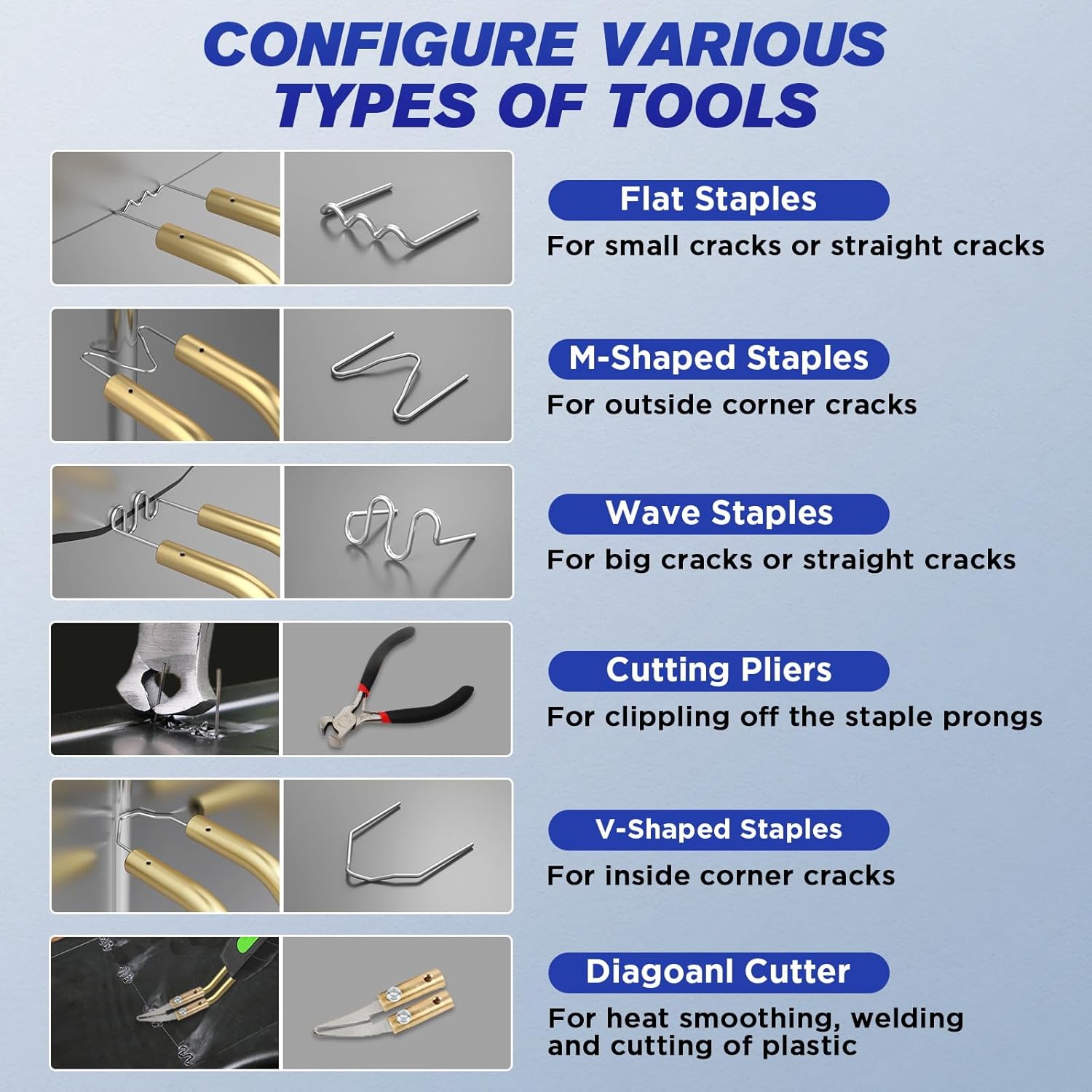
Image: A visual guide to the different types of staples and tools: Flat Staples for small/straight cracks, M-Shaped Staples for outside corner cracks, Wave Staples for big/straight cracks, Cutting Pliers for clipping prongs, V-Shaped Staples for inside corner cracks, and a Diagonal Cutter for heat smoothing, welding, and plastic cutting.
4. Karatteristiċi tal-prodott
- Funzjonalità 2-in-1: Combines plastic welding with hot stapling for comprehensive repair.
- Settings tal-Qawwa Aġġustabbli: Features 5 adjustable power levels (15W, 35W, 45W, 65W, 80W) to suit different plastic materials and repair needs.
- Tisħin Rapidu: Achieves maximum output power of 80W, heating up in 1-2 seconds for quick repairs.
- Disinn Ergonomiku: Robust, anti-slip, and corrosion-resistant handle for comfortable grip. Easy-to-use control knob.
- Dawl LED integrat: Illuminates dark work areas for improved visibility and safety.
- Versatile Staple Connection: Connects staples in 3 directions (30°, 45°, 90°) to accommodate various welding angles.
- Dissipazzjoni effiċjenti tas-sħana: Unique air hole design and 3 cooling channels ensure rapid cooling and extended welder runtime.
- Applikazzjoni wiesgħa: Compatible with 99% of vehicles, including cars, motorcycles, boats, lawn mowers, ATVs, and other industrial plastic applications.

Image: The MRCARTOOL C210 Plastic Welder with icons illustrating its features: 80W Fast Heating, 5-speed Power Adjustment, ability to Equip Various Welding Staples, LED Light, Portable Design, and Wide Use.

Immaġni: Close-up views of the welder's features: Button Design for easy operation, 3 Angle Installed Welded Staples (30°, 45°, 90°), a 10mm Thick Power Cord for durability, and the LED Light Design for working in dark environments.
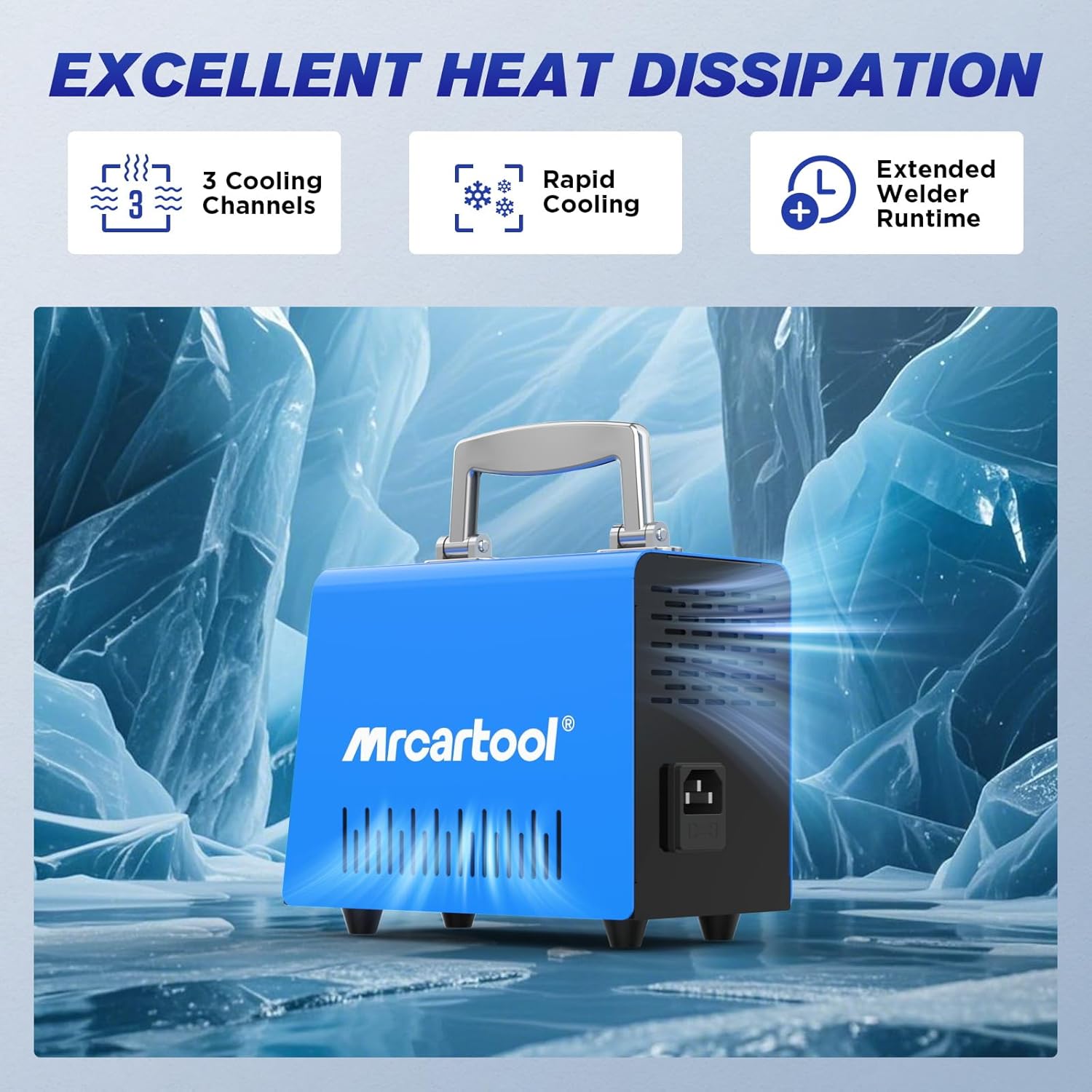
Image: An illustration of the welder's heat dissipation capabilities, showing 3 Cooling Channels, Rapid Cooling, and Extended Welder Runtime, set against an icy background to emphasize cooling efficiency.
5. Setup
- Ippakkja: Neħħi bir-reqqa l-komponenti kollha mill-imballaġġ u spezzjona għal kwalunkwe ħsara.
- Konnessjoni tal-Enerġija: Connect the power cord to the welder unit and then plug it into a standard 220V AC power outlet. Ensure the power switch is in the "OFF" position before plugging in.
- Staple Insertion: Select the appropriate welding staple for your repair task. Insert the staple into the welding head. The design allows for insertion at 30°, 45°, or 90° angles.
- Tħejjija taż-Żona tax-Xogħol: Ensure your work area is clean, well-ventilated, and free from flammable materials. Wear appropriate PPE (safety glasses, heat-resistant gloves).
6. Istruzzjonijiet Operattivi
Follow these steps for effective plastic repair:
- Qawwa Mixgħul: Turn the power switch to the "ON" position. The LED indicator will light up.
- Agħżel il-Livell tal-Qawwa: Use the rotary knob to select the desired power level (15W, 35W, 45W, 65W, or 80W) based on the thickness and type of plastic being repaired. Higher wattage provides faster heating and deeper penetration.
- Insert Staple: Ensure the correct staple type (flat, M-shaped, wave, V-shaped) is securely inserted into the welding head.
- Apply to Crack: Place the staple over the crack or damaged area. Press the trigger button to heat the staple. The staple will heat rapidly (1-2 seconds) and melt into the plastic.
- Embed Staple: Once the staple is embedded and the plastic has fused around it, release the trigger button and allow the plastic to cool and solidify.
- Ittrimmja l-Eċċess: Use the provided cutting pliers to trim any excess staple prongs that protrude from the plastic surface.
- Wiċċ lixx: For a smooth finish, use the heat smoothing head (diagonal cutter) to melt and level the repaired area.
- Irrepeti: Repeat the process for other sections of the crack as needed.

Image: A four-step visual guide demonstrating the welding process: 1. Select the right hot staples and mode. 2. Precise repair of the crack location by embedding the staple. 3. Use pliers to cut residual heat nail after heating and solidification. 4. The area after clip break repair is restored with a heated smoothing head.

Image: A close-up of the welder's control panel, highlighting the 5-speed power adjustment knob and indicator lights for 15W, 35W, 45W, 65W, and 80W settings. This allows temperature and power to be adjusted for different plastic materials.
7. Manutenzjoni
- Tindif: Ensure the device is unplugged and completely cool before cleaning. Wipe the exterior with a soft, dry cloth. Do not use abrasive cleaners or solvents.
- Staple Residue: Periodically clean any plastic residue from the welding head using a non-abrasive tool when the device is cool.
- Ħażna: Store the welder and its accessories in the provided storage case in a dry, cool place, away from direct sunlight and moisture.
- Spezzjoni tal-kurdun: Regularly inspect the power cord for any signs of damage. Do not use the device if the cord is frayed or damaged.
8 Issolvi l-problemi
| Problema | Kawża Possibbli | Soluzzjoni |
|---|---|---|
| L-apparat ma jixgħelx. | No power supply; power cord damaged; power switch off. | Check power outlet; inspect power cord for damage; ensure power switch is ON. |
| Staples do not heat up. | Incorrect power setting; loose staple insertion; internal fault. | Increase power setting; ensure staple is firmly inserted; contact customer support if problem persists. |
| Device stops working during operation. | Protezzjoni kontra s-sħana żejda attivata. | Allow the device to cool down. It will resume operation once the temperature drops below 120℃. Ensure proper ventilation. |
| Riżultati ħżiena tal-iwweldjar. | Incorrect power setting for plastic type; wrong staple type; insufficient pressure. | Adjust power setting; use appropriate staple type; apply firm, consistent pressure. |
9. Speċifikazzjonijiet
| Attribut | Valur |
|---|---|
| Numru tal-Mudell | C210 |
| Brand | MRCARTOOL |
| Input Voltage | 220 Volts AC |
| Output ta 'Qawwa Aġġustabbli | 15W / 35W / 45W / 65W / 80W (Max) |
| Ħin tat-Tisħin | 1-2 seconds (to max output) |
| Protezzjoni mis-sħana żejda | Automatic shutdown at >120℃ transformer temperature |
| Staples Inklużi | 600 pieces (Flat, M-shaped, Wave, V-shaped) |
| Dimensjonijiet tal-Prodott (Pakkett) | 28.3 x 24.4 x 13.7 ċm |
| Piż tal-Prodott | 2.5 Kilogrammi |
| Kulur | Blu |
10. Garanzija u Appoġġ
MRCARTOOL is committed to providing high-quality products and excellent customer service.
- Garanzija: This product comes with a 24-month quality support warranty from the date of purchase.
- Servizz tal-Klijent: For any issues, questions, or technical assistance, please contact MRCARTOOL customer service. We offer 7x24h customer support and will provide a solution as soon as possible.

Image: Customer service representatives wearing headsets, actively assisting customers, symbolizing the available support.
Ask a question about this manual
Ask about setup, troubleshooting, compatibility, parts, safety, or missing instructions. Manuals+ will review the question and use this page’s manual context to help answer it.