
1. Introduzzjoni
The Aubess Mini Smart Wi-Fi Switch 16A (Model WSM02) is designed to integrate seamlessly into your smart home ecosystem. This device enables remote control of connected appliances via your smartphone or tablet, offering convenience and enhanced energy management. It features an integrated energy monitor that provides real-time consumption data, helping you make informed decisions about your energy usage.
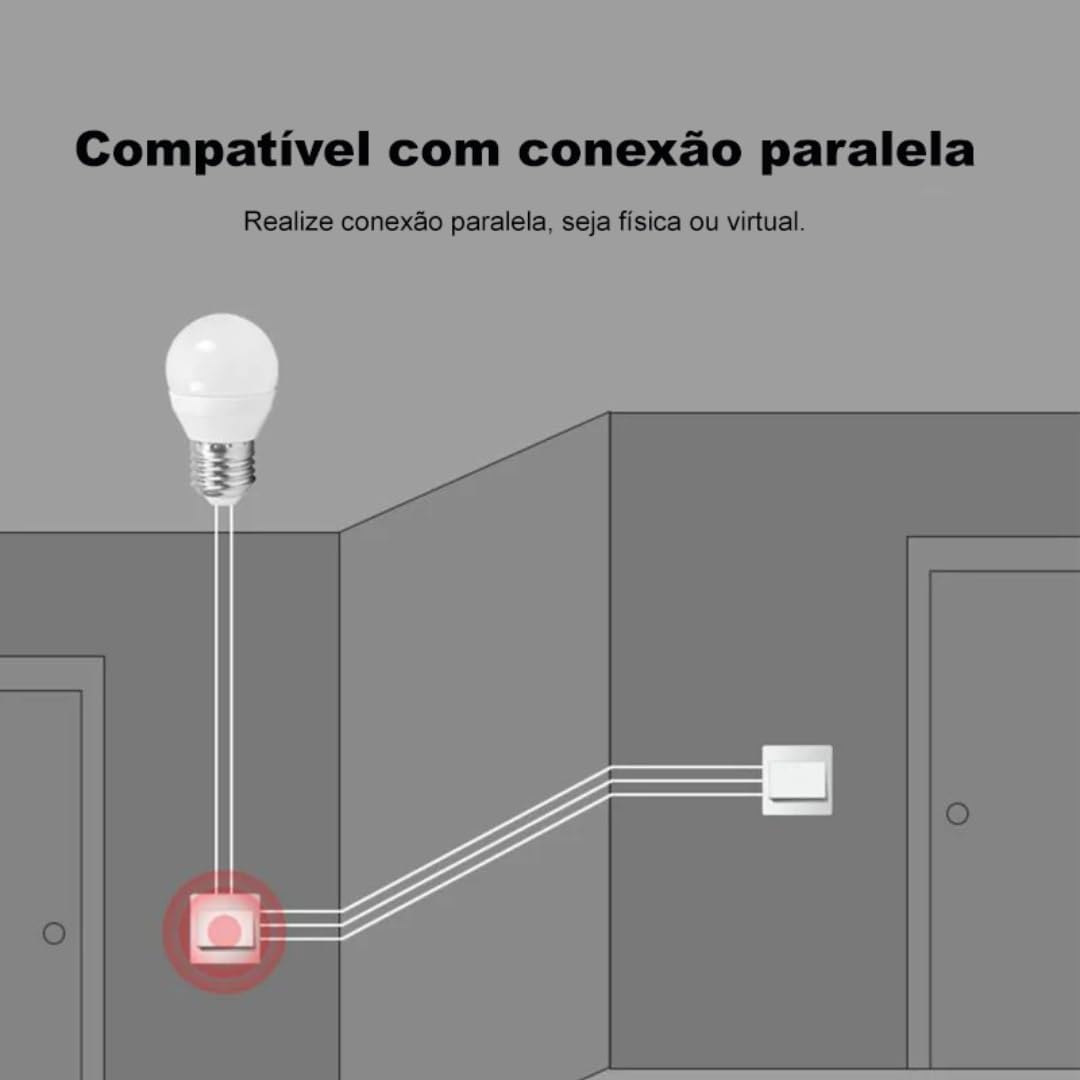
The switch is compatible with popular voice assistants such as Amazon Alexa and Google Home, and works with smart home platforms like Tuya Smart, Smart Life, and Home Assistant. Its compact design allows for simple and quick installation, including parallel installation with existing switches.
2. Informazzjoni dwar is-Sigurtà
TWISSIJA: Electrical installation should only be performed by a qualified electrician to ensure safety and compliance with local electrical codes. Incorrect installation can lead to electric shock, fire, or device damage.
- Dejjem skonnettja l-enerġija mis-circuit breaker qabel l-installazzjoni jew il-manutenzjoni.
- Kun żgur li l-apparat qed jintuża fil-volum speċifikat tiegħutage and current ratings (110V, 16A, 1600W).
- Tesponix l-apparat għal umdità jew temperaturi estremi.
- Dan l-apparat huwa ddisinjat għall-użu fuq ġewwa biss.
3. Kontenut tal-Pakkett
- 1 x Aubess Mini Smart Wi-Fi Switch
- 1 x Manwal għall-Utent
4. Karatteristiċi tal-prodott
- Konnettività Wi-Fi: Operates on 2.4GHz Wi-Fi networks for remote control.
- Monitoraġġ tal-Enerġija: Provides real-time and historical energy consumption data.
- Kontroll tal-Vuċi: Kompatibbli ma' Amazon Alexa u Google Home għal tħaddim mingħajr idejn.
- Kontroll tal-App: Works with Tuya Smart and Smart Life applications for comprehensive management.
- Klassifikazzjoni ta' Qawwa Għolja: Jappoġġja sa 16 Amperes and 1600 Watts.
- Installazzjoni Parallel: Designed to facilitate parallel wiring with existing traditional switches.
- Disinn kompatt: Small form factor for easy integration into electrical boxes.


5. Speċifikazzjonijiet
| Speċifikazzjoni | Valur |
|---|---|
| Mod ta' Operazzjoni | On-Off |
| Klassifikazzjoni kurrenti | 16 Amperes |
| Vol Operattivtage | 110 Volts |
| Tip ta' Kuntatt | Normalment Magħluq |
| Tip ta' Konnettur | Clamp |
| Tip ta' Swiċċ | Slide |
| Terminal | Invita |
| Tip ta 'Ċirkwit | 1-mod |
| Tip ta 'Immuntar | Mount Wall |
| Numru ta' Pożizzjonijiet | 2 |
| Klassifikazzjoni tat-Temperatura Massima | 55 Grad Celsius |
| Tip ta' Kontroll | Amazon Alexa, Push Button, Google Assistant |
| Metodu ta' Kontroll | Application, Remote, Touch, Voice |
| Tip ta 'Konnettività | Wi-Fi (2.4GHz) |
| Qawwa | 1600 Watts |
| Kulur | Abjad |
| Dimensjonijiet tal-oġġett | 41 x 20 x 41 millimetru |
| Għadd ta' Unitajiet | 1 Unit |
| Kwantità ta' Oġġetti | 1 |
| Materjal | Plastik |
| Kuntatt Materjal | Metall |
| Klassifikazzjoni tal-Protezzjoni Internazzjonali | IP00 |
| Compliant Specification | CE, RoHS |
| Manifattur | Aubess |
| Numru tal-Parti | WSM02 |
6. Setup u Installazzjoni
6.1 Istruzzjonijiet tal-Wiring
Importanti: Ensure power is disconnected at the circuit breaker before proceeding with any wiring. Professional installation is highly recommended.
- Identifika l-Wajers: Locate the Live (L), Neutral (N), and Load (L1, L2, etc.) wires in your electrical box. The Aubess switch requires a Neutral wire for operation.
- Qabbad Wajers: Connect the Live wire from your power source to the 'L' terminal on the switch. Connect the Neutral wire to the 'N' terminal. Connect the Load wire(s) (to your light fixture or appliance) to the 'L1' (and 'L2' if applicable) terminal(s).
- Konnessjonijiet sikuri: Kun żgur li l-konnessjonijiet kollha tal-wajers huma sikuri u iżolati sew.
- Swiċċ tal-Immuntar: Carefully place the switch into the electrical box and secure it.
- Irrestawra l-Enerġija: Ladarba l-installazzjoni tkun tlestiet u vverifikata, erġa' daħħal l-enerġija fis-circuit breaker.
6.2 Tqabbil tal-App
To control your Aubess Mini Smart Wi-Fi Switch, you need to pair it with the Tuya Smart or Smart Life application.
- Niżżel l-App: Niżżel l-app 'Tuya Smart' jew 'Smart Life' mill-app store tal-ismartphone tiegħek (iOS jew Android).
- Reġistrazzjoni/Idħol: Iftaħ l-app u rreġistra għal kont ġdid jew idħol jekk diġà għandek wieħed.
- Żid Apparat: Tektek l-ikona '+' fir-rokna ta' fuq tal-lemin tal-app biex iżżid apparat ġdid.
- Agħżel it-Tip ta' Apparat: Choose 'Electrical Switch' or 'Switch (Wi-Fi)'.
- Daħħal id-dettalji tal-Wi-Fi: Kun żgur li t-telefon tiegħek huwa konness ma' netwerk Wi-Fi ta' 2.4GHz. Daħħal il-password tal-Wi-Fi tiegħek fl-app.
- Poġġi l-Apparat fil-Modalità ta' Tqabbil: Power on the switch. If the indicator light is not blinking rapidly, press and hold the reset button on the switch for 5-10 seconds until it blinks rapidly.
- Ikkonferma t-Teptip: In the app, confirm that the indicator light is blinking rapidly.
- Qabbad: The app will begin searching for the device. Once found, you can rename it and complete the setup.
7. Istruzzjonijiet Operattivi
7.1 App Control
Once paired, you can control the switch from anywhere using the Tuya Smart or Smart Life app:
- Mixgħul/Mitfi: Tap the switch icon in the app to turn the connected appliance on or off.
- Skedar: Set schedules or timers for automatic operation.
- Xeni: Create custom scenes to control multiple devices simultaneously.
7.2 Kontroll tal-Vuċi (Alexa/Google Home)
To enable voice control, link your Tuya Smart/Smart Life account with Amazon Alexa or Google Home:
- Iftaħ l-app Alexa jew Google Home.
- Innaviga għal 'Ħiliet u Logħob' (Alexa) jew 'Jaħdem ma' Google' (Google Home).
- Fittex għal 'Tuya Smart' or 'Smart Life'.
- Enable the skill/service and link your account using your app credentials.
- Discover devices. You can now control your switch using voice commands like: "Alexa, turn on the living room light" or "Hey Google, turn off the fan."
7.3 Monitoraġġ tal-Enerġija
The integrated energy monitor allows you to track power consumption:
- In the Tuya Smart/Smart Life app, select your Aubess switch.
- Look for the 'Energy Monitoring' or 'Power Statistics' section.
- View real-time power usage (Watts), current (Amperes), and voltage (Volti).
- Access historical data, including daily, weekly, or monthly consumption graphs.

8. Manutenzjoni
- Tindif: Uża drapp artab u niexef biex tnaddaf l-apparat. Tużax kimiċi ħarxa jew prodotti tat-tindif li joborxu.
- Aġġornamenti tal-Firmware: Iċċekkja l-app Tuya Smart/Smart Life perjodikament għal aġġornamenti tal-firmware disponibbli biex tiżgura prestazzjoni u sigurtà ottimali.
- Kundizzjonijiet Ambjentali: Ensure the device is kept within its operating temperature range (max 55°C) and away from excessive humidity.
9 Issolvi l-problemi
- Apparat mhux Jirrispondi:
- Iċċekkja jekk l-apparat għandux enerġija.
- Verify your Wi-Fi network is active and stable (2.4GHz).
- Ensure your smartphone has an internet connection.
- Try restarting the switch by cycling its power at the circuit breaker.
- Ma tistax tqabbad:
- Make sure the switch's indicator light is blinking rapidly (pairing mode). If not, reset it by holding the button for 5-10 seconds.
- Confirm your Wi-Fi network is 2.4GHz. 5GHz networks are not supported.
- Kun żgur li l-password tal-Wi-Fi tiegħek iddaħħlet b'mod korrett.
- Move the switch closer to your Wi-Fi router during pairing.
- Il-Kontroll tal-Vuċi Mhux Jaħdem:
- Verify that the Tuya Smart/Smart Life skill/service is enabled and linked correctly in your Alexa/Google Home app.
- Ensure the device name in the smart home app matches the name you are using in voice commands.
- Ipprova skopri mill-ġdid apparati fl-app Alexa/Google Home tiegħek.
10. Garanzija u Appoġġ
For warranty information, technical support, or service inquiries, please contact Aubess customer support through their official website or the contact information provided at the point of purchase. Please have your product model (WSM02) and purchase details ready when contacting support.