
1. Introduzzjoni
This manual provides detailed instructions for the installation, operation, and maintenance of the QOLTEC 50900 Three Phase Electronic Energy Consumption Meter. This device is designed for measuring active energy consumption in three-phase, four-wire AC circuits. Please read this manual thoroughly before installation and use to ensure proper function and safety.
2. Informazzjoni dwar is-Sigurtà
TWISSIJA: Installation and maintenance of this device must be performed by qualified personnel only. Failure to follow these instructions can result in electric shock, fire, or serious injury.
- Dejjem skonnettja l-enerġija qabel ma tinstalla jew tagħmel manutenzjoni fuq il-miter.
- Kun żgur li l-konnessjonijiet tal-wajers kollha huma sikuri u korretti skont id-dijagramma tal-wajers.
- Tħaddimx il-miter f'ambjenti li jaqbżu l-kundizzjonijiet operattivi speċifikati tiegħu.
- Do not open or modify the meter casing. Ġewwa m'hemm l-ebda partijiet li jistgħu jiġu sservisjati mill-utent.
- Protect the meter from moisture, dust, and direct sunlight.
3. Prodott Aktarview
The QOLTEC 50900 is a compact, DIN rail mountable electronic energy meter designed for accurate measurement of three-phase energy consumption. It features an LCD display for clear readings and a pulse output for remote monitoring.

Figure 3.1: QOLTEC 50900 Energy Meter showing dimensions (75mm x 92mm x 76mm) and key features like Three Phase Type, 230V Rated Voltage, 1.0 Precision Class, and LCD Display.
Karatteristiċi ewlenin:
- Three-phase, four-wire measurement
- LCD digital display for energy consumption (kWh)
- DIN rail mounting (4P width)
- High accuracy (Class 1.0)
- Pulse output (400imp/kWh)
- Vol operattivtage: 3x230/400V
4. Speċifikazzjonijiet
| Parametru | Valur |
|---|---|
| Mudell | 50900 |
| Vol ikklassifikattage | 3x230/400V AC |
| Kurrent Rated | 3x10(100)A |
| Frekwenza | 50Hz |
| Klassi ta' Preċiżjoni | 1.0 |
| Wiri | LCD |
| Output tal-impuls | 400imp/kWh |
| Installazzjoni | DIN Rail (4P) |
| Dimensjonijiet (W x H x D) | 75 x 92 x 76 mm |
| Piż | 100 g |
| Materjal | Akriliku |
5. Setup u Installazzjoni
The QOLTEC 50900 meter is designed for standard 35mm DIN rail mounting. Ensure the installation location is dry, well-ventilated, and free from excessive vibration or electromagnetic interference.
5.1 Immuntar
- Locate a suitable 35mm DIN rail within your electrical panel.
- Align the meter's DIN rail clip with the rail.
- Press the meter firmly onto the rail until it clicks into place.

Figure 5.1: The QOLTEC 50900 meter securely mounted on a DIN rail, showing its compact form factor.
5.2 Konnessjonijiet tal-Wiring
IMPORTANTI: All wiring must comply with local electrical codes and regulations. Ensure power is OFF before making any connections.
- Identify the input (IN) and output (OUT) terminals on the meter.
- Connect the incoming three-phase lines (L1, L2, L3) and Neutral (N) to the corresponding IN terminals (typically 5, 6, 7, 8).
- Connect the outgoing three-phase lines (L1, L2, L3) and Neutral (N) to the corresponding OUT terminals (typically 1, 2, 3, 4).
- Kun żgur li l-konnessjonijiet kollha huma ssikkati u siguri biex tevita kuntatti maħlula u sħana żejda.

Figura 5.2: Ġenb view of the meter showing the wiring diagram for input (IN) and output (OUT) connections for L1, L2, L3, and Neutral.

Figura 5.3: Quddiem view of the meter with its LCD display and a separate view of the terminal block for wiring connections.
6. Istruzzjonijiet Operattivi
Once properly installed and powered, the QOLTEC 50900 meter will automatically begin measuring energy consumption.
6.1 Display LCD
The LCD displays the total active energy consumption in kilowatt-hours (kWh). The display is continuous and does not require any button presses for basic reading.
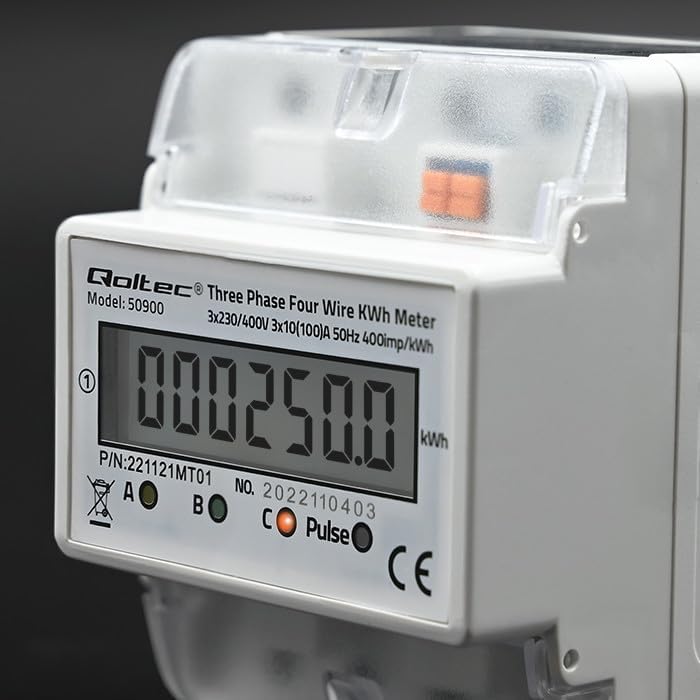
Figura 6.1: Close-up view of the LCD display showing an example energy reading in kWh.
6.2 Output tal-Impuls
The meter features a pulse output (400imp/kWh) which can be used to connect to external monitoring systems for remote data collection. Refer to the external system's documentation for connection details.
7. Manutenzjoni
The QOLTEC 50900 energy meter is designed for maintenance-free operation under normal conditions.
- Tindif: Use a soft, dry cloth to clean the meter's exterior. Do not use abrasive cleaners, solvents, or liquids that could enter the casing.
- Spezzjoni: Periodically inspect the wiring connections for any signs of loosening or damage. Ensure the meter is free from dust accumulation.
- Kundizzjonijiet Ambjentali: Ensure the operating environment remains within the specified temperature and humidity ranges to prolong the meter's lifespan.
8 Issolvi l-problemi
If you encounter issues with your QOLTEC 50900 meter, refer to the following common problems and solutions:
| Problema | Kawża Possibbli | Soluzzjoni |
|---|---|---|
| L-ebda display/il-miter mhux qed jixgħel | No power supply; Incorrect wiring; Blown fuse in circuit | Check power supply to the meter. Verify wiring connections. Check circuit breaker/fuse. |
| Incorrect energy reading | Incorrect wiring; Faulty meter | Verify wiring connections against the diagram. If wiring is correct, contact support. |
| Pulse output not working | Incorrect connection to external system; Faulty meter | Check pulse output wiring to the external system. Consult external system's manual. If issue persists, contact support. |
If the problem persists after attempting these solutions, please contact Qoltec customer support.
9. Garanzija u Appoġġ
Qoltec products are manufactured to high-quality standards. For warranty information and technical support, please refer to the warranty card included with your product or visit the official Qoltec websit. Żomm l-irċevuta tax-xiri tiegħek bħala prova tax-xiri.