1. Introduzzjoni
Thank you for choosing the Vortex T10M Pro+ Tablet. This manual will guide you through the features and functions of your new device, ensuring a smooth and enjoyable user experience. Please read this manual carefully before using your tablet.
X'hemm fil-Kaxxa
Upon unboxing your Vortex T10M Pro+ Tablet, please verify that all the following items are present:
- Vortex T10M Pro+ Tablet
- Ċarġer tal
- Protettur tal-iskrin
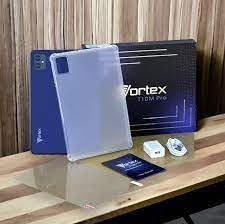
Image: Contents of the Vortex T10M Pro+ Tablet box. This includes the tablet, a clear protective case, the power adapter, and a screen protector, all neatly arranged on a wooden surface.
2. Prodott Aktarview
Familiarize yourself with the physical components and key features of your Vortex T10M Pro+ Tablet.
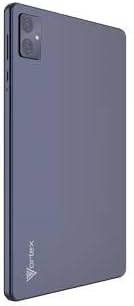
Immaġni: Wara view of the Vortex T10M Pro+ Tablet. The tablet has a sleek, dark finish with the 'Vortex' logo subtly placed at the bottom. The camera module is visible in the upper left corner.

Immaġni: Dettaljata view of the back of the Vortex T10M Pro+ Tablet, highlighting its specifications. Printed details include '10.1-inch Brilliant Display', '5MP Front Camera', '8MP Rear Camera', 'MTK6766 Processor', 'Quad-Core, 4GB+64GB', '5000mAh Mega Battery', and 'Android 12'.
3. Setup
3.1. Iċċarġjar tal-Apparat
Before first use, fully charge your tablet. Connect the provided charger to the tablet's charging port and plug it into a power outlet. The battery indicator on the screen will show charging progress.
3.2. Inserting SIM/MicroSD Card
The Vortex T10M Pro+ supports 4G LTE connectivity and expandable storage. To insert a SIM card (for mobile data) or a microSD card (for additional storage):
- Sib it-trej tal-kard SIM/microSD fuq il-ġenb tat-tablet.
- Uża l-għodda tal-ejector tas-SIM provduta biex tiftaħ it-trej.
- Carefully place the SIM card(s) and/or microSD card into the designated slots, ensuring correct orientation.
- Imbotta t-trej bil-mod lura fit-tablet sakemm tikklikkja f'postu.
3.3. L-Ewwel Tixgħil
Press and hold the Power button located on the side of the tablet until the Vortex logo appears. Follow the on-screen prompts to complete the initial setup, including language selection, Wi-Fi connection, and Google account setup.
4. Istruzzjonijiet Operattivi
4.1. Navigazzjoni Bażika
Your tablet runs on Android 13.0. Use touch gestures for navigation:
- Tektek: Agħżel oġġett jew iftaħ app.
- Swipe: Skrollja 'l fuq minn skrins jew listi.
- Agħfas biex tiżżumja: Iżżumja 'l ġewwa jew 'il barra fuq ritratti u web paġni.
- Agħfas fit-tul: Aċċessa l-menus kuntestwali jew iċċaqlaq l-ikoni.
4.2. Konnessjoni mal-Wi-Fi
Biex tikkonnettja ma' netwerk Wi-Fi:
- Mur fuq Settings > Netwerk u internet > Internet.
- Ixgħel il-Wi-Fi.
- Agħżel in-netwerk mixtieq tiegħek mil-lista u daħħal il-password jekk tintalab.
4.3. Using Mobile Data (4G LTE)
If you have inserted a valid SIM card with an active data plan:
- Mur fuq Settings > Netwerk u internet > SIMs.
- Ensure Mobile data is enabled for your SIM.
4.4. Operazzjoni tal-Kamera
The tablet features an 8MP rear camera and a 5MP front camera.
- Iftaħ l-app Camera.
- Tektek il-buttuna tax-shutter biex tieħu ritratt.
- Ibdel bejn il-kameras ta' quddiem u ta' wara billi tuża l-ikona tat-toggle tal-kamera.
4.5. Ġestjoni tal-Ħażna
Your tablet comes with 64GB of internal storage. You can expand this using a microSD card up to 128GB. To view storage usage, go to Settings > Ħażna.
5. Manutenzjoni
5.1. Tindif
Uża drapp artab u mingħajr suf biex tnaddaf l-iskrin u l-qafas tat-tablet. Evita li tuża kimiċi ħarxa jew materjali li joborxu.
5.2. Aġġornamenti tas-Software
Periodically check for software updates to ensure your tablet has the latest features and security patches. Go to Settings > Sistema > Aġġornament tas-sistema.
5.3. Kura tal-batterija
Biex ittawwal il-ħajja tal-batterija:
- Evita temperaturi estremi.
- Tħallix il-batterija tiċċarġja kompletament ta' spiss.
- Skonnettja l-ċarġer ladarba l-batterija tkun mimlija.
6 Issolvi l-problemi
Din it-taqsima tindirizza kwistjonijiet komuni li tista’ tiltaqa’ magħhom bit-tablet tiegħek.
| Ħruġ | Soluzzjoni Possibbli |
|---|---|
| It-tablet ma jixgħelx | Kun żgur li l-batterija hija ċċarġjata. Agħfas u żomm il-buttuna tal-Power għal mill-inqas 10-15-il sekonda biex terġa' tibda taħdem. |
| Kwistjonijiet ta 'konnessjoni Wi-Fi | Restart the tablet and your Wi-Fi router. Forget the network in settings and reconnect. |
| L-apps huma bil-mod jew qed jiġġarraf | Agħlaq l-apps fl-isfond. Neħħi l-cache tal-app (Settings > Apps > [Isem tal-App] > Ħażna > Neħħi l-cache). Erġa' ibda t-tablet. |
| Storage full message | Ħassar bla bżonn files or apps. Move media to a microSD card. |
7. Speċifikazzjonijiet
Detailed technical specifications for the Vortex T10M Pro+ Tablet.
| Karatteristika | Speċifikazzjoni |
|---|---|
| Isem tal-Mudell | T10M Pro+ Tablet (Unlocked) Blue 10.1" 64GB 4GB GSM 4G LTE + Wifi 8MP |
| Daqs tal-Wiri | 10.1 Pulzier |
| Riżoluzzjoni Massima tal-Iskrin | 1280 x 800 Pixels |
| Riffriskar Rata | 120 Hz |
| Proċessur | MediaTek, 2 GHz |
| RAM | 4 GB |
| Ħażna Interna | 64 GB |
| Ħażna espansibbli | MicroSD (sa 128GB) |
| Sistema Operattiva | Android 13.0 |
| Kamera ta' wara | 8 MP |
| Kamera ta' Quddiem | 5 MP |
| Konnettività | 4G LTE, Wi-Fi, Bluetooth, GPS |
| Tip ta 'batterija | Lithium-Ion |
| Ħajja Medja tal-Batterija | 18 Sigħat |
| Dimensjonijiet tal-Prodott | 10.1 x 5 x 3 pulzieri |
| Kulur | Iswed |
8. Informazzjoni dwar Garanzija
This product is covered by a manufacturer's warranty. Please refer to the warranty card included with your purchase or visit the manufacturer's official websit għal termini u kundizzjonijiet dettaljati dwar il-kopertura tal-garanzija, it-tul ta' żmien, u l-proċess tat-talbiet.
9. Appoġġ
For further assistance, technical support, or service inquiries, please contact the manufacturer's customer support. Contact information can typically be found on the product packaging, the manufacturer's website, or the warranty documentation.


