
SMATRUL 768561056835
SMATRUL Smart Wall Light Switch User Manual
Mudell: 768561056835
1. Prodott Aktarview
The SMATRUL Smart Wall Light Switch with USB C Port is designed to provide convenient and intelligent control over your lighting. This touch-sensitive switch integrates seamlessly into modern smart homes, offering multiple control options including touch, mobile application, and voice commands via popular smart assistants like Alexa and Google Home. It also supports RF433 remote control for added flexibility. Featuring a USB-C port for additional utility and a power-off memory function, this switch ensures your settings are retained even after power interruptions. Please note that a neutral wire is required for installation.

Figure 1: SMATRUL Smart Wall Light Switch (2 Gang, White)
Vidjo 1: Fuqview of the Smart Wall Light Switch with Type-C Port, showcasinil-karatteristiċi u d-disinn tiegħu.
2. Karatteristiċi ewlenin
- USB C Interface Design: Equipped with a USB C port, this smart switch is compatible with all devices featuring a Type-C port, offering convenient plug-and-play functionality and reducing cable clutter.
- APP/Voice Control: Control the smart switch remotely using the Smart Life mobile application. Set timers for automatic on/off functions. Integrate with smart gateways to enable voice control through Amazon Alexa and Google Home Assistant.
- Disinn tas-Sigurtà: An isolation board is strategically installed between the panel and the circuit board/wiring, effectively preventing short circuits and enhancing device and user safety.
- Dawl Indikatur: The switch features an indicator light that glows red when ON and blue or no light when OFF. The backlight can be disabled via the APP for nighttime use.
- Funzjoni tal-Memorja Power Off: The switch retains its last state (ON/OFF) after a power outage, li jiżgura operazzjoni konsistenti.
- RF433 Remote Control Support: Allows for control using an RF433 remote, providing an alternative control method.
- Ċertifikazzjonijiet: The smart touch switch has passed CE, RoHS, and FCC certifications, ensuring quality and safety standards.

Figura 2: Dettaljat view of the circuit isolation board and 2.5D tempered glass for enhanced safety and durability.

Figure 3: Internal structure layout designed for durability and extended service life.
3. X'hemm fil-Kaxxa
Upon opening your package, you will find the following items:
- 1 x SMATRUL Smart Touch Switch
- 1 x Gwida għall-Utent
- Accessories (e.g., screws for installation)
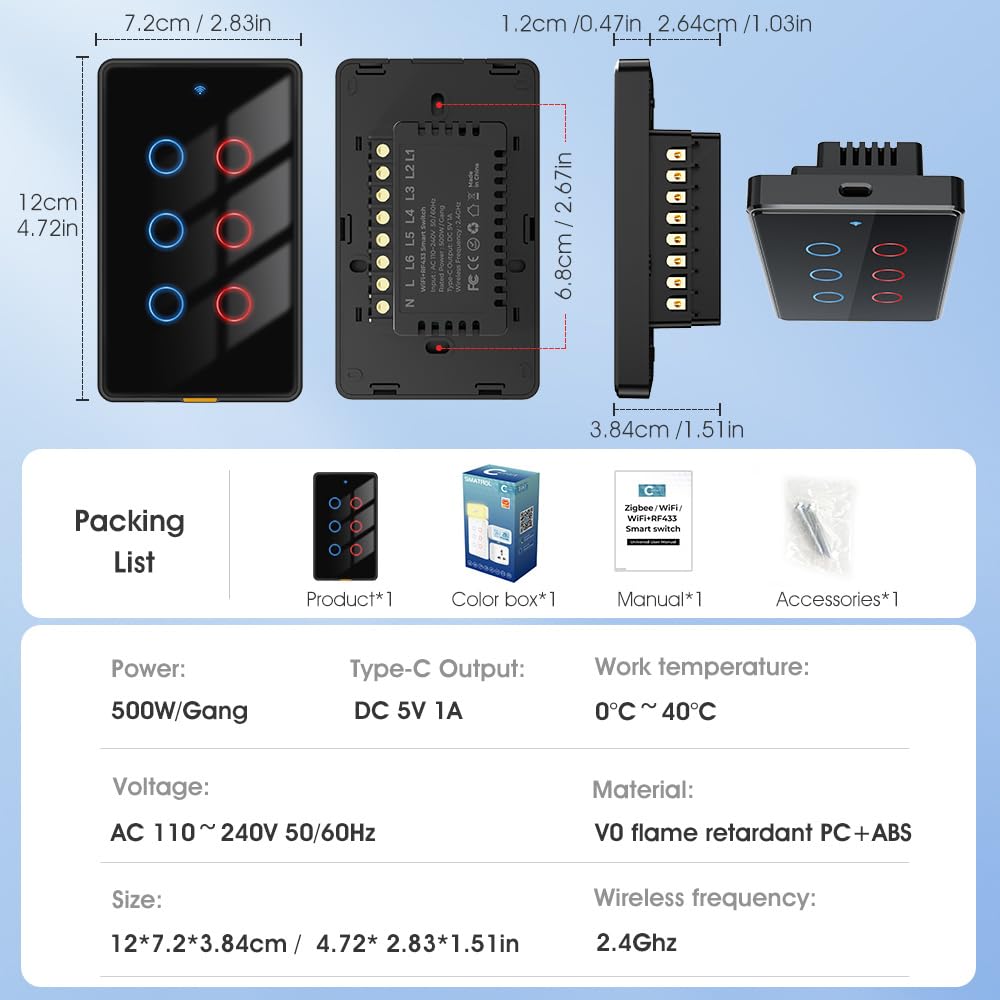
Figure 4: Visual representation of the packing list and product dimensions.
4. Gwida għall-Installazzjoni
Important: This WI-FI smart switch requires a neutral wire connection. It only supports 2.4 GHz Wi-Fi networks (5 GHz is not supported).
4.1 Prekawzjonijiet tas-Sigurtà
- Always turn off power at the circuit breaker before beginning any electrical installation.
- Jekk m'intix ċert dwar il-wajers elettriċi, ikkonsulta elettriċista kwalifikat.
- Ensure the switch is installed in a dry indoor location.
4.2 Dijagramma tal-Wiring
Follow the wiring diagram carefully. Identify the Live (L), Neutral (N), and Light (L1, L2, etc.) lines in your wall box.

Figure 5: Wiring diagram showing connections for Live (Red), Neutral (Blue), and Light (Green) lines. Neutral wire is required.
4.3 App Setup (Smart Life App)
To connect your smart switch to your Wi-Fi network and enable smart features, follow these steps:
- Download the "Smart Life" app from the App Store (iOS) or Google Play (Android).
- Irreġistra jew idħol fil-kont Smart Life tiegħek.
- Kun żgur li l-Wi-Fi u l-Bluetooth tat-telefon tiegħek huma attivati.
- In the app, tap the "+" icon in the upper right corner to add a device.
- Long press any button on the smart switch until the indicator lights flash rapidly (synthetic light flashing) to enter pairing mode.
- The app should discover the device. Tap "Add" when prompted.
- Follow the on-screen instructions to connect the switch to your 2.4GHz Wi-Fi network.
- Once successfully networked, you can rename the switch and individual gangs within the app for easier control.

Figure 6: Step-by-step guide for adding the smart switch to the Smart Life application.
5. Istruzzjonijiet Operattivi
5.1 Kontroll Manwali tal-Mess
Simply touch the circular icons on the switch panel to turn the connected lights ON or OFF. The indicator light will change color (red for ON, blue/no light for OFF) to reflect the status.

Figure 7: Backlight indicator status: Red for ON, Blue/No light for OFF.
5.2 App Control
Once connected to the Smart Life app, you can:
- Turn lights ON/OFF remotely from anywhere.
- Issettja skedi u tajmers għal dawl awtomatizzat.
- Configure countdowns, circulate, random, and inching modes.
- Adjust or disable the backlight of the switch.
- Receive offline reminders if the switch loses connection.

Figure 8: Multi-time settings available through the app, including countdown, schedule, circulate, random, and inching.
Kontroll tal-Vuċi 5.3 (Alexa u Google Home)
After linking your Smart Life account to Alexa or Google Home, you can control your lights with voice commands. Examples:
- "Alexa, ixgħel id-dawl tal-kamra tal-għixien."
- "Ħej Google, itfi d-dawl tal-kamra tas-sodda."

Figure 9: The smart switch supports voice control via Alexa and Google Home, as well as mobile app control.
Video 2: Demonstration of the smart touch switch functionality.
5.4 RF433 Remote Control
The switch can be paired with an RF433 remote control (sold separately) for convenient wireless control. The remote control distance without obstacles is approximately 100 meters.
Video 3: Demonstration of controlling the smart switch via an RF433 remote control.
5.5 Multi-Control Association (2-Way)
For 2-way control, you can associate multiple smart switches within the app. This allows you to control the same light fixture from different switch locations without complex traditional wiring.
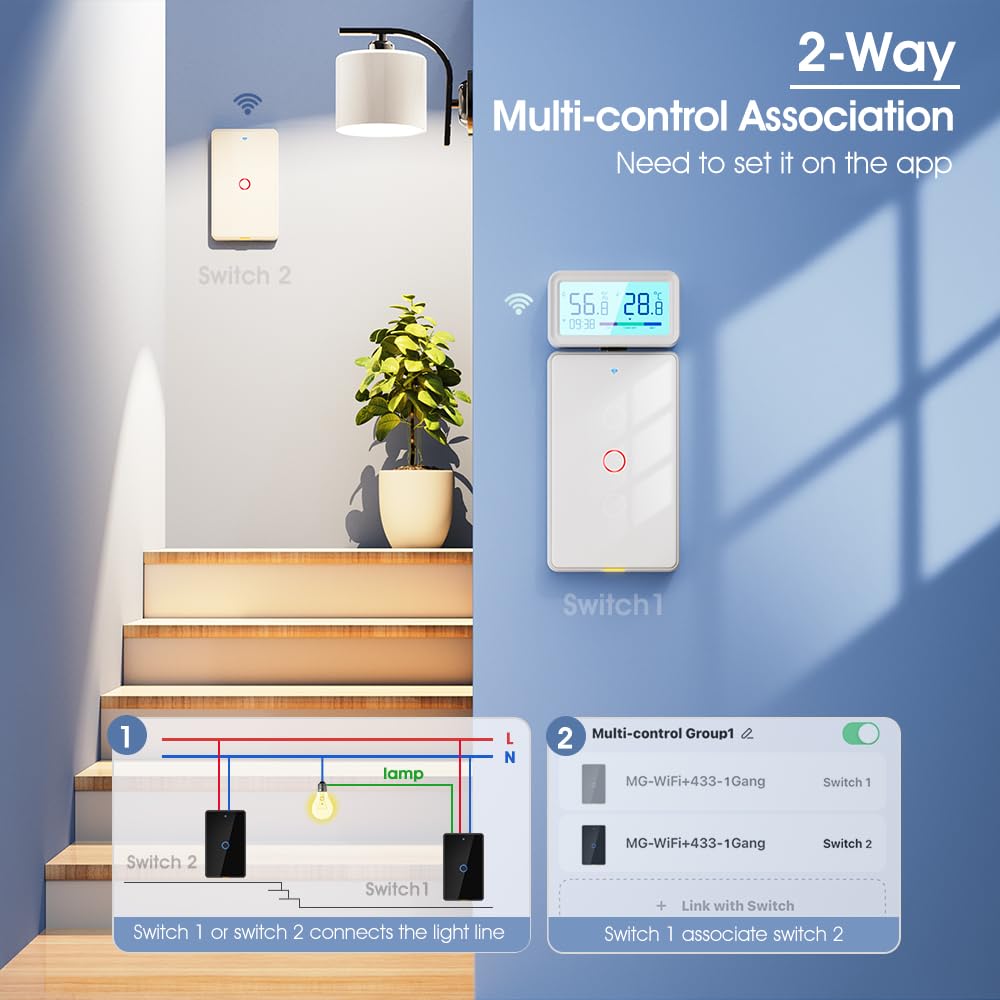
Figure 10: Diagram illustrating 2-Way Multi-control Association, where two switches control one light, configured via the app.
6. Manutenzjoni
To ensure the longevity and optimal performance of your SMATRUL Smart Wall Light Switch, follow these simple maintenance guidelines:
- Tindif: Gently wipe the surface of the switch with a soft, dry cloth. Avoid using abrasive cleaners, solvents, or excessive moisture, as these can damage the finish or internal components.
- Aġġornamenti tal-Firmware: Periodically check the Smart Life app for any available firmware updates for your switch. Keeping the firmware updated ensures you have the latest features and security enhancements.
- Kundizzjonijiet Ambjentali: Ensure the switch is not exposed to extreme temperatures, direct sunlight for prolonged periods, or high humidity, which can affect its performance and lifespan.
7 Issolvi l-problemi
If you encounter issues with your SMATRUL Smart Wall Light Switch, please refer to the following common troubleshooting steps:
| Problema | Kawża Possibbli | Soluzzjoni |
|---|---|---|
| Is-swiċċ mhux qed jirrispondi għall-mess. | Power issue, loose wiring, or temporary glitch. | Check circuit breaker. Ensure wiring is secure (power off first!). Try turning off power at the breaker for 10 seconds, then turn it back on. |
| Ma tistax tikkonnettja mal-Wi-Fi. | Incorrect Wi-Fi band, weak signal, or incorrect password. | Ensure your router is broadcasting a 2.4 GHz network. Move the switch closer to the router. Double-check your Wi-Fi password. Reset the switch to pairing mode and try again. |
| Il-kontroll tal-vuċi mhux qed jaħdem. | Smart Life account not linked, device not discovered by voice assistant, or incorrect commands. | Verify Smart Life account is linked in Alexa/Google Home app. Ask the voice assistant to "discover devices." Use precise commands as listed in the app. |
| USB-C port not charging devices. | Device incompatibility or low power output. | The USB-C port is primarily for powering accessories like the temperature/humidity sensor or night light, and provides DC 5V 1A output. It may not be sufficient for fast charging all mobile devices. Ensure the device is compatible with 5V 1A charging. |
| Switch goes "wacko" after cover plate is installed. | Possible interference or improper seating of the switch within the wall box. | Ensure the switch is properly seated and not being pressed or obstructed by the cover plate. Check for any wires that might be pinching or interfering with the touch panel. If the issue persists, consult a qualified electrician. |
If the problem persists after trying these solutions, please contact SMATRUL customer support for further assistance.
8. Speċifikazzjonijiet tal-Prodott
| Speċifikazzjoni | Dettall |
|---|---|
| Numru tal-Mudell | 768561056835 |
| Dimensjonijiet tal-Prodott | 4.72 x 2.83 x 1.51 pulzieri; 7.05-il uqija |
| Input Voltage | AC 110 ~ 240V 50/60Hz |
| Rated Power / Gang | 500W / Gang |
| Output tat-Tip C | DC 5V 1A |
| Frekwenza bla fili | 2.4GHz (Wi-Fi) |
| Mod ta' Operazzjoni | ON-OFF |
| Tip ta' Kuntatt | Normalment Miftuħ |
| Tip ta' Konnettur | Tip-Ċ |
| Terminal | Invita |
| Tip ta 'Ċirkwit | 2-mod |
| Tip ta' Attwatur | Imbotta Buttuna |
| Kuntatt Materjal | V0 Flame Retardant PC+ABS |
| Klassifikazzjoni tal-Protezzjoni Internazzjonali | V0 flame retardant PC+ABS |
| Temperatura operattiva | 0°C ~ 40°C |
| Manifattur | SMATRUL |
9. Garanzija u Appoġġ
The SMATRUL Smart Wall Light Switch has passed CE, RoHS, and FCC certifications, ensuring its quality and compliance with international standards.
For any technical support, warranty claims, or further inquiries, please contact SMATRUL customer service through the platform where you purchased the product or refer to the contact information provided in the physical user's guide included with your product.
We are committed to providing high-quality smart home solutions and excellent customer service.
Ask a question about this manual
Ask about setup, troubleshooting, compatibility, parts, safety, or missing instructions. Manuals+ will review the question and use this page’s manual context to help answer it.