
Introduzzjoni
This manual provides essential information for setting up, operating, maintaining, and troubleshooting your Lenovo Legion Slim 5 16AHP9 laptop. Please read this manual thoroughly to ensure proper use and to maximize the performance and longevity of your device. Keep this manual for future reference.

Figure 1: Lenovo Legion Slim 5 16AHP9 Laptop Overview
X'hemm fil-Kaxxa
Ivverifika li l-oġġetti kollha huma preżenti fil-pakkett:
- Lenovo Legion Slim 5 16AHP9 Laptop
- Adapter tal-Enerġija u Cable
- Dokumentazzjoni (Gwida ta' Bidu Mgħaġġel, Informazzjoni dwar il-Garanzija)
Setup
1. Spakkjar u Spezzjoni Inizjali
Carefully remove the laptop and all accessories from the packaging. Inspect the laptop for any signs of physical damage. If any damage is found, contact your retailer immediately.
2. Konnessjoni tal-Adapter tal-Enerġija
Connect the power adapter to the laptop's power input port, typically located on the rear or side. Plug the power cable into a wall outlet. It is recommended to fully charge the battery before the first use.

Figura 2: Il-ġenb tal-laptop View bil-Portijiet
3. L-Ibbutjar Inizjali u s-Setup tal-Windows
Press the power button to turn on the laptop. Follow the on-screen instructions to complete the Windows operating system setup. This includes selecting your region, language, accepting terms, and creating a user account.
- Buttuna tal-Qawwa: Normalment ikun jinsab fuq il-gverta tat-tastiera jew fil-ġenb.
- Konnessjoni tan-Netwerk: Connect to a Wi-Fi network or use an Ethernet cable during setup for updates.
- Aġġornamenti: Allow Windows to download and install necessary updates after initial setup.
Istruzzjonijiet Operattivi
1. Modalità Mixgħul/Mitfi u Modalità Rieqed
- Qawwa Mixgħul: Agħfas il-buttuna tal-qawwa.
- Itfi: Ikklikkja l-buttuna Start, imbagħad Power > Shut down.
- Ibda mill-ġdid: Ikklikkja l-buttuna Start, imbagħad Power > Restart.
- Irqad: Agħlaq l-għatu jew ikklikkja l-buttuna Start, imbagħad Power > Sleep.
2. Tastiera u Touchpad
The laptop features a full-sized keyboard and a precision touchpad. Refer to the image below for a visual representation.
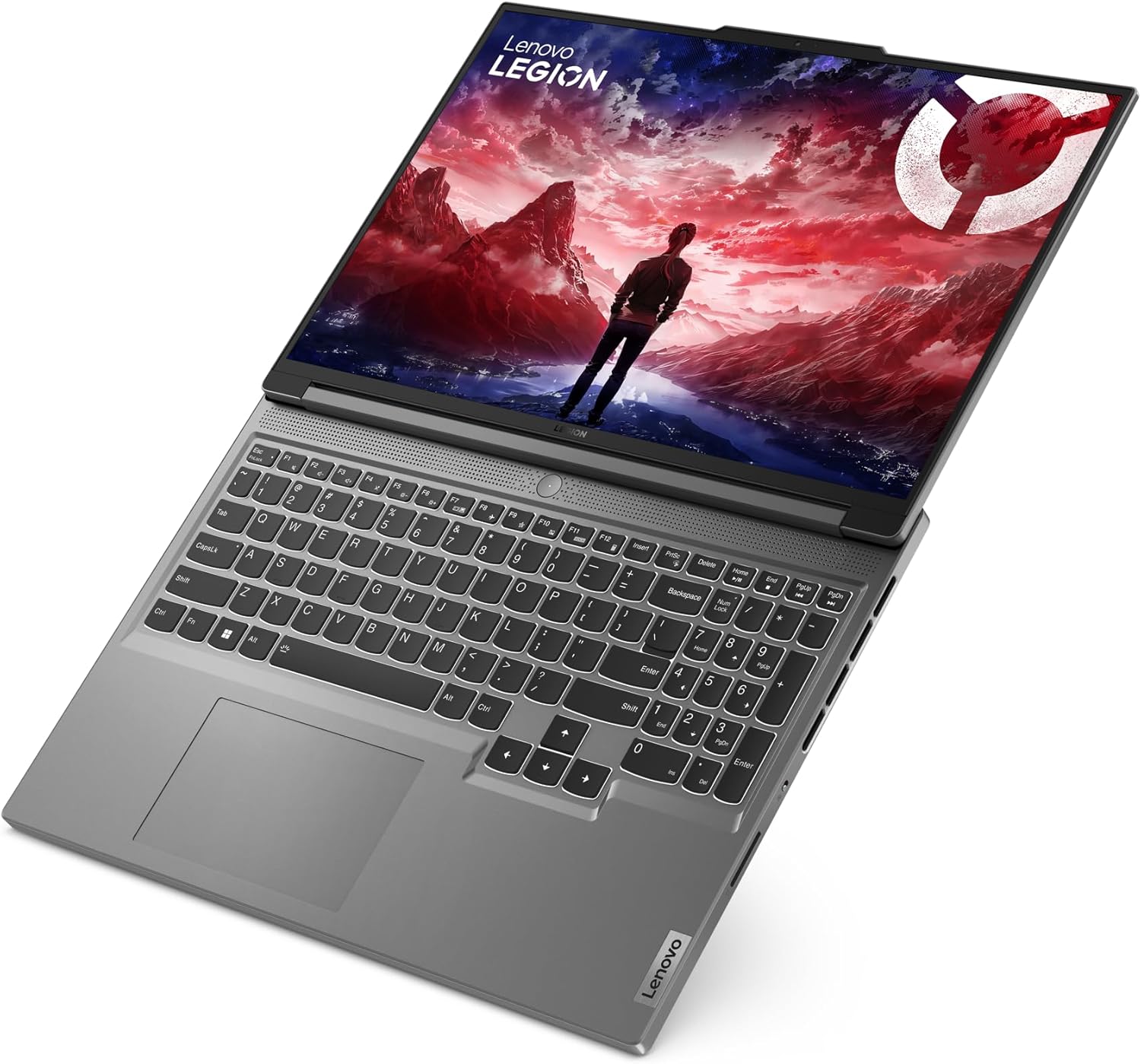
Figura 3: It-tqassim tat-tastiera u t-touchpad
- Ċwievet tal-Funzjoni (Fn): Use the Fn key in combination with F1-F12 for special functions like volume control, brightness adjustment, and Wi-Fi toggle.
- Ġesti tat-touchpad: Supports multi-touch gestures for scrolling, zooming, and switching applications. Customize these in Windows Settings.
3. Konnessjoni Periferali
Il-laptop tiegħek huwa mgħammar b'diversi portijiet għall-konnessjoni ta' apparati esterni:
- Portijiet USB: For mice, keyboards, external drives, etc.
- Port HDMI: Qabbad ma' monitors jew televiżjonijiet esterni.
- Awdjo Jack: Għal headphones jew kelliema esterni.
- Wi-Fi/Bluetooth: Connect to wireless networks and Bluetooth devices.

Figure 4: Laptop Right Side Ports
Manutenzjoni
1. Tindif tal-Laptop
- Skrin: Uża ċarruta ratba u mingħajr ħelu dampLaħlaħ bl-ilma jew b'tindif tal-iskrin. Tisprejjax likwidu direttament fuq l-iskrin.
- Tastiera u Chassis: Uża drapp artab. Għal ħmieġ iebes, neħħi ftit drapp.amp Jista' jintuża drapp b'sapun ħafif, u jiżgura li l-ebda likwidu ma jidħol fil-fetħiet.
- Ventijiet: Periodically clean dust from the cooling vents using compressed air to maintain optimal airflow.
2. Kura tal-batterija
- Evita temperaturi estremi.
- Tneħħix il-batterija kompletament ta' spiss.
- Jekk se taħżen il-laptop għal perjodu estiż, iċċarġja l-batterija sa madwar 50-60%.
3. Aġġornamenti tas-Software
Regularly update your operating system, drivers, and applications to ensure security and optimal performance. Check for updates via Windows Update and Lenovo Vantagsoftwer elettroniku.
Issolvi l-problemi
- Il-laptop ma jixgħelx:
- Kun żgur li l-adapter tal-enerġija huwa konness sew kemm mal-laptop kif ukoll ma' sokit tal-enerġija li jaħdem.
- Ipprova żbokk tad-dawl differenti.
- Jekk il-batterija tkun ixxotta kompletament, ħalliha tiċċarġja għal ftit minuti qabel ma tipprova tixgħelha.
- Problemi bil-wiri (l-ebda immaġni, teptip):
- Kun żgur li l-laptop huwa mixgħul.
- Aġġusta l-luminożità tal-iskrin billi tuża ċ-ċwievet tal-funzjoni.
- If an external monitor is connected, try disconnecting it or switching display modes (Fn + F7 or similar).
- Prestazzjoni bil-mod:
- Agħlaq l-applikazzjonijiet bla bżonn li jkunu qed jaħdmu fl-isfond.
- Iċċekkja u installa kwalunkwe aġġornament pendenti tal-Windows jew tas-sewwieq.
- Ensure adequate free space on the SSD.
- Mexxi skenn tal-virus.
- Problemi bil-konnessjoni tal-Wi-Fi:
- Ensure Wi-Fi is enabled (Fn + F5 or similar).
- Erġa' ibda r-router u l-modem tiegħek.
- Check network settings in Windows.
- Aġġorna s-sewwieqa tal-Wi-Fi.
Speċifikazzjonijiet
| Ditta: | Lenovo |
| Numru tal-Mudell: | 83DH001FGE |
| Serje: | Lenovo Legion Slim 5 16AHP9 |
| Kulur: | Griż |
| Fattur tal-Formola: | Ultra-portabbli |
| Ditta tal-Proċessur: | AMD |
| Tip ta' proċessur: | Ryzen 7 8845HS |
| Veloċità tal-proċessur: | 3.4 GHz |
| Daqs tal-iskrin: | 16 pulzieri (40.6 ċm) |
| Riżoluzzjoni tal-iskrin: | 2560 x 1600 pixel (WQXGA) |
| Daqs RAM: | 16 GB DDR5-SDRAM |
| Tip ta' Hard Drive: | SSD |
| Daqs tal-Hard Drive: | 1 TB |
| Koproċessur tal-Grafika: | NVIDIA GeForce RTX 4060 |
| Graphics Memory Type: | GDDR6 |
| Graphics Memory Size: | 8 GB |
| Sistema Operattiva: | Windows 11 |
| Tip bla fili: | 802.11ac, 802.11ax, 802.11n (Wi-Fi 6E compatible) |
| Portijiet USB 2.0: | 1 |
| Portijiet USB 3.0: | 1 |
| Portijiet HDMI: | 1 |
| Batterija: | 1 Lithium Ion battery (included), 4 cells |
| Piż tal-oġġett: | 4.1 Kilogrammi |
Garanzija u Appoġġ
Your Lenovo Legion Slim 5 16AHP9 laptop comes with a standard manufacturer's warranty. For detailed warranty terms and conditions, please refer to the warranty documentation included with your product or visit the official Lenovo support websit.
For technical support, driver downloads, and service information, please visit support.lenovo.com.