
1. Introduzzjoni
Grazzi tax-xiriasing the Kaiser Professional 15-inch Speaker System, Model GEM-9520. This manual provides essential information for the safe and efficient operation of your new speaker system. Please read it thoroughly before use and retain it for future reference.
2. Informazzjoni dwar is-Sigurtà
- Sors tal-Enerġija: Uża biss l-adapter tal-enerġija speċifikat. Kun żgur li l-volumtage taqbel mal-provvista tal-enerġija lokali tiegħek.
- Ilma u Umdità: Do not expose the speaker to water, rain, or high humidity. Avoid placing liquid-filled objects on the speaker.
- Ventilazzjoni: Aċċerta ruħek li jkun hemm ventilazzjoni adegwata madwar l-ispiker. Timblokkax xi fetħiet tal-ventilazzjoni.
- Sħana: Żomm l-ispiker 'il bogħod minn sorsi ta' sħana bħal radjaturi, reġistri tas-sħana, stufi, jew apparat ieħor li jipproduċi sħana.
- Tindif: Skonnettja l-provvista tal-enerġija qabel it-tindif. Uża drapp niexef u artab. Tużax prodotti tat-tindif likwidi jew prodotti tat-tindif bl-ajrusol.
- Servizzi: Tippruvax isservi dan il-prodott int stess. Irreferi l-manutenzjoni kollha lil persunal tas-servizz kwalifikat.
- Pjazzament: Place the speaker on a stable, flat surface or securely mount it on the provided tripod. Avoid placing it in direct sunlight or near strong magnetic fields.
3. Kontenut tal-Pakkett
Ivverifika li l-oġġetti kollha huma preżenti fil-pakkett:
- Kaiser GEM-9520 Professional 15-inch Speaker System
- Mikrofonu bil-fili
- Stand tal-Kelliem Tripod
- Kejbil tal-Enerġija
- Manwal għall-Utent (dan id-dokument)

Image: Kaiser GEM-9520 speaker system with included microphone and tripod stand.
4. Prodott Aktarview
The Kaiser GEM-9520 is a versatile 15-inch professional speaker system designed for various audio applications. It features multiple input options, LED lighting, and a robust design.
Front Panel
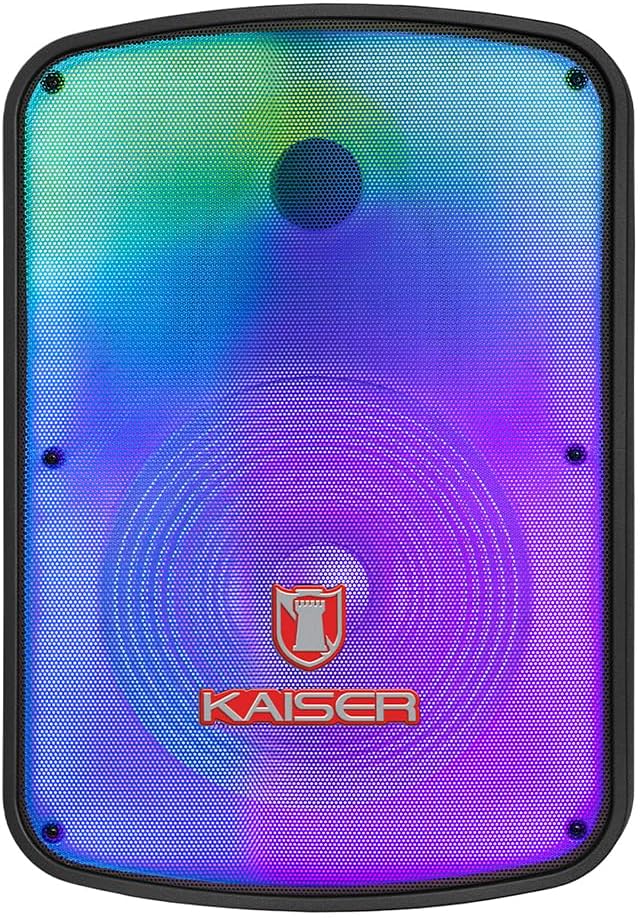
Immaġni: Quddiem view of the Kaiser GEM-9520 speaker, showcasing the 15-inch driver and integrated LED lighting.
Panel ta' Kontroll ta' wara
The rear panel houses all input/output connections and control knobs.

Immaġni: Wara view of the Kaiser GEM-9520 speaker, displaying the control panel with various inputs and adjustments.

Immaġni: Dettaljata view of the control panel, showing the display, volume, equalizer, and input ports.
Included Microphone and Tripod

Image: The wired microphone included with the Kaiser GEM-9520 speaker system.
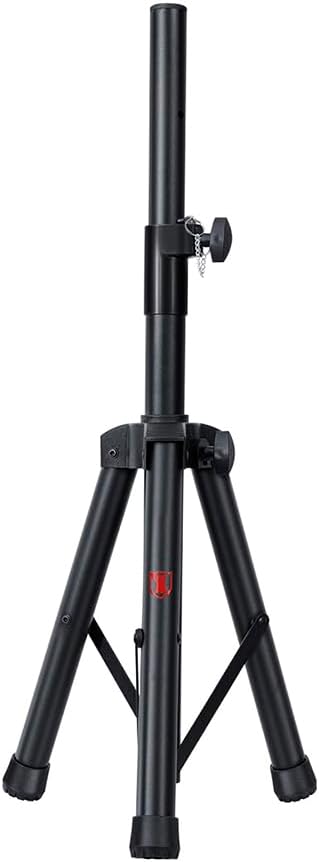
Image: The adjustable tripod stand for mounting the speaker.
5. Setup
5.1 Żpakkjar u Pożizzjonament Inizjali
- Neħħi bir-reqqa l-komponenti kollha mill-imballaġġ.
- Place the speaker on a flat, stable surface or prepare for tripod mounting.
5.2 Tripod Assembly and Speaker Mounting
- Unfold the tripod legs and extend them to a stable position. Ensure all locking mechanisms are secure.
- Adjust the height of the tripod to your desired level and secure the locking pin and knob.
- Carefully lift the speaker and place its bottom mounting hole onto the tripod pole. Ensure it is seated firmly.

Image: Close-up of the tripod stand, showing its adjustable components.
5.3 Power Connection and Initial Charge
- Connect the provided power cable to the speaker's power input port on the rear panel.
- Ipplaggja t-tarf l-ieħor tal-kejbil tal-enerġija f'sokit elettriku adattat.
- For optimal battery life, fully charge the speaker before its first use. The charging time is approximately 3 hours.
6. Istruzzjonijiet Operattivi
6.1 Power On/Off
Locate the power switch on the rear control panel. Flip it to the 'ON' position to power on the speaker. Flip it to 'OFF' to power off.
6.2 Għażla tal-Modalità
Press the 'MODE' button on the control panel to cycle through available input modes: Bluetooth, USB, Micro SD, AUX, and FM Radio.
6.3 Volume and Equalizer Controls
- Volum: Rotate the 'VOLUME' knob to adjust the overall output volume.
- Treble (Agudos): Use the 'AGUDOS' knob to adjust the high-frequency response.
- Bass (Bajos): Use the 'BAJOS' knob to adjust the low-frequency response.
6.4 Konnessjoni Bluetooth
- Switch the speaker to Bluetooth mode. The display will show 'BLUE' and a pairing indicator will flash.
- Fuq l-apparat mobbli tiegħek (smartphone, tablet, laptop), attiva l-Bluetooth u fittex apparati disponibbli.
- Select 'Kaiser GEM-9520' (or similar name) from the list.
- Ladarba jkun imqabbad, l-ispiker se joħroġ ħoss ta' konferma, u l-indikatur tal-Bluetooth jieqaf iteptep.
Daqq ta' 6.5 USB/Micro SD
- Daħħal USB flash drive jew Micro SD card (mgħobbija minn qabel b'awdjo MP3) files) fil-port rispettiv.
- The speaker will automatically switch to USB/Micro SD mode and begin playback. If not, press the 'MODE' button.
- Use the playback controls (Play/Pause, Next/Previous Track) on the control panel to manage your music.
6.6 Input AUX
- Connect an external audio device (e.g., MP3 player, computer) to the 'AUX' input port on the speaker using a 3.5mm audio cable.
- Switch the speaker to AUX mode using the 'MODE' button.
- Ikkontrolla d-daqq u l-volum mit-tagħmir konness tiegħek.
6.7 Użu tal-Mikrofonu
- Connect the wired microphone to the 'MIC' input port on the rear panel.
- Adjust the microphone volume using the 'VOL MIC' knob.
- Adjust the echo effect using the 'ECO' knob.

Image: Close-up of the wired microphone, showing its ON/OFF switch.
6.8 Microphone Audio Priority Function
This function automatically lowers the background music volume when the microphone is in use, making the voice clearer and more prominent. To activate/deactivate this function, refer to the specific button or switch on the control panel labeled for 'Mic Priority' or similar.

Image: Diagram illustrating the microphone audio priority function, which lowers music volume when the microphone is active.
6.9 KSR-LINK Function
The KSR-LINK function allows you to wirelessly connect two compatible Kaiser speakers for a stereo sound experience. Refer to the specific instructions for KSR-LINK pairing, usually involving pressing a dedicated button on both speakers simultaneously.
7. Manutenzjoni
- Tindif: Wipe the speaker's exterior with a soft, dry cloth. Do not use abrasive cleaners, waxes, or solvents.
- Ħażna: Meta ma tkunx qed tużah għal perjodi twal, aħżen l-ispiker f'post frisk u niexef, 'il bogħod mix-xemx diretta u minn temperaturi estremi.
- Kura tal-batterija: Biex ittawwal il-ħajja tal-batterija, evita li tiċċarġja kompletament il-batterija ta’ spiss. Erġa’ ċċarġja l-ispiker regolarment, anke jekk ma jkunx qed jintuża.
8 Issolvi l-problemi
| Problema | Kawża Possibbli | Soluzzjoni |
|---|---|---|
| Ebda qawwa | Kejbil tal-enerġija mhux imqabbad; Batterija skargata; Swiċċ tal-enerġija mitfi. | Ensure power cable is securely connected and plugged in. Charge the battery. Turn the power switch to 'ON'. |
| L-ebda ħoss | Volum baxx wisq; Modalità ta' input mhux korretta; Apparat estern mhux qed idoqq. | Increase the master volume. Select the correct input mode. Ensure the connected device is playing and its volume is up. |
| Il-Bluetooth mhux qed jgħaqqad | Speaker not in pairing mode; Device too far; Previously paired device connected. | Ensure speaker is in Bluetooth pairing mode. Move device closer to speaker. Disconnect from other Bluetooth devices. |
| Mikrofonu mhux qed jaħdem | Microphone not connected; Microphone volume too low; Microphone switch off. | Ensure microphone is securely plugged in. Increase 'VOL MIC' knob. Turn the microphone's ON/OFF switch to 'ON'. |
| Riċeviment ħażin tar-radju FM | Sinjal dgħajjef; L-ebda antenna esterna. | Reposition the speaker. Extend any built-in antenna or connect an external one if available. |
9. Speċifikazzjonijiet
| Karatteristika | Speċifikazzjoni |
|---|---|
| Mudell | GEM-9520 |
| Output Wattage | 25000 Watt (PMPO) |
| Daqs tal-Kelliem | 15 pulzieri |
| Sors tal-Enerġija | Batterija |
| Ħajja tal-Batterija (Medja) | 6 Sigħat |
| Ħin tal-Iċċarġjar | 3 Sigħat |
| Teknoloġija tal-Konnettività | AUX, Bluetooth, USB |
| Inputs tal-awdjo | Microphone, USB, Micro SD, 3.5 mm, 6.3 mm |
| Karatteristiċi Speċjali | High-resolution audio, LED light, USB port, Microphone Audio Priority, KSR-LINK |
| Tip ta 'Immuntar | Floor Mount (Tripod included) |
| Materjal | Plastik |
| Dimensjonijiet tal-Prodott (L x W x H) | 45 x 35 x 64 ċm |
| Piż tal-Prodott | 10.85 kg |
10. Garanzija u Appoġġ
This Kaiser product is covered by a manufacturer's warranty. For specific warranty terms and conditions, please refer to the warranty card included in your product packaging or contact Kaiser customer support. For technical assistance or service inquiries, please visit the official Kaiser websit jew ikkuntattja lid-dipartiment tas-servizz tal-konsumatur tagħhom.