
1. Introduzzjoni
Thank you for choosing the OSCAL PowerMax 3600 Portable Power Station and PM200 Solar Panel. This manual provides essential information for the safe and efficient operation, setup, and maintenance of your device. Please read this manual thoroughly before use and retain it for future reference.
Prekawzjonijiet tas-Sigurtà
- M'għandekx tiżżarma, tissewwa, jew timmodifika l-unità.
- Żomm l-unità 'l bogħod min-nar, l-ilma, u temperaturi estremi.
- Kun żgur li jkun hemm ventilazzjoni xierqa waqt l-użu u l-iċċarġjar.
- Evita li twaqqa' l-unità jew li tissottomettiha għal impatti qawwija.
- Żomm fejn ma jintlaħaqx mit-tfal u l-annimali domestiċi.
2. Prodott Aktarview
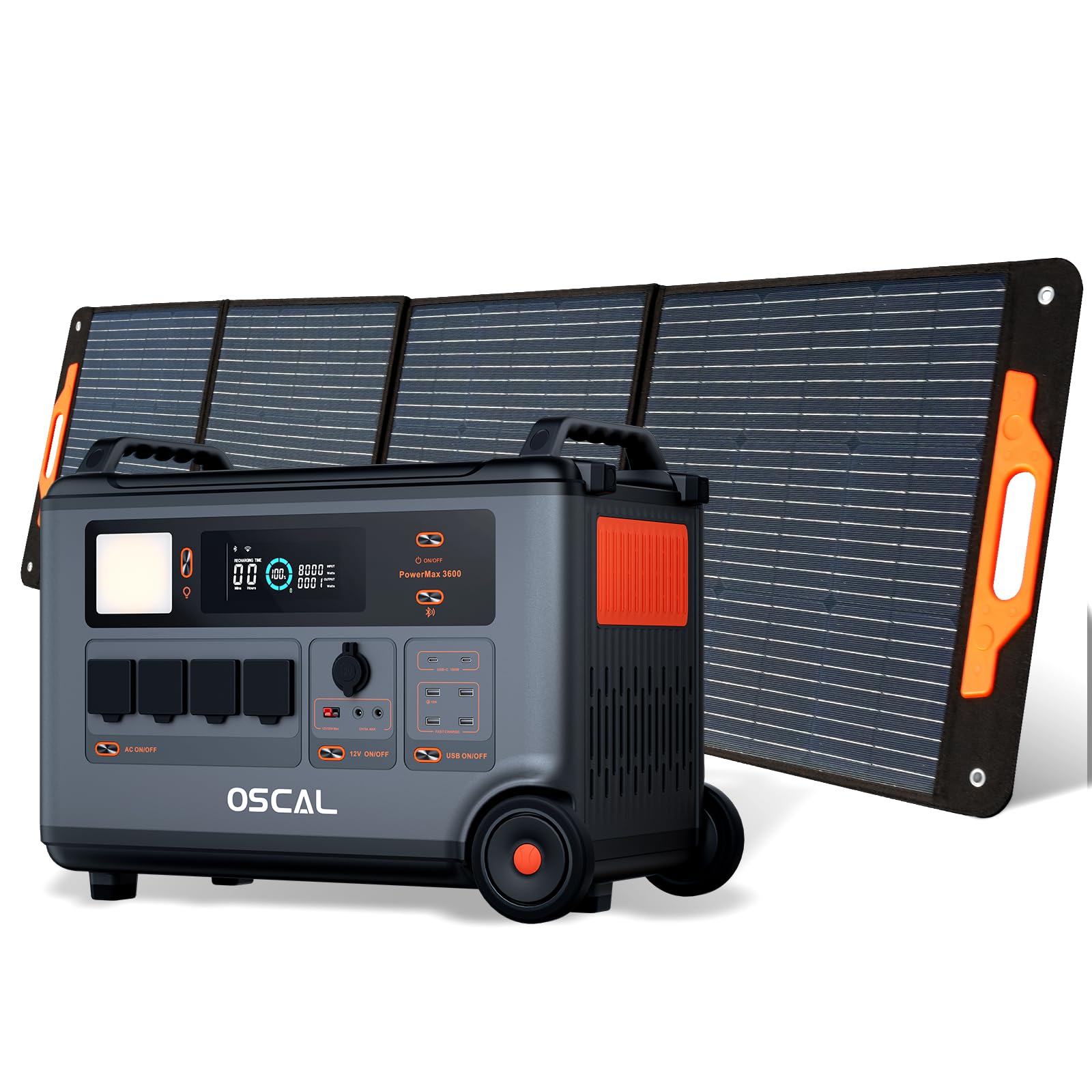
The OSCAL PowerMax 3600 is a high-capacity portable power station designed for various applications, from outdoor adventures to emergency home backup. It features a robust LiFePO4 battery and multiple output ports.
Karatteristiċi ewlenin:
- Kapaċità Għolja: 3600 Wh base capacity, expandable up to 57,600 Wh with additional batteries.
- Riżultat b'saħħtu: 6000 W peak output, capable of powering most household appliances.
- Batterija LiFePO4: Safe, stable, and durable with over 3500 charge cycles (to 80% capacity).
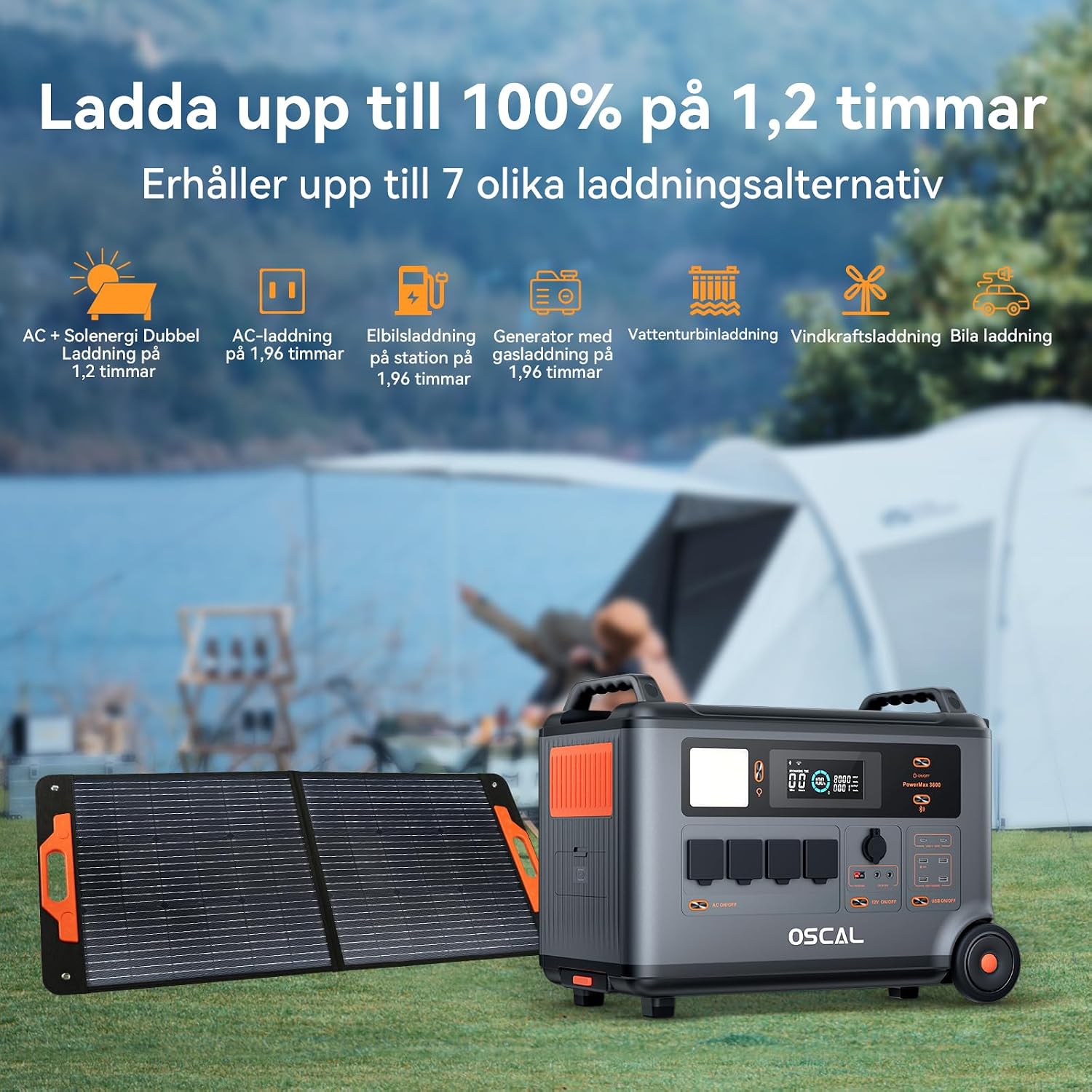
- Iċċarġjar veloċi: Fully charged in 1.2 hours with dual AC and solar input.
- Provvista ta' Enerġija Mhux Interruttibbli (UPS): Automatic switchover in 5-8 ms during power outages.
- Kontroll intelliġenti: Monitor and control via the OSCAL smartphone application (Wi-Fi/Bluetooth).
- Disinn Durabbli: Splash-proof, dust-proof, 0.8M vertical drop protection, UV-resistant, and UL94V-0 fire rating.

3. Setup
3.1 Żpakkjar u Spezzjoni Inizjali
Carefully remove all components from the packaging. Verify that all items listed in the 'What you will get' section are present and undamaged. If any items are missing or damaged, contact customer support immediately.
3.2 Iċċarġjar inizjali
Before first use, fully charge the PowerMax 3600. Connect the AC charging cable to the unit's AC input port and then to a standard wall outlet. The display will indicate the charging status. A full charge typically takes 1.2 hours with combined AC and solar input, or 1.96 hours with AC only.
3.3 Connecting the PM200 Solar Panel
To charge using solar power, unfold the PM200 solar panel and position it in direct sunlight. Connect the MC4 to Anderson cable (or other compatible cable) from the solar panel to the PowerMax 3600's solar input port. The unit will automatically detect the solar input and begin charging.

4. Istruzzjonijiet Operattivi
4.1 Tixgħel/Jitfi
Agħfas u żomm il-buttuna ewlenija tal-qawwa għal ftit sekondi biex tixgħel jew titfi l-unità. Id-displej jixgħel malli tiġi attivata.
4.2 L-Użu tal-Outputs tal-AC
Press the AC power button to activate the AC outlets. Plug your devices into the available AC ports. The PowerMax 3600 provides a pure sine wave output, suitable for sensitive electronics. The unit has 4 AC outlets.
4.3 Using DC Outputs (USB-A, USB-C, 12V)
Press the DC power button to activate the DC outputs. Connect your USB-powered devices to the 4 USB-A ports or 2 USB-C ports (100W each). The 12V car port and other DC outputs are also available for compatible devices.

4.4 Nifhmu l-Wiri
The integrated display shows real-time information including battery level, input/output wattage, remaining run time, and active ports. Refer to the on-screen icons for specific indicators.
4.5 Funzjoni tal-Provvista tal-Enerġija Mingħajr Interruzzjoni (UPS)
When connected to an AC wall outlet and powering devices, the PowerMax 3600 acts as a UPS. In the event of a power outage, it automatically switches to battery power within 5 to 8 milliseconds, ensuring continuous operation for connected devices like computers or medical equipment (e.g., CPAP machines).

4.6 Smart Remote Control (OSCAL App)
Download the OSCAL application from your smartphone's app store. Pair the PowerMax 3600 via Wi-Fi or Bluetooth to monitor battery status, control outputs, and perform firmware updates remotely.

5. Metodi ta 'ċċarġjar
The PowerMax 3600 supports multiple charging methods to ensure you always have power.
- AC Wall Outlet: Connect the included AC charging cable to a standard wall outlet.
- Iċċarġjar Solari: Use the PM200 solar panel or other compatible solar panels via the MC4 input.
- Iċċarġjar tal-Karozza: Charge from your vehicle's 12V cigarette lighter port using the included car charging cable.
- Stazzjon tal-Iċċarġjar tal-EV: The unit can be charged at an electric vehicle charging station (up to 2200W input).
- Ġeneratur: Connect to a gasoline generator for charging (up to 2200W input).
- Batterija taċ-ċomb-aċidu: Supports charging from lead-acid batteries for emergency situations.


6. Manutenzjoni
6.1 Kura tal-Batterija
The PowerMax 3600 uses LiFePO4 batteries, known for their longevity. To maximize battery lifespan:
- Evita li tiċċarġja l-batterija kompletament ta' spiss.
- Aħżen l-unità b'livell ta' ċċarġjar bejn 50% u 80% jekk ma tintużax għal perjodi twal.
- Erġa' ċċarġja l-unità kull 3-6 xhur waqt il-ħażna biex tevita li l-batterija tiskarika sew.

6.2 Tindif
Use a dry, soft cloth to clean the exterior of the unit. Do not use abrasive cleaners or solvents. Ensure all ports are free from dust and debris.
6.3 Ħażna
Store the PowerMax 3600 in a cool, dry place, away from direct sunlight and extreme temperatures. Ensure the unit is turned off during storage.
7 Issolvi l-problemi
If you encounter issues with your PowerMax 3600, refer to the following common problems and solutions:
| Problema | Kawża Possibbli | Soluzzjoni |
|---|---|---|
| L-unità ma tixgħel | Il-batterija hija skarikata kompletament; Il-buttuna tal-qawwa ma ġietx ippressata għal żmien twil biżżejjed. | Charge the unit using AC power; Press and hold the power button for 3-5 seconds. |
| L-ebda output mill-portijiet AC/DC | AC/DC output not activated; Device draws too much power; Overload protection triggered. | Press the respective AC/DC button; Check device wattage; Restart the unit and reduce load. |
| L-iċċarġjar solari mhux qed jaħdem | Insufficient sunlight; Incorrect panel connection; Damaged solar panel/cable. | Ensure direct sunlight; Verify cable connections; Test with another solar panel/cable if possible. |
| Kwistjonijiet ta 'konnessjoni tal-app | Bluetooth/Wi-Fi off; Unit too far from phone; App not updated. | Ensure Bluetooth/Wi-Fi is on; Move phone closer to unit; Update the OSCAL app. |
If the problem persists, please contact OSCAL customer support.
8. Speċifikazzjonijiet
| Karatteristika | Dettall |
|---|---|
| Brand | OSCAL |
| Numru tal-Mudell | BP3600-PM3600 (PowerMax 3600) |
| Tip ta 'batterija | LiFePO4 |
| Kapaċità | 3600 Wh (expandable up to 57,600 Wh) |
| Qawwa tal-Ħruġ AC | 3600 W (Rated), 6000 W (Peak) |
| Sokits tal-AC Totali | 4 |
| Outputs USB-A | 4 |
| Outputs USB-C | 2 (100 W each) |
| Input Voltage | 12 Volts (DC input for car/solar) |
| Frekwenza | 60 Hz |
| Ħin tal-Iċċarġjar (AC + Solari) | 1.2 sigħat (sa 100%) |
| Charging Time (AC only) | 1.96 sigħat (sa 100%) |
| Ħin tal-Qlib tal-UPS | 5-8 ms |
| It-tul tal-ħajja | 3500+ cycles (to 80% capacity) |
| Dimensjonijiet (L x W x H) | 48 ċm x 44 ċm x 35 ċm |
| Piż | 44.45 Kilogrammi |
| Materjal | ABS |
| Karatteristiċi Speċjali | Extra-long battery life, Energy efficient, BMS protection (over-voltage, taħt il-voltage, over-current, over-charge, low/high temperature, short-circuit) |
9. Garanzija u Appoġġ
9.1 Informazzjoni dwar Garanzija
The OSCAL PowerMax 3600 comes with a Garanzija ta' 5 snin mill-manifatturDin il-garanzija tkopri difetti fil-materjali u fix-xogħol taħt użu normali. Jekk jogħġbok żomm il-prova tax-xiri tiegħek għal talbiet ta' garanzija.
9.2 Komponenti Inklużi
Il-pakkett jinkludi:
- PowerMax 3600 Portable Charging Station
- PM200 Portable Solar Panel
- Cable tal-Iċċarġjar tal-AC
- Cable tal-Iċċarġjar tal-Karozza
- Solar Charging Cable (MC4 to Anderson, MC4 to 7909, 6530, XT60, 5521)
- Manwal għall-Utent
- Karta ta' Garanzija
9.3 Appoġġ għall-Klijent
For technical assistance, warranty claims, or any questions regarding your OSCAL PowerMax 3600, please refer to the contact information provided on your warranty card or visit the official OSCAL website. 24-hour after-sales support is available.